Top 10 WordPress Content Strategies Recommended by Experts

Top 10 WordPress Content Strategies Recommended by Experts

Home » WordPress » Page 6

Conquering the skill of generating first-rate content for your WordPress site is key to succeeding online and the top 10 WordPress content strategies recommended by experts in this article can help you develop your strategy. In this comprehensive article, we’ll look into the top 10 content tactics recommended by seasoned pros so you can produce interesting, excellent content for your website that is also SEO-optimized.

From penning captivating blog posts to developing diverse multimedia content, we’ll examine the most efficient techniques for creating, refining and disseminating your content. These professional suggestions can direct you toward writing material that resonates with your audience and secures a prominent position in search engine rankings, whether you’re an experienced content writer or just beginning your journey in the blogging industry.

Introduction

Why is Content Strategy Important?

Any internet business needs a strong content strategy to succeed. It enables you to communicate your brand’s message consistently and cohesively, interact with your target market, and ultimately increase conversion rates. However, there is no foolproof method for creating a winning content strategy. It necessitates a thorough comprehension of your target market, brand, and objectives.

In order to assist you enhance your content game, we’ve put up a list of the top 10 content tactics that experts recommend. You may also want to read our article titled How to Create a WordPress Content Strategy for Your Business to gain a better understanding of this subject.

Content Strategy Question and Answer

Question from Jordan P.: What is the most important strategy to focus on when starting my WordPress blog?

Answer: It’s hard to say which of the top 10 WordPress content strategies recommended by experts is more vital because they all contribute to your blog’s overall performance. But if you’re just getting started, it’s crucial to concentrate on knowing your target market and producing worthwhile, shareable content.

You’ll be able to create a strong foundation for your blog and make sure that the proper audience connects with your material by doing this. As you progress, you can implement other strategies to enhance your content marketing efforts further and achieve your goals.

Create a Personalized Content Management Plan

Create a Personalized Content Management Plan

“Content is the atomic particle of all digital marketing.” – Rebecca Lieb, Industry Analyst and Author

Set a Goal of One Blog Post Each Day

Set a Goal of One Blog Post Each Day

Strategy #1: Know Your Audience

Any effective content strategy is built on an understanding of your target audience. Take the time to research their needs, preferences, and pain points. Create audience personas to guide your content creation efforts and ensure that your content resonates with them.

  • Conduct surveys or interviews to gather insights about your audience.
  • Analyze user behavior on your website and on social media platforms using analytics tools.
  • Monitor online forums, social media groups, and blog comments to identify common questions and concerns.

Strategy #2: Create Valuable and Shareable Content

High-quality content that provides value to your audience is more likely to be shared and linked to, improving your online visibility and authority. Put your energy into producing material that engages your audience or provides solutions to their questions.

  • Write in-depth, well-researched articles that cover topics in detail.
  • Include actionable tips, expert advice, and relevant examples to make your content more useful.
  • Use storytelling techniques to make your content more engaging and memorable.

Strategy #3: Optimize Your Content for SEO

In order for your target audience to find your material simply, search engine optimization (SEO) is essential. Optimizing your content for relevant keywords and following SEO best practices can increase your chances of ranking higher in search results.

  • Perform keyword research to identify relevant long-tail keywords for your content.
  • Optimize your title tags, meta descriptions, headers, and image alt tags with your target keywords.
  • Use internal and external links to boost your content’s SEO value.

Strategy #4: Use Visual Content to Enhance Engagement

Your blog postings will be more appealing and engaging with visual content, which will keep readers interested. Incorporate images, videos, infographics, or other visual elements to break up long blocks of text and improve the overall user experience.

  • Use high-quality, relevant images to support your content.
  • Create custom graphics or infographics to illustrate complex ideas.
  • Embed videos or other multimedia content to enrich your posts.

Strategy #5: Leverage Content Marketing Tools

You may streamline your content development, optimization, and distribution efforts by using one of the many content marketing solutions that are available. You may save time, produce higher-quality material, and strengthen your entire strategy by making use of these resources.

Create a Personalized Content Management Plan

Create a Personalized Content Management Plan

Strategy #6: Implement an Editorial Calendar

An editorial calendar helps you plan, organize, and schedule your content in advance. It ensures that you maintain a consistent posting schedule and allows you to strategically plan your content around important events, product launches, or seasonal trends.

  • Map out your content topics and publishing dates in a calendar or spreadsheet.
  • Include relevant details such as target keywords, target audience, and content format.
  • Adjust your editorial calendar as needed to accommodate new ideas or changes in your strategy.

Strategy #7: Repurpose and Update Old Content

Perhaps my favorite of top 10 WordPress content strategies recommended by experts is to maximize the value of your existing content by repurposing it into different formats or updating it with fresh information. By keeping your material current and pertinent, this not only enables you to attract new audiences, but also enhances the SEO of your website.

  • Turn popular blog posts into videos, podcasts, or infographics.
  • Update old content with new data, examples, or insights to maintain its relevance.
  • Combine related blog posts into comprehensive guides or e-books.

Strategy #8: Collaborate with Influencers

You may increase your credibility, your audience, and your reach by collaborating with influencers in your specialized field. Collaborate with influencers on content projects, such as guest posts, interviews, or joint webinars, to tap into their expertise and leverage their audience.

  • Identify influencers who share your target audience and have a strong online presence.
  • Reach out with a personalized pitch outlining the benefits of collaborating with you.
  • Develop a mutually beneficial content partnership that provides value to both parties.

Strategy #9: Promote Your Content Across Multiple Channels

You must also make sure that your intended audience sees the high-quality material you provide. To increase its visibility and interaction, promote your content using a variety of channels, including social media, email marketing, and online communities.

  • Create a Social Media Strategy to share your material on the appropriate social media channels, then interact with your followers through comments and direct messaging.
  • Include your content in your email newsletters to keep your subscribers updated.
  • Participate in niche-specific forums, groups, or communities to share your content and network with other professionals.

Strategy #10: Measure and Analyze Your Content Performance

You can learn what’s working, what isn’t, and where you can improve your content performance by routinely monitoring and analyzing it. Use analytics tools to track key metrics, such as traffic, engagement, conversions, and social shares, to inform your future content decisions.

  • Set up goals and track conversions in Google Analytics to measure the effectiveness of your content.
  • To track the effectiveness of your content across several platforms, use social media analytics tools.
  • Regularly review and adjust your content strategy based on data-driven insights.

The Inspirational Journey of a Content Creator

The Inspirational Journey of a Content Creator

Inspirational Story: A Content Creator’s Journey

After discussing the top 10 WordPress content strategies, let’s look at a motivational tale from a fellow content producer. Meet Lena H., a successful blogger and content strategist who has used these strategies to grow her online presence and achieve her goals.

When Lena first started her blog, she struggled to gain traction and grow her audience. She knew she had valuable insights to share, but her content wasn’t reaching the right people. Determined to turn things around, Lena decided to invest time and effort into learning and implementing proven content strategies.

One of the first things Lena did was to research her target audience extensively. She wanted to understand their needs, preferences, and pain points. She was able to provide content that spoke to their needs and worries by doing this. Lena then concentrated on producing worthwhile and sharing content.

She took the time to produce in-depth, thoroughly researched pieces that offered helpful information and guidance. This approach quickly paid off, as her content began to be shared more frequently and her website traffic increased.

To further improve her online visibility, Lena optimized her content for SEO. She conducted keyword research and incorporated target keywords into her title tags, meta descriptions, and headers. Over time, her search engine rankings improved, and her content became more easily discoverable by her target audience.

Lena also began experimenting with different content formats, such as infographics and videos. This not only made her content more engaging but also helped her reach new audiences who preferred these formats over traditional blog posts.

As Lena’s content gained traction, she started leveraging content marketing tools and implementing an editorial calendar. This allowed her to streamline her content creation process and maintain a consistent posting schedule.

One of the most transformative strategies Lena implemented was collaborating with influencers in her niche. By partnering with them on guest posts, interviews, and joint webinars, she was able to tap into their expertise and expand her reach to their audiences.

Finally, Lena made a point to regularly measure and analyze her content performance. This data-driven approach allowed her to make informed decisions about her content strategy and continually improve her results.

Today, Lena is thrilled with the success she has achieved through her content efforts. She’s built a loyal following, grown her online presence, and even landed some lucrative partnerships. Although Lena acknowledges that her road wasn’t always simple, she is appreciative of the lessons she has learned and the development she has gone through.

Regarding advice for other content producers, Lena stresses the significance of knowing your audience, producing worthwhile material, and never being hesitant to try new things.

She advises, “Remain dedicated to your objectives and always be willing to learn and adapt.”

Thoughts On Creating a WordPress Content Strategy

Thoughts On Creating a WordPress Content Strategy

Final Thoughts WordPress Content Strategies

You’ll be well on your way to developing interesting and valuable content that connects with your target audience by adhering to these top 10 WordPress content strategies recommended by experts. To stay ahead in the always changing world of online content, be dedicated to your content marketing goals, take lessons from your triumphs and failures, and make constant adjustments to your methods. Your diligence and commitment will be rewarded with more website traffic, a devoted following, and ultimately the accomplishment of your content marketing goals.

Implementing these top 10 WordPress content strategies can significantly improve your content marketing efforts and help you achieve your goals. Remember to:

  • Understand your target audience.
  • Create valuable and shareable content.
  • Optimize your content for SEO.
  • Experiment with different content formats.
  • Leverage content marketing tools.
  • Implement an editorial calendar.
  • Repurpose and update old content.
  • Collaborate with influencers.
  • Promote your content across multiple channels.
  • Measure and analyze your content performance.

Disclosure: You may find affiliate links to beneficial resources within this article. You won’t pay more for using our link, but we’ll get a commission. This supports our content creation, and we only suggest products we genuinely believe in. Thank you for being so understanding!

Affiliate Links

James Turner

James Turner

Author/Copywriter

Why Choosing the Best Web Hosting Company Matters in 2025

Find out why choosing the best web hosting company matters in 2025 to boost your site’s performance and skyrocket sales.

Hiring a Website Designer

Hiring a website designer? Discover actionable tips, red flags to avoid, and how to find the right designer to create a website that grows your business.

How to Create a Landing Page Using WordPress

Follow our guide on how to create a landing page using WordPress and the built-in Block Editor, page builder plugins, or specialized themes.

Creating a Photography Business Website Using WordPress

Creating a Photography Business Website Using WordPress

Home » WordPress » Page 6

You’ve made the wise choice to elevate your photography business to new heights by creating a photography business website using WordPress. Good news, you’ve arrived at the ideal location to acquire the guidance you need! In this article, we’ll walk you through the process of creating an eye-catching and original photography company website, allowing you to stand out among the many rivals in the sector.

Our top priority is to equip you with all the necessary information needed to establish a strong online presence that showcases your exceptional photography skills and captivates potential clients with your artistic masterpieces. In this digital era, it’s essential for businesses to establish a powerful online presence, and your photography endeavor is no exception. By leveraging WordPress, a highly-regarded and adaptable platform, you’ll have access to the necessary tools to craft a truly outstanding website that embodies the spirit of your photography business.

The Goal of This Article is to Prepare You to Build a Photography Website for Your Business

Throughout this informative article, we’ll cover everything from the fundamentals of constructing a website to the more nuanced aspects of customizing it specifically for your photography business needs. Key components such as selecting the ideal theme, determining the most suitable plugins, and incorporating engaging galleries to display your beautiful photographs will be discussed. Furthermore, we’ll delve into the finer points of search engine optimization for your website, ensuring it is compatible with mobile devices, and even addressing the significance of incorporating social media.

So, let’s get started on this thrilling adventure of creating a photography business website together as we equip you with the essential tools and knowledge to create an unforgettable photography business website harnessing the capabilities of WordPress. After reading this article you can create a website showcasing your photographic skills and the love you have for photography. These tips can help you create a lasting digital impression with your stunning visuals. As you boost your digital presence, prepare for self-expression and aesthetic greatness.

John D. asks: “What makes a photography business website different from a generic WordPress website?”

Great question, John! A photography business website requires specific features, such as image galleries, portfolio pages, and booking functionality, to showcase your work and make it easy for potential clients to book your services.

Your Website Should Have a Professional Design

Your Website Should Have a Professional Design

“Your website is your virtual storefront; make it a window into your world of creativity and professionalism.” – Anon

Choosing a Photography Theme and Plugins

Choosing a Photography Theme and Plugins

Choosing the Right Theme

First, you’ll need to choose the right theme to create a photography business website. You may want to look for themes specifically designed for photographers, as they’ll have features tailored to your needs, such as responsive image galleries, portfolio pages, and customizable layouts. Some popular photography themes include:

When deciding How to Choose the Best WordPress Theme for your website, choosing one that is responsive is crucial, ensuring seamless adaptation to different screen sizes and a visually appealing appearance on any device. It is equally important to have easy customization options, allowing you to create a unique online presence that reflects your individual style and preferences. You’ll be on the right track to building a website that enthralls your audience and offers a positive user experience if you consider these criteria.

Essential Plugins for Your Photography Website

Plugins can greatly enhance your photography website’s functionality, helping you create an even more professional online presence, which is why we wrote an article on Essential WordPress Plugins for Every Website. Here are some essential plugins you’ll want to consider for a photography business website:


Image Galleries and Portfolios

  • Envira Gallery – A responsive gallery plugin that offers a variety of gallery layouts and lightbox effects.
  • NextGEN Gallery – A powerful and flexible gallery plugin with multiple display options and e-commerce integration for selling prints.

Image Optimization

  • Smush – Automatically compresses and optimizes images for faster load times and better performance.
  • EWWW Image Optimizer – Reduces image file sizes without losing quality, improving site speed and user experience.

Booking and Scheduling

  • Rebrand Amelia – A comprehensive booking plugin that allows clients to book appointments and events directly on your website.
  • Bookly – A user-friendly booking plugin with customizable forms, automatic notifications, and payment integration.

SEO

  • Yoast SEO – An all-in-one SEO solution that helps you optimize your content, generate XML sitemaps, and more.
  • All in One SEO Pack – A comprehensive SEO plugin with features like automatic meta tag generation and XML sitemap support.
Optimizing Images and SEO for a Photography Website

Optimizing Images and SEO for a Photography Website

Optimizing Images for the Web

High-quality images are crucial for a photography website, but they can also slow down your site if not optimized properly. However, if you follow our WordPress Image Optimization Guide for Creating Stunning Visuals, your pictures and graphics will be well-optimized and load fast. Keep these tips in mind when preparing your images:

  • Resolution: Find the right balance between image quality and file size. Choose an appropriate resolution that maintains clarity while keeping the file size in check.
  • Format selection: Select the optimal image format based on the content. JPEG is suitable for photographs, while PNG is better for graphics and images with transparency.
  • Cropping and resizing: Crop or resize images to display only what’s necessary. This reduces the file size and focuses on the essential elements of the image.
  • File naming: Use descriptive file names that include relevant keywords, improving search engine optimization (SEO) and making it easier to manage your image library.
  • Lazy loading: Implement lazy loading techniques that load images only when they become visible on the user’s screen, improving overall site performance.

SEO Tips for Your Photography Website

Search engine optimization (SEO) is crucial for any website, including your photography business site. Here are some tips to help you improve your site’s visibility in search engine results:

  • Use long-tail keywords in your content, headings, and image alt text to target specific search queries related to your photography niche.
  • Create high-quality, engaging content that provides value to your audience. This can help boost your site’s authority and search rankings.
  • How to Boost Your SEO with WordPress: A Comprehensive Guide.
  • Optimize your site’s load times by compressing images, using a caching plugin, and minimizing the use of unnecessary plugins or scripts.
  • Use an SEO plugin like Yoast SEO or All in One SEO Pack to help you manage your metadata, create XML sitemaps, and optimize your content.
  • Build quality backlinks by reaching out to other photography websites, writing guest posts, and sharing your content on social media.

Adding Booking Functionality

Your workflow can be streamlined, and clients’ ability to make reservations for your services is made simpler by integrating a booking system while creating a photography business website using WordPress. To add a booking feature to your WordPress website, follow these steps:

  • Select a booking plugin like Amelia or Bookly that offers the features you need, such as customizable forms, automatic notifications, and payment integration.
  • Install and activate the plugin, then follow the plugin’s documentation to configure the settings and create booking forms tailored to your services.
  • Add booking forms to your website using shortcodes or widgets, making sure they are easily accessible to potential clients.
  • Through your blog, social media, and email marketing, encourage customers to make direct reservations through your website.
The Journey of a Successful Photographer

The Journey of a Successful Photographer

An Inspirational Story: The Journey of a Successful Photographer

Meet Jamie S., a successful photographer who built her online presence using WordPress. Jamie started her photography business five years ago, capturing stunning landscapes and cityscapes. Despite her talent, she had trouble getting clients and building a reputation for herself in the field. She learned the value of having a good website to promote her job and establish connections with potential customers after attending a class.

Jamie spent countless hours researching and crafting her photography website using WordPress. She carefully selected a theme that highlighted her unique style and added plugins to optimize her images and manage bookings. Jaime also invested time in learning SEO techniques to help her site rank higher in search engine results.

Over time, Jamie’s hard work paid off. Her website became a significant source of new clients, and she started receiving rave reviews from satisfied customers. Reflecting on her journey, Jamie offers the following advice to aspiring photographers:

  • Invest time and effort in creating a professional website that reflects your brand and showcases your work.
  • Never underestimate the power of SEO. Your internet visibility depends on it, and it has the power to make or kill your company.
  • Engage with your audience on social media and through your blog while maintaining consistency in your marketing efforts.
  • Be a photographer and business owner who is constantly willing to learn and grow.

Jamie’s tale is evidence of the effectiveness of a well-designed website and the value of tenacity in the face of difficulties.
With the right tools, knowledge, and determination, you too can build a thriving photography business.

Photography Business Statistics and Resources

Photography Business Statistics and Resources

Photography Business Website Statistics

Understanding industry trends and statistics can help you make informed decisions about your photography business website. Here are some key stats:

  • A Credo study found that 60% of businesses invest in SEO services to improve their online visibility and drive organic traffic.
  • A Kinsta report revealed that 54% of mobile users bounce from websites that take more than 3 seconds to load, highlighting the importance of optimizing your site for speed.
  • Research by Backlinko shows that long-tail keywords account for 70% of all search traffic, making them a crucial aspect of your SEO strategy.

Useful Resources for Building Your Photography Business Website

Here are valuable resources for creating a successful photography business website using WordPress:

  • WordPress Support – The official support forum for WordPress users, where you can find answers to common questions and troubleshooting tips.
  • WPBeginner – WordPress tutorials, tips, and techniques for beginners and experts.
  • Yoast Academy – Offers online courses and resources to help you learn SEO and improve your WordPress website’s visibility in search engines.
Photography Facts Testimonials and Expert Advice

Photography Facts Testimonials and Expert Advice

Testimonial from Jaime S.

“Creating a photography business website with WordPress was a game-changer for my business. The platform allowed me to create a professional online presence that showcased my work and made it easy for clients to book my services. The support and resources available for WordPress users helped me learn invaluable SEO techniques that boosted my site’s visibility and brought in more traffic. I highly recommend WordPress to any photographer looking to grow their business.”

Expert Comments on Photography Business Websites

The following is what some business experts have to say about the significance of a well designed photography website:

“A professional website is crucial for photographers to showcase their work, build their brand, and connect with potential clients. With WordPress, photographers can create a stunning online presence that’s both visually appealing and easy to navigate.”

– Jen D., Web Design Expert

“In today’s digital landscape, having an online booking system can set your photography business apart from the competition. It streamlines the booking process for both you and your clients, and can lead to increased bookings and revenue.”

– Natalia B., Business Consultant

Facts About Photography Business Websites

Here are some interesting facts related to photography business websites:

  • Increase visitor engagement and time spent on photography websites by using a visually appealing and simple-to-navigate design.
  • Optimizing your website for local search can help attract clients in your area, especially for photographers specializing in events, weddings, or family portraits.
  • Including social network integrations on your website can boost traffic from sites like Instagram, Facebook, and Pinterest and help you establish a stronger online presence.
  • Responsive web design is crucial for photography websites, as a significant portion of traffic comes from mobile users who expect a seamless browsing experience across all devices.
Comparing Photography Themes and Plugins

Comparing Photography Themes and Plugins

Comparing Popular Photography Themes and Plugins

When creating a photography business website, choosing the right theme and plugins to meet your needs is essential. Here are some popular options:

  1. Themes:
    • Photography: A versatile and responsive theme designed specifically for photographers, with multiple gallery and portfolio layouts, eCommerce support, and easy customization options.
    • Oshine: A popular multipurpose theme with over 50 demos, including several tailored to photographers. Oshine offers a built-in visual page builder, numerous layout options, and extensive customization features.
    • Divi: A user-friendly WordPress theme with a drag-and-drop page builder. It offers pre-designed layouts, customization options, and responsive design for easy website creation.
    • Novo: A modern and clean photography theme with a focus on simplicity and minimalism. Novo includes several gallery and portfolio layouts, as well as support for selling prints and digital downloads.
  2. Plugins:
    • Envira Gallery: A powerful and user-friendly gallery plugin for WordPress, with features like responsive design, social sharing, and watermark protection.
    • Imagely: A comprehensive solution for photographers, offering a range of gallery layouts, eCommerce integration, and built-in SEO tools.
    • WP Smush: An image optimization plugin that automatically compresses and resizes images on your website, helping to improve load times and overall site performance.

Glossary of Key Terms

Here are some essential terms related to photography business websites and their definitions:

Content Management System (CMS)
A software application or platform that allows users to create, edit, and manage digital content, such as websites and blogs. WordPress is a popular example of a CMS.
Search Engine Optimization (SEO)
A set of practices and techniques used to improve a website’s visibility in search engine results, driving organic traffic and increasing its online presence.
Responsive Web Design
An approach to web design that ensures a website’s layout and content adapt seamlessly to various screen sizes and devices, providing an optimal viewing experience for all users.
Plugin
A piece of software that can be added to a CMS like WordPress to extend its functionality or add new features.
Theme
A pre-designed template for a website that dictates its appearance and layout, including elements like fonts, colors, and page structures. Themes can be customized to fit a specific brand or style.
Long-tail Keywords
Specific and less common search queries that often have lower search volume but higher conversion rates, as they target users who are more likely to engage with the content or make a purchase.
Building a Photography Business Website Using WordPress

Building a Photography Business Website Using WordPress

Do’s and Don’ts of Building a Photography Business Website


Do’s

  • Choose a visually appealing and responsive theme that showcases your photography style and brand.
  • Optimize your website for SEO, including proper use of metadata, image alt tags, and long-tail keywords.
  • Integrate an online booking system to streamline the process of scheduling and managing appointments.
  • Utilize social media integrations and sharing buttons to increase your online presence and drive traffic to your site.

Don’ts

  • Overload your website with too many high-resolution images, which can slow down load times and negatively impact user experience.
  • Ignore the importance of mobile responsiveness, as a significant portion of users will access your site from their smartphones or tablets.
  • Forget to include essential information about your photography services, pricing, and contact details for potential clients.
  • Overlook the value of regular updates and fresh content, which can help maintain your site’s relevance and search engine rankings.
Create a Photography Website for Your Business

Create a Photography Website for Your Business

Final Thoughts

Constructing a photography business website by employing WordPress as the foundation is a crucial move in developing your digital footprint and expanding your clientele. By selecting the most suitable theme and essential plugins, fine-tuning your site’s performance for search engine optimization (SEO), and incorporating valuable features such as online appointment scheduling and seamless social media integration, you’ll be able to create a polished, user-friendly website that not only showcases your incredible work but also draws in potential new clients.

Disclosure: You may find affiliate links to beneficial resources within this article. You won’t pay more for using our link, but we’ll get a commission. This supports our content creation, and we only suggest products we genuinely believe in. Thank you for being so understanding!

Affiliate Links

James Turner

James Turner

Author/Copywriter

Why Choosing the Best Web Hosting Company Matters in 2025

Find out why choosing the best web hosting company matters in 2025 to boost your site’s performance and skyrocket sales.

Hiring a Website Designer

Hiring a website designer? Discover actionable tips, red flags to avoid, and how to find the right designer to create a website that grows your business.

How to Create a Landing Page Using WordPress

Follow our guide on how to create a landing page using WordPress and the built-in Block Editor, page builder plugins, or specialized themes.

Why Hiring a Website Designer is Cheaper Than Doing it Yourself

Why Hiring a Website Designer is Cheaper Than Doing it Yourself

Home » WordPress » Page 6

There are numerous reasons why hiring a website designer is cheaper than doing it yourself, ranging from saving time and money to increasing your internet visibility and obtaining better outcomes. In our current technology-driven society, possessing a well-crafted website is crucial for companies aiming to create a significant online presence.

Even though do-it-yourself website creation tools are an affordable alternative, engaging the services of a professional web designer can ultimately save both time and money. This comprehensive article will delve into the numerous benefits of enlisting a professional website designer’s assistance and examine how it can contribute to a more fruitful and prominent online presence for your business.

You May Also Find The Article Below Helpful:

Question from Leon M.: “Hey, I’m thinking about designing my own website. What are the advantages of hiring a professional website designer instead?”

Answer: Great question, Leon! Hiring a professional website designer offers expertise, access to quality resources, and knowledge of trends. This results in a polished, optimized, and efficient website, saving you time and money while enhancing user satisfaction and performance.

Investing In a Professional Website Designer

Investing In a Professional Website Designer

“Investing in a professional website designer is like planting the seeds for your online garden; with their expertise and resources, your business will flourish and grow, reaping the rewards of a well-crafted digital presence.” James Turner, Website Designer

Access to Valuable Resources Can Save You Money

Access to Valuable Resources Can Save You Money

Website Designers Have Access to Valuable Resources, Which Can Save You Money

One of the key advantages of hiring a professional website designer is their access to a wide range of resources that can significantly streamline the design and development process. By utilizing these resources, you can save both time and money on your website project. Some of the resources that a professional website designer can provide include:

  • High-quality templates: Expert designers have a large selection of high-quality templates to use for website creation. These templates are typically optimized for user experience and search engine performance, providing a strong foundation for your website.
  • Licensed themes with lifetime updates: A designer can grant you access to premium, licensed themes that come with lifetime updates. Maintaining your website’s compatibility with emerging web standards is essential to provide a consistent user experience throughout time.
  • Stock images: Professional designers usually have subscriptions to stock image websites, giving them access to a broad range of high-resolution images that can enhance your website’s visual appeal. This saves you money and provides professional-quality photos for your site.
  • Plugins with lifetime updates: Plugins are crucial for adding functionality and features to your website. A professional designer can supply you with premium plugins that come with lifetime updates, making sure your website continues to function optimally as web technologies progress.

By leveraging these valuable resources, a skilled webmaster can aid in the development of a polished and efficient website that ultimately saves valuable time and resources. Enhancing the visual appeal of your website not only elevates its visitor engagement but also optimizes its functionality and search engine optimization, thereby augmenting the possibility of attracting and converting potential customers.

Web Designers Leverage Industry Insights

Web Designers Leverage Industry Insights

Leveraging Industry Insights: How a Website Designer’s Experience Enhances Your Website’s Effectiveness

When you employ a skilled website designer, you get more than just technical knowledge and tools. Additionally, you gain from their extensive knowledge and experience, which enables them to offer insightful opinions and suggestions based on accepted practices. Their expertise can help ensure that your website is both effective and efficient in achieving your business goals. Here’s how their experience can be beneficial:

  • Staying current with trends: A professional website designer is well-versed in the latest web design trends, technologies, and best practices. They may help you maintain your website’s relevance and appeal to your target audience by advising you on design aspects, functionality, and the overall user experience.
  • Optimizing for search engines: A designer with knowledge of search engine optimization (SEO) can enhance your website’s visibility on search engine results pages. They can offer advice on the organization and content of your website as well as other elements that can improve its SEO performance and increase organic traffic to it. To make the most of your online opportunities, you will want to learn How Website Performance Impacts SEO and Your Rankings.
  • Understanding user behavior: Experienced web designers thoroughly understand how visitors engage with websites.
    With this information, they may create a user-friendly, visually appealing, and interesting website, which will ultimately increase the possibility that visitors will stay on your site and complete the needed actions.
  • Customizing for your industry: A professional designer with experience in your specific industry can offer insights into your target audience’s unique needs and preferences. They can tailor your website’s design and functionality to cater to these specific requirements, ensuring higher user satisfaction and better overall performance.

You can achieve both visual appeal and high performance in accomplishing your business goals by enlisting the services of a knowledgeable website designer. Their expertise in web design, SEO, user behavior, and industry best practices enables them to offer valuable insights and recommendations for enhancing the development process. This can save money, time, and improve ROI.

Reasons to Hire a Website Design Agency

Reasons to Hire a Website Design Agency

More Reasons to Hire a Website Designer

1. Time is Money

Creating a business website without experience is time-consuming, unpleasant, and complicated. Hiring a professional can save time and ensure a visually stunning and highly functional end product. You can trust a skilled specialist to guide you through the complex web design process and realize your online ambitions.

2. Professionalism

Visitors’ impressions of your company will be highly influenced by how professional your website appears to them. A professional website designer possesses the know-how and expertise to create a website that accurately reflects your brand’s identity and effectively engages your target audience. They know the significance of creating a unified, polished design that effectively communicates your brand’s message and values without sacrificing usability.

Hiring a professional website designer puts your online presence in the hands of someone who is current on design best practices, industry standards, and any other relevant information. Professionalism increases your website’s attractiveness, functionality, and general performance, increasing its potential to attract and retain customers or clients.

3. Website Designers Have Customization Experience

Customization plays a pivotal role in creating a distinctive website, and while DIY website builders may present an array of templates and themes, they frequently don’t measure up when it comes to forging a truly personalized site that embodies your brand’s identity and objectives. In contrast, a professional website designer can collaborate with you, delving into your requirements, tastes, and aspirations for your online presence.

By employing their know-how and proficiency, a professional designer can fashion a website like no other, distinguishing you from your rivals and highlighting your brand’s distinct selling points. This degree of customization not only elevates the user experience but also aids in establishing brand recognition and credibility, ultimately supporting the long-lasting success of your enterprise in the digital world.

4. Technical Expertise in Website Design Practices

Professional website design services guarantee that your site is modern, mobile-friendly, and optimized for search engines. A Professional Designer Can Help You Create a Site That is Easy to Maintain, saving you a lot of money over time and ensuring your site is always up to date.

5. Cost-effectiveness

The initial expense of hiring a professional web designer may appear steep, but it is a wise investment that yields long-term benefits. A website that is executed with precision can yield enduring advantages, such as augmented earnings and a superior ROI. Professionally designed websites attract and retain clients and streamline your online presence, saving time and money.

Hiring a professional web designer ensures that you’ll have a site that meets your needs as a business in terms of organization, graphic appeal, and user friendliness. The initial investment will be prudent as it continues to pay off over time due to their expertise in keeping up with industry developments, adhering to best practices, and optimizing for search engines.

6. Avoiding Costly Mistakes

When weighing the financial implications of building a website, evaluating the cost efficiency of engaging a professional website designer versus tackling the project yourself is crucial. A significant perk of collaborating with an expert is the ability to dodge expensive errors that might stem from a subpar DIY website.

It’s quite common for business owners to end up in a predicament where rectifying problems with their DIY site becomes pricier than having initially sought a professional’s help. By teaming up with a specialist, you gain the advantage of their knowledge and proficiency, ensuring your website is properly and effectively assembled from day one.

Furthermore, a seasoned website designer is acquainted with industry norms, tried-and-true methods, and cutting-edge technologies. They can steer you clear of potential hazards and lead you through the steps of crafting a website that caters to your distinct requirements and goals. Consequently, you’ll establish a robust online presence that appears visually appealing and functions optimally. Ultimately, working with a professional designer may save you time, cash, and irritation, making it a wise investment for any organization seeking a dynamic and lucrative online presence.

7. Better User Experience

The value of engaging a skilled website designer becomes clear when you consider the lasting advantages of a properly designed website. By developing a user-friendly, visually captivating site, and tailored for conversions, a professional designer ensures that your online presence is built to draw in and keep customers.

An outstanding user experience is a vital aspect of a thriving website since it directly impacts visitor involvement, repeat visits, and conversion rates. An expert web designer can create a site tailored to your audience’s specific wants and needs, increasing conversions and expanding your online revenue potential.

Using Popular WordPress Website Builders

Using Popular WordPress Website Builders

Inspirational Story: Ryan T.’s Experience

When Ryan T. started his small business , he thought he could save some money by designing his own website using a popular DIY website builder. He spent countless hours trying to create a site that represented his brand and offered a seamless user experience. Although he tried his best, the site appeared unprofessional and failed to produce the intended outcomes.

Frustrated, Ryan decided to hire a professional website designer. The designer took the time to understand Ryan’s business goals, target audience, and brand identity. Thanks to their expertise, Ryan’s products and services were showcased in the best possible light through a visually stunning and highly functional website they created.

The new website not only looked professional, but it also attracted more visitors and converted them into customers. Thanks to this, Ryan experienced a considerable boost in revenue and managed to expand his business more rapidly than he had ever imagined. If he could do it all over again, Ryan would have hired a professional website designer from the start.

Based on his experience, Ryan recommends that other small business owners consider the following when deciding whether to hire a professional website designer:

  • Evaluate the long-term benefits of a professionally designed website, such as increased revenue and brand recognition.
  • Consider the significant investment of time and effort needed to craft a first-rate website independently.
  • Determine if you are equipped with the skills required to design and build a website that serves your company’s goals and provides a pleasant experience for site visitors.
  • Remember that fixing a poorly designed DIY website can cost more than hiring a professional in the first place.
Website Design Statistics and Resources

Website Design Statistics and Resources

Statistics on Website Design and Business Success

  • 94% of first impressions are related to a website’s design.
  • 75% of users judge a company’s credibility based on their website’s design.
  • 48% of users consider a website’s design as the top factor in determining the credibility of a business.
  • 38% of people will stop engaging with a website if the content or layout is unattractive.
  • Businesses that invest in a professional website design see a 33% increase in conversions on average.

Useful Resources

  • U.S. Small Business Administration – Offers resources and advice for small business owners, including information on website design and online marketing strategies.
  • Nielsen Norman Group – Provides articles and research on website usability and user experience design best practices.
  • Google Web Developers – Offers tutorials and resources for web developers, including information on website performance, responsive design, and SEO.
Comparing DIY and Professional Website Designs

Comparing DIY and Professional Website Designs

Comparing DIY Websites and Professionally Designed Websites

Here’s a quick comparison of the main differences between DIY websites and professionally designed websites:

  • DIY Websites
    • Lower upfront cost
    • Limited customization options
    • Potentially time-consuming
    • May lack technical expertise and design skills
    • May result in an amateurish appearance and lower credibility
    • Potential for costly mistakes and difficult fixes
  • Professionally Designed Websites
    • Higher upfront cost, but better long-term ROI
    • Unlimited customization tailored to your specific needs
    • Time-saving, allowing you to focus on other aspects of your business
    • Access to professional skills and expertise in web design
    • Professional and polished appearance, increasing credibility and trust
    • Avoid costly mistakes with expert guidance and support

Glossary of Terms

Responsive Design
A web design approach that ensures a website displays correctly and functions well on various devices and screen sizes.
Search Engine Optimization (SEO)
A set of strategies and techniques aimed at improving a website’s visibility and ranking in search engine results pages.
User Experience (UX)
The overall experience a user has when interacting with a website or application, including factors such as usability, accessibility, and design aesthetics.
Conversion Rate
The percentage of website visitors who take a desired action, such as making a purchase, signing up for a newsletter, or filling out a contact form.
Return on Investment (ROI)
A financial metric used to evaluate the effectiveness of an investment, such as the revenue generated from a professionally designed website compared to its cost.

Do’s and Don’ts of Website Design

  • Do: Focus on user experience and ensure your website is easy to navigate and visually appealing.
  • Don’t: Overload your website with unnecessary features or elements that can distract users from your main message.
  • Do: Optimize your website for search engines by using relevant keywords and following SEO best practices.
  • Don’t: Use “black hat” SEO techniques, such as keyword stuffing or hidden text, which can lead to penalties from search engines.
  • Do: Test your website on various devices and browsers to ensure it displays correctly and functions well.
  • Don’t: Neglect mobile users, who now account for a significant portion of web traffic.
  • Do: Regularly update and maintain your website to ensure it stays current and secure.
  • Don’t: Set it and forget it – your website is an ongoing project that requires regular attention.
Thoughts On Hiring a Professional Designer

Thoughts On Hiring a Professional Designer

Final Thoughts on Hiring A Professional Website Designer

In conclusion, hiring a professional website designer is a wise investment for businesses looking to establish a solid online presence. By leveraging their expertise, you can save time and money, create a more professional and polished website, and ultimately achieve better results in attracting and converting customers. Please remember to weigh the long-term benefits against the upfront cost and consider the potential pitfalls of designing your website.

When making your decision, keep the following crucial facts and recommendations in mind:

  • Consider the long-term advantages of employing a professional website designer, such as greater revenue and brand awareness.
  • You should consider long and hard about the effort required to establish a professional website that truly expresses your business’s goal.
  • Be realistic about your skills and expertise in web design.
  • Remember that fixing a poorly designed DIY website can be more expensive than hiring a professional.

Disclosure: You may find affiliate links to beneficial resources within this article. You won’t pay more for using our link, but we’ll get a commission. This supports our content creation, and we only suggest products we genuinely believe in. Thank you for being so understanding!

Affiliate Links

James Turner

James Turner

Author/Copywriter

Why Choosing the Best Web Hosting Company Matters in 2025

Find out why choosing the best web hosting company matters in 2025 to boost your site’s performance and skyrocket sales.

Hiring a Website Designer

Hiring a website designer? Discover actionable tips, red flags to avoid, and how to find the right designer to create a website that grows your business.

How to Create a Landing Page Using WordPress

Follow our guide on how to create a landing page using WordPress and the built-in Block Editor, page builder plugins, or specialized themes.

How to Create a Website for a Nail Salon

How to Create a Website for a Nail Salon

Home » WordPress » Page 6

Investing time and effort to learn how to create a website for a nail salon can pay huge dividends. An attractive and straightforward site will help you win over new clients and keep existing ones. This article will delve into the essential aspects of building a nail salon website, including design tips, SEO best practices, and helpful resources.

Hi there! I’m James Turner, a website designer and business owner for over 25 years. Today, I’ll guide you through creating a stunning website for your nail salon. So let’s get started!

In addition to this article, you may want to consider the following blog posts we have created to help businesses create a website.

Question from Georgina K.: “What are the key elements of a nail salon website?”

Answer: A nail salon website should include essential information about your business, showcase your services, and provide a way for clients to book appointments. Your website should be attractive and easy to use. The key elements include a homepage, an about page, a services page, a gallery, a booking system, contact information, and a blog.

A Virtual Storefront for Your Nail Salon

A Virtual Storefront for Your Nail Salon

“Your website is your salon’s virtual storefront. Make it as inviting and informative as your physical space.” Don Marsh, Content Management

Design a Captivating Home Page for Your Nail Salon

Design a Captivating Home Page for Your Nail Salon

1. Designing a Homepage That Captivates

Your homepage is the first impression visitors get of your nail salon. To make a lasting impact, focus on creating a clean and professional design. To communicate your brand’s message, use high-quality graphics and simple language.

  • Choose a color scheme: Pick a color palette that represents your salon’s atmosphere and complements your logo.
  • Utilize a responsive design: Ensure your website is mobile-friendly and looks great on various screen sizes.
  • Include a call-to-action: Encourage visitors to book an appointment, browse your services, or contact you.

2. The About Page: Telling Your Story

The about page is an opportunity to share your salon’s story and introduce your team. Include a brief history of your salon, the expertise of your staff, and any awards or recognition you’ve received. Be sure to add professional photos of your team members and salon interior.

3. Showcasing Your Services

Your services page is where you’ll highlight the treatments and packages your salon offers. Sort your offerings like manicures, pedicures, and nail art into convenient categories. Include clear descriptions, pricing, and the estimated duration of each service.

  • Use high-quality images: Display eye-catching photos of your work to entice potential clients.
  • Offer package deals: Create special packages or promotions to encourage clients to try multiple services.

A picture is worth a thousand words, especially for industries where beauty is a priority, like in the nail salon business. A visually stunning gallery showcases your team’s talent and helps potential clients decide which services to book.

  • Update regularly: Keep your gallery fresh by adding new images of your latest creations.
  • Use high-resolution photos: Invest in a high-quality digital camera or hire a professional photographer to capture the excellent work you and your staff do for clients.
  • Organize by style or service: Make it easy for clients to browse your gallery by categorizing your images.

Check out our WordPress Image Optimization Guide for Creating Stunning Visuals, it will help you optimize your pictures so they look great and load fast too.

Implement a User Friendly Booking System

Implement a User Friendly Booking System

5. Implementing a Seamless Booking System

Integrating a user-friendly booking system into your website can streamline appointment scheduling for both clients and staff. Choose a booking platform that allows clients to view available time slots, select services, and receive appointment confirmations.

  • Offer multiple booking options: Give clients the flexibility to book appointments online, over the phone, or in person.
  • Send reminders: Use an automated system to send appointment reminders via email or text message.

6. Providing Easy Access to Contact Information

Make it easy for customers to reach you by promoting it prominently on your website. Don’t forget to provide people a way to reach you besides just guessing. Embedding a Google Maps widget can help clients find your salon easily.

7. Engaging Visitors with a Blog

You can engage with customers, demonstrate your knowledge, and boost your site’s search engine rankings all with the help of a blog. Publish articles on topics related to nail care, beauty trends, and salon news. Encourage interaction by allowing comments and sharing your blog posts on social media.

8. SEO Best Practices for Nail Salon Websites

To increase your website’s visibility on search engines, follow these SEO best practices:

  • Research keywords: Identify relevant long-tail keywords for your nail salon and incorporate them into your content.
  • Optimize your content: Use keywords in your headings, titles, meta descriptions, and image alt tags.
  • Build backlinks: Reach out to industry influencers, bloggers, and local businesses to earn high-quality backlinks.
Creating a Website for Your Nail Salon

Creating a Website for Your Nail Salon

9. Useful Resources for Building a Nail Salon Website

Discover valuable resources for building a stunning website for your nail salon:

  • W3Schools: A comprehensive guide to HTML, CSS, and JavaScript for web development.
  • Canva: A user-friendly graphic design platform for creating visually appealing website elements and social media graphics.
  • Unsplash: A source of high-quality, royalty-free images to enhance your website’s appearance.
  • Ahrefs Blog: An informative blog featuring SEO tips and strategies for improving your website’s search engine rankings.
  • Contact My Island Designs if you need someone to create a fantastic Custom Nail Salon Website for your nail salon.
User Friendly Website Design and SEO Strategy

User Friendly Website Design and SEO Strategy

10. Final Thoughts on Creating a Nail Salon Website

Creating a nail salon website requires a combination of engaging content, user-friendly design, and effective SEO strategies. This tutorial will help you build a website that showcases your salon’s specialties, attracts new customers, and boosts business. Remember, your website is an extension of your salon’s brand, so invest time and effort in making it as polished and professional as your services.

Disclosure: You may find affiliate links to beneficial resources within this article. You won’t pay more for using our link, but we’ll get a commission. This supports our content creation, and we only suggest products we genuinely believe in. Thank you for being so understanding!

Affiliate Links

James Turner

James Turner

Author/Copywriter

Why Choosing the Best Web Hosting Company Matters in 2025

Find out why choosing the best web hosting company matters in 2025 to boost your site’s performance and skyrocket sales.

Hiring a Website Designer

Hiring a website designer? Discover actionable tips, red flags to avoid, and how to find the right designer to create a website that grows your business.

How to Create a Landing Page Using WordPress

Follow our guide on how to create a landing page using WordPress and the built-in Block Editor, page builder plugins, or specialized themes.

How to Create a WordPress Website for Your Restaurant

How to Create a WordPress Website for Your Restaurant

Home » WordPress » Page 6

If you want to benefit from online ordering and an online menu, you must understand how to create a WordPress website for your restaurant. Perhaps you’re just getting started and want to develop a beautiful website to exhibit your culinary talents; our helpful guide can help you with that as well. Whatever your motivation, creating a WordPress website for your restaurant is an excellent way to reach out to new consumers and develop your business. We’ll walk you through the steps of developing a visually stunning and effective website in this article. From choosing a theme to customizing your menu, we’ve got you covered!

Question: Hey, I’m Blaire T., can you really create a professional-looking website for my restaurant with WordPress?

Answer: Certainly, Blaire! WordPress has a number of themes and plugins that are specifically built for restaurants, making it simple to create a beautiful, functioning website with little work.

Running a Restaurant With the Help of WordPress

Running a Restaurant With the Help of WordPress

“I can’t imagine running my restaurant without my WordPress website. It has become an essential part of my business and has helped me attract new customers and keep them coming back for more.” – Ely B., restaurant owner

Choosing the Right WordPress Restaurant

Choosing the Right WordPress Restaurant

1. Choose the Right Restaurant Theme

When building your restaurant website, the first step is to choose a WordPress theme specifically designed for restaurants or one capable of using template files and plugins to create the desired site. Several restaurant themes are available, with features like reservation systems, menu display options, and event management. Some popular themes offered at themeforest.net include:

2. Customize Your WordPress Website

After you’ve chosen your theme, you will need to customize your WordPress website to accurately reflects your restaurant’s brand identity. Consider the following when customizing your site:

  • Logo: Upload your restaurant’s logo to make your site instantly recognizable.
  • Color scheme: Choose a color scheme that complements your restaurant’s branding and ambiance.
  • Typography: Select fonts that are easy to read and fit your restaurant’s style.
  • Images: Use high-quality images of your dishes, restaurant interior, and team to make your website visually appealing.
  • Layout: Arrange your content in a way that is easy to navigate and highlights the most important information.

3. Create and Display Your Online Menu

Your menu is the heart of your restaurant website, so could you make sure it’s easy to find and well-designed? You can use a plugin like Food and Drink Menu or Restaurant Menu Manager to create your Food and Drink Menu or Restaurant Menu Manager. Popular WordPress plugins like Menus by WP Baker make it simple to create, organize, and display a menu that readers will like using. Be sure to include enticing descriptions and high-quality images for each dish.


Integrating a Menu and Online Ordering

Integrating a Menu and Online Ordering

4. Social Integrations and Plugin Features

To make your website even more functional and user-friendly, consider adding some of the following integrations and features:

  • Reservation system: A plugin like OpenTable allows customers to make reservations directly from your website.
  • Online ordering: Allow customers to place orders for pickup or delivery using a plugin like RestroPress.
  • Event management: Promote and manage special events using a plugin like The Events Calendar.
  • Social media integration: Encourage customers to follow and engage with your restaurant on social media by displaying your profiles and feeds on your website using plugins like Smash Balloon.
  • Reviews and testimonials: Display customer reviews and testimonials on your website to build trust and credibility using a plugin like Strong Testimonials.

5. Internet Marketing Strategies

Some of the following advertising approaches are worth considering if you want to boost visitors to your website and interaction with your brand:

  • Email marketing: Use a service like Mailchimp to compile an email list and broadcast periodic newsletters advertising sales, events, and other news and information.
  • Search engine optimization (SEO): SEO-optimize your website’s content and structure. This includes keyword research, on-page optimization, and link building.
  • Content marketing: Blog posts, recipes, and behind-the-scenes stories will attract and maintain clients.
  • Social media marketing: To maintain your online presence, provide updates and interact with fans on Facebook, Instagram, and Twitter.
  • Local marketing: Collaborate with other local businesses, attend community events, and participate in local online directories to increase your visibility within your community. You may also want to consider hiring a professional for your Local SEO Services.
A Restaurant Owner Shares His WordPress Story

A Restaurant Owner Shares His WordPress Story

A Restaurant Owners Inspirational Story

Allow me to share my story as Cassady R., a restaurant owner who successfully built a WordPress website for my restaurant. Having a strong web presence would be important for my restaurant when it first opened. However, starting from scratch to create a website was daunting.

After doing some research, I discovered WordPress and its vast selection of restaurant-specific themes and plugins. I chose a theme that perfectly captured the essence of my restaurant and began customizing it to make it my own. I picked up some knowledge about search engine optimization and its value along the way.

Having a reservation system that could be embedded into my website was a great addition. This made booking a table easy for my customers and helped me manage my reservations efficiently. Additionally, integrating social media and customer reviews helped me build trust and credibility with my audience.

Several life lessons have emerged from this experience:

  • Don’t be shy about looking for guidance or requesting further materials.

  • To increase site visits, you should work on search engine optimization and content promotion.

  • Regularly update your website with fresh content and promotions to keep customers engaged.

  • Monitor your website’s performance and make adjustments as needed.

I look back at the website I created for my restaurant with great satisfaction today. I’ve been able to expand my clientele, get devoted fans, and attract new business because of my active internet profile. WordPress’s user-friendliness, adaptability, and abundance of helpful materials would make me pick it up again in a heartbeat.

Restaurant Website Order Statistics

Restaurant Website Order Statistics

Online Restaurant Ordering Statistics

Here are some interesting statistics related to restaurant websites and online marketing:

  • Approximately 90% of customers research a restaurant online before deciding to dine there (ReviewTrackers).
  • Restaurants that use online reservation systems can increase their table bookings by up to 20% (OpenTable).
  • According to a study by Toast, 56% of guests prefer to order directly from a restaurant’s website rather than third-party platforms.
  • Mobile-friendly websites are crucial, as over 52% of global website traffic comes from mobile devices (Statista).

Useful WordPress Resources

Here are some helpful resources for building and managing your restaurant’s website:

  • U.S. Small Business Administration: Offers guidance and resources for small businesses, including marketing and online presence.
  • Yoast SEO: A comprehensive SEO plugin for WordPress to help you optimize your website’s content and structure.
  • Google My Business: A free tool that allows you to manage your restaurant’s online presence across Google, including Search and Maps.
Facts About WordPress Restaurant Websites

Optimizing Conversions With A-B Testing

Restaurant Patron Testimonial

“I had the pleasure of dining at a new local restaurant last month, and I must say, the website played a significant role in my decision to visit. The easy-to-navigate menu, high-quality images, and the option to book a reservation directly on the site made for a seamless experience. The website’s design and features truly reflect the quality and atmosphere of the restaurant itself.” – Laura R.

Expert Comments

“SEO is essential for driving traffic to your restaurant’s website and improving its visibility in search engine results. Be sure to invest time and effort into keyword research, on-page optimization, and link building to ensure your website ranks highly and attracts potential customers.” – Lenetta P., SEO Consultant

“Integrating features like online reservations, ordering, and event management can greatly enhance your website’s user experience and lead to increased customer satisfaction. Make sure your website is also mobile-friendly, as more and more consumers are using their smartphones to search for and interact with businesses online.” – Chad L., Digital Marketing Strategist

Facts

Some interesting facts about restaurant websites:

  • WordPress powers over 40% of all websites on the internet, making it the most popular content management system available (W3Techs).
  • Having a professional and user-friendly website can greatly increase customer trust and brand perception, leading to increased revenue and customer retention.
  • Integrating social media and customer reviews into your website can help build credibility and trust with potential customers.
  • For local companies like restaurants, the bulk of their online traffic will come from mobile devices, thus making sure their website is mobile-friendly is crucial.
WordPress Restaurant Website Theme Comparison

WordPress Restaurant Website Theme Comparison

WordPress Theme Comparison

Here’s a comparison of some popular WordPress themes for restaurant websites:

  • Divi: Divi is a versatile and customizable theme that offers a wide range of pre-built layouts and modules. It’s suitable for any type of restaurant and can be easily tailored to your specific needs.
  • Astra: Astra is a lightweight and fast-loading theme with numerous pre-built templates specifically designed for restaurants. It also integrates seamlessly with popular page builders like Elementor and Beaver Builder.
  • Rosa 2: Rosa 2 is a stylish and modern theme focused on creating an immersive experience for your website visitors. It features full-screen images, parallax effects, and a unique layout that showcases your menu and other content.

Restaurant Website Design Glossary

Here is a glossary of key terminology connected to building a WordPress website for your restaurant that you should be aware of:

  • WordPress: An open-source, free website creation and administration platform.
  • Theme: A pre-built design template that can be applied to your WordPress website. Themes can be customized to fit your restaurant’s branding and requirements.
  • Plugin: A software component that adds specific features or functionality to your WordPress website, such as reservation systems, online ordering, or SEO tools.
  • SEO: Search engine optimization optimizes a website’s content, structure, and other variables to increase its search engine rankings.
  • Mobile-friendly: A website optimized for smartphones and tablets.

Restaurant Website Creation with WordPress Do’s and Don’ts

A helpful list of things to keep in mind while you design your restaurant’s WordPress website:

  • Do: Pick a popular and well-designed WordPress theme that fits your restaurant’s aesthetic.
  • Do: Regularly update your website with fresh content, promotions, and events.
  • Do: Optimize your website for search engines using SEO best practices.
  • Don’t: Neglect mobile-friendliness, as a significant portion of your visitors will be using mobile devices to access your site.
  • Do: Integrate social media and customer reviews into your website to build credibility and trust with potential customers.
  • Don’t: Make your menu, location, and contact information hard to find.
  • Do: Use high-quality images and visuals to showcase your dishes and entice potential customers.
  • Don’t: Overlook the importance of user experience and site speed when designing your website.

WordPress Restaurant Website Templates

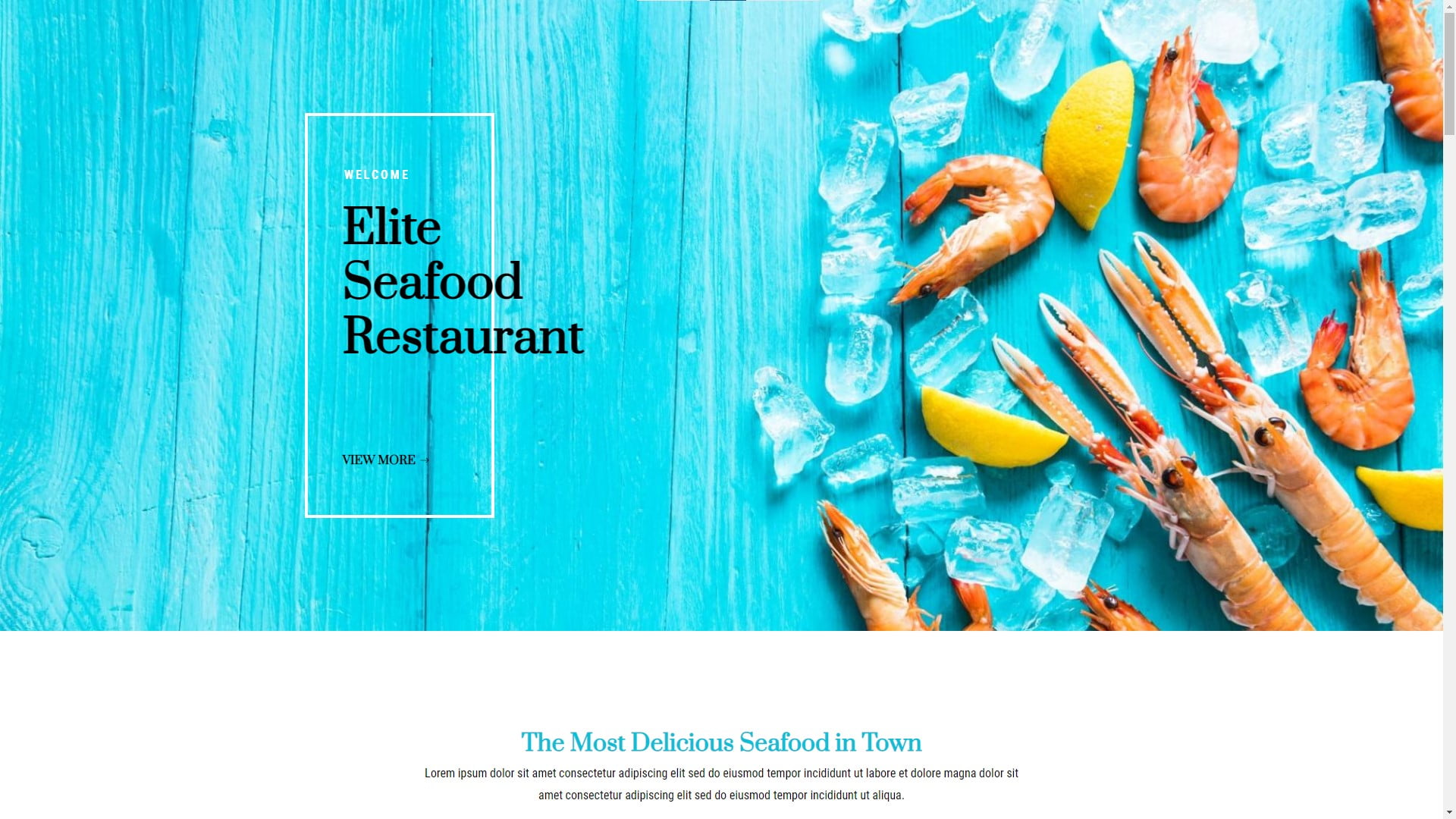
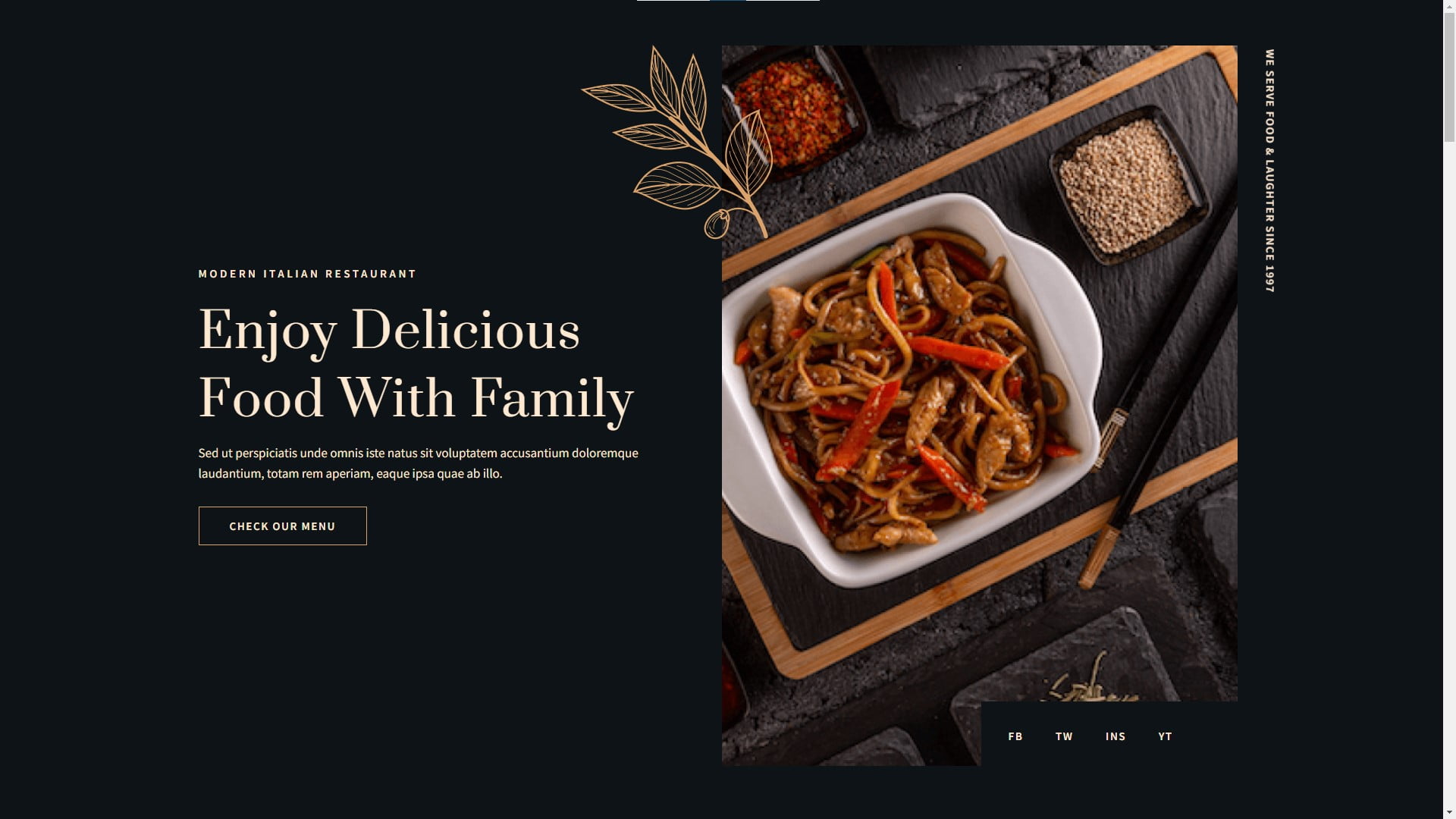
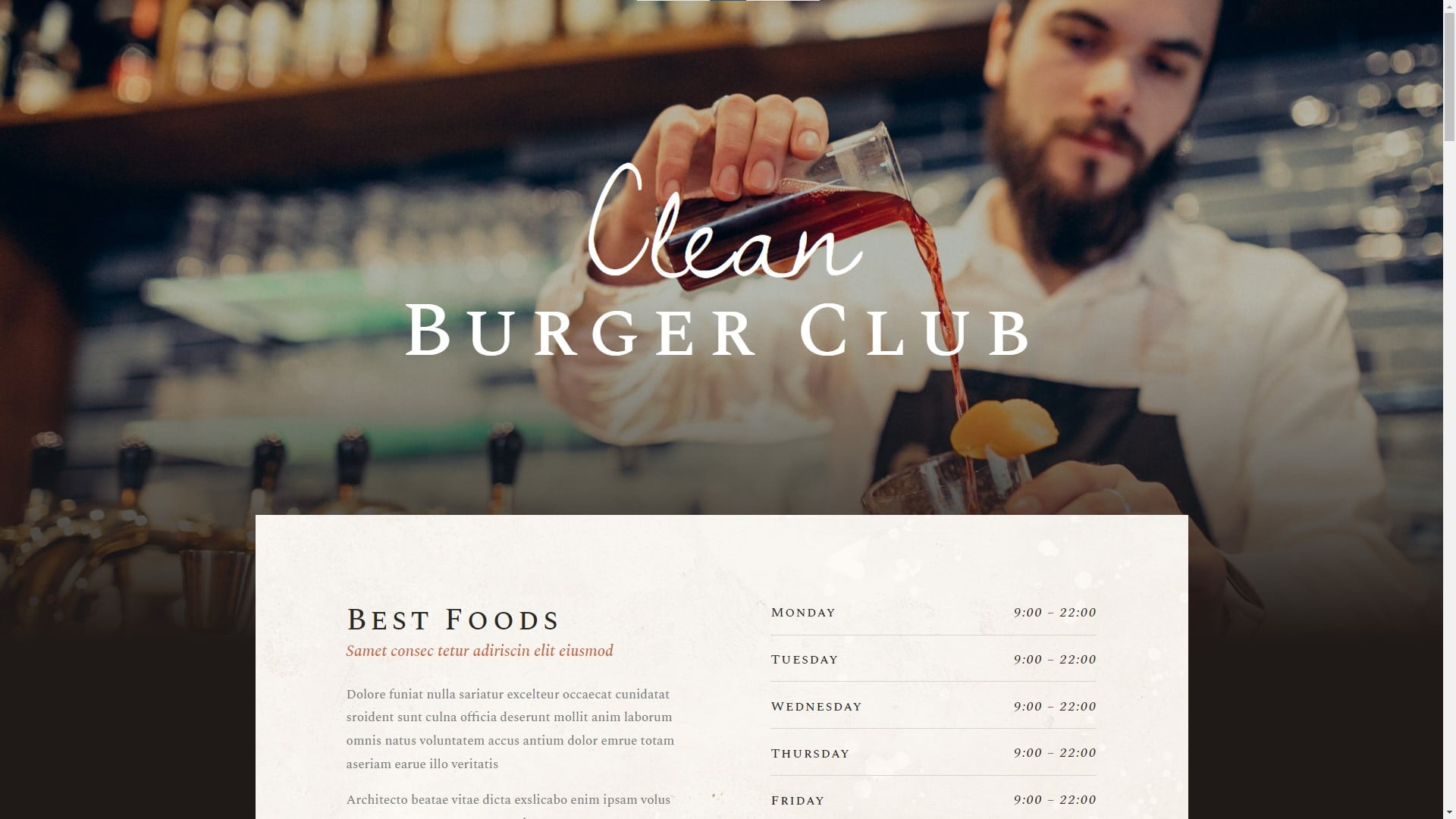
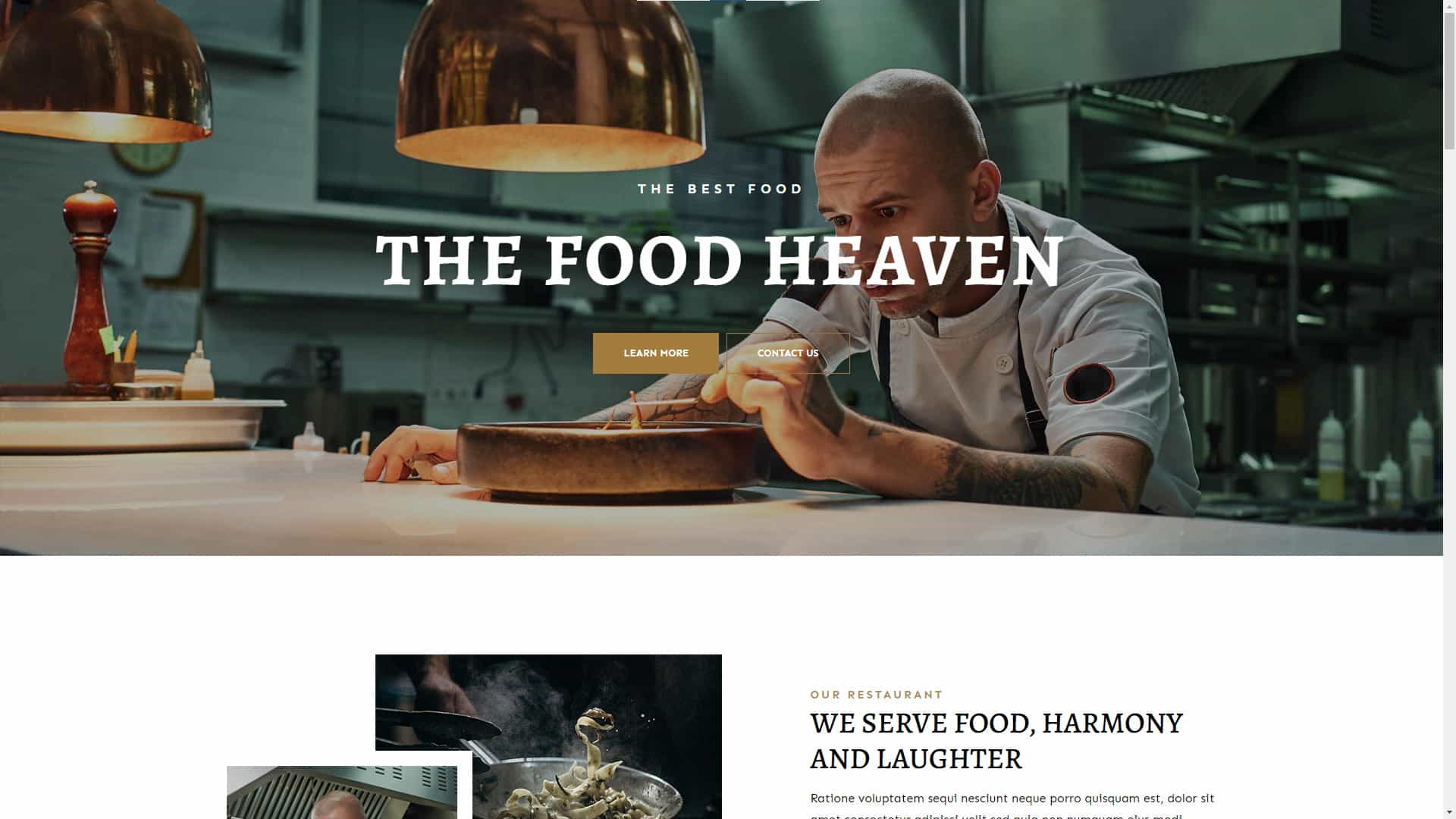
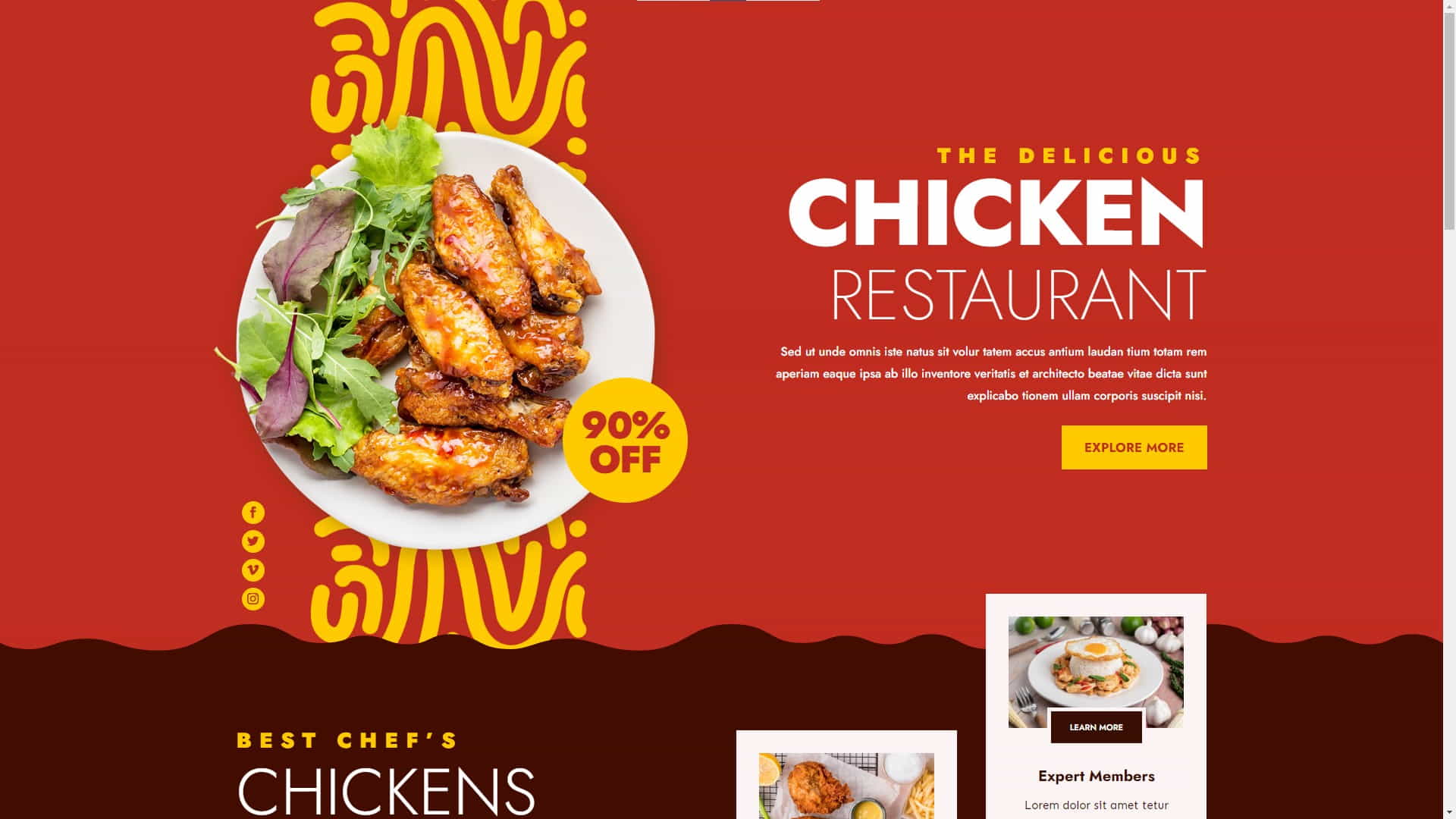
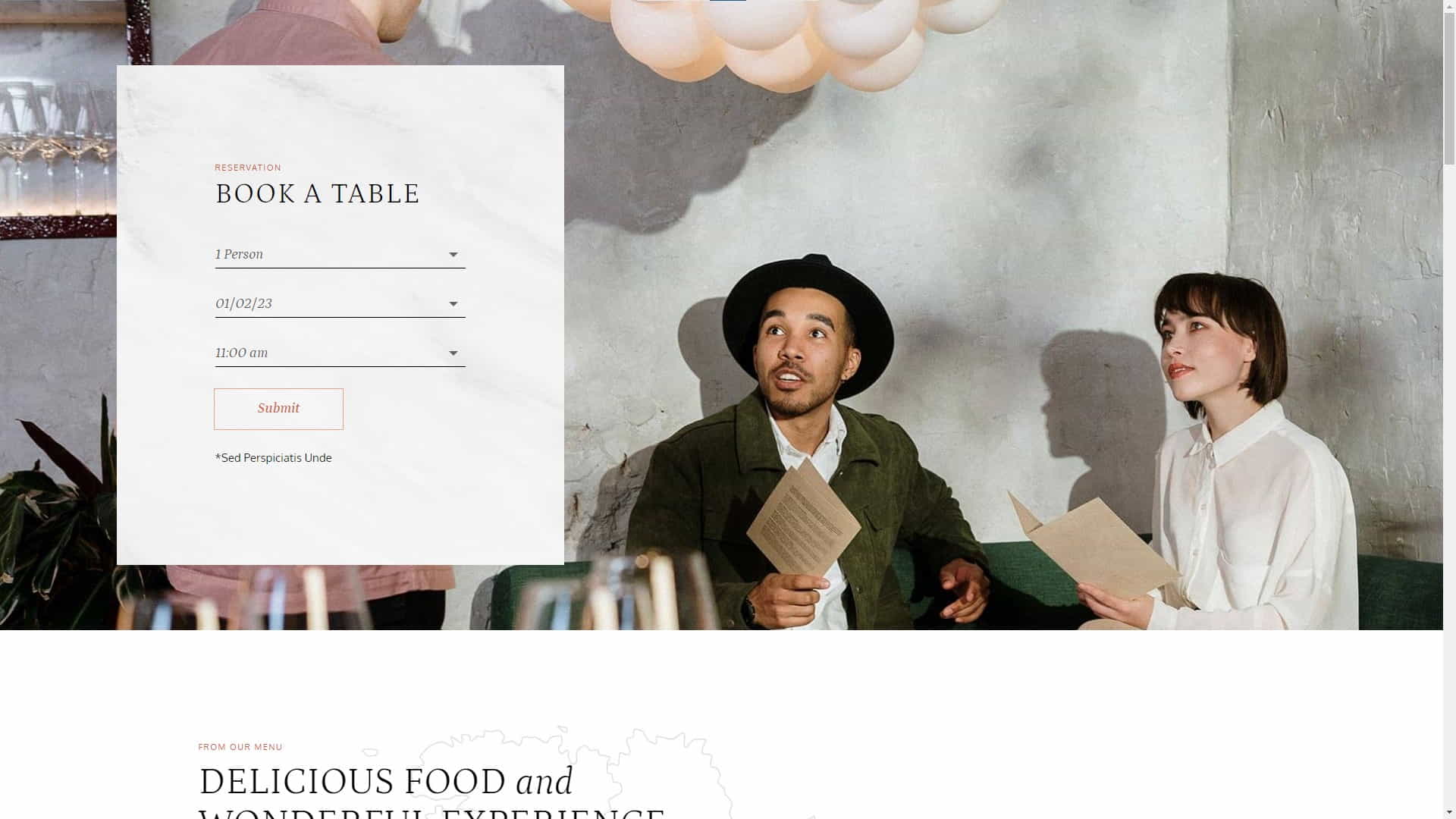
Countless WordPress restaurant website templates can be used with specialty themes or to customize almost any general-use WordPress theme. However, some templates are designed using a specific theme like Divi or Elementor, so be sure the template you choose is compatible with the theme you plan to use.

Every template displayed on this page was designed with the Divi theme. The image carousel above contains four more templates designed for restaurant websites. You can learn how to create a WordPress website for your restaurant by searching for tutorials on YouTube, like this one title “How to design a restaurant website – Divi Theme“.

Final Thoughts On WordPress Restaurant Websites

Final Thoughts On WordPress Restaurant Websites

Final Thoughts

Creating a WordPress website for your restaurant is a step toward establishing an online presence, which can help you attract more consumers. You will successfully create a digital platform that is a true reflection of your establishment’s high-quality offerings and contributes to the expansion of your business by carefully selecting an appropriate theme that embodies the essence of your restaurant, fine-tuning your website to be easily discoverable by search engines, and ensuring a seamless, user-friendly experience.

Remember that keeping your site current is essential to its continued success as a part of your overall internet strategy. This includes not only sharing the latest news, promotions, and menu updates but also implementing innovative features that improve the overall experience for your patrons. By prioritizing a human touch in your digital communications, you can make a lasting impression on your clientele and foster a loyal following that will contribute to the ongoing success of your business.

Disclosure: You may find affiliate links to beneficial resources within this article. You won’t pay more for using our link, but we’ll get a commission. This supports our content creation, and we only suggest products we genuinely believe in. Thank you for being so understanding!

Affiliate Links

James Turner

James Turner

Author/Copywriter

Why Choosing the Best Web Hosting Company Matters in 2025

Find out why choosing the best web hosting company matters in 2025 to boost your site’s performance and skyrocket sales.

Hiring a Website Designer

Hiring a website designer? Discover actionable tips, red flags to avoid, and how to find the right designer to create a website that grows your business.

How to Create a Landing Page Using WordPress

Follow our guide on how to create a landing page using WordPress and the built-in Block Editor, page builder plugins, or specialized themes.

My Island Designs

Pin It on Pinterest