Creating High-Converting Landing Pages With WordPress

Creating High-Converting Landing Pages With WordPress

Home » page builder

Creating high-converting landing pages with WordPress is essential for any business looking to increase their online presence and convert visitors into customers. In this article, we’ll dive into the world of WordPress and explore how to create landing pages that truly convert. We’ll cover everything from the basics of landing page design to advanced techniques for increasing conversion rates. So, buckle up and get ready to take your WordPress website to new heights!

Question from Davey G.: How can I create a high-converting landing page with WordPress?

Answer: Creating a high-converting landing page with WordPress involves understanding your target audience, designing a visually appealing layout, writing persuasive copy, and implementing conversion-optimized elements like forms and call-to-action buttons. This article will guide you through the entire process in detail.

Good Design is Good Business

Good Design is Good Business

“Good design is good business.” – Thomas J. Watson, former CEO of IBM

Understanding Landing Pages is the First Step

Understanding Landing Pages is the First Step

1. Understanding Landing Pages

A landing page is a standalone web page designed with a single goal in mind: to convert visitors into leads or customers. It is the starting point for a particular advertising drive and is designed to get site visitors to do something, such as join up for a mailing list, download a free ebook, or buy a product.

Landing pages are integral to digital advertising campaigns since they boost conversion rates through more direct communication with the intended audience. This article will examine the various landing page formats and the aspects that determine their effectiveness.

Types of Landing Pages

  • Lead Generation: These pages are designed to collect user information, such as email addresses, names, or phone numbers, typically in exchange for something of value like an eBook, webinar, or newsletter subscription. The main goal of a lead generation landing page is to generate leads for your business or organization.
  • Click-through: Landing pages are pages that are meant to be clicked through to a sales page or online store for further purchase or information. They often include strong calls-to-action, persuasive copy, and engaging visuals to entice users to take the next step in the buyer’s journey.
  • Sales: Sales landing pages aim to directly sell a product or service to visitors. Product descriptions, prices, customer reviews, and a compelling call to action are common features of these sites. Sales landing pages are typically used for time-sensitive offers or promotions to create a sense of urgency.
  • Event Registration: Event registration landing pages are designed to promote and collect sign-ups for an upcoming event, such as a webinar, conference, or workshop. These pages typically include event details, speaker information, and a registration form to capture attendee information.
  • App or Software Download: These landing pages promote a specific software application or mobile app and encourage users to download or sign up for a trial version. To encourage app downloads, these materials often detail the app’s features, benefits, cost, and praise from satisfied customers.

Understanding the different types of landing pages and their specific purposes is essential when creating effective landing pages with WordPress. Boost conversions and see better overall results from your marketing campaign by customizing your landing page to match its unique needs.

Key Success Factors

Several elements affect a landing page’s success, including:

  • Relevance: Meeting the expectations of visitors from advertisements or other sources.
  • Clarity: Providing a concise message communicating the value proposition and desired action.
  • Visual appeal: Designing an attractive, professional-looking page that engages visitors and builds trust.
  • Conversion-focused design: Implementing elements encouraging users to take the desired action, such as forms, call-to-action buttons, and persuasive copy.
The Key Elements of High Converting Pages

The Key Elements of High Converting Pages

2. Key Elements of a High-Converting Landing Page

Now that we understand the basics of landing pages let’s dive into the key elements that contribute to high conversion rates:

Compelling Headline

I think a strong headline is crucial for grabbing the attention of your visitors and persuading them to stay on the page. It should be clear, concise and communicate your offer’s primary benefit or value proposition.

Subheadline

The subheadline is a secondary heading that provides additional context and supports the main headline. It should expand on the headline’s message and emphasize the value proposition.

Visuals

High-quality photographs or videos can assist demonstrate your product or service, build trust, and improve the overall appeal of your landing page. Choose relevant and professional-looking visuals, and avoid generic stock photos that don’t add value.

Persuasive Copy

Effective landing page copy should be concise, easy to read, and focused on the benefits of your offer. Use clear, convincing language that addresses your audience’s demands. Here are 10 WordPress Content Strategy Mistakes and How to Fix Them, which will help you ensure your content is always high-quality.

Call-to-Action (CTA)

Your landing page’s call-to-action drives conversions. Your CTA should be clear, prominent, and compelling, urging visitors to take the right action as soon as possible.

Trust Indicators

Adding trust indicators, such as testimonials, reviews, or logos of well-known clients, can help build credibility and reassure visitors that your offer is reliable and worth considering.

Mobile Optimization

Your landing page must be mobile-friendly and smooth across devices as more visitors browse websites on mobile devices.

The Best WordPress Landing Page Plugins

The Best WordPress Landing Page Plugins

3. Top WordPress Plugins for Creating Landing Pages

WordPress plugins with drag-and-drop interfaces and pre-designed templates make creating high-converting landing pages with WordPress easier. Learn Why WordPress is the Best Website Builder for Beginners and how it can help you succeed online.

Here are some of the top WordPress plugins for creating landing pages:

Elementor

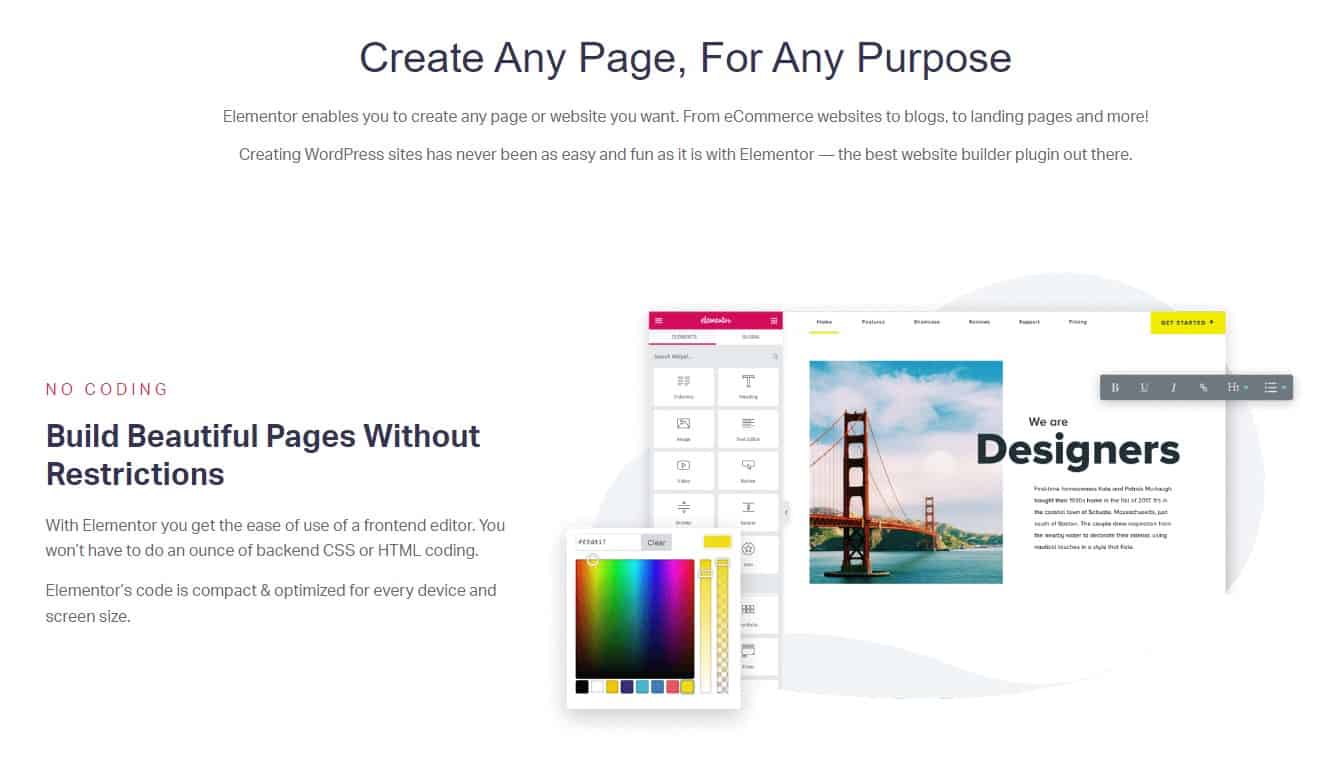
Elementor is a popular page builder plugin allowing you to design stunning landing pages without coding knowledge. Its user-friendly interface, a large library of pre-built templates, and an extensive range of design elements enable you to construct the perfect landing page.

Divi Builder

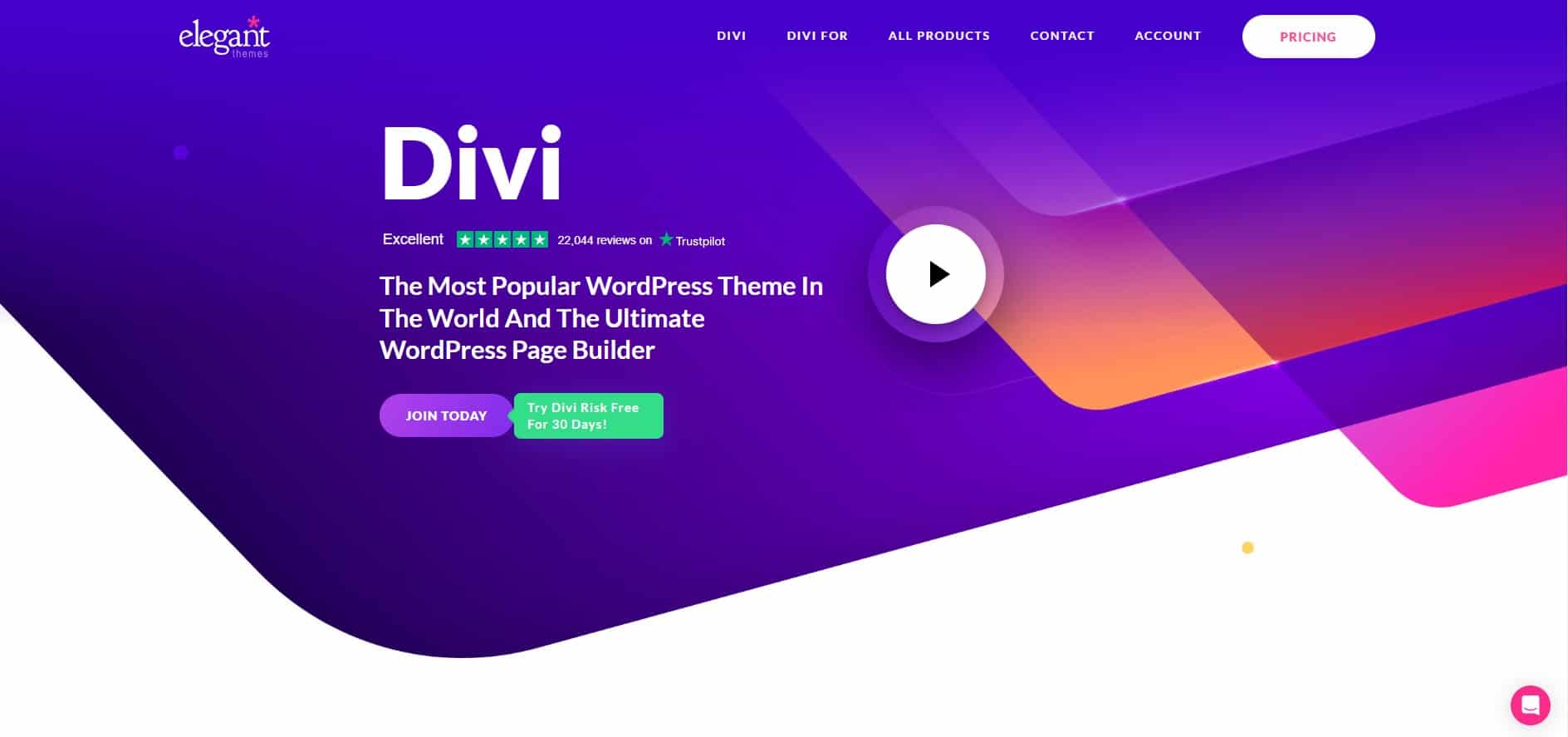
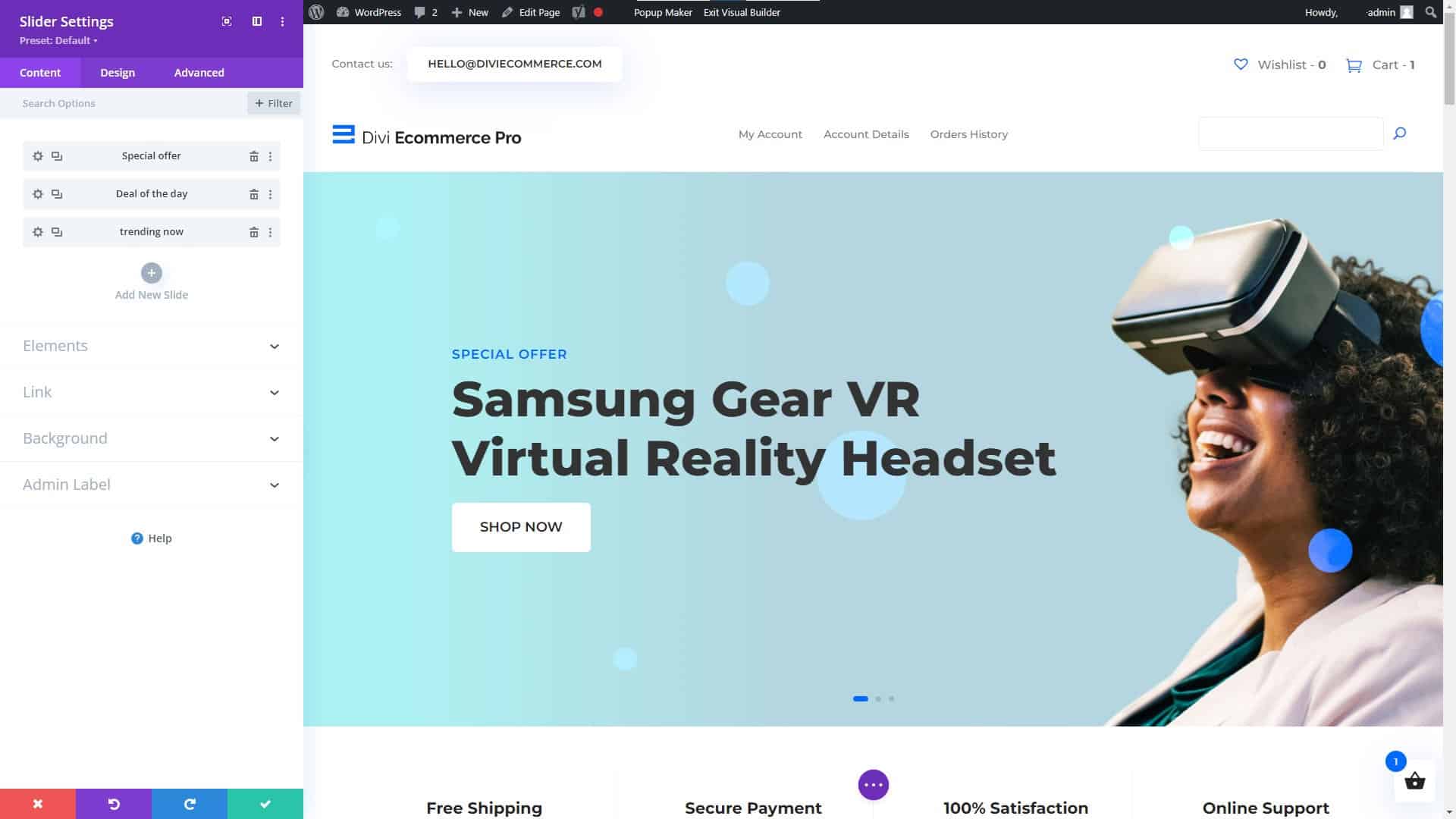
Divi Builder is another powerful page builder plugin that’s part of the Divi Theme by Elegant Themes. It features a visual drag-and-drop editor, a large collection of pre-designed templates, and advanced design settings for creating fully customizable landing pages. This blog and website were created using the Divi builder, and we have found it to be very powerful and easy to use.

OptimizePress

OptimizePress is specifically designed for creating conversion-optimized landing pages. It offers a range of conversion-focused features, including opt-in forms, countdown timers, and A/B testing capabilities. It has many pre-built templates and an easy-to-use editor.

Thrive Architect

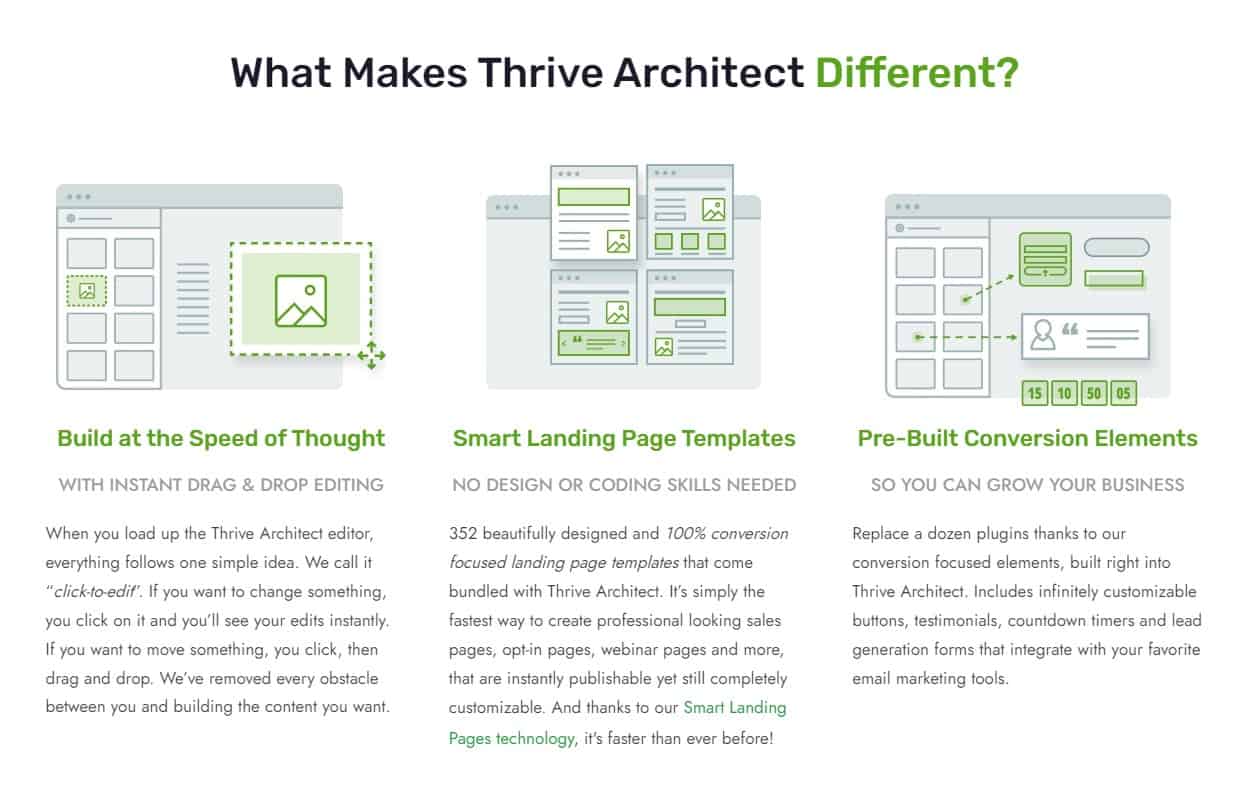
Thrive Architect is a page builder plugin by Thrive Themes, focusing on conversion optimization. It offers many pre-designed themes, customizable call-to-action buttons, and an easy drag-and-drop editor for constructing visually appealing and high-converting landing pages.

Landing Page Website Design Tips

Landing Page Website Design Tips

4. Design Tips for High-Converting Landing Pages

Here are some valuable WordPress landing page design tips and suggestions to help you produce visually engaging and high-converting landing pages that will effectively resonate with your target audience:

  1. Select a clean and simple design, which minimizes distractions and helps users concentrate on the page’s main purpose. A clutter-free layout is essential in maintaining your visitors’ focus and helping them towards the desired action.
  2. Display your title, subheadline, and CTA prominently and clearly.
    I’d like for you to make these elements aesthetically beautiful and easy to grasp to grab the user’s attention and deliver your message.
  3. To stand out from the page, use contrasting call-to-action buttons. Choosing vivid and attention-grabbing colors increases the chance that users will notice and interact with your CTAs, leading to better conversion rates.
  4. Break up extensive text into smaller sections by adding headings, bullet points, and visual elements like images or icons. This method will make your text easier to read and digest.
  5. Incorporate white space thoughtfully throughout your landing page to give your content room to breathe and direct the visitor’s eye through the different elements on the page. White or negative space contributes to a sense of balance and hierarchy, making it simpler for users to process and comprehend your content.
  6. Make sure your landing page works well on mobile devices. Providing an excellent user experience regardless of screen size or platform is crucial, as more users access the web from several devices.

By adhering to these recommendations, you’ll be on track to create visually impressive, high-converting landing pages that look fantastic and effectively encourage your visitors to take the desired actions.

Optimizing Conversions With A-B Testing

Optimizing Conversions With A-B Testing

5. Optimizing Conversions: A/B Testing and Analytics

Test and optimize your landing page to increase conversions. A/B testing, also known as split testing, involves creating two or more variations of a landing page and comparing their performance to determine which one generates better results.

Some elements you can test include:

  • Headlines and subheadlines
  • Call-to-action buttons (color, size, text)
  • Images and videos
  • Form fields and placement
  • Copy and messaging

By analyzing the performance data from A/B tests and making data-driven improvements, you can continually optimize your landing page for higher conversion rates. A/B testing and web analytics like Google Analytics are vital for landing page performance. These tools provide user behavior, traffic sources, and other crucial analytics to help you make informed decisions and improve your landing page.

Mastering WordPress Landing Page Design

Mastering WordPress Landing Page Design

An Inspirational Story: How Helena O. Mastered Landing Page Design

A small business owner, Helena knew she needed to up her game to drive more conversions and grow her business. She decided to learn everything she could about landing page design and optimization. She started by researching the best practices, taking online courses, and attending webinars. Over time, Helena began to see the positive impact of her efforts on her conversion rates.

Helena realized the importance of understanding her target audience and aligning her landing pages with their needs and preferences. She made it a point to continually test and optimize her pages, using A/B testing and analytics to make data-driven improvements. Her perseverance and dedication paid off, as she saw a significant increase in leads, sales, and overall business growth.

Some key takeaways from Helena’s experience include:

  • Invest time and effort in learning about landing page design and optimization.
  • Understand your target audience and create landing pages that cater to their needs.
  • Continually test and optimize your landing pages to improve their performance.
  • Stay up-to-date with industry trends and best practices to maintain a competitive edge.
Useful Statistics and Resources for Marketers

Useful Statistics and Resources for Marketers

Landing Page Statistics You Need to Know

  • WordStream reports that the average conversion rate for a landing page is 2.35 percent across all industries, with the top 25 percent achieving conversion rates of 5.31 percent or above.
  • According to data compiled by Unbounce, landing pages with a single CTA have a significantly greater conversion rate than those with several CTAs.
  • A study by HubSpot found that companies with 40 or more landing pages generate 12 times more leads than those with 5 or fewer.
  • According to MarketingSherpa, 48% of marketers build a new landing page for each marketing campaign.
  • Conversion rates can increase by up to 50% when videos are added to a landing page, as reported by EyeView Digital.

Useful Resources for Learning More About Landing Page Design

E-commerce Success Stories and Expert Comments

Understanding More About Website Hosting is Vital

Reader Testimonial: A Success Story

Michale G., an e-commerce store owner, shared his success story after implementing the strategies mentioned in this article. “I was struggling with low conversion rates on my landing pages, but after following the tips and best practices outlined here, I saw a remarkable improvement in my sales and lead generation. Understanding my audience, focusing on a single call-to-action, and continually testing and optimizing my pages have made all the difference.”


Expert Comment on Landing Page Best Practices

“Understanding your audience is key to creating landing pages that resonate with them. Perform extensive research and create buyer personas to ensure your landing pages address the needs, preferences, and pain points of your target audience.” – Carl T., Conversion Optimization Specialist

Facts About Landing Pages

  • Landing pages are designed for specific marketing campaigns and have a singular focus, such as generating leads, selling a product, or promoting an event.
  • Effective landing pages are built around a strong, clear call-to-action that encourages visitors to take a specific action.
  • Headlines, visuals, and persuasive copy are essential elements of high-converting landing pages.
  • A/B testing and web analytics are critical tools for optimizing landing page performance and driving higher conversion rates.
  • There are various types of landing pages, such as lead generation, click-through, sales, event registration, and app or software download pages, each with its own unique purpose and design considerations.

Glossary of Key Landing Page Terms

Call-to-Action (CTA)
An invitation for site visitors to perform some desired action, such as subscribing to a newsletter or buying something.
Conversion Rate
The percentage of visitors who complete the desired action on a landing page.
A/B Testing
A method of comparing two landing page versions to determine which one performs better.
Lead Generation
Attracting and converting prospects into potential customers, often by collecting their contact information.
Click-through Rate (CTR)
The percentage of visitors who click on a specific link or call-to-action on a landing page.
Bounce Rate
The percentage of visitors who leave a website after viewing only one page, without taking any action.
Landing Page Builder
A software tool that helps users create and customize landing pages, typically featuring drag-and-drop functionality and pre-built templates.
The Secrets of Landing Page Design

The Secrets of Landing Page Design

Do’s and Don’ts of Landing Page Design

The following are crucial “Do’s” and “Don’ts” for WordPress landing page construction and refinement. You may improve the performance of your landing page by emphasizing a distinct call to action, writing attention-grabbing headlines, and providing illustrative material to back up your claims. We recommend using bold pictures and graphics, narrowly focused on the topic of the landing page.

  • Do’s
    • Focus on a single call-to-action.
    • Make your headlines clear and compelling.
    • Create a responsive design that works well on all devices.
    • Use visuals to support your message.
    • A/B test your landing pages to optimize performance.
  • Don’ts
    • Clutter your landing page with multiple calls-to-action.
    • Use vague or confusing headlines.
    • Ignore the importance of mobile optimization.
    • Rely on text alone to convey your message.
    • Assume you know what will work best for your audience.
Creating Successful Landing Pages With WordPress

Creating Successful Landing Pages With WordPress

Final Thoughts

Creating high-converting landing pages with WordPress is achievable with the right knowledge and tools. Focus on understanding your audience, designing with a single objective in mind, and continually testing and optimizing your pages. By following these best practices and leveraging the power of popular landing page builders, you can drive more conversions and grow your business.

Disclosure: You may find affiliate links to beneficial resources within this article. You won’t pay more for using our link, but we’ll get a commission. This supports our content creation, and we only suggest products we genuinely believe in. Thank you for being so understanding!

Affiliate Links

James Turner

James Turner

Author/Copywriter

Why Choosing the Best Web Hosting Company Matters in 2025

Find out why choosing the best web hosting company matters in 2025 to boost your site’s performance and skyrocket sales.

Hiring a Website Designer

Hiring a website designer? Discover actionable tips, red flags to avoid, and how to find the right designer to create a website that grows your business.

How to Create a Landing Page Using WordPress

Follow our guide on how to create a landing page using WordPress and the built-in Block Editor, page builder plugins, or specialized themes.

Why WordPress is the Best Website Builder for Beginners

Why WordPress is the Best Website Builder for Beginners

Home » page builder

WordPress is the best website builder for beginners due to its usability, adaptability, supportive community, SEO optimization tools, and cost-effectiveness. This comprehensive guide covers the platform’s usability, flexibility, community support, SEO, and affordability. WordPress lets novices build and manage websites.

 This informative guide explains why beginners should use WordPress and how robust the community is and how it can help you overcome website-building obstacles. We’ll also explore the platform’s excellent SEO optimization options to boost your website’s visibility.

Using WordPress is Easy Because it Does Not Require Coding

Using WordPress is Easy Because it Does Not Require Coding

“WordPress is the ultimate canvas for designers, offering limitless possibilities to create, innovate, and make an impact in the digital world.” – David Airey, Renowned Graphic Designer

Ease of Use for Beginners and Nearly Unlimited Functionality Options to Grow Your Website

WordPress has an easy-to-use interface that benefits newbies. You can make a great website without coding or design knowledge. Drag-and-drop page builders like Elementor and Beaver Builder let you arrange website pieces without coding. These simple tools allow you to build stunning, functional websites without knowing complicated coding languages. This saves time and hassle and lets you focus on other website tasks like content generation and promotion.

WordPress’s easy interface and drag-and-drop page builders make it an excellent choice for beginners who want to develop a beautiful website without technical intricacies. WordPress is ideal for bloggers, entrepreneurs, and beginners.

Quick Installation and Setup

One of the top reasons WordPress is the best website builder for beginners is that it is simple to use. The one-click installation makes constructing a website with many web hosting providers easy, and you can learn How to Install WordPress in Minutes by following this quick setup guide. Once installed, you may customize your site’s look and feel with thousands of free and premium themes.

Without design abilities, these themes let you construct a distinctive and professional website. Plugins allow you to effortlessly add functionality to your site, from contact forms to social media integration.

Unrivaled Customization Options

WordPress can be easily modified, making it an attractive choice as the best website-building platform for novices. Around 58,000 plugins are available in the WordPress Plugin Directory, allowing you to expand the capabilities of your site easily.

You don’t need to know how to code to use these plugins to increase your site’s functionality. Whether you need to add a contact form, integrate social media, or improve your search engine optimization, a plugin is accessible for practically any demand.

Having such granular control over your website’s appearance and functionality helps it stand out from the crowd and lets you tailor it to your exact requirements. WordPress is the best option if you want a flexible, easily modified platform on which to create and maintain your website.

Over 10,000 Free Themes are Available

To find the right theme for your website, visit WordPress.org. Installing and tweaking themes for your brand is simple. WordPress’s extensive theme collection lets you match your website’s content and audience. There are themes for everyone, from minimalist to extravagant.

Even a non-designer can customize a WordPress theme. Most themes have built-in color schemes and font styles to customize your website to match your brand and vision.


Over Ten Thousand Free WordPress Theme Downloads

Over Ten Thousand Free WordPress Theme Downloads

Plugins

  • E-commerce: Easily transform your website into an online store with plugins like WooCommerce.
  • Contact forms: Add contact forms to your site with plugins like WPForms.
  • Security: Protect your website from hackers and spam with plugins like Wordfence.
  • SEO: Optimize your website for search engines with plugins like Yoast SEO.
Community Support for Beginners is Just a Click Away

Community Support for Beginners is Just a Click Away

Community and Support

WordPress has millions of active and supporting users. You’ll get access to many resources, tutorials, and forums to learn and solve problems. The community helps beginners and experts alike. Get answers, connect with other users, and get comments on your website design and operation.

WordPress’s community is a major benefit over alternative website builders. It encourages creativity, innovation, and platform learning. And with the support you can learn How to Leverage the WordPress Community for Better SEO so your website will rank higher on Google, Bing, and other search engines.

WordPress Forums

Developers and users benefit from the WordPress Help Forums. These forums are full with advice and answers to common issues.

The help forums are great for WordPress inquiries and technical issues. Search for conversations, post questions, and interact with other users who share your interests.

WordPress users are friendly and helpful. Members are willing to help, advise, and share their knowledge. This fosters a nurturing, learning environment.

More Tutorials and Guides

Countless tutorials and guides are available online, covering everything from basic setup to advanced customization. With so many resources, learning WordPress is easy and enjoyable.

SEO Optimization is Better and Easier

WordPress’ SEO tools are another benefit. These qualities make your website search engine-friendly, increasing organic visitors. These tools let you SEO-optimize title tags, meta descriptions, and URLs. Yoast SEO and All in One SEO help boost your website’s SEO.


All In One SEO WordPress Plugin

All In One SEO WordPress Plugin


SEO optimization elements help your target audience find your website and content by ranking higher in search engine results pages. This can boost website traffic, engagement, and revenue.

SEO Plugins

Yoast SEO and Rank Math are WordPress SEO plugins that can enhance your website’s content and boost its search engine ranks. Keyword optimization, meta descriptions, and sitemaps are among these plugins’ SEO functions. They also suggest ways to optimize your content for readers and search engines.

Mobile Responsiveness

Most WordPress themes are mobile-responsive, so your website will appear excellent on all devices. Google promotes mobile-friendly websites in its search results, making this feature crucial for SEO.

A mobile-responsive theme lets you give visitors a smooth experience on any device. This increases traffic and search engine rankings. WordPress themes are mobile-friendly and customizable in color, font, and layout. You can customize your website’s look while keeping it mobile-responsive.

A Cost-Effective Solution for Beginners

A Cost-Effective Solution for Beginners

A Cost-effective

WordPress is great for budget-conscious novices. The platform, themes, and plugins are free. Premium options are cheaper than other website builders, making them an excellent option for budget-friendly website creation. Its large library of free and low-cost solutions lets you design a great-looking, budget-friendly website.

WordPress’s cost doesn’t compromise quality or functionality. With free themes and plugins, you can build a well-designed, SEO-optimized website that meets all your demands. WordPress’s affordability benefits beginners building a website on a budget, and with its free and low-cost themes and plugins, you can construct a beautiful and effective website.

WordPress Offers the Most Free and Low-Cost Resources

WordPress is perfect for low-budget starters. Several themes and plugins are free, as is the platform. Compared to other website builders, premium options are generally cheaper, making WordPress a fantastic choice for individuals who wish to construct a professional and functional website without breaking the bank. With its extensive library of free and low-cost alternatives, you can design a website that looks and operates excellently on a budget.

Another fantastic thing about WordPress is that it is affordable without sacrificing quality or usefulness. You can build a well-designed, search-engine-optimized website with free themes and plugins. Low cost is a significant benefit for anyone trying to develop a website on a budget. Its free and low-cost themes and plugins allow you to construct a beautiful and functioning website without overspending, making it a great alternative for anyone wishing to succeed online without spending a lot.

The Best Website Builder for a Creative Design Process

The Best Website Builder for a Creative Design Process

Final Words on Why WordPress is Best for Beginners, and Professionals Alike

There is no better solution for beginners than WordPress because of its user-friendliness, flexibility, community support, search engine optimization (SEO) features out of the box, and low price. WordPress allows users of all skill levels to construct professional-looking websites easily.

Most people agree WordPress is the best website builder for beginners, and that is a fact since more websites are created using it than any other CMS or site builder. It is the right choice if you need something that provides all the tools necessary to launch a successful website, from an intuitive interface and configurable themes to active support forums and search engine optimization tools. In addition, the platform’s low cost means you can expand your web footprint without breaking the bank.

Disclosure: Some of the links in this post may be “affiliate links.” If you click on one of those links and purchase the item, I will receive a commission, but it will not increase your cost.

Affiliate Links

The links in the article’s text are not affiliate links, however the links below are. We use the hosting service stated below for our network’s 100+ websites and the WordPress theme for the majority of the websites we create for our firm and our clients.

  • Web Hosting that is fast and stable at a low cost, as well as Turbo hosting for resource-intensive websites such as WooCommerce stores.
  • The Divi WordPress Theme is beginner friendly, includes incredible support, affordable, and the #1 best selling WordPress theme in the world.
James Turner

James Turner

Author/Copywriter

Why Choosing the Best Web Hosting Company Matters in 2025

Find out why choosing the best web hosting company matters in 2025 to boost your site’s performance and skyrocket sales.

Hiring a Website Designer

Hiring a website designer? Discover actionable tips, red flags to avoid, and how to find the right designer to create a website that grows your business.

How to Create a Landing Page Using WordPress

Follow our guide on how to create a landing page using WordPress and the built-in Block Editor, page builder plugins, or specialized themes.

A Beginner’s Guide to the Best WordPress Website Builders

A Beginner’s Guide to the Best WordPress Website Builders

Home » page builder

Using a website builder is the best option if you want a website but don’t have the funds to employ a professional. Finding the best website builder might be difficult for beginners. We promise not to leave you hanging though. In this article, we’ll compare and contrast several of the best WordPress website builders currently available, so you can make a well-informed decision.

WordPress Website Builder Table of Contents

Overview of WordPress Website Builders

With the help of a WordPress website builder, you can make a website and make whatever changes you want to it without knowing any code. Most commonly, these constructors are offered as a WordPress plugin or theme. They provide a user-friendly interface that only requires dragging and dropping elements, as well as a number of premade layouts and extensive personalization choices.

Numerous WordPress website builders exist, each with its unique set of features and capabilities. Some are preferable for more advanced users, while others are ideal for newcomers. Some are tailored for particular kinds of websites, such portfolios or shops. There are both more and less expensive options.

Wordpress Website Theme and Page Builders

WordPress Website Theme and Page Builders

“In the world of website building, WordPress is the wizard and website builders are the magic wand – choose wisely, and the sky’s the limit for your digital domain.”

Comparing the Top WordPress Website Builders

It can be overwhelming to look at all of the options for WordPress website builders, but picking the one that best suits your needs is crucial. The functionality, template choices, and cost structures offered by the various website builders vary widely. While some, like Elementor and Beaver Builder, give customers a vast variety of design options and templates, others, like Divi and WP Bakery Page Builder, take a more streamlined and simplified approach. Your website’s level of personalization should be proportional to your budget for site development, your level of technical expertise, and the time you have available for site development. Explore your options by comparing and contrasting the best WordPress website builders, and you’ll soon have the website of your dreams up and running.

Elementor Page Builder

Elementor Page Builder

Elementor

Among the many WordPress site-creation plugins available, Elementor stands out for its user-friendliness and versatility. It has a user-friendly drag-and-drop interface, stock layouts, and extensive personalization possibilities. It also has a sizable user and developer base, so there are many guides and tutorials available to help you get started.

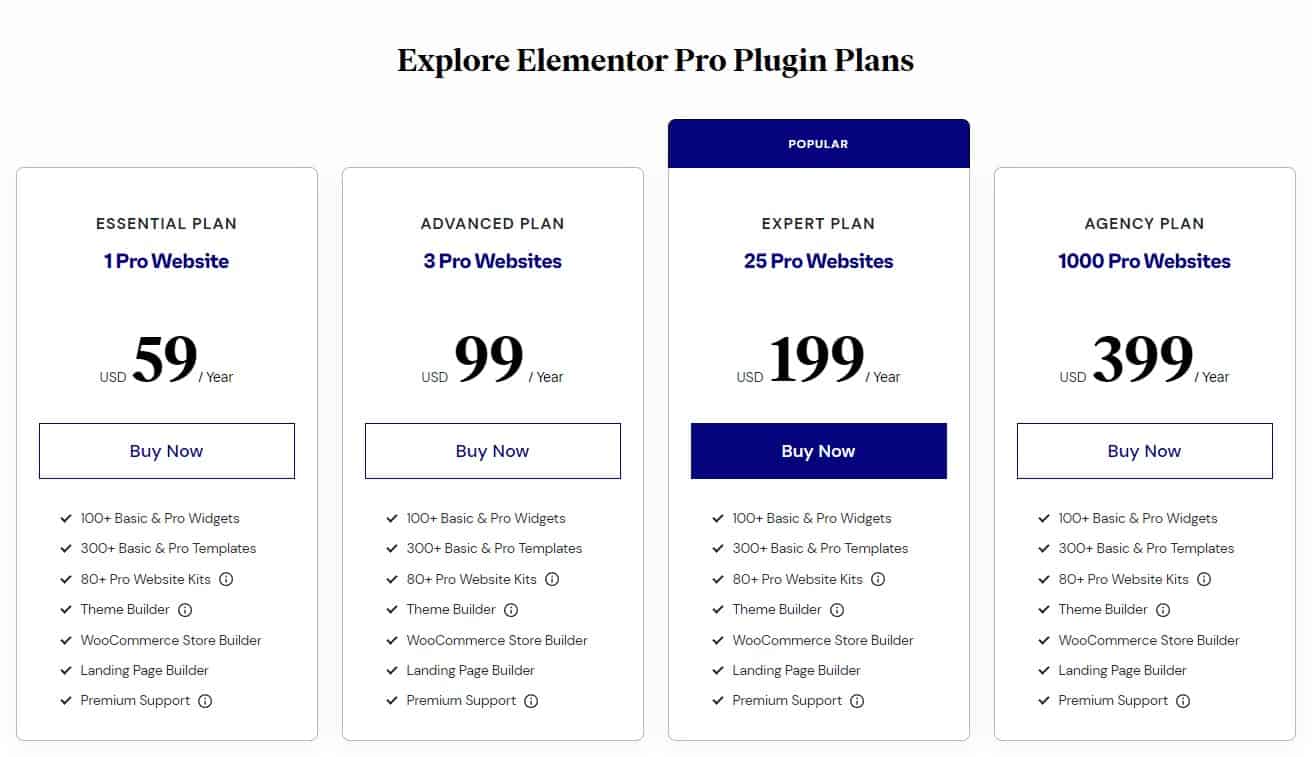
Elementor’s versatility and ease-of-use for newcomers are two of the program’s greatest strengths. The price is also reasonable, with a free version and a paid version that starts at $59 per year (2/10/2023). Some of the key features of Elementor include:

  • A drag-and-drop interface for easy customization
  • A wide range of pre-designed templates to choose from
  • A large library of widgets and elements to add to your website
  • Integration with popular WordPress plugins and services
  • A live design feature that allows you to see your changes in real-time
Elementor Page Builder Pricing Plans

Elementor Page Builder Pricing Plans

In some cases, particularly on sites with many widgets and other components, Elementor may take a while to load. You’ll probably need to upgrade to the commercial version of Elementor to unlock its full potential, as the free version has several features and functionality restrictions.

Divi WordPress Page Builder and Theme

Divi WordPress Page Builder and Theme

Divi Website Builder Image Settings

Divi Website Builder Image Settings

Divi Website Builder for WordPress Slider Settings

Divi Website Builder for WordPress Slider Settings

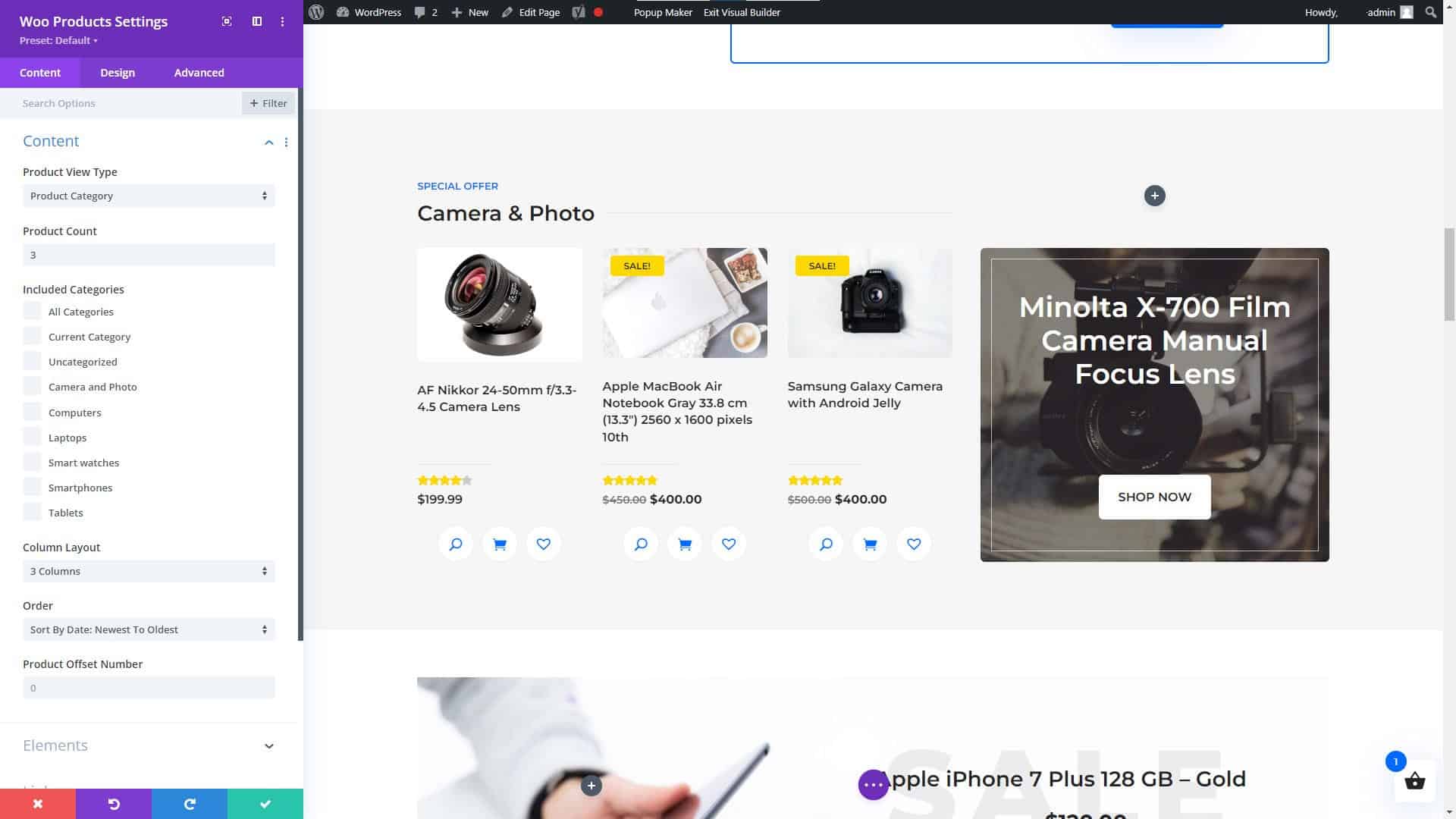
Divi Website Builder WooCommerce Products Module

Divi Website Builder WooCommerce Products Module

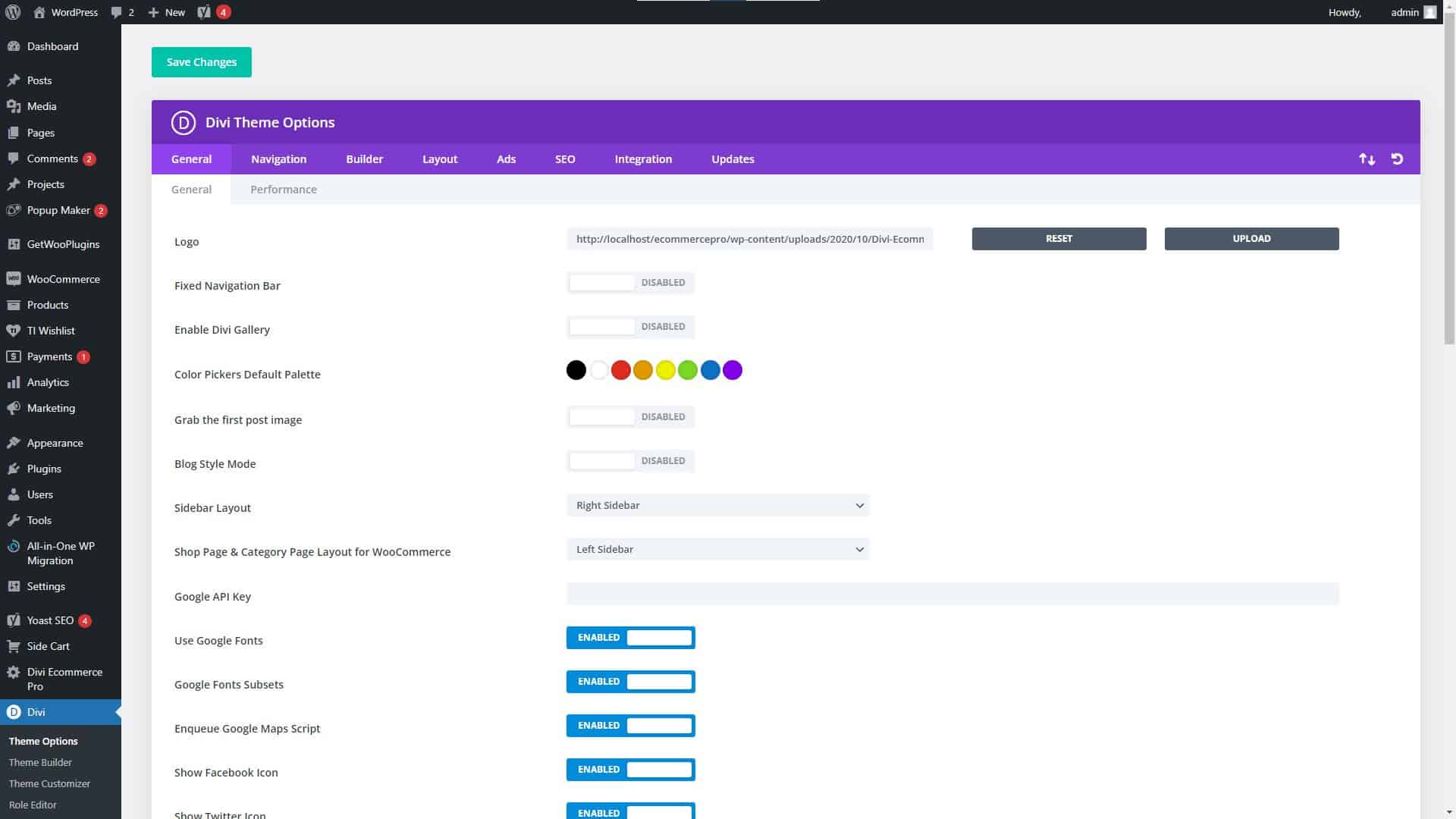
Divi Website Builder Theme Settings

Divi Website Builder Theme Settings

Divi

When it comes to WordPress website builders, Divi is another popular option due to its versatility and user-friendliness. It has a user-friendly interface that only requires dragging and dropping elements, as well as several choices for personalization. As a result of its popularity, there is a wealth of documentation and how-to guides available online to help you get started.

Get the Divi Theme for WordPress and start building your future, today!

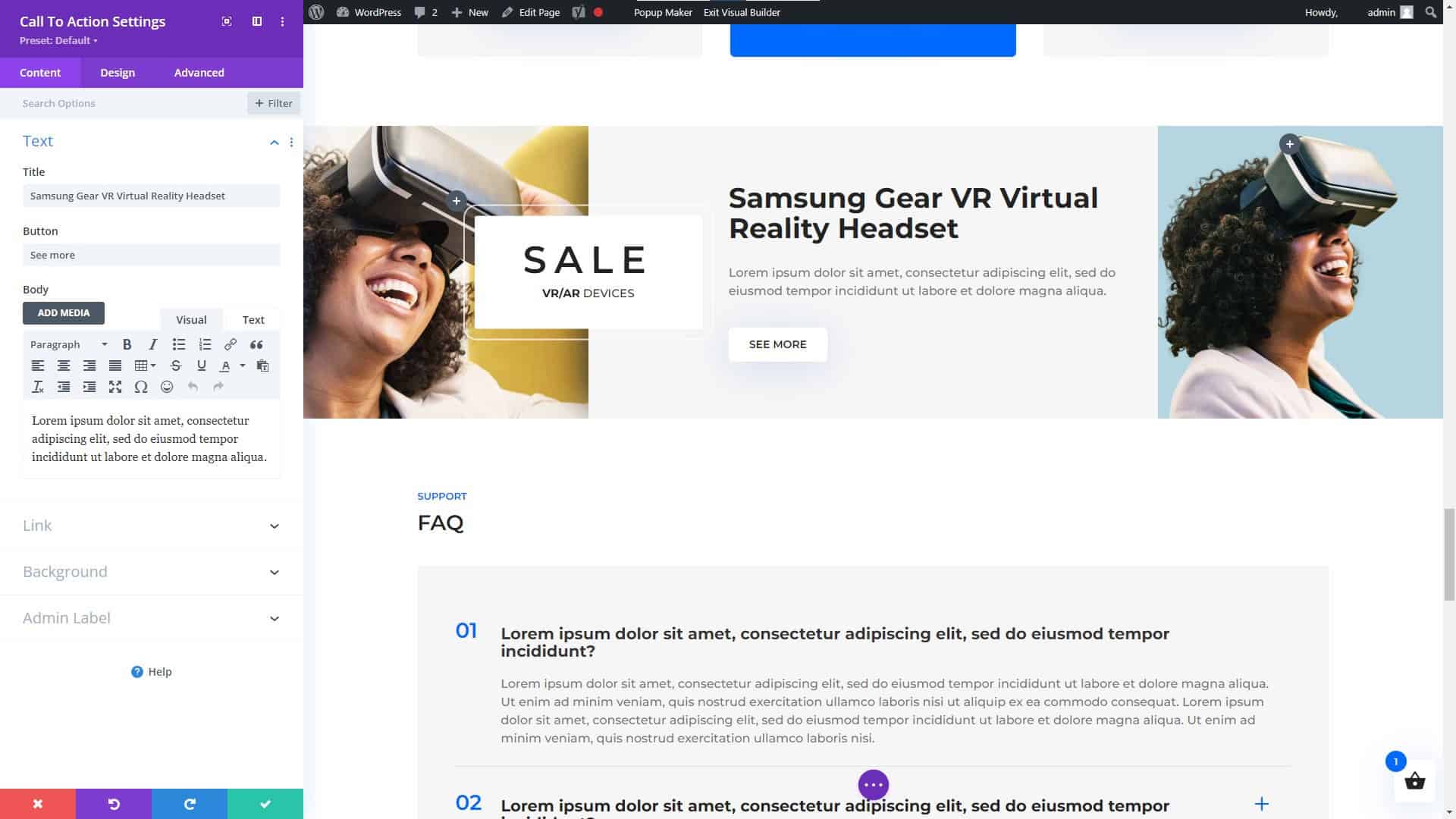
Divi Website Builder for WordPress Call to Action Module

Divi Website Builder for WordPress Call to Action Module

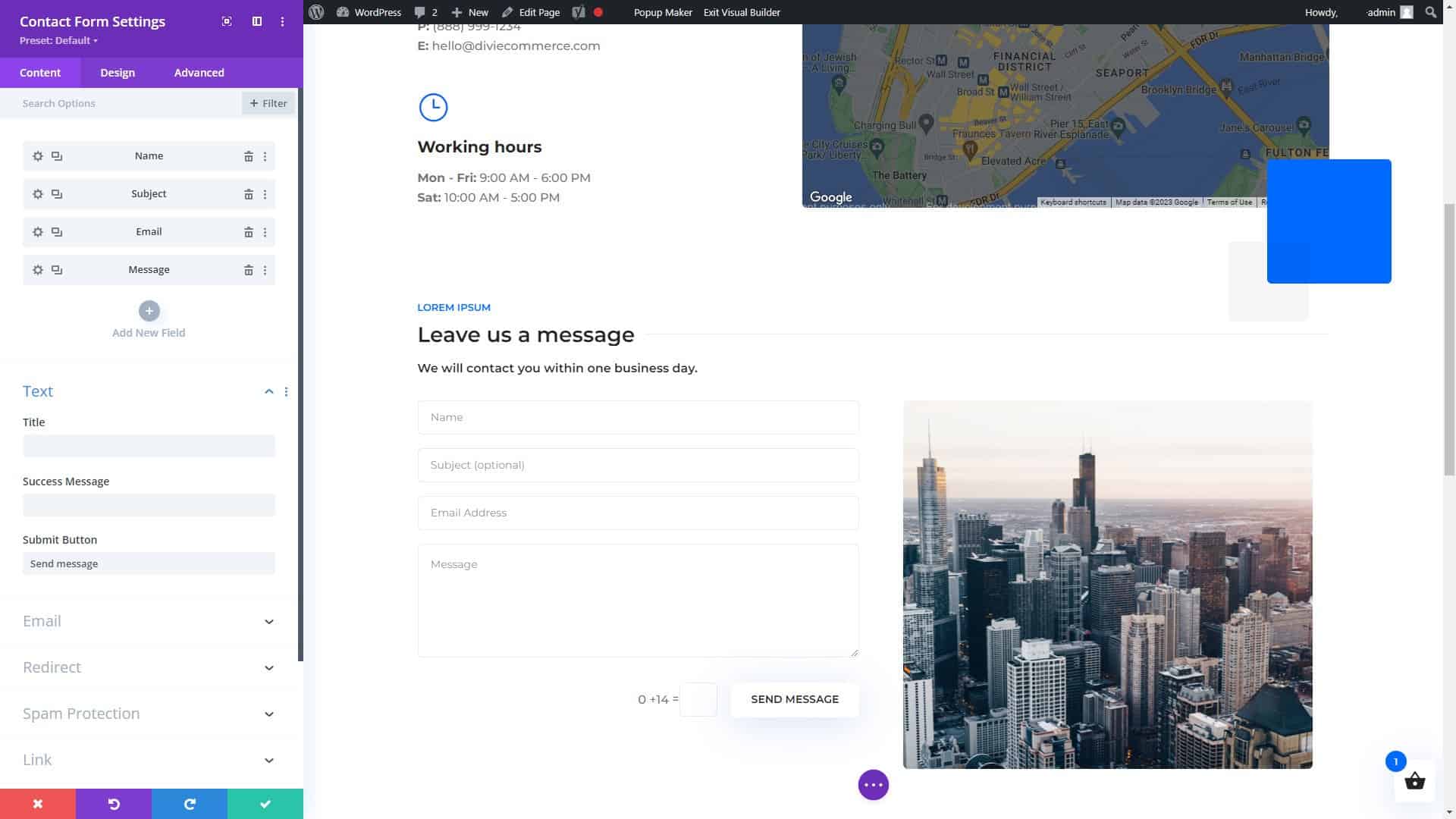
Divi Page Builder for WordPress Contact Form Settings

Divi Page Builder for WordPress Contact Form Settings

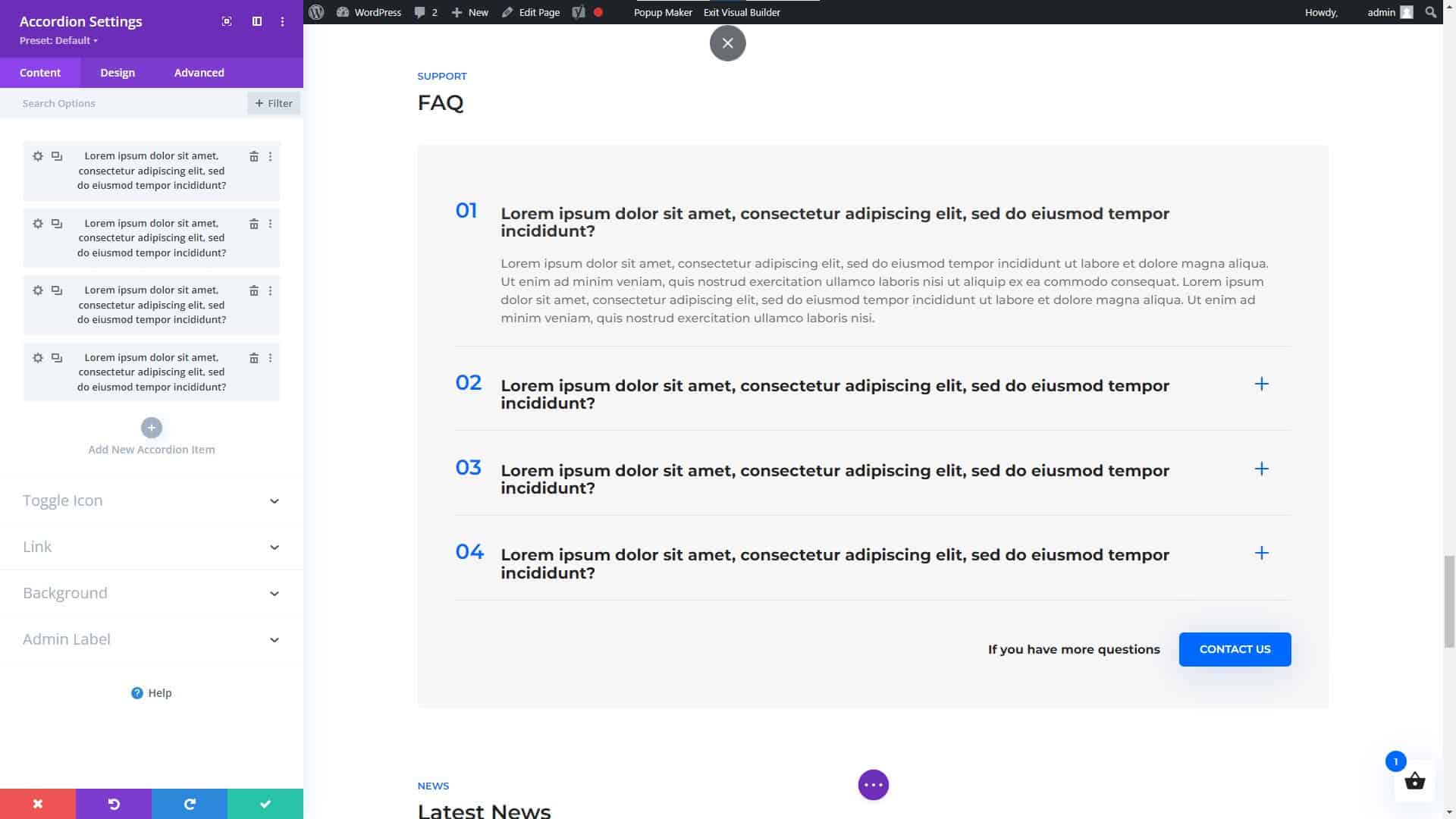
Divi Website Builder for WordPress Accordion Module

Divi Website Builder for WordPress Accordion Module

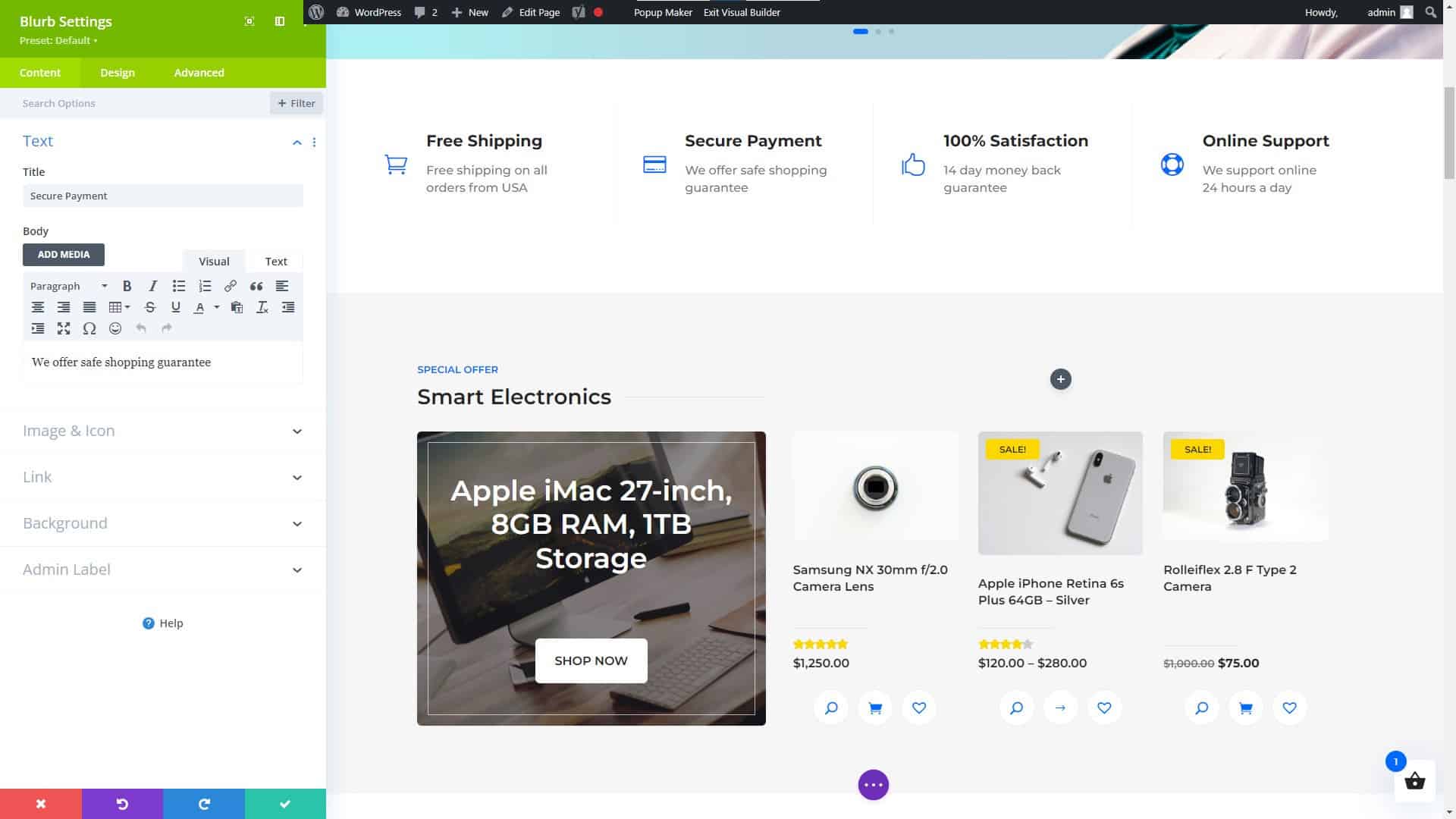
Divi Website Builder Blurb Settings

Divi Website Builder Blurb Settings

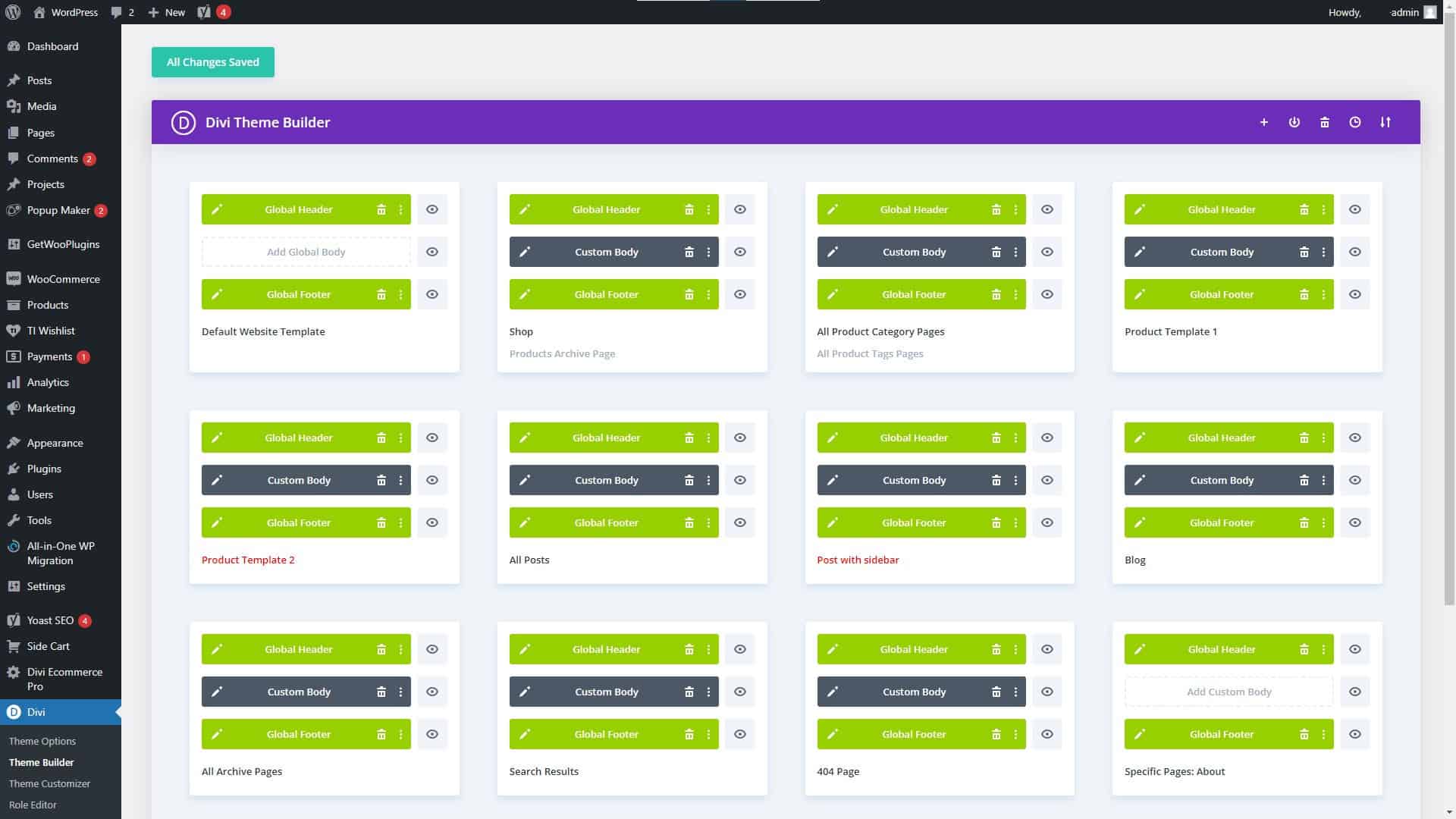
Divi Theme Builder Settings

Divi Theme Builder Settings

Divi Theme Features and Advantages

Divi’s many useful features and options are one of its primary selling points. Additionally, it comes equipped with a theme builder that lets you create unique layouts without having to learn how to code. Among Divi’s many great qualities are:

  • A HUGE number of third-party themes, modules, plugins, and fellow users offering everything you could possibly need to create an amazing website.
  • A drag-and-drop interface for easy customization
  • A wide range of pre-designed templates to choose from
  • A large library of widgets and elements to add to your website
  • Integration with popular WordPress plugins and services
  • A live design feature that allows you to see your changes in real-time
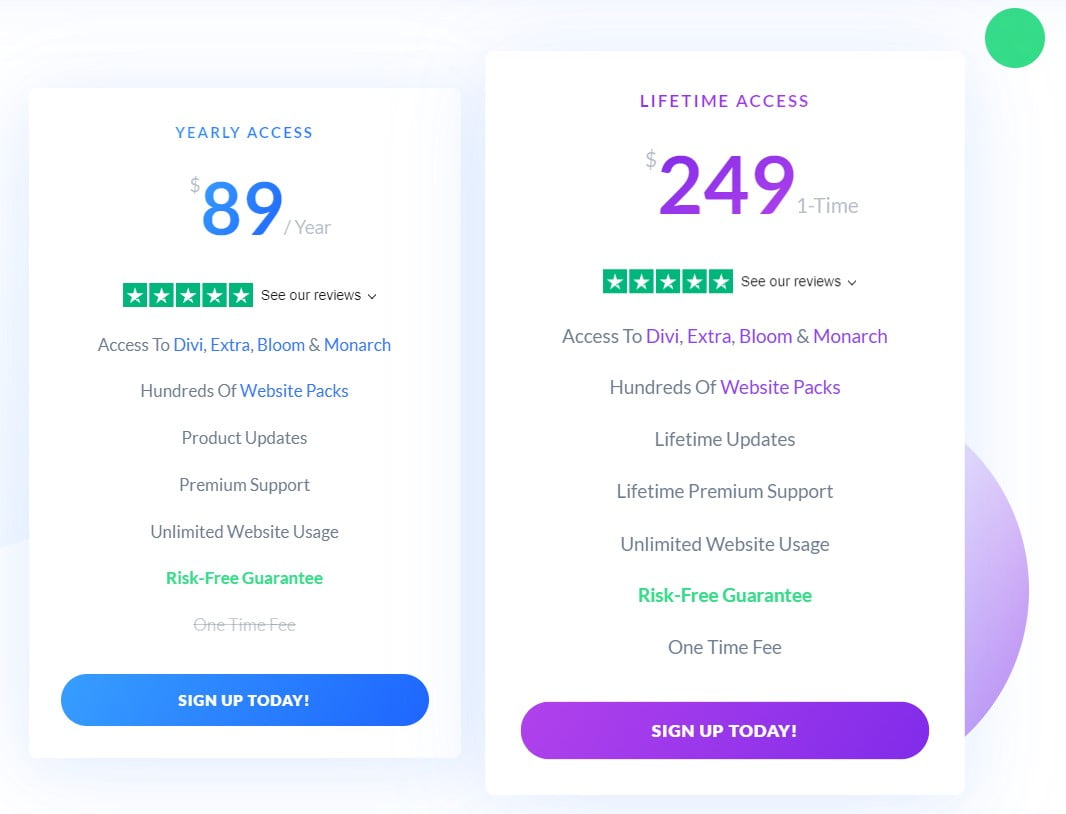
Elegant Themes Membership Pricing Plans

Elegant Themes Membership Pricing Plans

Divi Pricing, Pros, and Cons

Divi’s loading time used to be a problem on some sites, especially those with many widgets and elements. However, a major update of Divi was released on August 18, 2021, with the goal of “Speeding Up Divi From Every Angle,” according to my tests and the many sites I have created using Divi, it was a huge success.

Additionally, it is one of the most expensive website builders on the market, with pricing starting at $89 per year (2/10/2023).

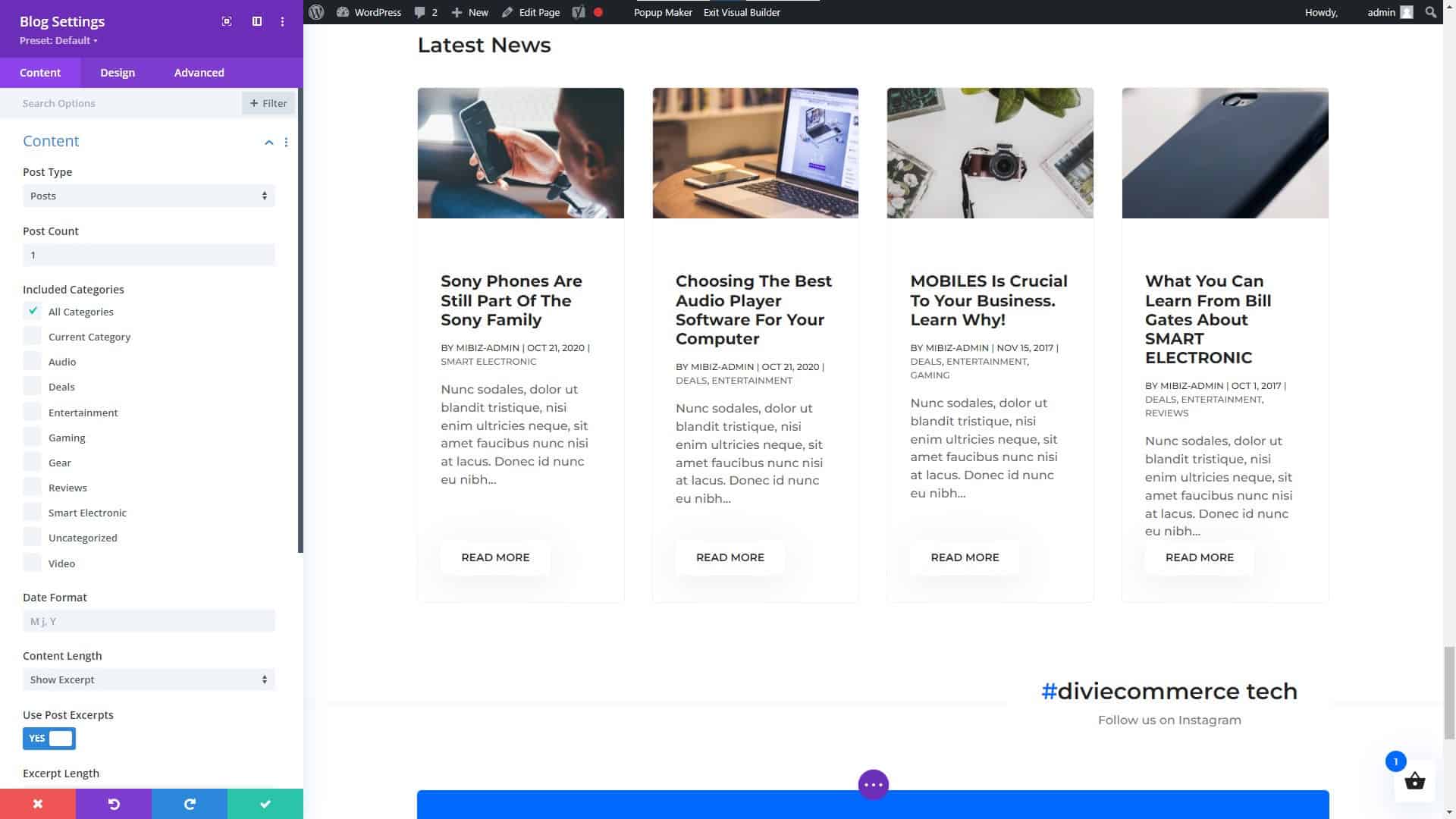
Divi Builder Blog Module Settings

Divi Builder Blog Module Settings

Divi Modules (NOT a Complete List)

Hhere are some of the main categories of modules that you can expect to find with Divi:

  1. Basic Modules: These modules include Text, Image, Gallery, Video, Audio, Button, Number Counter, and more.
  2. Design Elements: These modules include Call to Action, Blurb, Testimonial, Pricing Table, and more.
  3. Layout Elements: These modules include Fullwidth Header, Fullwidth Menu, Fullwidth Slider, Fullwidth Map, and more.
  4. Blog Modules: These modules include Post Title, Post Meta, Post Navigation, Author Box, and more.
  5. Portfolio Modules: These modules include Portfolio, Portfolio Slider, Portfolio Grid, and more.
  6. WooCommerce Modules: These modules include Products, Product Slider, Product Category, and more.
  7. Lead Generation Modules: These modules include Optin, Bloom, and more.
  8. Social Media Modules: These modules include Follow, Share, and more.

These are but a few of the many possible module types available in the Divi framework. Keep in mind that the specific modules and their names may change over time, so it is always a good idea to visit the Divi website for the most up-to-date information.

Beaver Builder Page Builder

Beaver Builder Page Builder

Beaver Builder

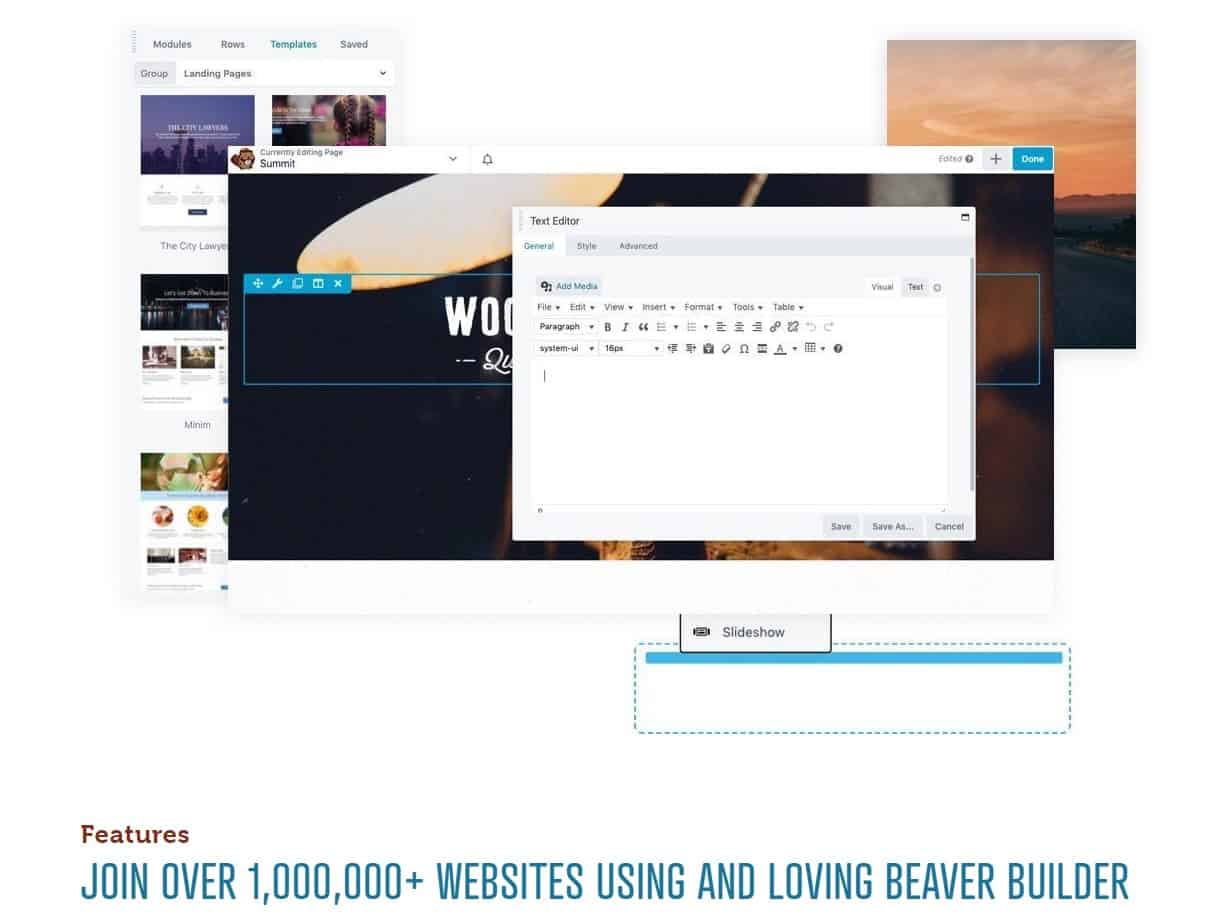
Among the many WordPress site-construction plugins available, Beaver Builder stands out for its user-friendliness and flexibility. It has a user-friendly interface where you can simply drag and drop elements, as well as a number of customizable pre-made layouts. You may discover many guides and tutorials to help you get started thanks to its enormous user and developer base.

Beaver Builder’s flexibility in providing a wide variety of features and capabilities is one of its primary strengths. It also includes a theme creator that lets you make unique layouts without learning to code. Here are a few of Beaver Builder’s most notable capabilities:

  • A drag-and-drop interface for easy customization
  • A wide range of pre-designed templates to choose from
  • A large library of widgets and elements to add to your website
  • Integration with popular WordPress plugins and services
  • A live design feature that allows you to see your changes in real-time
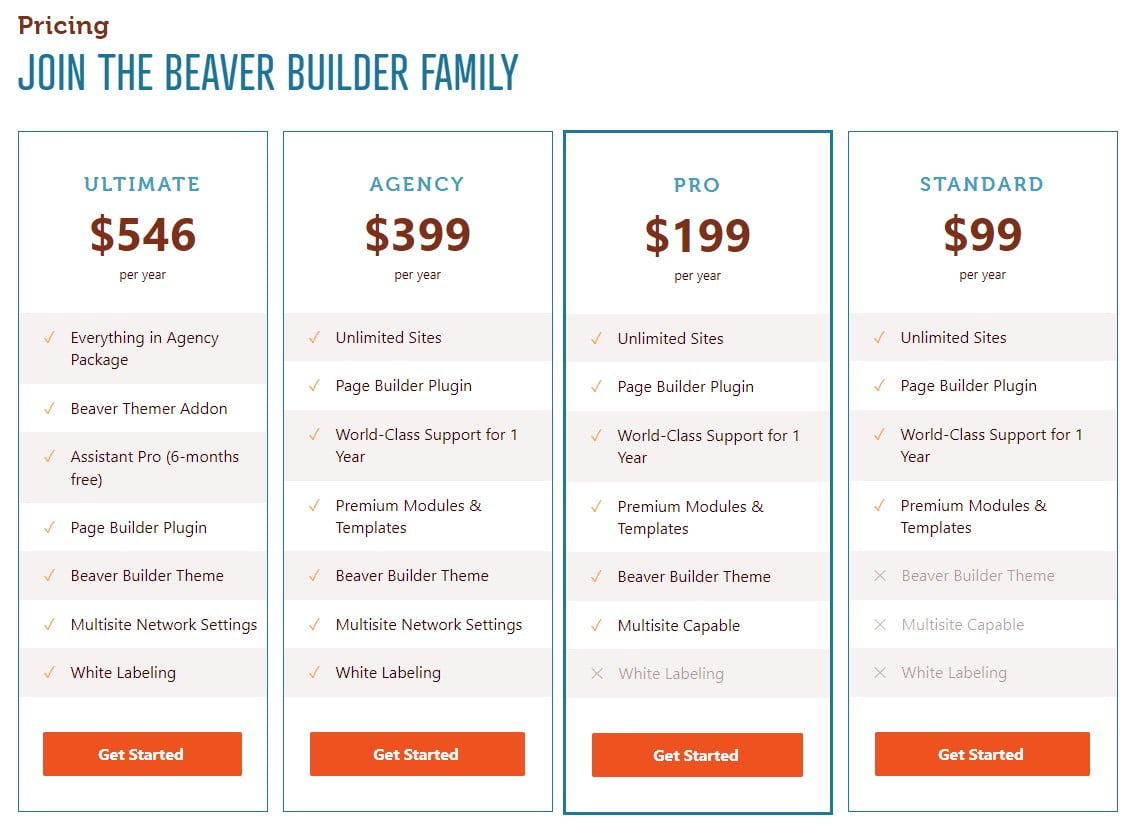
Beaver Builder Pricing Plans

Beaver Builder Pricing Plans

One of the downsides of Beaver Builder is that it can be a bit more expensive than some of the other website builders on the market, with pricing starting at $99 for the standard version (2/10/2023) and $199 for the pro version (2/10/2023). Additionally, some users have reported that the interface can be a bit confusing, particularly for beginners.

Thrive Architect Page Builder

Thrive Architect Page Builder

Thrive Architect

In the world of WordPress website builders, Thrive Architect stands out for its user-friendliness and flexibility. It has a user-friendly interface where you can simply drag and drop elements, as well as a number of customizable pre-made layouts. You may discover many guides and tutorials to help you get started thanks to its enormous user and developer base.

Thrive Architect’s versatility lies on its many useful features and capabilities. It also includes a theme creator that lets you make unique layouts without learning to code. Among Thrive Architect’s many useful features are:

  • A drag-and-drop interface for easy customization
  • A wide range of pre-designed templates to choose from
  • A large library of widgets and elements to add to your website
  • Integration with popular WordPress plugins and services
  • A live design feature that allows you to see your changes in real-time
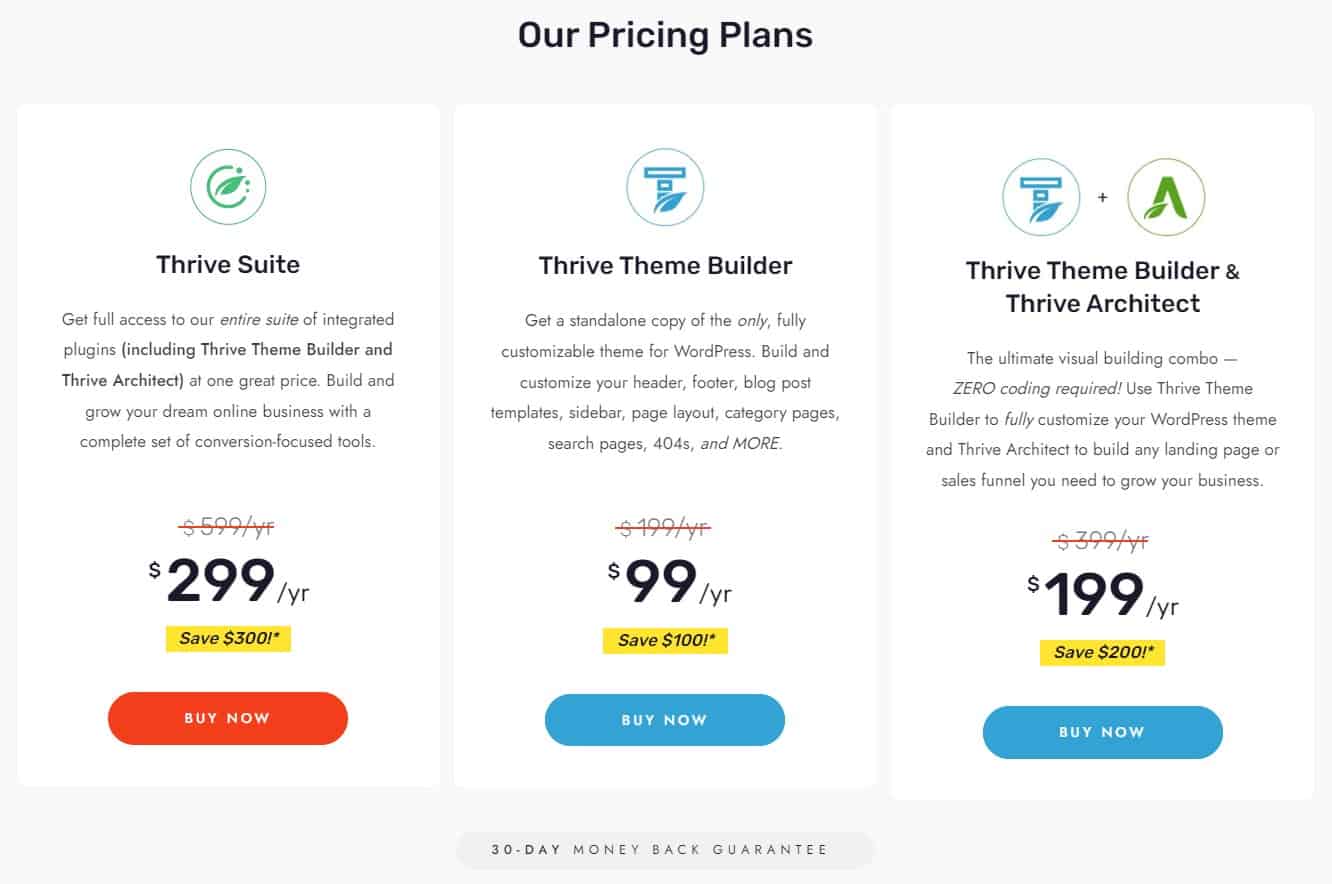
Thrive Architect Page Builder Pricing Plans

Thrive Architect Page Builder Pricing Plans

One of the downsides of Thrive Architect is that it can be a bit more expensive than some of the other website builders on the market, with pricing starting at $67 for the standard version (2/10/2023). Additionally, some users have reported that the interface can be a bit confusing, particularly for beginners.

WordPress Page Builders Do Not Require Knowledge of Coding

WordPress Page Builders Do Not Require Knowledge of Coding

Choosing the Right WordPress Website Builder

Choosing a WordPress page builder is not as simple as it may seem. Price, features, compatibility, sales or users, usability, functioning, updates, and developer reliability should all be considered. Each aspect is critical in picking the best page builder for your requirements. Some themes, like Divi, include a builder, so you can get more information on How to Choose the Best WordPress Theme to make an informed decision.

Choosing a WordPress page builder can be daunting, so we’ve compiled this handy checklist to help you narrow down your options.

Price: What is the cost of the page builder, and does it fit within your budget?

Features: Does the page builder have all the features you need to build your website, such as responsive design, custom fonts, and e-commerce integration?

Compatibility: Does the page builder work seamlessly with your WordPress theme and other plugins?

Number of sales or users: How many people have used or purchased the page builder, and what are their experiences with it?

Ease of use: Is the page builder user-friendly, and does it have a straightforward interface that’s easy to navigate?

Functionality: Does the page builder have all the functionalities you need to build your website, such as drag-and-drop functionality, and the ability to add custom CSS?

Update schedule: How often does the developer release updates for the page builder, and are they reliable and bug-free?

Reliability of the developer:

Ask yourself if the page builder’s creator can be relied upon to deliver high-quality software and responsive customer service.

With this information in hand, you may confidently select the most suitable WordPress page builder. For your convenience, we have expanded upon three of the most important factors to keep in mind while deciding on the best WordPress website builder for your business or personal site below.

Features and Functionality

Features and functionality are two of the most crucial factors to think about when selecting a WordPress website builder. It’s important to note that different builders cater to different skill levels. Some are tailored to certain niches, like portfolios or e-commerce sites. Also, prices vary widely from one option to the next.

Before settling on a website builder, it’s wise to evaluate your needs. Do you want or require a lot of room for personalization? Do you wish there was a theme creator preinstalled? Are you trying to find a simple to operate program? When deciding on a website builder, these are crucial factors to consider.

Ease of Use

When deciding on a WordPress website builder, simplicity of use is an additional point to think about. It’s crucial to select a builder that’s simple to use, even if you’re just starting out with website creation, and some are more user-friendly than others.

Find a website creator that has a user-friendly drag-and-drop interface, several design possibilities, and premade templates. You should also consider the size of the tool’s user and developer community as an indicator of its accessibility.

Pricing

Finally, when deciding on a WordPress website builder, cost should not be ignored. It’s crucial to do some research and pick a builder that works within your budget.

A website builder’s recurring fees should also be taken into account. There are both subscription-based and one-time payment options among the available builders. Also, some constructors provide a free version, but the more sophisticated capabilities are only available in a paid upgrade.

Before settling on one, it’s important to weigh the upfront expenditures against the total over the life of the website. Add the price of any further tools or subscriptions you may need.

The Final Word on WordPress Website and Page Builders

The Final Word on WordPress Website and Page Builders

Conclusion

For those without prior experience, settling on a WordPress website builder can feel like an overwhelming undertaking. You can choose a product that works for your demands and your budget if you take into account things like features and functionality, convenience of use, and pricing.

Elementor, Divi, Beaver Builder, and Thrive Architect are just a few of the greatest WordPress website builders, and we’ve reviewed them all here. Each of these resources has advantages and disadvantages; pick the one that works best for you.

To reiterate, it is crucial to locate a tool that is not only affordable, but also meets your needs in terms of usability, features, and functionality. And don’t be shy about reaching out to others for advice and assistance.

The WordPress Support Forum

For more information on WordPress, and support, visit the WordPress Support Forum.

NOTICE: All pricing listed within this article was accurate on the date this article was published (02/10/2023). However, pricing changes, so please refer to the developers’ websites listed in this article for their latest prices. You may even get lucky and find the cost is less due to a Black Friday sale, anniversary sale, Cyber Monday sale, or another special offering.

Disclosure: You may find affiliate links to beneficial resources within this article. You won’t pay more for using our link, but we’ll get a commission. This supports our content creation, and we only suggest products we genuinely believe in. Thank you for being so understanding!

Affiliate Links

James Turner

James Turner

Author/Copywriter
Why Choosing the Best Web Hosting Company Matters in 2025

Find out why choosing the best web hosting company matters in 2025 to boost your site’s performance and skyrocket sales.

Hiring a Website Designer

Hiring a website designer? Discover actionable tips, red flags to avoid, and how to find the right designer to create a website that grows your business.

How to Create a Landing Page Using WordPress

Follow our guide on how to create a landing page using WordPress and the built-in Block Editor, page builder plugins, or specialized themes.

My Island Designs

Pin It on Pinterest