Why WordPress is the Best Website Builder for Beginners

Why WordPress is the Best Website Builder for Beginners

Home » no coding required

WordPress is the best website builder for beginners due to its usability, adaptability, supportive community, SEO optimization tools, and cost-effectiveness. This comprehensive guide covers the platform’s usability, flexibility, community support, SEO, and affordability. WordPress lets novices build and manage websites.

 This informative guide explains why beginners should use WordPress and how robust the community is and how it can help you overcome website-building obstacles. We’ll also explore the platform’s excellent SEO optimization options to boost your website’s visibility.

Using WordPress is Easy Because it Does Not Require Coding

Using WordPress is Easy Because it Does Not Require Coding

“WordPress is the ultimate canvas for designers, offering limitless possibilities to create, innovate, and make an impact in the digital world.” – David Airey, Renowned Graphic Designer

Ease of Use for Beginners and Nearly Unlimited Functionality Options to Grow Your Website

WordPress has an easy-to-use interface that benefits newbies. You can make a great website without coding or design knowledge. Drag-and-drop page builders like Elementor and Beaver Builder let you arrange website pieces without coding. These simple tools allow you to build stunning, functional websites without knowing complicated coding languages. This saves time and hassle and lets you focus on other website tasks like content generation and promotion.

WordPress’s easy interface and drag-and-drop page builders make it an excellent choice for beginners who want to develop a beautiful website without technical intricacies. WordPress is ideal for bloggers, entrepreneurs, and beginners.

Quick Installation and Setup

One of the top reasons WordPress is the best website builder for beginners is that it is simple to use. The one-click installation makes constructing a website with many web hosting providers easy, and you can learn How to Install WordPress in Minutes by following this quick setup guide. Once installed, you may customize your site’s look and feel with thousands of free and premium themes.

Without design abilities, these themes let you construct a distinctive and professional website. Plugins allow you to effortlessly add functionality to your site, from contact forms to social media integration.

Unrivaled Customization Options

WordPress can be easily modified, making it an attractive choice as the best website-building platform for novices. Around 58,000 plugins are available in the WordPress Plugin Directory, allowing you to expand the capabilities of your site easily.

You don’t need to know how to code to use these plugins to increase your site’s functionality. Whether you need to add a contact form, integrate social media, or improve your search engine optimization, a plugin is accessible for practically any demand.

Having such granular control over your website’s appearance and functionality helps it stand out from the crowd and lets you tailor it to your exact requirements. WordPress is the best option if you want a flexible, easily modified platform on which to create and maintain your website.

Over 10,000 Free Themes are Available

To find the right theme for your website, visit WordPress.org. Installing and tweaking themes for your brand is simple. WordPress’s extensive theme collection lets you match your website’s content and audience. There are themes for everyone, from minimalist to extravagant.

Even a non-designer can customize a WordPress theme. Most themes have built-in color schemes and font styles to customize your website to match your brand and vision.


Over Ten Thousand Free WordPress Theme Downloads

Over Ten Thousand Free WordPress Theme Downloads

Plugins

  • E-commerce: Easily transform your website into an online store with plugins like WooCommerce.
  • Contact forms: Add contact forms to your site with plugins like WPForms.
  • Security: Protect your website from hackers and spam with plugins like Wordfence.
  • SEO: Optimize your website for search engines with plugins like Yoast SEO.
Community Support for Beginners is Just a Click Away

Community Support for Beginners is Just a Click Away

Community and Support

WordPress has millions of active and supporting users. You’ll get access to many resources, tutorials, and forums to learn and solve problems. The community helps beginners and experts alike. Get answers, connect with other users, and get comments on your website design and operation.

WordPress’s community is a major benefit over alternative website builders. It encourages creativity, innovation, and platform learning. And with the support you can learn How to Leverage the WordPress Community for Better SEO so your website will rank higher on Google, Bing, and other search engines.

WordPress Forums

Developers and users benefit from the WordPress Help Forums. These forums are full with advice and answers to common issues.

The help forums are great for WordPress inquiries and technical issues. Search for conversations, post questions, and interact with other users who share your interests.

WordPress users are friendly and helpful. Members are willing to help, advise, and share their knowledge. This fosters a nurturing, learning environment.

More Tutorials and Guides

Countless tutorials and guides are available online, covering everything from basic setup to advanced customization. With so many resources, learning WordPress is easy and enjoyable.

SEO Optimization is Better and Easier

WordPress’ SEO tools are another benefit. These qualities make your website search engine-friendly, increasing organic visitors. These tools let you SEO-optimize title tags, meta descriptions, and URLs. Yoast SEO and All in One SEO help boost your website’s SEO.


All In One SEO WordPress Plugin

All In One SEO WordPress Plugin


SEO optimization elements help your target audience find your website and content by ranking higher in search engine results pages. This can boost website traffic, engagement, and revenue.

SEO Plugins

Yoast SEO and Rank Math are WordPress SEO plugins that can enhance your website’s content and boost its search engine ranks. Keyword optimization, meta descriptions, and sitemaps are among these plugins’ SEO functions. They also suggest ways to optimize your content for readers and search engines.

Mobile Responsiveness

Most WordPress themes are mobile-responsive, so your website will appear excellent on all devices. Google promotes mobile-friendly websites in its search results, making this feature crucial for SEO.

A mobile-responsive theme lets you give visitors a smooth experience on any device. This increases traffic and search engine rankings. WordPress themes are mobile-friendly and customizable in color, font, and layout. You can customize your website’s look while keeping it mobile-responsive.

A Cost-Effective Solution for Beginners

A Cost-Effective Solution for Beginners

A Cost-effective

WordPress is great for budget-conscious novices. The platform, themes, and plugins are free. Premium options are cheaper than other website builders, making them an excellent option for budget-friendly website creation. Its large library of free and low-cost solutions lets you design a great-looking, budget-friendly website.

WordPress’s cost doesn’t compromise quality or functionality. With free themes and plugins, you can build a well-designed, SEO-optimized website that meets all your demands. WordPress’s affordability benefits beginners building a website on a budget, and with its free and low-cost themes and plugins, you can construct a beautiful and effective website.

WordPress Offers the Most Free and Low-Cost Resources

WordPress is perfect for low-budget starters. Several themes and plugins are free, as is the platform. Compared to other website builders, premium options are generally cheaper, making WordPress a fantastic choice for individuals who wish to construct a professional and functional website without breaking the bank. With its extensive library of free and low-cost alternatives, you can design a website that looks and operates excellently on a budget.

Another fantastic thing about WordPress is that it is affordable without sacrificing quality or usefulness. You can build a well-designed, search-engine-optimized website with free themes and plugins. Low cost is a significant benefit for anyone trying to develop a website on a budget. Its free and low-cost themes and plugins allow you to construct a beautiful and functioning website without overspending, making it a great alternative for anyone wishing to succeed online without spending a lot.

The Best Website Builder for a Creative Design Process

The Best Website Builder for a Creative Design Process

Final Words on Why WordPress is Best for Beginners, and Professionals Alike

There is no better solution for beginners than WordPress because of its user-friendliness, flexibility, community support, search engine optimization (SEO) features out of the box, and low price. WordPress allows users of all skill levels to construct professional-looking websites easily.

Most people agree WordPress is the best website builder for beginners, and that is a fact since more websites are created using it than any other CMS or site builder. It is the right choice if you need something that provides all the tools necessary to launch a successful website, from an intuitive interface and configurable themes to active support forums and search engine optimization tools. In addition, the platform’s low cost means you can expand your web footprint without breaking the bank.

Disclosure: Some of the links in this post may be “affiliate links.” If you click on one of those links and purchase the item, I will receive a commission, but it will not increase your cost.

Affiliate Links

The links in the article’s text are not affiliate links, however the links below are. We use the hosting service stated below for our network’s 100+ websites and the WordPress theme for the majority of the websites we create for our firm and our clients.

  • Web Hosting that is fast and stable at a low cost, as well as Turbo hosting for resource-intensive websites such as WooCommerce stores.
  • The Divi WordPress Theme is beginner friendly, includes incredible support, affordable, and the #1 best selling WordPress theme in the world.
James Turner

James Turner

Author/Copywriter

Why Choosing the Best Web Hosting Company Matters in 2025

Find out why choosing the best web hosting company matters in 2025 to boost your site’s performance and skyrocket sales.

Hiring a Website Designer

Hiring a website designer? Discover actionable tips, red flags to avoid, and how to find the right designer to create a website that grows your business.

How to Create a Landing Page Using WordPress

Follow our guide on how to create a landing page using WordPress and the built-in Block Editor, page builder plugins, or specialized themes.

Are Most Websites Built with WordPress?

Are Most Websites Built with WordPress?

Home » no coding required

Many people wonder if most websites are built with WordPress and the answer is WordPress is a well-liked CMS because it is simple to use for website creation and maintenance. That is why WordPress is the most popular content management system (CMS). It is very popular with small business owners, webmasters, and website design agencies because of its accessibility and flexibility regarding management, then umber of useful plugins, and fantastic themes and page builders that make it easy for almost anyone to create a website.

Nonetheless, with the abundance of website creation and content management system possibilities, one may reasonably speculate why WordPress has come to dominate the market. In this article, we’ll dive into the numbers and examine the benefits and drawbacks of using WordPress to create and manage your website.

What Is WordPress and Why You Should Use It

What Is WordPress and Why You Should Use It

“WordPress powers over 40% of all the websites on the Internet. It’s an incredible achievement and testament to its versatility, user-friendliness, and the incredible community that supports it.” – Matt Mullenweg, co-founder of WordPress.

What is WordPress?

WordPress, a boundless and open-source content management system, was first introduced to the public in the year of 2003. Built utilizing the programming languages of PHP and MySQL, it has since become well-known for its versatility, ease of use, and expansive selection of plugins and themes.

With WordPress, users are not limited in their website creation endeavors. They have the ability to generate an array of websites, ranging from simple blogs to intricate e-commerce emporiums, galleries, and beyond. One of the key benefits of utilizing WordPress is its user-friendly interface, which is intuitive and easy to navigate, even for those without a technical background.

The platform’s vast array of plugins and themes adds to its allure, allowing users to customize their website to their specific needs and aesthetic preferences. WordPress’s plugin library boasts over 58,000 options, offering users an extensive selection of features to choose from.

Moreover, WordPress is continually evolving, with regular updates and improvements made to its functionality and security. This ensures that the platform remains up-to-date with the latest technological advancements and security protocols.

Overall, WordPress provides users with a reliable and dynamic platform for website creation and management. Its ease of use, flexibility, and abundance of features make it a popular choice for users of all technical backgrounds.

WordPress vs. Other Platforms

While WordPress is the most popular CMS in the world, there are other website builders and platforms available. Some of the most popular alternatives to WordPress include:

  • Wix
  • Squarespace
  • Shopify
  • Drupal
  • Joomla

Each platform has its own strengths and weaknesses, and the choice ultimately comes down to the specific needs of your website. If you are interested in learning How to Get Started With WordPress the Right Way, this article can help.

WordPress Market Share is Huge

WordPress Market Share is Huge

WordPress Market Share

According to W3Techs, WordPress currently powers 42.4% of all websites on the internet. This means that WordPress is by far the most popular CMS in the world, with no other platform coming close to its market share.

WordPress is a free and open-source CMS that facilitates the generation, administration, and distribution of website content. From its first introduction in 2003, it has rapidly become the most widely used content management system (CMS) worldwide, accounting for 42.4% of all websites as of February 2023, according to W3Techs.

There are numerous causes behind WordPress’s immense success. The first and largest benefit is that it requires no technical knowledge whatsoever to operate. The platform features a simple interface, several available themes and plugins, and a vibrant community of developers and users who are always willing to help out.

WordPress is also very adaptable, serving as a foundation for everything from personal blogs to elaborate online stores and intranets. Its adaptability has made it a favorite among both individuals and organizations since it can be used to build a website or administer an online presence in a way that best serves the individual or company’s specific needs and objectives.

The fact that it is open source also plays a large role in WordPress’s success. This means that the source code is freely available to anyone who wants to view or make changes to it, opening up a wealth of possibilities for personalization and fresh ideas. It also means that there is a sizable group of people working tirelessly to enhance the platform, iron out any kinks, and add any features that users could find useful.

WordPress’s popularity is a result of its user-friendliness, adaptability, and dedication of its user base and developer community. WordPress has become the de facto standard content management system for millions of websites throughout the world, and its popularity is only expected to grow.

The Advantages of Building a Website With WordPress

The Advantages of Building a Website With WordPress

Advantages of WordPress

1. Easy to Use

WordPress is known for its user-friendly interface, which makes it easy for anyone to create and manage a website. Even if you have no prior web development experience, you can quickly learn how to use WordPress to build and maintain your site.

2. Vast Selection of Plugins and Themes

One of the biggest advantages of WordPress is its extensive library of plugins and themes. With over 58,000 plugins and thousands of themes available, you can easily customize your site to suit your needs and preferences.

3. Strong Community Support

WordPress has a large and active community of users and developers who are always willing to help with any questions or issues. This means you can easily find support and resources online if you ever need assistance with your site.

The WordPress support forum is an online community where users can seek assistance, share knowledge, and troubleshoot WordPress-related issues. The forum is an excellent resource for WordPress users of all skill levels, from novices to seasoned professionals.

One of the most significant advantages of the WordPress support forum is that it is free and open to everybody. Individuals with WordPress experience can ask questions and receive answers from other users. This is especially useful for novices new to the platform and may require assistance with simple activities such as installing themes and plugins or setting up their website.

Users can browse the forum archives for answers to frequent problems in addition to asking queries. This might save you a lot of time because other users have already answered many questions. The forum also has many lessons, articles, and other tools to assist users in improving their WordPress skills.

The WordPress support forum also has the advantage of being a community-driven platform. Users can work together, share ideas, and learn from one another. This may be a terrific method to meet and connect with other WordPress users, whether they’re other bloggers, developers, or company owners.

Overall, the WordPress support forum is an excellent resource for anyone who works with the WordPress platform. Whether new or seasoned, the forum may help you troubleshoot problems, learn new skills, and interact with other WordPress users.

For more information on WordPress, visit the WordPress Support Forum.

4. SEO-Friendly

WordPress is designed to be SEO-friendly, with built-in features that make it easy to optimize your site for search engines. This can help improve your site’s visibility and attract more organic traffic.

5. Affordable

WordPress is a free CMS, which means that you can build and manage your site without incurring any software costs. While there may be additional expenses associated with hosting, themes, and plugins, these are often much more affordable than hiring a web developer to build a custom site from scratch.

Disadvantages of WordPress

1. Security Risks

WordPress is a central content management system, making it a common target for hackers and cyber attacks. While there are steps you can do to secure your site, such as using strong passwords and keeping your plugins and themes up to date, security flaws are always a possibility.

2. Maintenance and Updates

Because WordPress is constantly evolving, you’ll need to regularly update your site to ensure that it stays secure and up to date. This can require significant time and effort, especially if you have a large or complex site.

3. Customization Limitations

While WordPress offers a wide range of customization options, there may be limitations to what you can do with your site without custom development work. This can be incredibly frustrating if you have a specific site vision requiring advanced functionality.

4. Plugin Compatibility Issues

With so many plugins available for WordPress, it can be challenging to ensure that all of your plugins work well together. Some plugins may not be compatible with your site’s theme or other plugins, leading to site functionality and performance issues.

5. Learning Curve

While WordPress is relatively easy to use, a learning curve is still involved. If you’re new to web development, you may need to learn the basics of HTML, CSS, and PHP to customize your site fully.

Common Myths People Have About WordPress

Common Myths People Have About WordPress

Common Myths About WordPress

1. WordPress is Only for Blogs

WordPress was originally intended for blogging, but it has now evolved into a robust CMS that can be used for any website. WordPress is capable of handling everything from e-commerce stores to portfolios. For example, you can learn How to Create a Website for a Nail Salon or How to Create a WordPress Website for Your Restaurant.

2. WordPress Sites Look Generic

While some WordPress sites may appear similar due to popular themes, various customization options are available to make your site stand out. You can construct a distinctive and engaging site that matches your business and style with the correct design and development work.

3. WordPress is Not Secure

While WordPress is susceptible to security threats, there are numerous methods you can take to protect your site. You can reduce the danger of cyber attacks and keep your site secure by using strong passwords, keeping your site and plugins up to date, and employing security plugins.

When Should You Use WordPress?

WordPress is an excellent alternative for anyone who wants to quickly and easily create a website without requiring substantial web programming skills. It’s also a wonderful choice for people looking for a versatile and adaptable CMS that can manage a wide range of website kinds and sizes.

Some specific situations where WordPress may be the best choice include:

  • Blogging
  • Small business websites
  • E-commerce stores
  • Portfolio websites
  • Non-profit websites

When Should You Avoid WordPress?

While WordPress is a great choice for many websites, there are some situations where it may not be the best option. Some reasons to avoid WordPress include:

  • You have little technical expertise: While WordPress is user-friendly and relatively straightforward to set up, it may be more difficult to use than other website builders or CMS solutions if you have low technical knowledge or experience.
  • You must have a high-performance website: While WordPress can be optimized for performance, it may not be the best solution if you have a significant volume of traffic or sophisticated features. A more specialized CMS or custom-built solution may be more appropriate for your requirements.
  • You will require a very simple website: WordPress may be overkill if you only require a simple website with a few pages of information and no advanced features. A static site generator or website builder may be a better alternative in this scenario.
  • You desire complete control over the coding of your website: While WordPress allows for considerable customisation, if you want complete control over the code of your website, you should pick a more flexible CMS or a custom-built solution.
  • WordPress, as previously said, requires frequent maintenance to keep it secure and functioning efficiently. This involves installing updates, backing up data, and keeping an eye out for security flaws.
  • You have a restricted budget: While WordPress is free to use, the price of hiring developers or purchasing premium plugins and themes can rapidly mount up. If you are on a tight budget, you may want to look into a less expensive website builder or CMS.
  • You’ll need a website with the following e-commerce features: While WordPress provides e-commerce capabilities with plugins such as WooCommerce, a specialist e-commerce platform may be a better alternative if you require particularly specific e-commerce functionality, such as interaction with a certain payment gateway or delivery supplier.

In these circumstances, different CMS choices or custom web development work may be considered to guarantee your site fulfills your specific demands.

Examples Of Websites Designed With WordPress

Examples of Websites Designed With WordPress

Examples of High-Profile Websites Built with WordPress

WordPress is used by a wide range of websites, from small blogs to large corporations. Some high-profile websites that are built with WordPress include:

  • The New Yorker – The New Yorker is a well-known magazine that has been around for nearly 100 years. The magazine’s website is built on WordPress, and it’s used for its flexibility and ease of use. WordPress allows the magazine’s team to easily publish articles, manage their archives, and make updates to their website quickly.
  • BBC America – BBC America is the US version of the British Broadcasting Corporation (BBC) and it also uses WordPress for its website. The platform allows the site to be customized easily to meet the specific needs of the organization. WordPress is also secure, making it an ideal choice for a high-traffic website like BBC America.
  • The Walt Disney Company – WordPress powers several of the Walt Disney Company’s websites, including the Disney Parks Blog, which is a popular destination for fans of the company’s theme parks. WordPress is a great choice for Disney because it’s easy to use, even for people who aren’t tech-savvy, and it’s scalable, so it can handle the huge amount of traffic that Disney’s websites receive.
  • The New York Times Company – The New York Times Company uses WordPress for several of its websites, including The New York Times itself, which is one of the most popular news websites in the world. WordPress is an ideal choice for the Times because it’s flexible, easy to use, and it allows for quick updates and changes to be made to the website.
  • Sony Music – Sony Music is one of the largest music companies in the world, and it uses WordPress for its corporate website. WordPress allows Sony to easily manage and update its website, and it’s also secure, making it a good choice for a large company that deals with sensitive information.
  • The White House – The official website of the White House, the residence of the President of the United States, is built on WordPress. WordPress allows the White House to easily publish news, speeches, and policy statements, while also providing a platform for citizen engagement through comments and petitions.
  • The Smithsonian Institution – The Smithsonian Institution is the world’s largest museum and research complex. Its website is built on WordPress because the platform allows the museum to easily manage its vast collection of exhibits, while also providing a platform for visitor engagement through multimedia galleries and interactive features.
  • The National Football League (NFL) – The official website of the NFL, the premier professional football league in the United States, is built on WordPress. WordPress allows the NFL to easily manage and update its content, including news, scores, and statistics, while also providing a platform for fan engagement through social media integrations and fantasy football leagues.
  • Kettlebell Kings – Kettlebell Kings is an online retailer that specializes in kettlebells and related fitness equipment. The company’s website is built on WordPress and uses the WooCommerce plugin to manage its ecommerce operations. WooCommerce allows Kettlebell Kings to easily manage its product catalog, process payments, and handle shipping and logistics. In addition, the platform provides a range of customization options, allowing the company to create a unique and engaging online shopping experience for its customers. Kettlebell Kings’ use of WordPress and WooCommerce demonstrates how these platforms can be used to sell niche products online, while also providing a platform for brand building and customer engagement.
  • Allbirds – Allbirds is a sustainable footwear company that uses WordPress to power its online store. The company’s website is built on WordPress and uses the WooCommerce plugin to manage its ecommerce operations. WooCommerce allows Allbirds to easily manage and update its product catalog, process payments, and handle shipping and logistics. WordPress also offers a range of customization options, allowing Allbirds to create a unique and engaging online shopping experience for its customers. Allbirds’ use of WordPress and WooCommerce demonstrates how these platforms can be used to sell physical products online, while also providing a platform for brand building and customer engagement.

These websites demonstrate the versatility and scalability of WordPress, showing that it can be used to power sites of all sizes and types.

Overall, WordPress is a popular choice for websites because it’s easy to use, customizable, and secure. These ten examples show how a variety of organizations use WordPress to meet their specific needs, whether it’s managing archives for a magazine, publishing news for a major newspaper, or promoting the latest music for a major record label.

WordPress is Well Coded for Stability and Performance

WordPress is Well Coded for Stability and Performance

Final Thoughts on the Popularity of WordPress

So, do the majority of websites use WordPress? The answer is unequivocally “yes.” According to the data, WordPress now powers over 42% of all websites on the internet, making it the world’s most popular CMS.

While WordPress may not be the greatest option for every website, it does provide a number of benefits that make it a popular choice among many website owners. Its ease of use, large selection of plugins and themes, and strong community support make it an excellent choice for people looking to quickly and easily establish a website.

If you’re thinking about adopting WordPress for your website, you should examine the pros and disadvantages to see if it’s the best fit for your individual needs. You can design a beautiful and useful website that meets your aims and exceeds your expectations if you take the appropriate approach.

WordPress FAQs

  • Is WordPress easy to use?

    Yes, WordPress is known for its user-friendly interface that makes it easy for even non-technical users to create and manage a website.

  • Can WordPress be used for e-commerce?

    Yes, WordPress can be used to create an e-commerce store using plugins like WooCommerce, we even offer A Step-by-Step Guide to Setting Up a WooCommerce Store. To further enhance the looks and functionality of your store there are numerous themes, child themes, and plugins available that can help you create a professional online store.

  • Is WordPress secure?

    WordPress can be vulnerable to security risks, but there are many measures you can take to protect your site, such as using strong passwords, keeping your site and plugins up to date, and using security plugins like WordFence.

  • Can WordPress handle high levels of traffic?

    Yes, WordPress can handle high levels of traffic, but you may need to optimize your site and hosting to ensure that it can handle the load. As an example, it powers New York Times website, one of the most popular news websites in the world.

  • Is WordPress the best choice for every website?

    No, while WordPress is a great option for many websites, there may be situations where alternative CMS options or custom development work are more appropriate.

NOTICE: This article contains informational data that may change. For reliable, up-to-date information, visit the companies websites.

Disclosure: You may find affiliate links to beneficial resources within this article. You won’t pay more for using our link, but we’ll get a commission. This supports our content creation, and we only suggest products we genuinely believe in. Thank you for being so understanding!

Affiliate Links

James Turner

James Turner

Author/Copywriter
Why Choosing the Best Web Hosting Company Matters in 2025

Find out why choosing the best web hosting company matters in 2025 to boost your site’s performance and skyrocket sales.

Hiring a Website Designer

Hiring a website designer? Discover actionable tips, red flags to avoid, and how to find the right designer to create a website that grows your business.

How to Create a Landing Page Using WordPress

Follow our guide on how to create a landing page using WordPress and the built-in Block Editor, page builder plugins, or specialized themes.

A Beginner’s Guide to the Best WordPress Website Builders

A Beginner’s Guide to the Best WordPress Website Builders

Home » no coding required

Using a website builder is the best option if you want a website but don’t have the funds to employ a professional. Finding the best website builder might be difficult for beginners. We promise not to leave you hanging though. In this article, we’ll compare and contrast several of the best WordPress website builders currently available, so you can make a well-informed decision.

WordPress Website Builder Table of Contents

Overview of WordPress Website Builders

With the help of a WordPress website builder, you can make a website and make whatever changes you want to it without knowing any code. Most commonly, these constructors are offered as a WordPress plugin or theme. They provide a user-friendly interface that only requires dragging and dropping elements, as well as a number of premade layouts and extensive personalization choices.

Numerous WordPress website builders exist, each with its unique set of features and capabilities. Some are preferable for more advanced users, while others are ideal for newcomers. Some are tailored for particular kinds of websites, such portfolios or shops. There are both more and less expensive options.

Wordpress Website Theme and Page Builders

WordPress Website Theme and Page Builders

“In the world of website building, WordPress is the wizard and website builders are the magic wand – choose wisely, and the sky’s the limit for your digital domain.”

Comparing the Top WordPress Website Builders

It can be overwhelming to look at all of the options for WordPress website builders, but picking the one that best suits your needs is crucial. The functionality, template choices, and cost structures offered by the various website builders vary widely. While some, like Elementor and Beaver Builder, give customers a vast variety of design options and templates, others, like Divi and WP Bakery Page Builder, take a more streamlined and simplified approach. Your website’s level of personalization should be proportional to your budget for site development, your level of technical expertise, and the time you have available for site development. Explore your options by comparing and contrasting the best WordPress website builders, and you’ll soon have the website of your dreams up and running.

Elementor Page Builder

Elementor Page Builder

Elementor

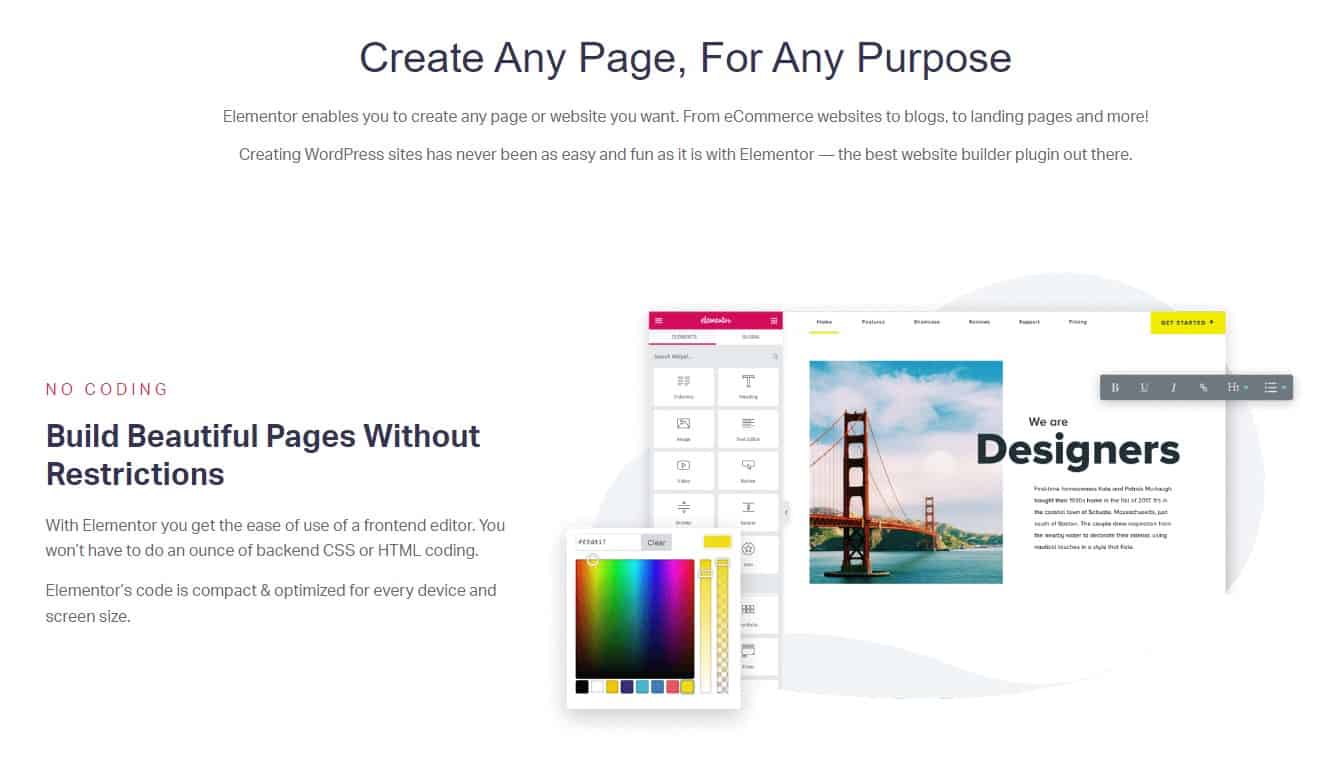
Among the many WordPress site-creation plugins available, Elementor stands out for its user-friendliness and versatility. It has a user-friendly drag-and-drop interface, stock layouts, and extensive personalization possibilities. It also has a sizable user and developer base, so there are many guides and tutorials available to help you get started.

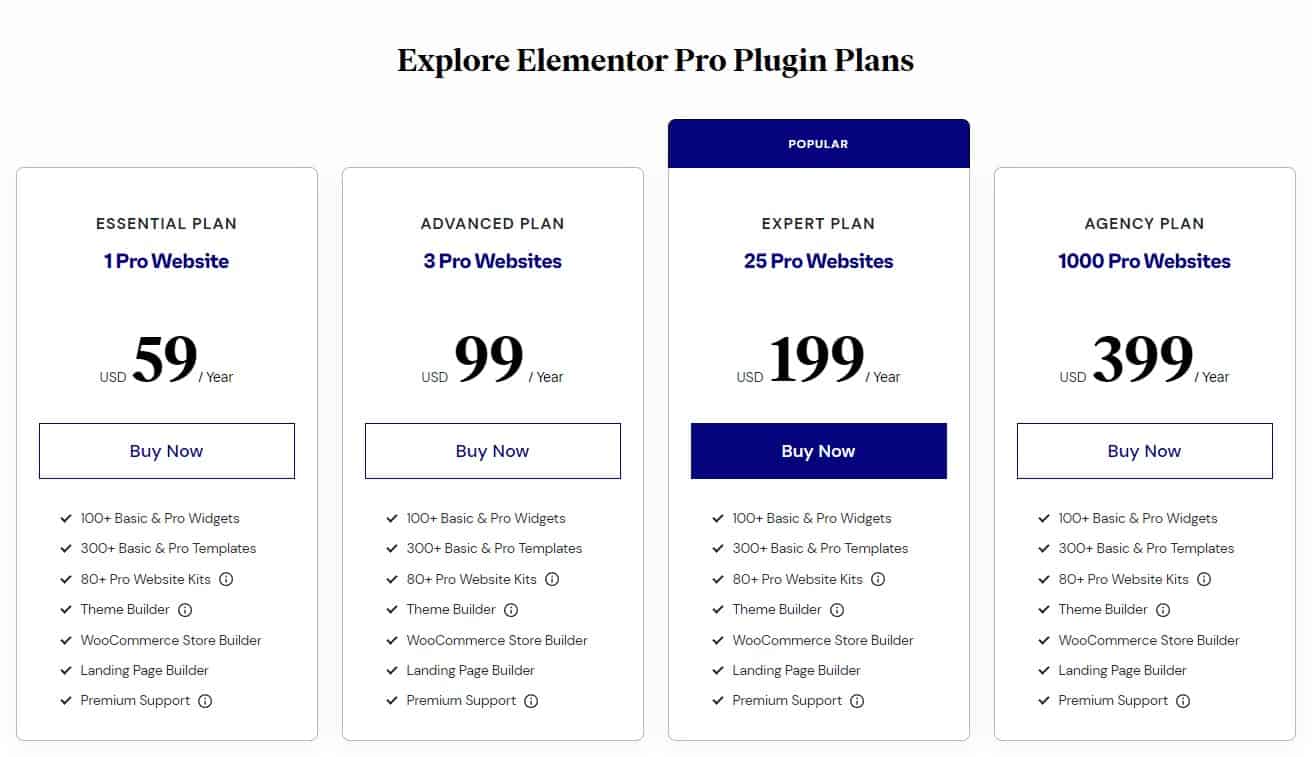
Elementor’s versatility and ease-of-use for newcomers are two of the program’s greatest strengths. The price is also reasonable, with a free version and a paid version that starts at $59 per year (2/10/2023). Some of the key features of Elementor include:

  • A drag-and-drop interface for easy customization
  • A wide range of pre-designed templates to choose from
  • A large library of widgets and elements to add to your website
  • Integration with popular WordPress plugins and services
  • A live design feature that allows you to see your changes in real-time
Elementor Page Builder Pricing Plans

Elementor Page Builder Pricing Plans

In some cases, particularly on sites with many widgets and other components, Elementor may take a while to load. You’ll probably need to upgrade to the commercial version of Elementor to unlock its full potential, as the free version has several features and functionality restrictions.

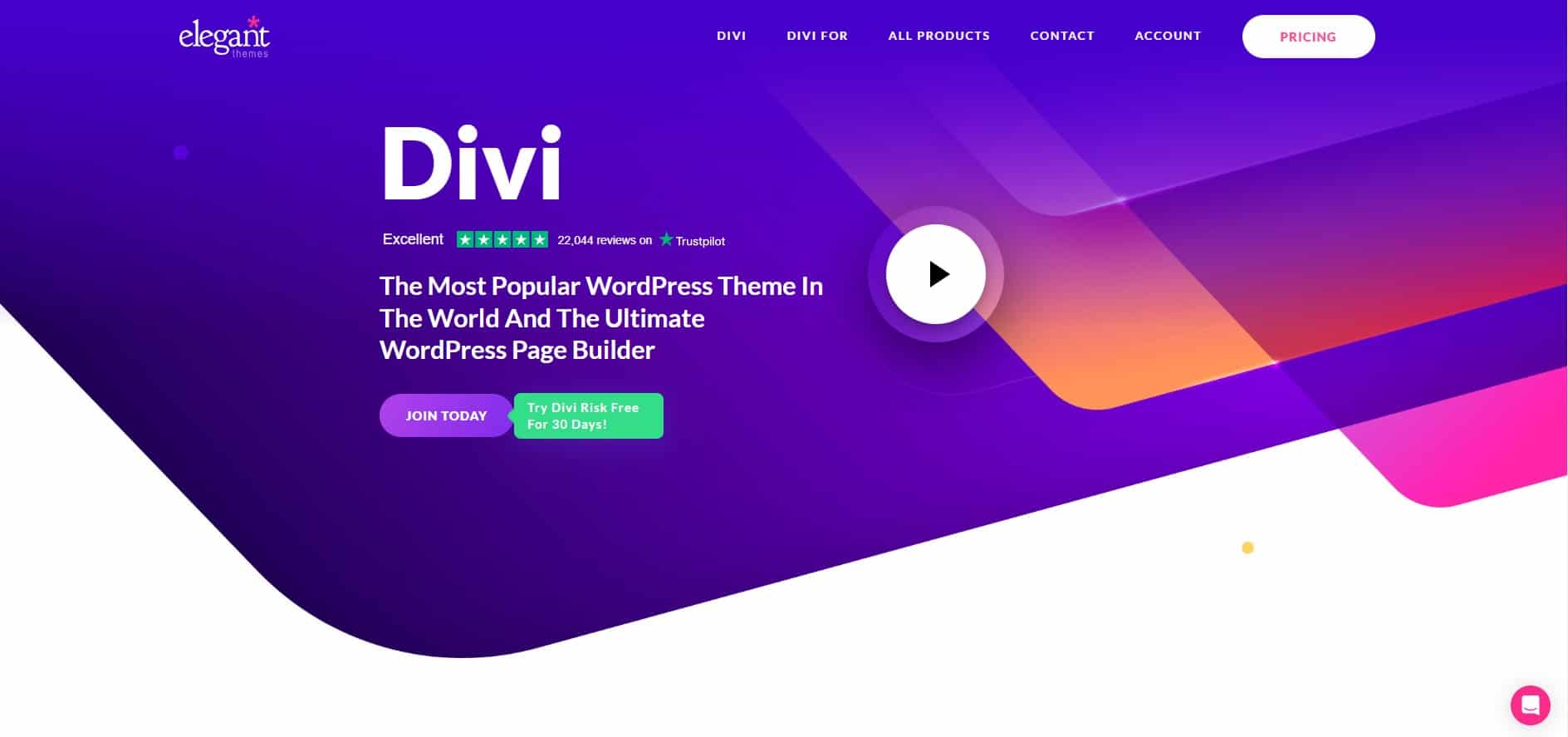
Divi WordPress Page Builder and Theme

Divi WordPress Page Builder and Theme

Divi Website Builder Image Settings

Divi Website Builder Image Settings

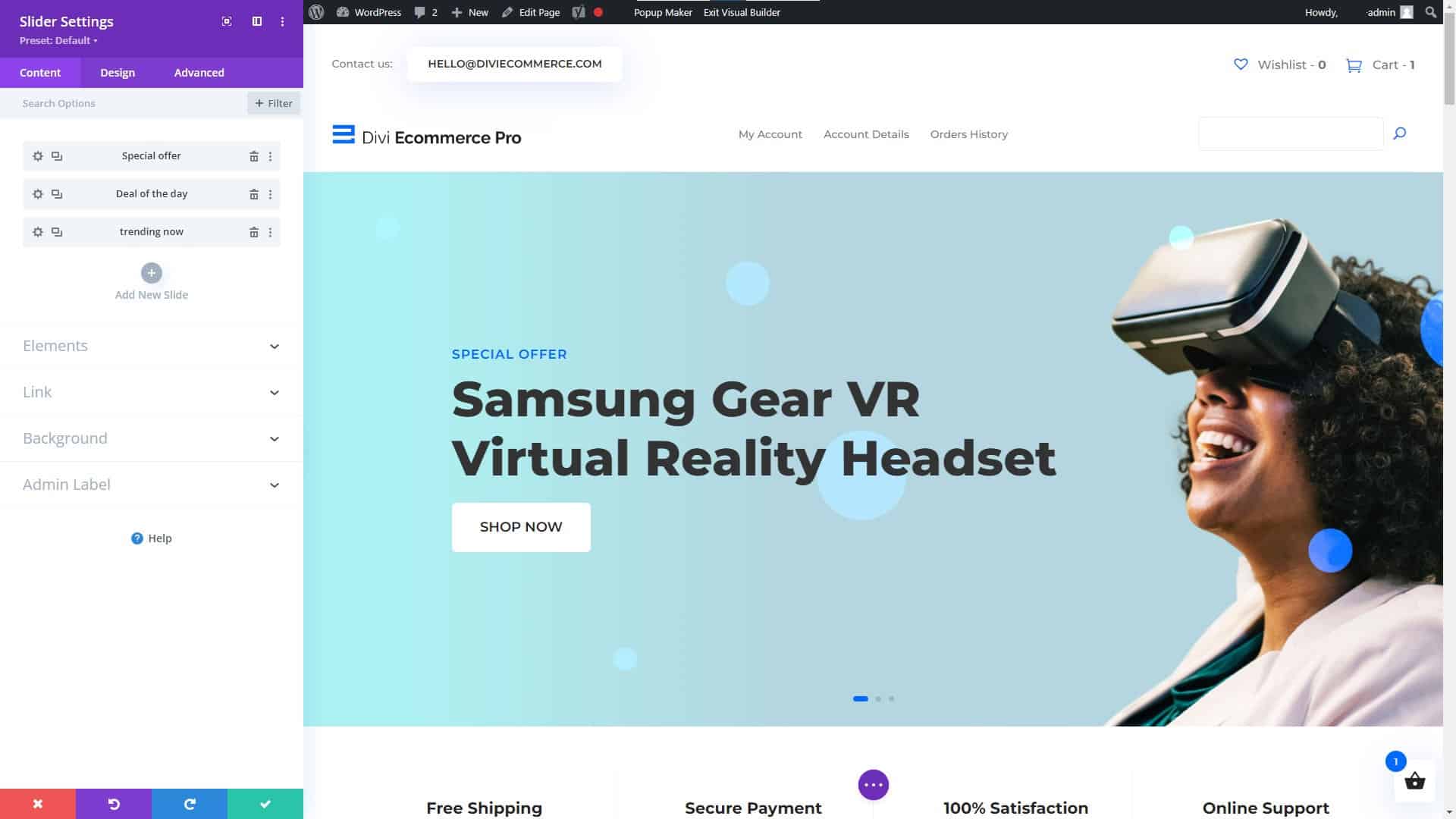
Divi Website Builder for WordPress Slider Settings

Divi Website Builder for WordPress Slider Settings

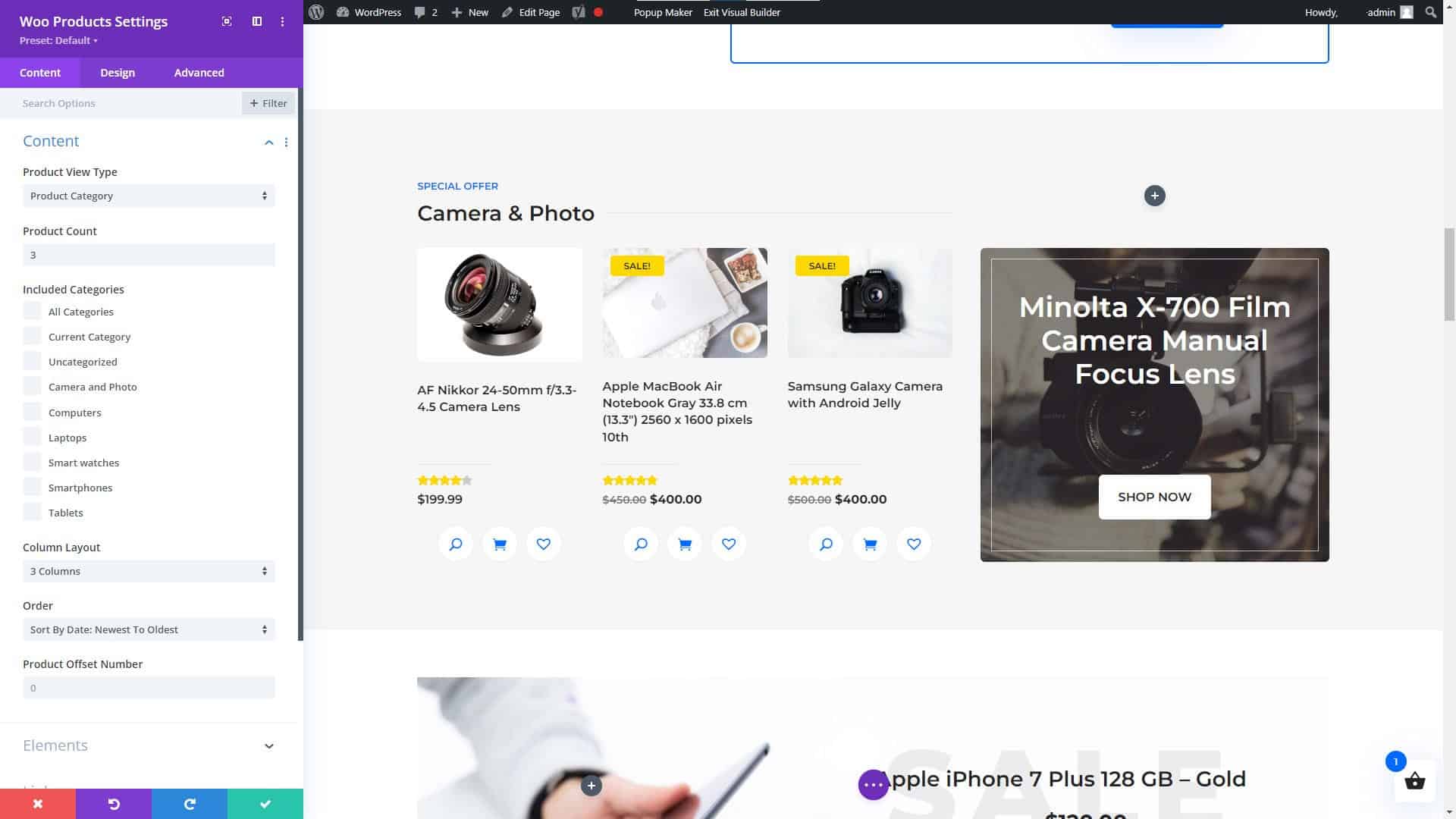
Divi Website Builder WooCommerce Products Module

Divi Website Builder WooCommerce Products Module

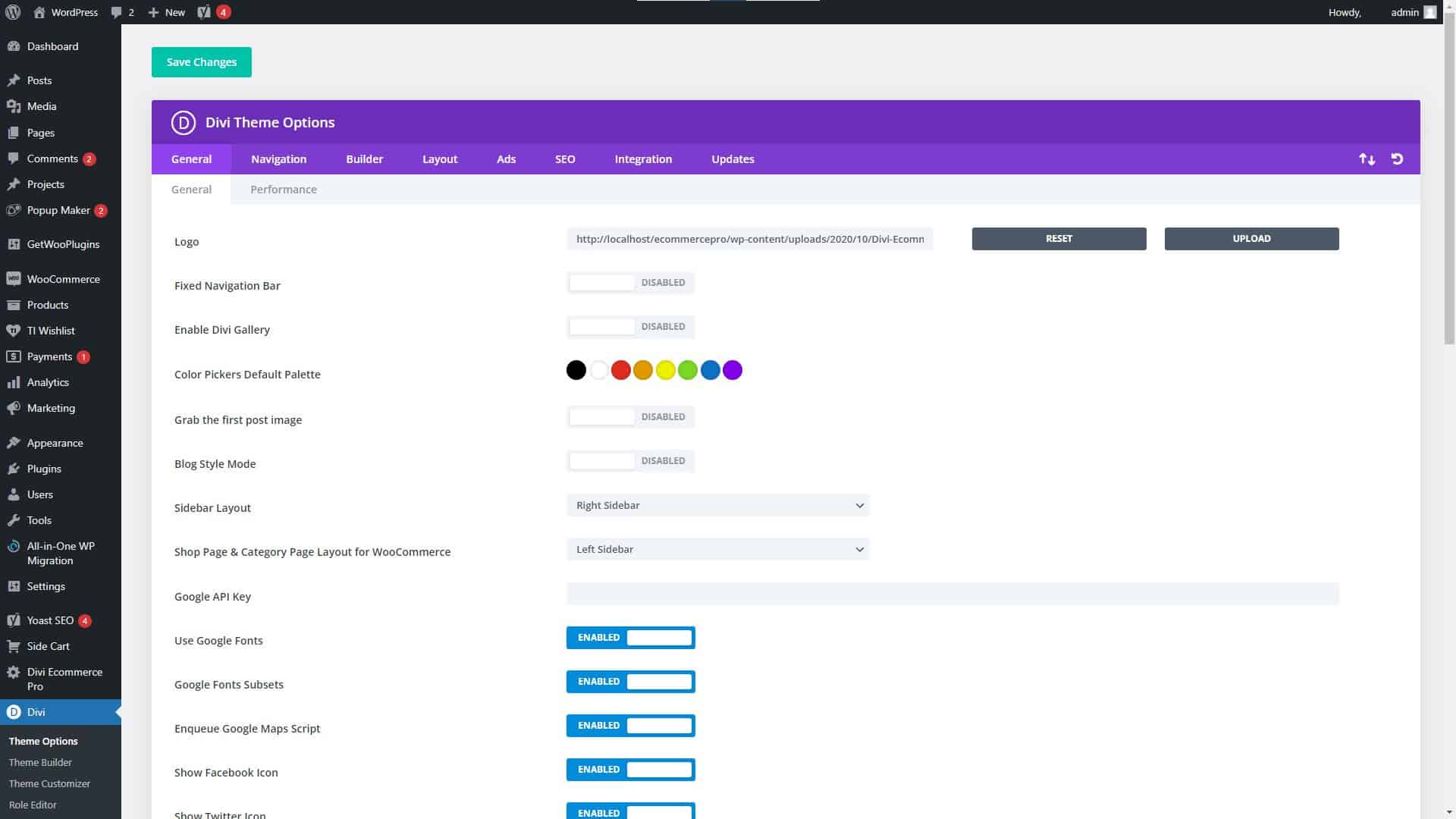
Divi Website Builder Theme Settings

Divi Website Builder Theme Settings

Divi

When it comes to WordPress website builders, Divi is another popular option due to its versatility and user-friendliness. It has a user-friendly interface that only requires dragging and dropping elements, as well as several choices for personalization. As a result of its popularity, there is a wealth of documentation and how-to guides available online to help you get started.

Get the Divi Theme for WordPress and start building your future, today!

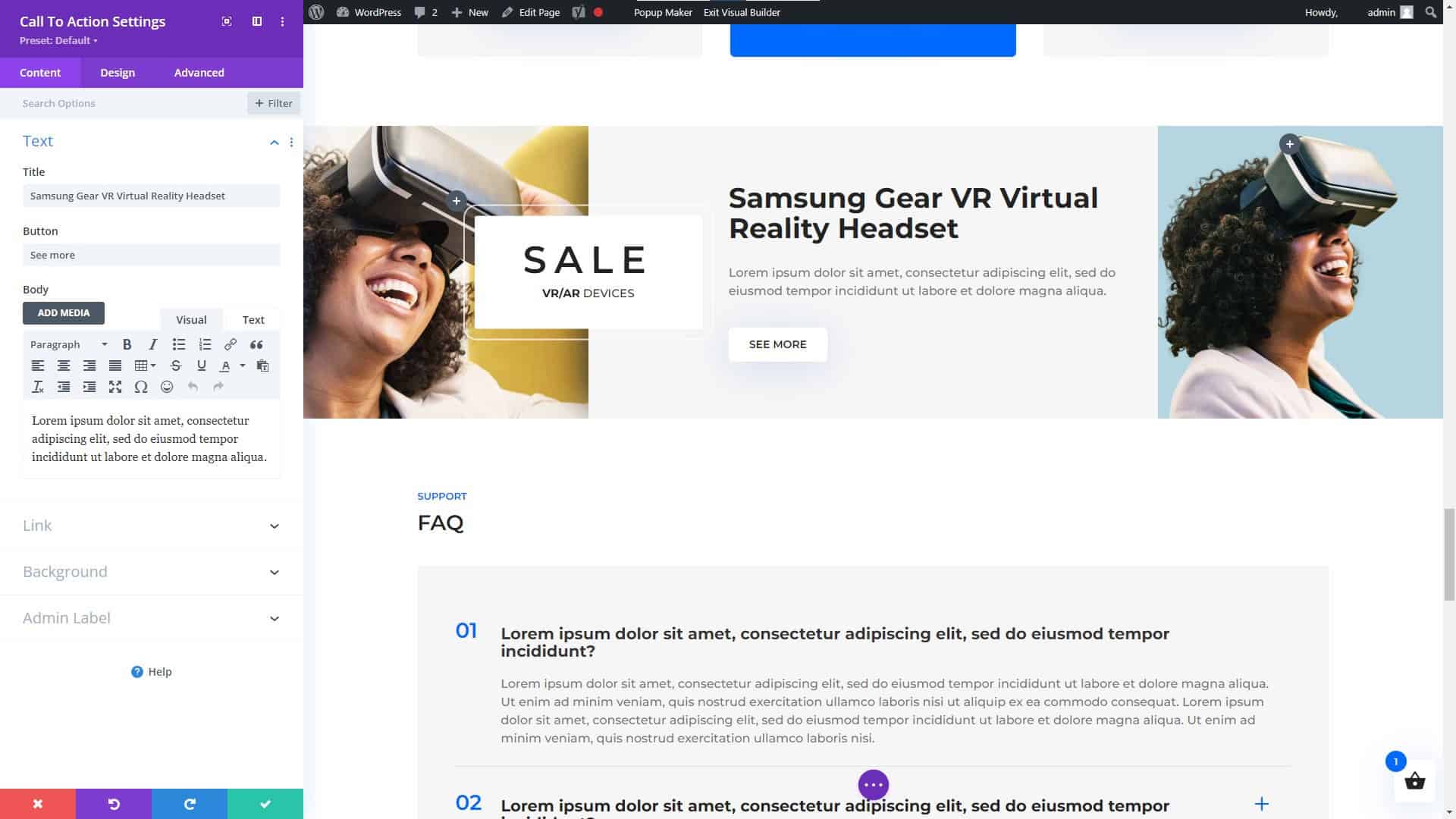
Divi Website Builder for WordPress Call to Action Module

Divi Website Builder for WordPress Call to Action Module

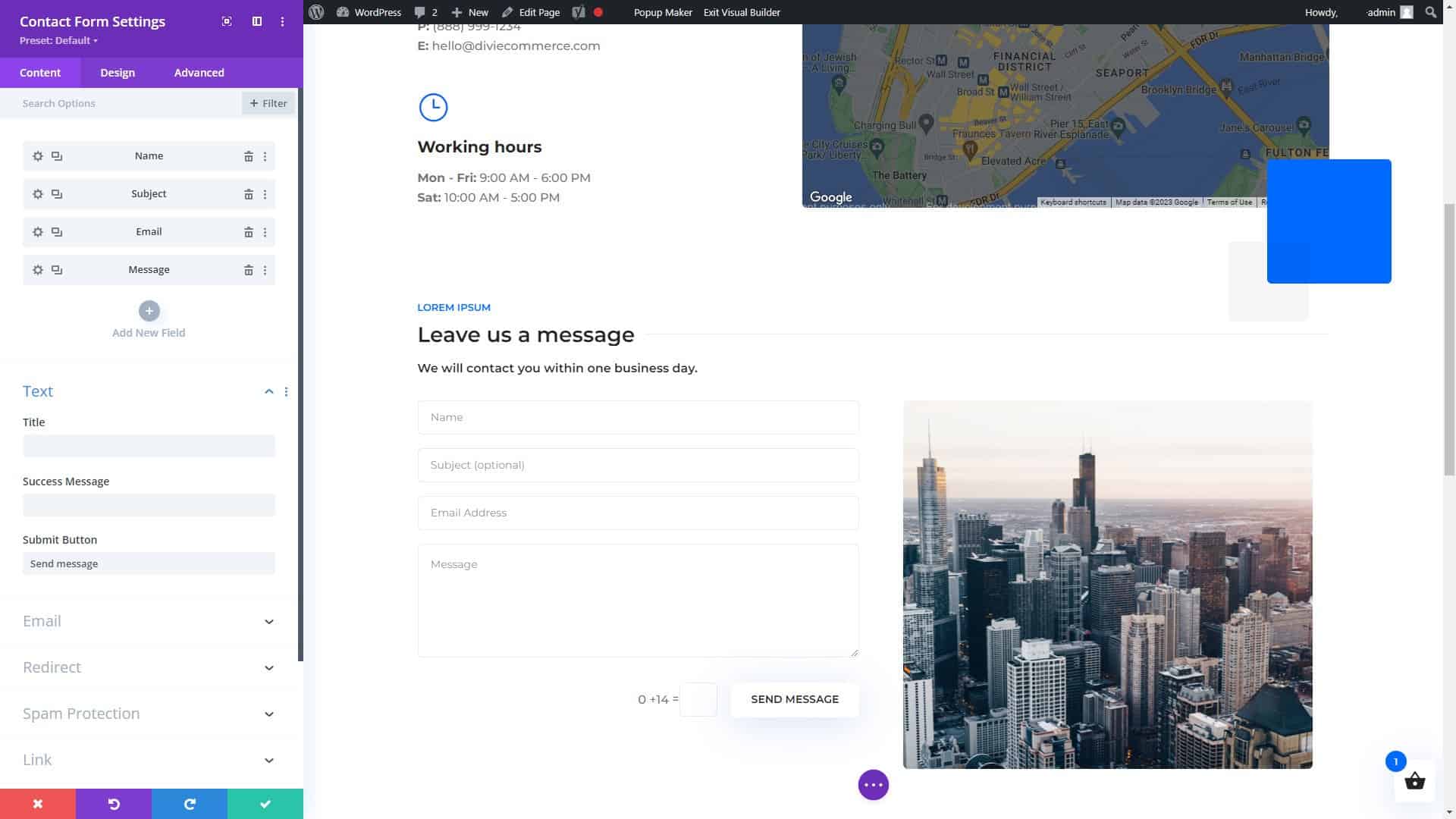
Divi Page Builder for WordPress Contact Form Settings

Divi Page Builder for WordPress Contact Form Settings

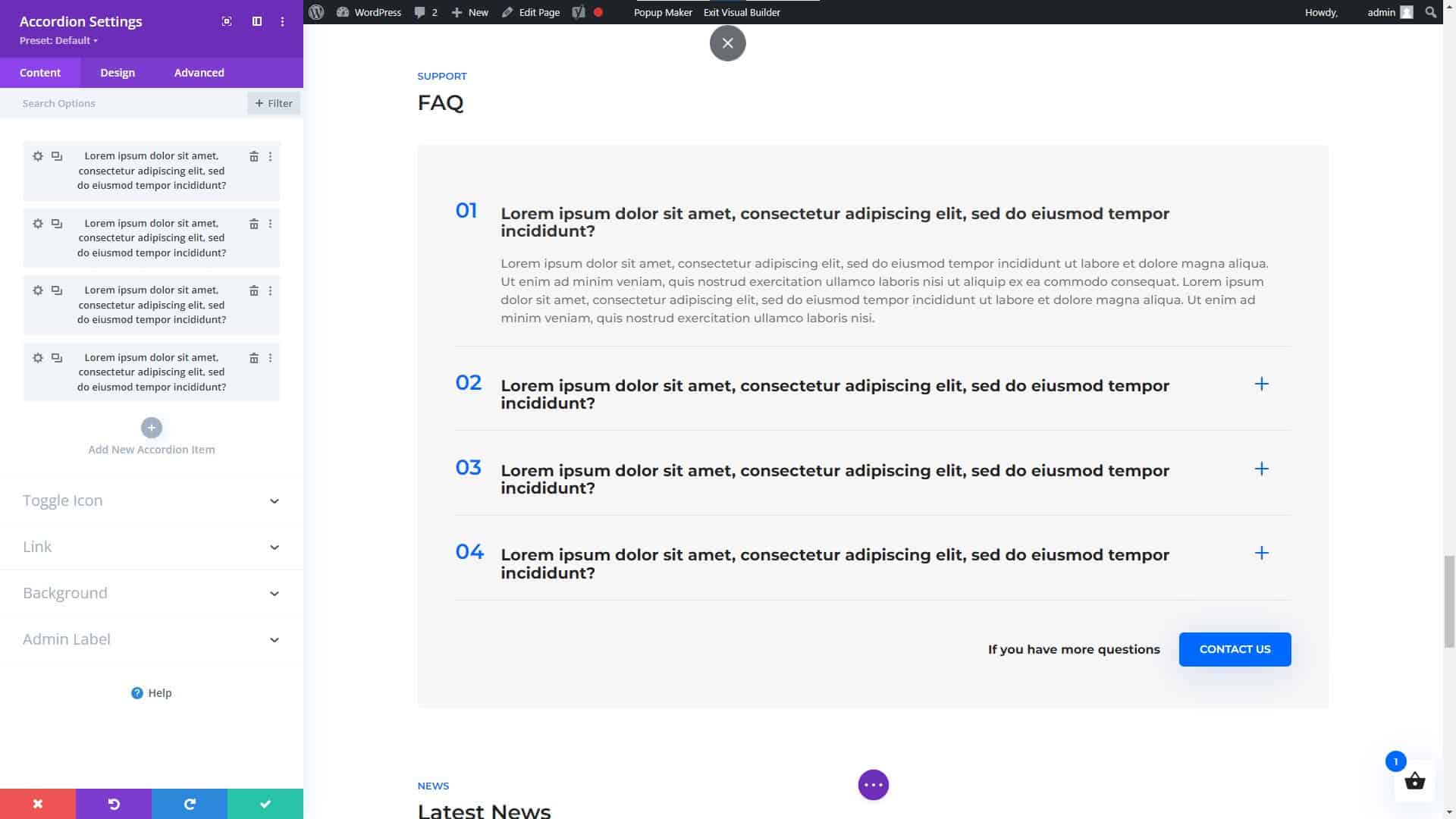
Divi Website Builder for WordPress Accordion Module

Divi Website Builder for WordPress Accordion Module

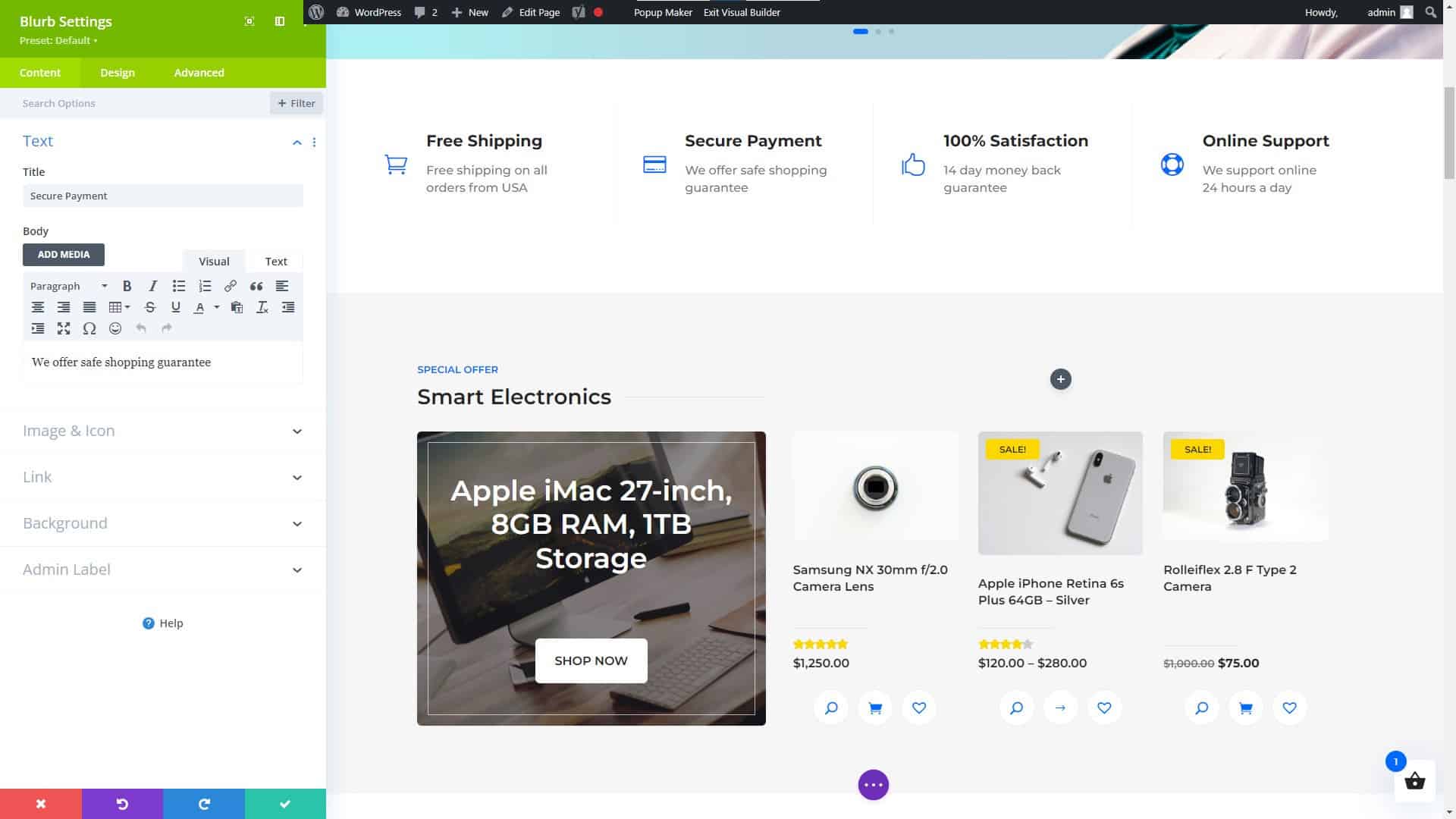
Divi Website Builder Blurb Settings

Divi Website Builder Blurb Settings

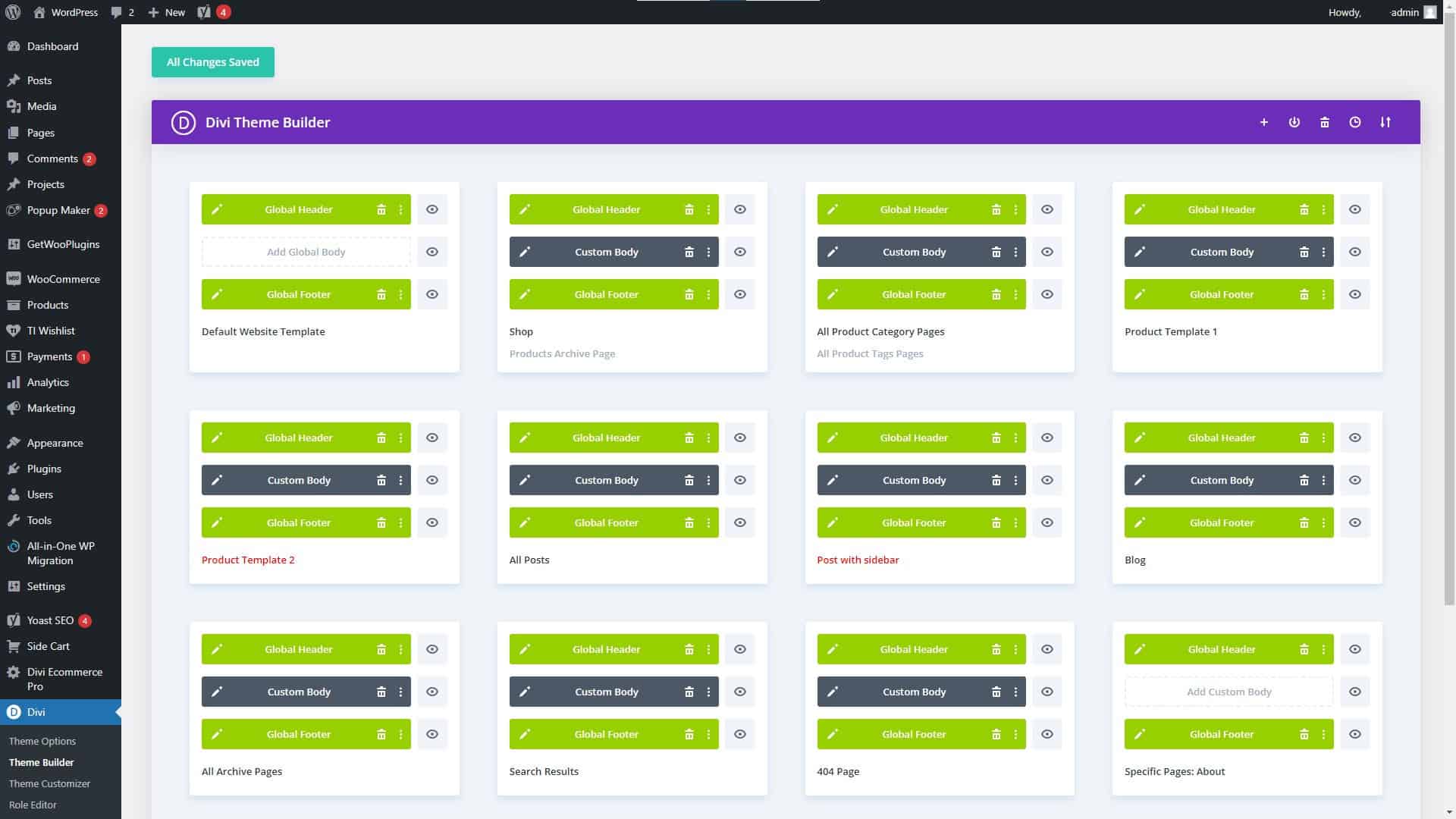
Divi Theme Builder Settings

Divi Theme Builder Settings

Divi Theme Features and Advantages

Divi’s many useful features and options are one of its primary selling points. Additionally, it comes equipped with a theme builder that lets you create unique layouts without having to learn how to code. Among Divi’s many great qualities are:

  • A HUGE number of third-party themes, modules, plugins, and fellow users offering everything you could possibly need to create an amazing website.
  • A drag-and-drop interface for easy customization
  • A wide range of pre-designed templates to choose from
  • A large library of widgets and elements to add to your website
  • Integration with popular WordPress plugins and services
  • A live design feature that allows you to see your changes in real-time
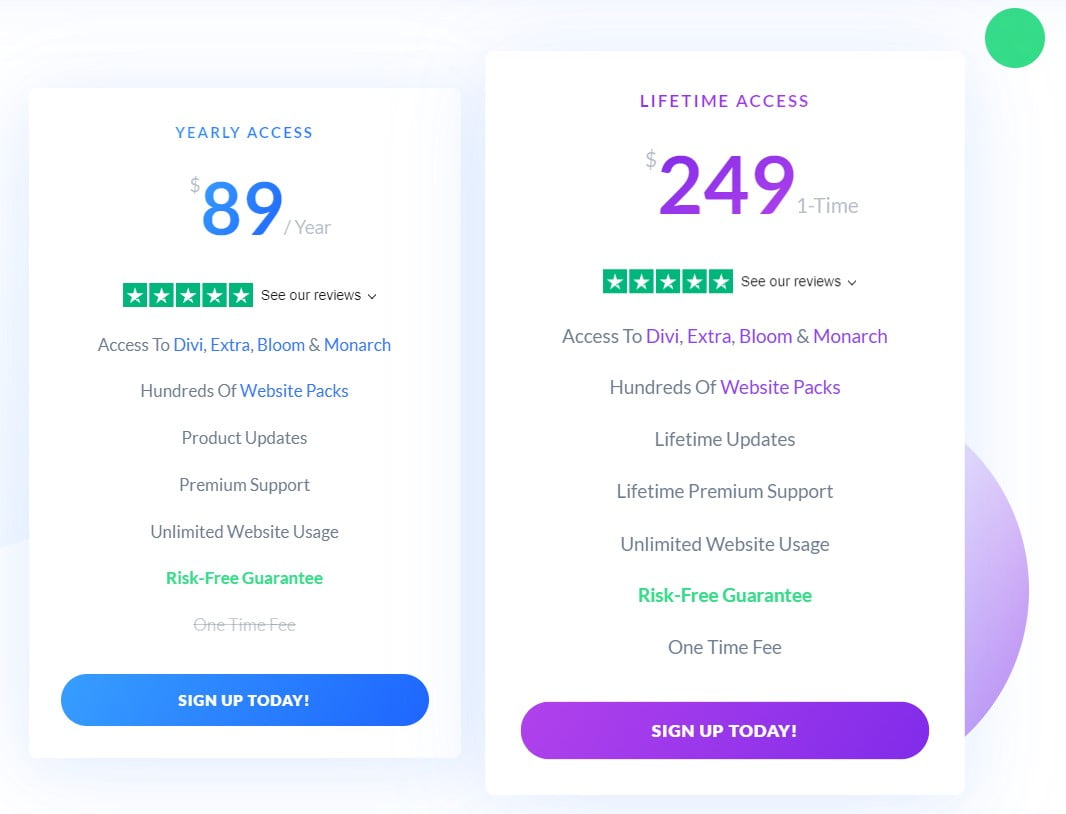
Elegant Themes Membership Pricing Plans

Elegant Themes Membership Pricing Plans

Divi Pricing, Pros, and Cons

Divi’s loading time used to be a problem on some sites, especially those with many widgets and elements. However, a major update of Divi was released on August 18, 2021, with the goal of “Speeding Up Divi From Every Angle,” according to my tests and the many sites I have created using Divi, it was a huge success.

Additionally, it is one of the most expensive website builders on the market, with pricing starting at $89 per year (2/10/2023).

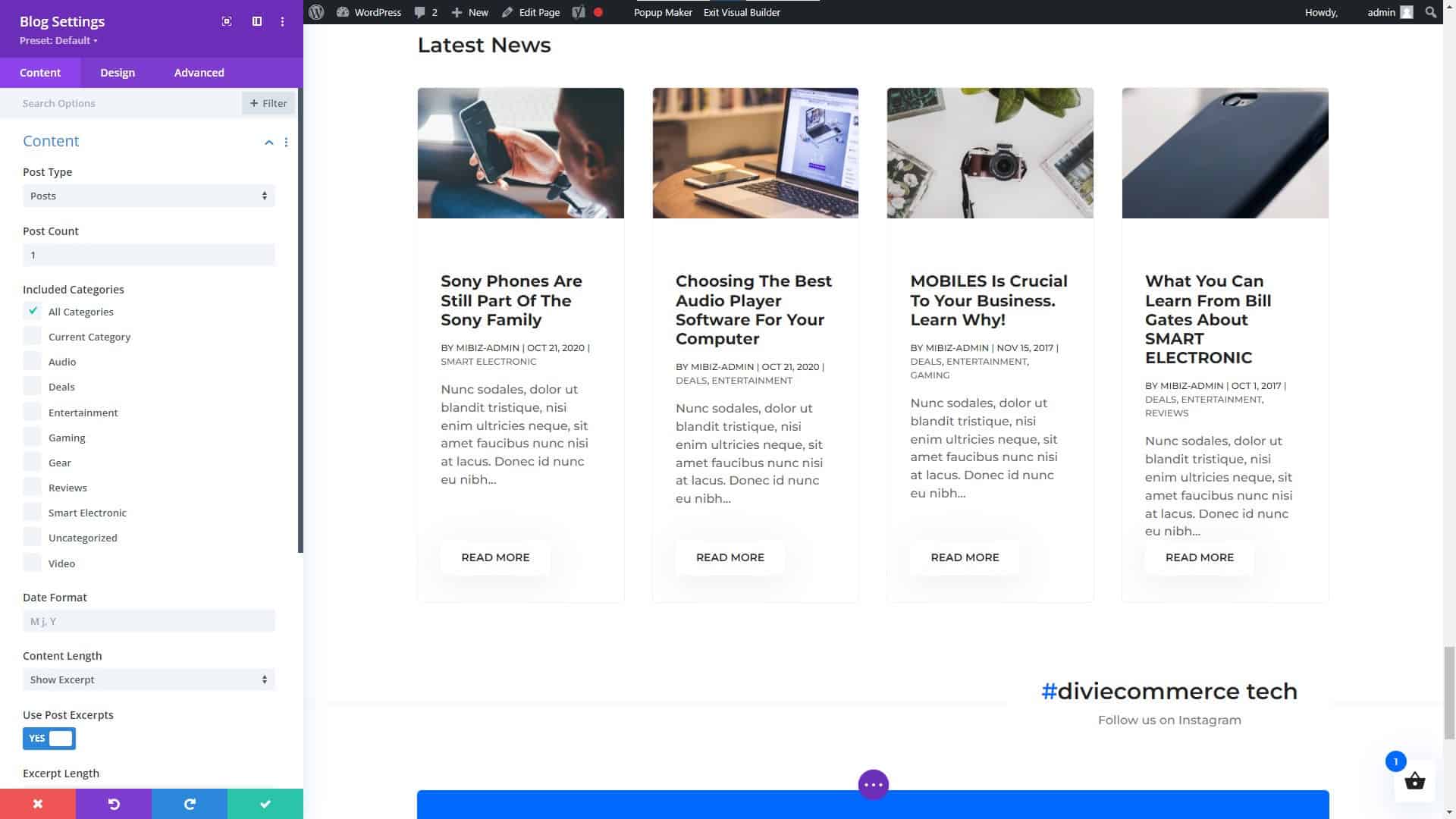
Divi Builder Blog Module Settings

Divi Builder Blog Module Settings

Divi Modules (NOT a Complete List)

Hhere are some of the main categories of modules that you can expect to find with Divi:

  1. Basic Modules: These modules include Text, Image, Gallery, Video, Audio, Button, Number Counter, and more.
  2. Design Elements: These modules include Call to Action, Blurb, Testimonial, Pricing Table, and more.
  3. Layout Elements: These modules include Fullwidth Header, Fullwidth Menu, Fullwidth Slider, Fullwidth Map, and more.
  4. Blog Modules: These modules include Post Title, Post Meta, Post Navigation, Author Box, and more.
  5. Portfolio Modules: These modules include Portfolio, Portfolio Slider, Portfolio Grid, and more.
  6. WooCommerce Modules: These modules include Products, Product Slider, Product Category, and more.
  7. Lead Generation Modules: These modules include Optin, Bloom, and more.
  8. Social Media Modules: These modules include Follow, Share, and more.

These are but a few of the many possible module types available in the Divi framework. Keep in mind that the specific modules and their names may change over time, so it is always a good idea to visit the Divi website for the most up-to-date information.

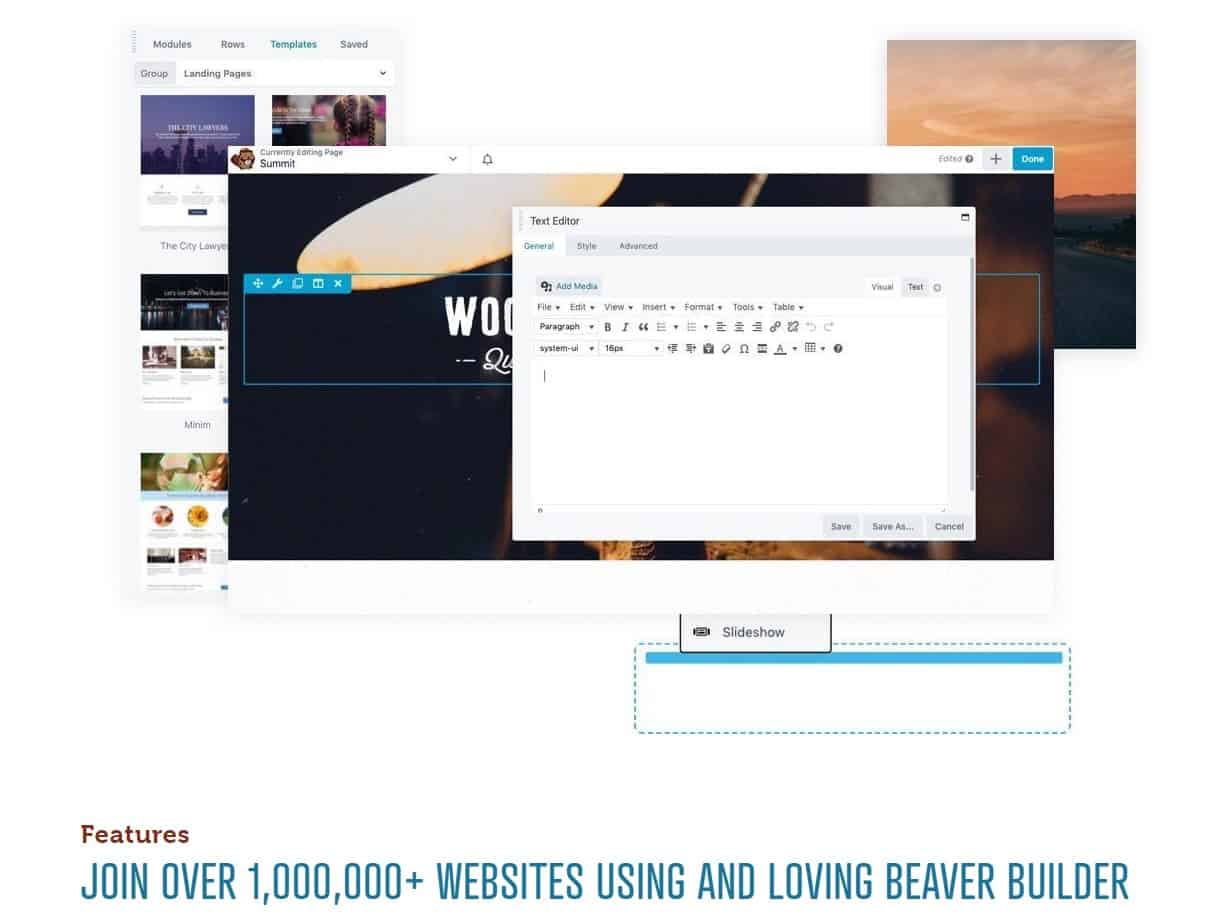
Beaver Builder Page Builder

Beaver Builder Page Builder

Beaver Builder

Among the many WordPress site-construction plugins available, Beaver Builder stands out for its user-friendliness and flexibility. It has a user-friendly interface where you can simply drag and drop elements, as well as a number of customizable pre-made layouts. You may discover many guides and tutorials to help you get started thanks to its enormous user and developer base.

Beaver Builder’s flexibility in providing a wide variety of features and capabilities is one of its primary strengths. It also includes a theme creator that lets you make unique layouts without learning to code. Here are a few of Beaver Builder’s most notable capabilities:

  • A drag-and-drop interface for easy customization
  • A wide range of pre-designed templates to choose from
  • A large library of widgets and elements to add to your website
  • Integration with popular WordPress plugins and services
  • A live design feature that allows you to see your changes in real-time
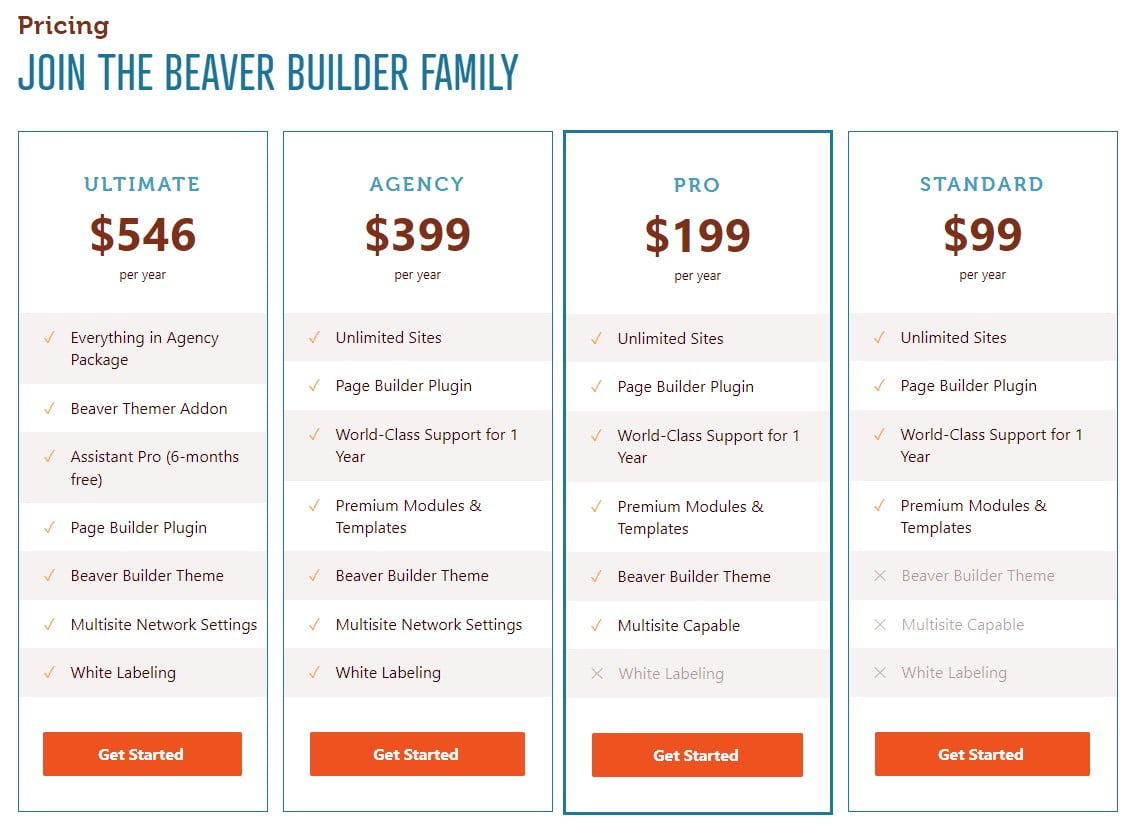
Beaver Builder Pricing Plans

Beaver Builder Pricing Plans

One of the downsides of Beaver Builder is that it can be a bit more expensive than some of the other website builders on the market, with pricing starting at $99 for the standard version (2/10/2023) and $199 for the pro version (2/10/2023). Additionally, some users have reported that the interface can be a bit confusing, particularly for beginners.

Thrive Architect Page Builder

Thrive Architect Page Builder

Thrive Architect

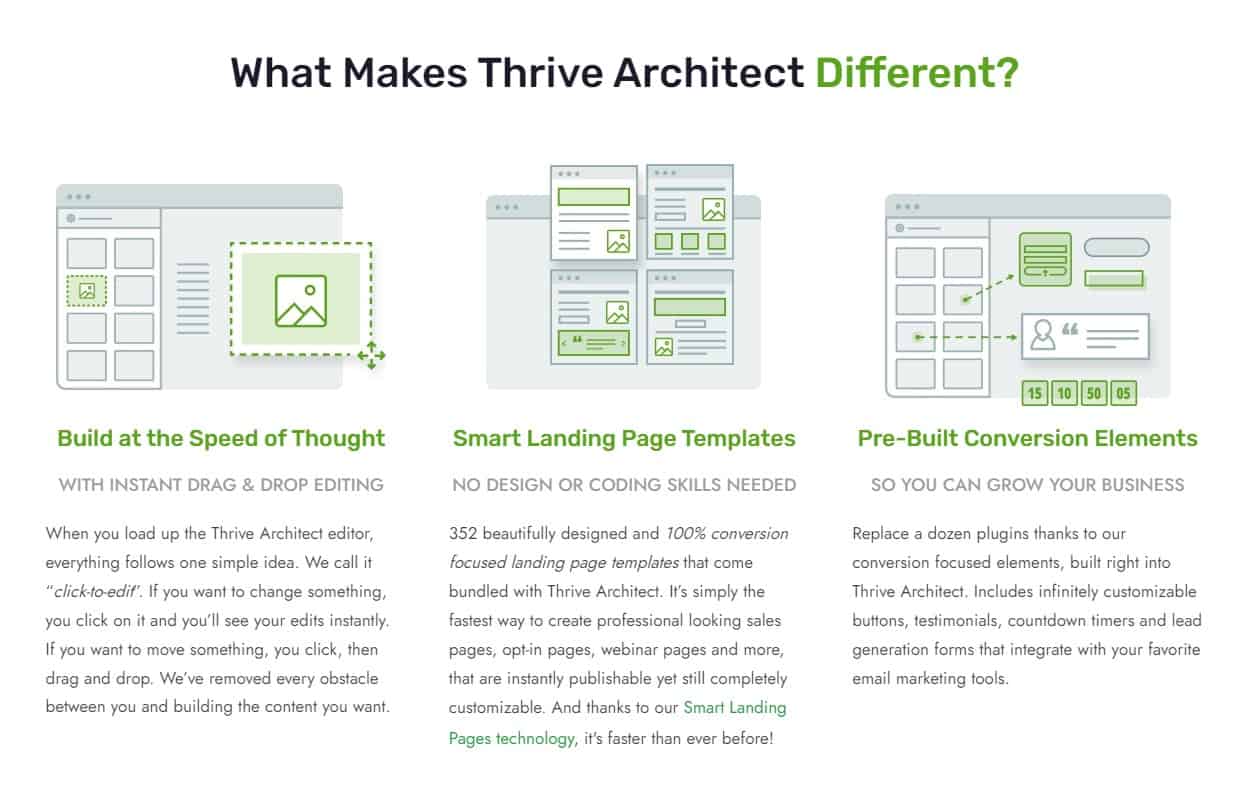
In the world of WordPress website builders, Thrive Architect stands out for its user-friendliness and flexibility. It has a user-friendly interface where you can simply drag and drop elements, as well as a number of customizable pre-made layouts. You may discover many guides and tutorials to help you get started thanks to its enormous user and developer base.

Thrive Architect’s versatility lies on its many useful features and capabilities. It also includes a theme creator that lets you make unique layouts without learning to code. Among Thrive Architect’s many useful features are:

  • A drag-and-drop interface for easy customization
  • A wide range of pre-designed templates to choose from
  • A large library of widgets and elements to add to your website
  • Integration with popular WordPress plugins and services
  • A live design feature that allows you to see your changes in real-time
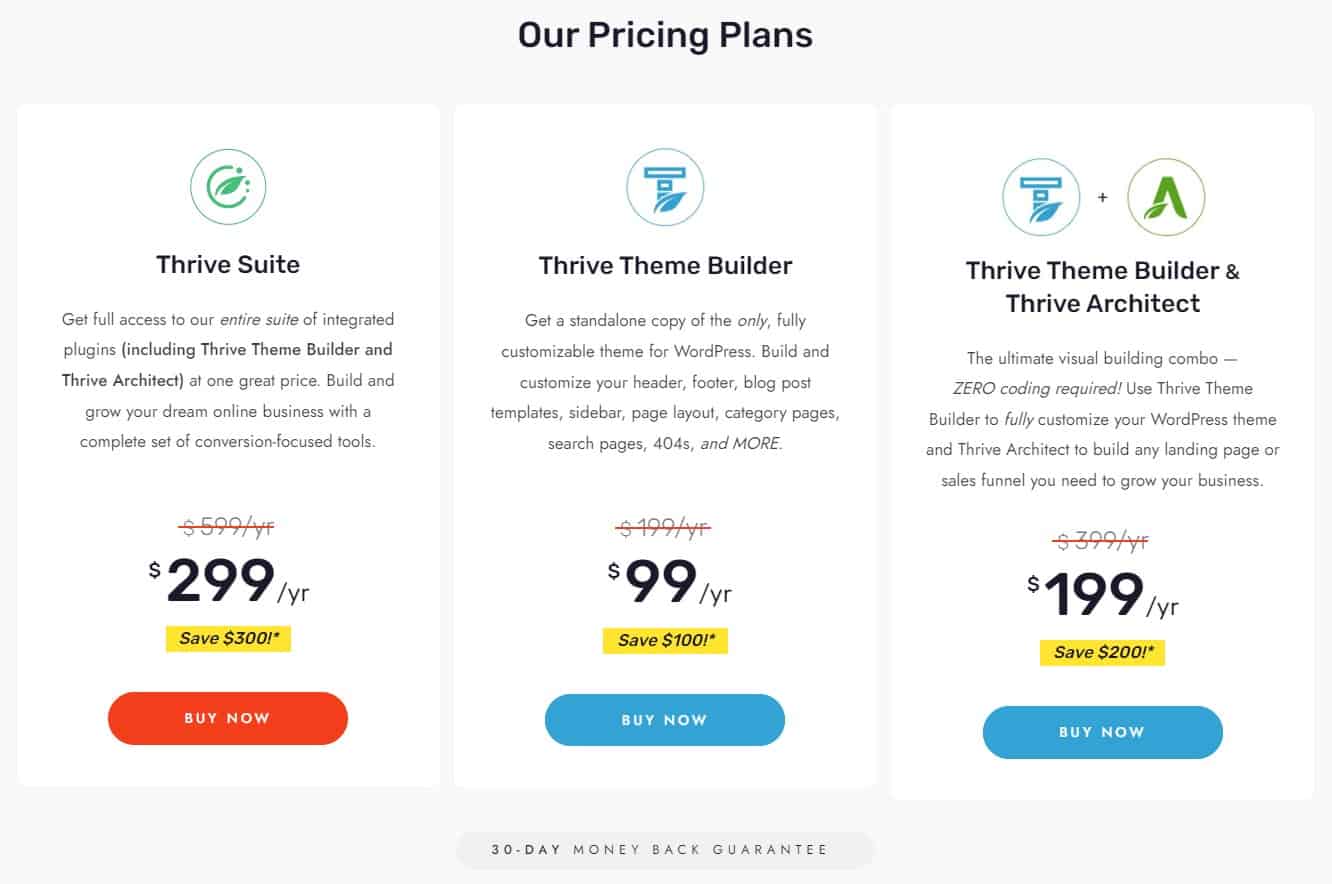
Thrive Architect Page Builder Pricing Plans

Thrive Architect Page Builder Pricing Plans

One of the downsides of Thrive Architect is that it can be a bit more expensive than some of the other website builders on the market, with pricing starting at $67 for the standard version (2/10/2023). Additionally, some users have reported that the interface can be a bit confusing, particularly for beginners.

WordPress Page Builders Do Not Require Knowledge of Coding

WordPress Page Builders Do Not Require Knowledge of Coding

Choosing the Right WordPress Website Builder

Choosing a WordPress page builder is not as simple as it may seem. Price, features, compatibility, sales or users, usability, functioning, updates, and developer reliability should all be considered. Each aspect is critical in picking the best page builder for your requirements. Some themes, like Divi, include a builder, so you can get more information on How to Choose the Best WordPress Theme to make an informed decision.

Choosing a WordPress page builder can be daunting, so we’ve compiled this handy checklist to help you narrow down your options.

Price: What is the cost of the page builder, and does it fit within your budget?

Features: Does the page builder have all the features you need to build your website, such as responsive design, custom fonts, and e-commerce integration?

Compatibility: Does the page builder work seamlessly with your WordPress theme and other plugins?

Number of sales or users: How many people have used or purchased the page builder, and what are their experiences with it?

Ease of use: Is the page builder user-friendly, and does it have a straightforward interface that’s easy to navigate?

Functionality: Does the page builder have all the functionalities you need to build your website, such as drag-and-drop functionality, and the ability to add custom CSS?

Update schedule: How often does the developer release updates for the page builder, and are they reliable and bug-free?

Reliability of the developer:

Ask yourself if the page builder’s creator can be relied upon to deliver high-quality software and responsive customer service.

With this information in hand, you may confidently select the most suitable WordPress page builder. For your convenience, we have expanded upon three of the most important factors to keep in mind while deciding on the best WordPress website builder for your business or personal site below.

Features and Functionality

Features and functionality are two of the most crucial factors to think about when selecting a WordPress website builder. It’s important to note that different builders cater to different skill levels. Some are tailored to certain niches, like portfolios or e-commerce sites. Also, prices vary widely from one option to the next.

Before settling on a website builder, it’s wise to evaluate your needs. Do you want or require a lot of room for personalization? Do you wish there was a theme creator preinstalled? Are you trying to find a simple to operate program? When deciding on a website builder, these are crucial factors to consider.

Ease of Use

When deciding on a WordPress website builder, simplicity of use is an additional point to think about. It’s crucial to select a builder that’s simple to use, even if you’re just starting out with website creation, and some are more user-friendly than others.

Find a website creator that has a user-friendly drag-and-drop interface, several design possibilities, and premade templates. You should also consider the size of the tool’s user and developer community as an indicator of its accessibility.

Pricing

Finally, when deciding on a WordPress website builder, cost should not be ignored. It’s crucial to do some research and pick a builder that works within your budget.

A website builder’s recurring fees should also be taken into account. There are both subscription-based and one-time payment options among the available builders. Also, some constructors provide a free version, but the more sophisticated capabilities are only available in a paid upgrade.

Before settling on one, it’s important to weigh the upfront expenditures against the total over the life of the website. Add the price of any further tools or subscriptions you may need.

The Final Word on WordPress Website and Page Builders

The Final Word on WordPress Website and Page Builders

Conclusion

For those without prior experience, settling on a WordPress website builder can feel like an overwhelming undertaking. You can choose a product that works for your demands and your budget if you take into account things like features and functionality, convenience of use, and pricing.

Elementor, Divi, Beaver Builder, and Thrive Architect are just a few of the greatest WordPress website builders, and we’ve reviewed them all here. Each of these resources has advantages and disadvantages; pick the one that works best for you.

To reiterate, it is crucial to locate a tool that is not only affordable, but also meets your needs in terms of usability, features, and functionality. And don’t be shy about reaching out to others for advice and assistance.

The WordPress Support Forum

For more information on WordPress, and support, visit the WordPress Support Forum.

NOTICE: All pricing listed within this article was accurate on the date this article was published (02/10/2023). However, pricing changes, so please refer to the developers’ websites listed in this article for their latest prices. You may even get lucky and find the cost is less due to a Black Friday sale, anniversary sale, Cyber Monday sale, or another special offering.

Disclosure: You may find affiliate links to beneficial resources within this article. You won’t pay more for using our link, but we’ll get a commission. This supports our content creation, and we only suggest products we genuinely believe in. Thank you for being so understanding!

Affiliate Links

James Turner

James Turner

Author/Copywriter
Why Choosing the Best Web Hosting Company Matters in 2025

Find out why choosing the best web hosting company matters in 2025 to boost your site’s performance and skyrocket sales.

Hiring a Website Designer

Hiring a website designer? Discover actionable tips, red flags to avoid, and how to find the right designer to create a website that grows your business.

How to Create a Landing Page Using WordPress

Follow our guide on how to create a landing page using WordPress and the built-in Block Editor, page builder plugins, or specialized themes.

My Island Designs

Pin It on Pinterest