A Beginner’s Guide to the Best WordPress Website Builders

A Beginner’s Guide to the Best WordPress Website Builders

Using a website builder is the best option if you want a website but don’t have the funds to employ a professional. Finding the best website builder might be difficult for beginners. We promise not to leave you hanging though. In this article, we’ll compare and contrast several of the best WordPress website builders currently available, so you can make a well-informed decision.

WordPress Website Builder Table of Contents

Overview of WordPress Website Builders

With the help of a WordPress website builder, you can make a website and make whatever changes you want to it without knowing any code. Most commonly, these constructors are offered as a WordPress plugin or theme. They provide a user-friendly interface that only requires dragging and dropping elements, as well as a number of premade layouts and extensive personalization choices.

Numerous WordPress website builders exist, each with its unique set of features and capabilities. Some are preferable for more advanced users, while others are ideal for newcomers. Some are tailored for particular kinds of websites, such portfolios or shops. There are both more and less expensive options.
Wordpress Website Theme and Page Builders

WordPress Website Theme and Page Builders

“In the world of website building, WordPress is the wizard and website builders are the magic wand – choose wisely, and the sky’s the limit for your digital domain.”

Comparing the Top WordPress Website Builders

It can be overwhelming to look at all of the options for WordPress website builders, but picking the one that best suits your needs is crucial. The functionality, template choices, and cost structures offered by the various website builders vary widely. While some, like Elementor and Beaver Builder, give customers a vast variety of design options and templates, others, like Divi and WP Bakery Page Builder, take a more streamlined and simplified approach. Your website’s level of personalization should be proportional to your budget for site development, your level of technical expertise, and the time you have available for site development. Explore your options by comparing and contrasting the best WordPress website builders, and you’ll soon have the website of your dreams up and running.
Elementor Page Builder

Elementor Page Builder

Elementor

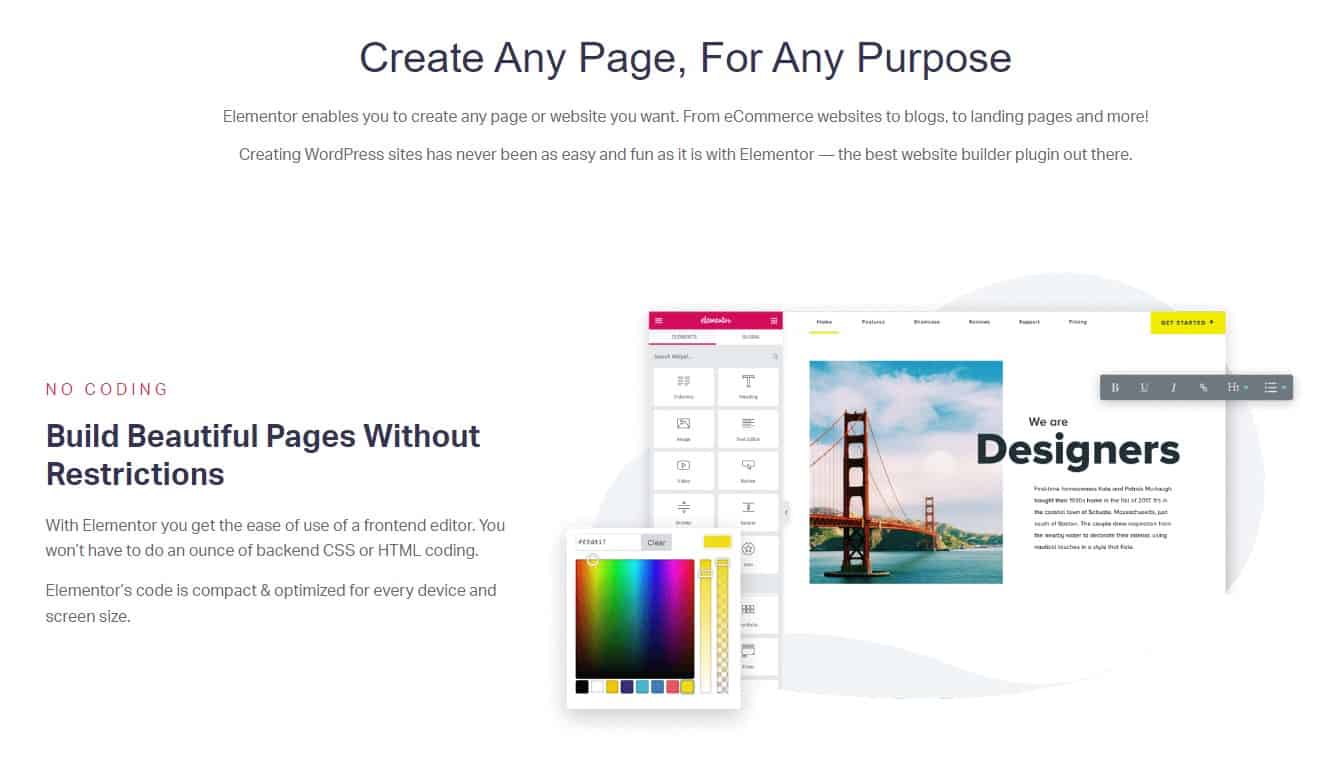
Among the many WordPress site-creation plugins available, Elementor stands out for its user-friendliness and versatility. It has a user-friendly drag-and-drop interface, stock layouts, and extensive personalization possibilities. It also has a sizable user and developer base, so there are many guides and tutorials available to help you get started.

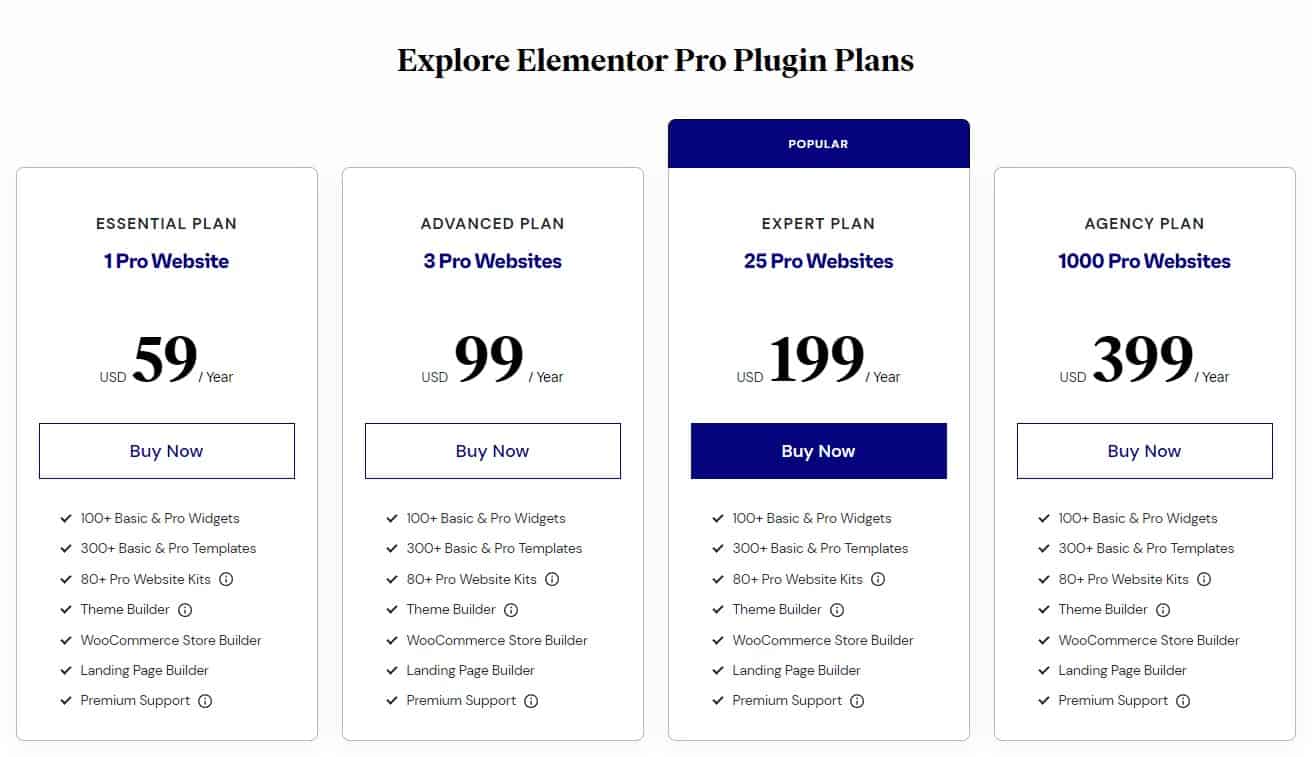
Elementor’s versatility and ease-of-use for newcomers are two of the program’s greatest strengths. The price is also reasonable, with a free version and a paid version that starts at $59 per year (2/10/2023). Some of the key features of Elementor include:

  • A drag-and-drop interface for easy customization
  • A wide range of pre-designed templates to choose from
  • A large library of widgets and elements to add to your website
  • Integration with popular WordPress plugins and services
  • A live design feature that allows you to see your changes in real-time
Elementor Page Builder Pricing Plans

Elementor Page Builder Pricing Plans

In some cases, particularly on sites with many widgets and other components, Elementor may take a while to load. You’ll probably need to upgrade to the commercial version of Elementor to unlock its full potential, as the free version has several features and functionality restrictions.
Divi WordPress Page Builder and Theme

Divi WordPress Page Builder and Theme

Divi Website Builder Image Settings
Divi Website Builder Image Settings

Divi Website Builder for WordPress Slider Settings
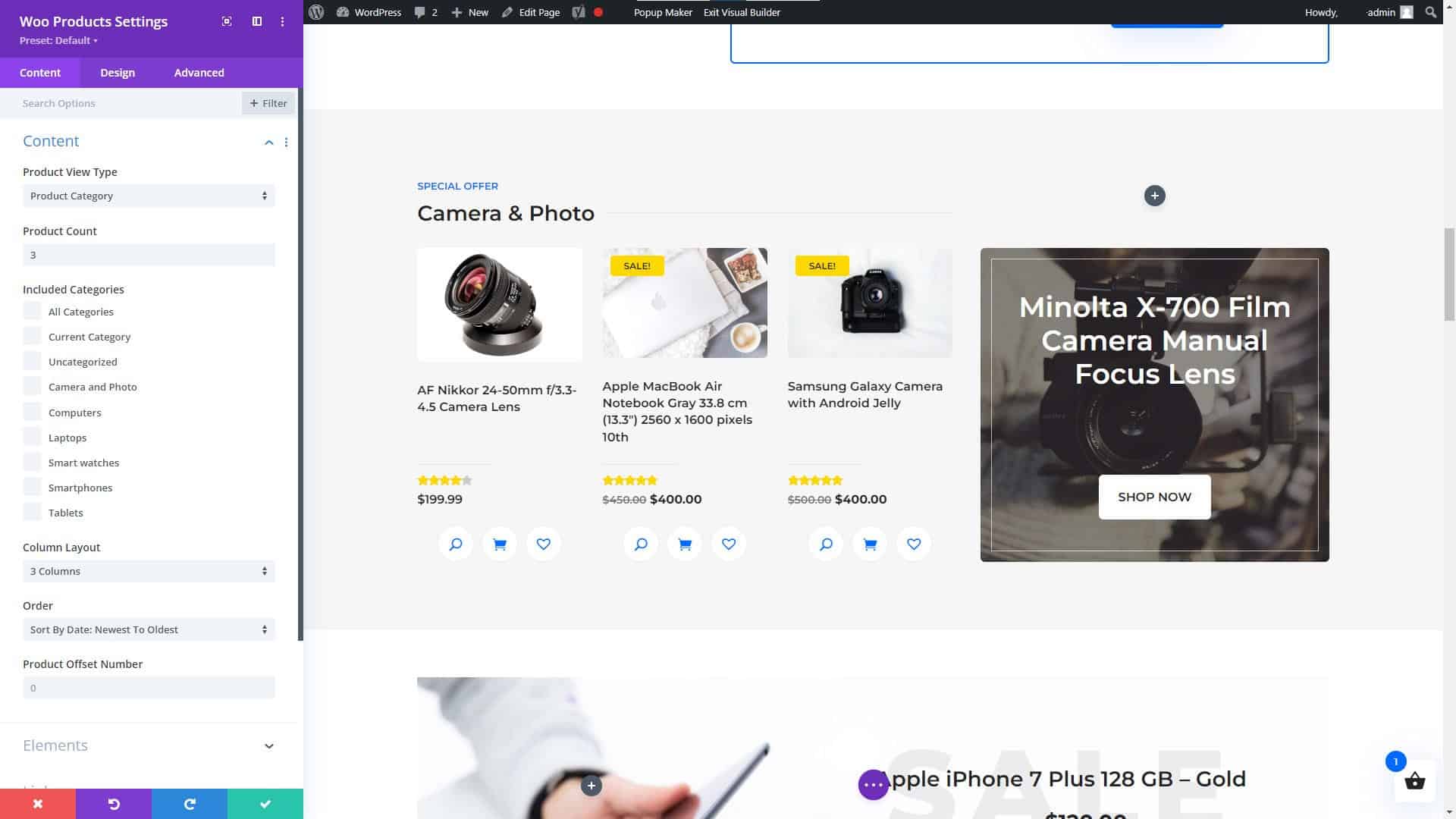
Divi Website Builder for WordPress Slider Settings

Divi Website Builder WooCommerce Products Module
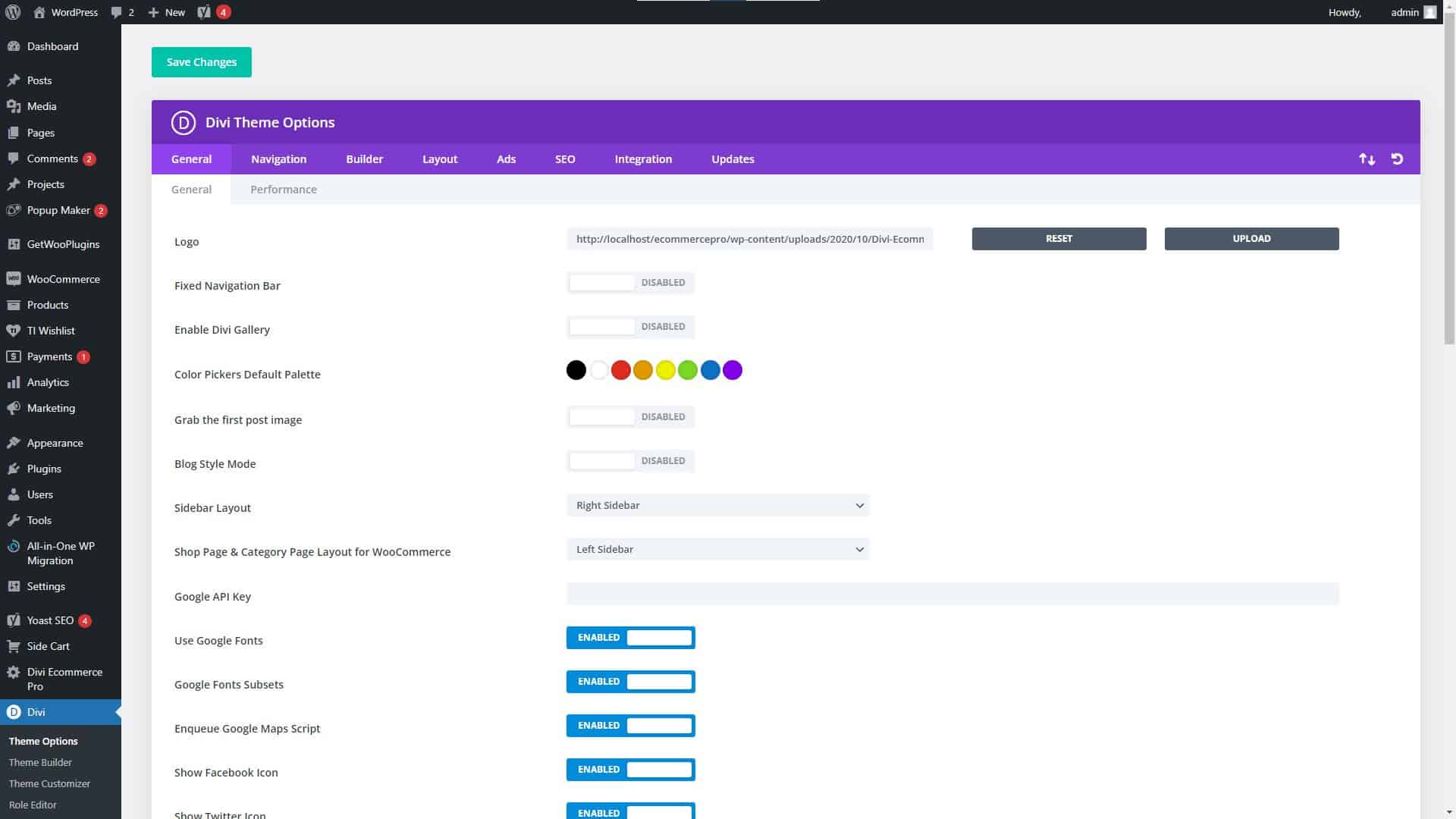
Divi Website Builder WooCommerce Products Module

Divi Website Builder Theme Settings

Divi Website Builder Theme Settings

Divi

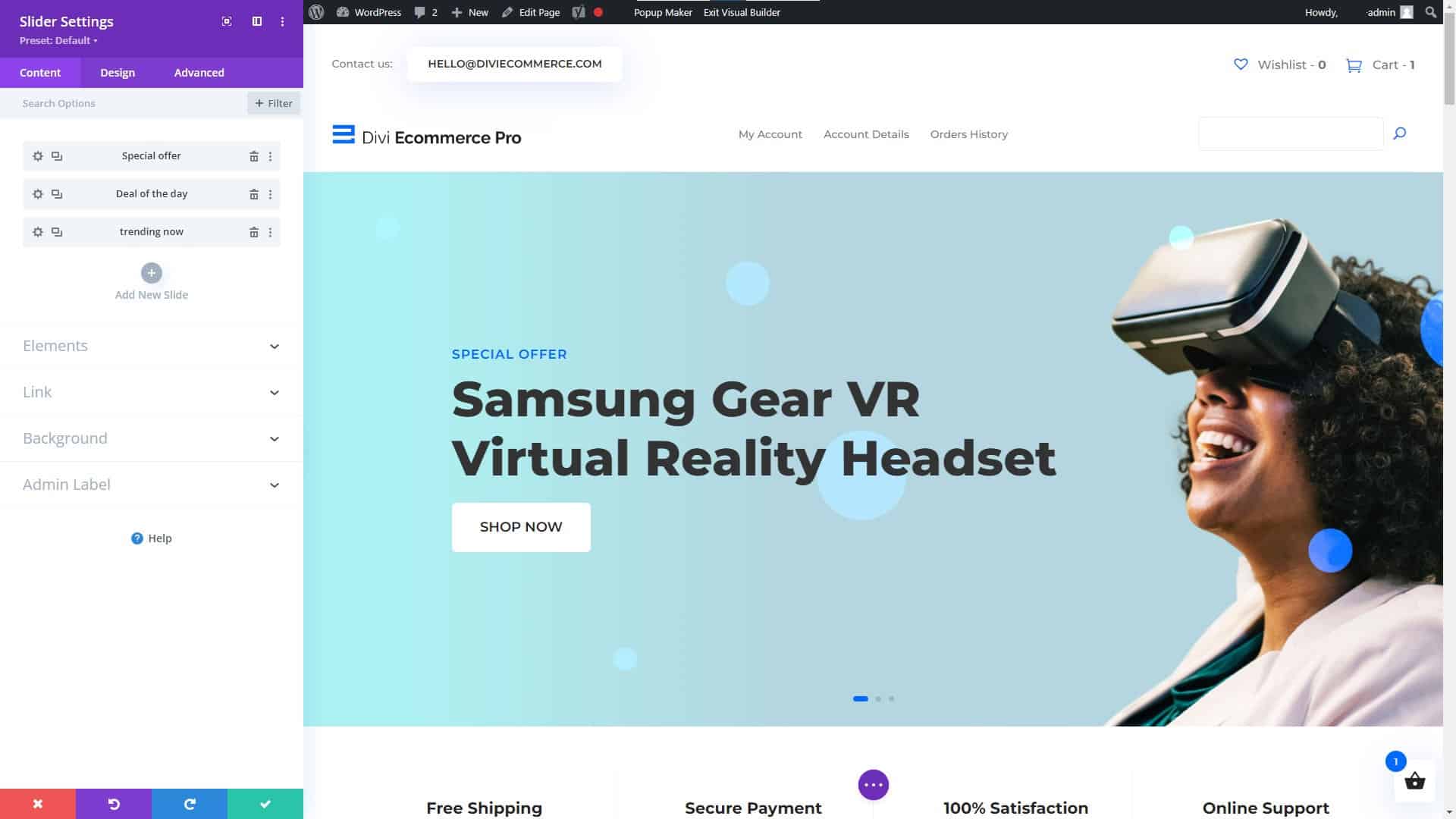
When it comes to WordPress website builders, Divi is another popular option due to its versatility and user-friendliness. It has a user-friendly interface that only requires dragging and dropping elements, as well as several choices for personalization. As a result of its popularity, there is a wealth of documentation and how-to guides available online to help you get started.

Get the Divi Theme for WordPress and start building your future, today!
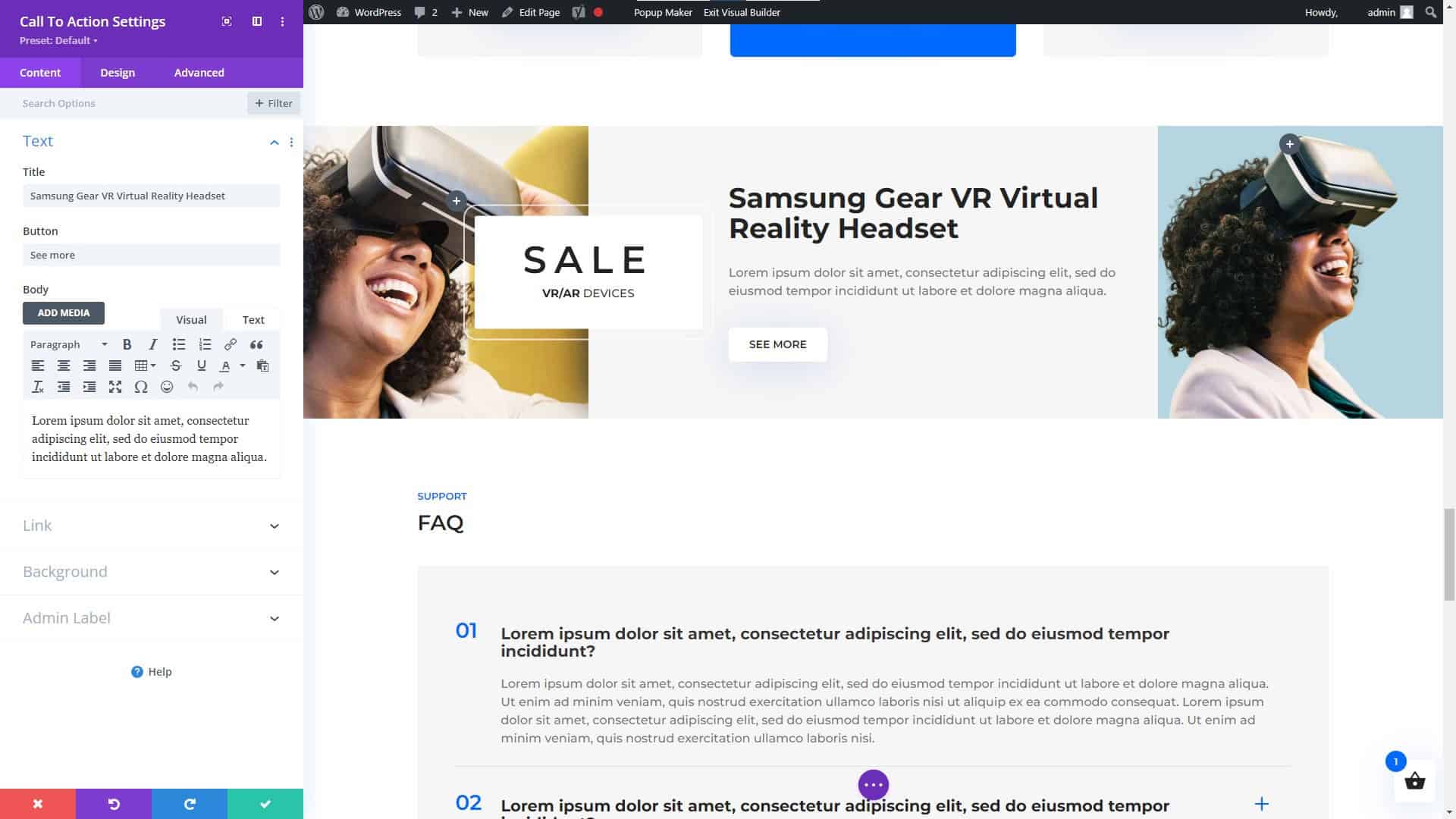
Divi Website Builder for WordPress Call to Action Module
Divi Website Builder for WordPress Call to Action Module

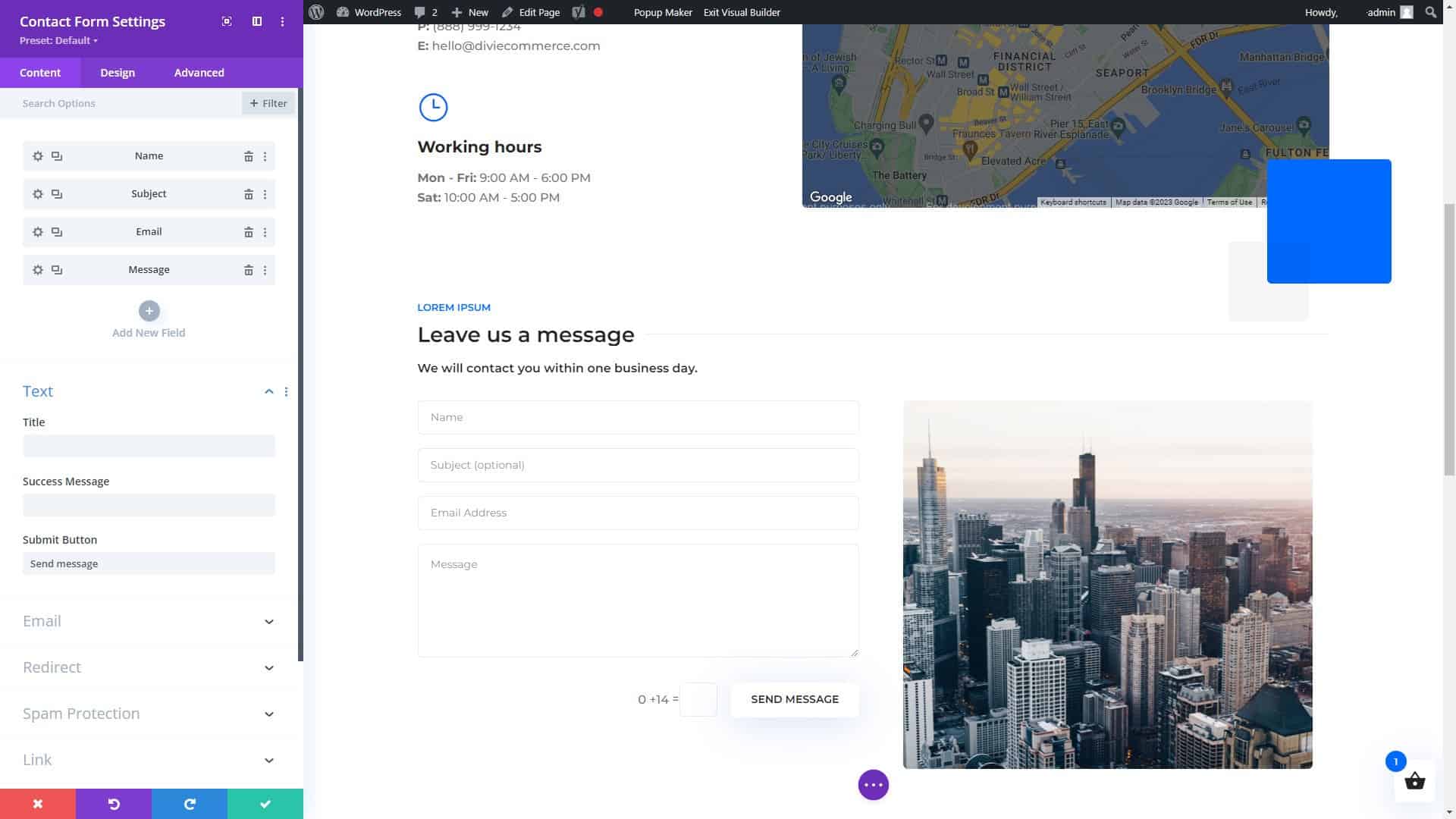
Divi Page Builder for WordPress Contact Form Settings
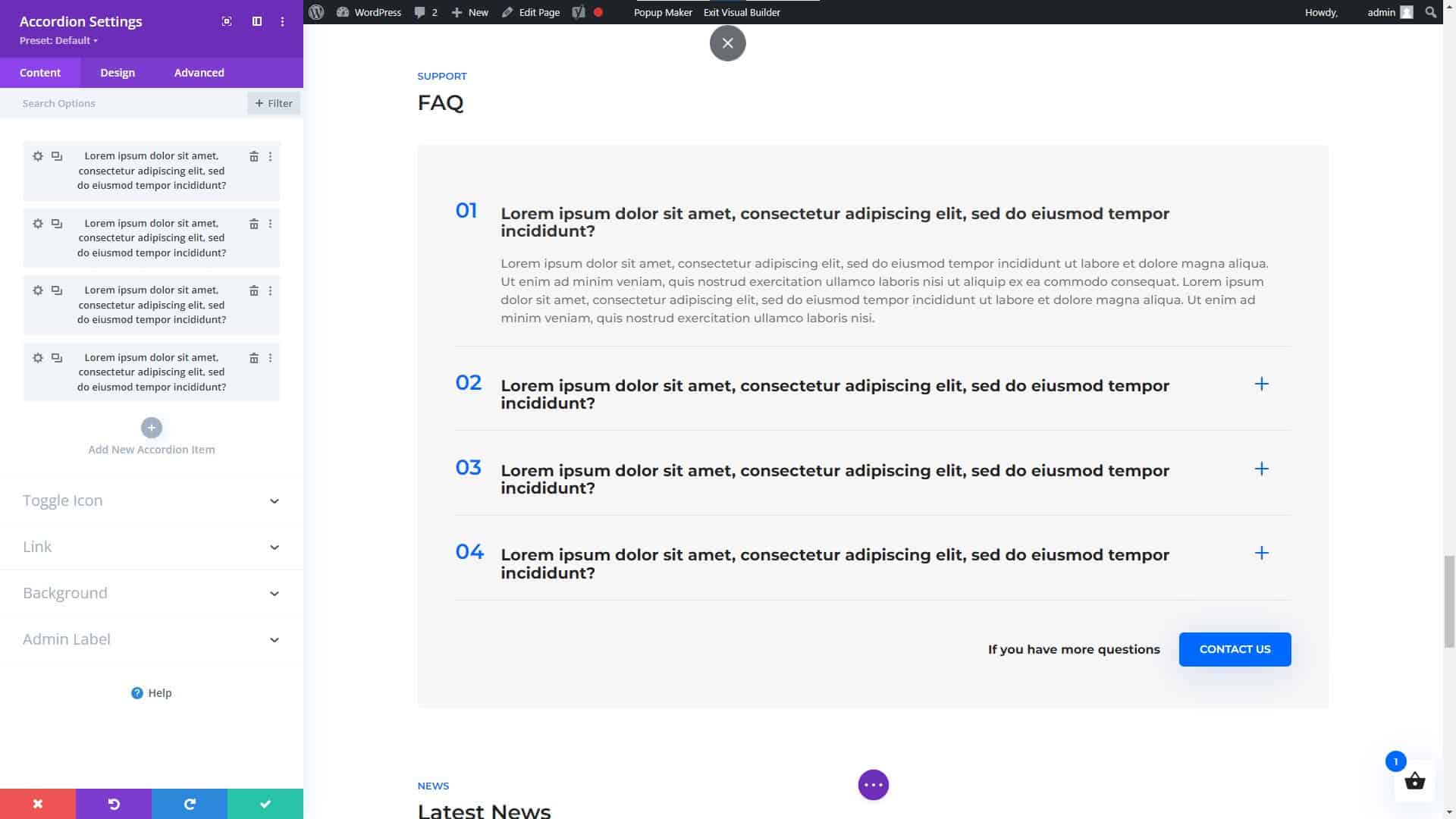
Divi Page Builder for WordPress Contact Form Settings

Divi Website Builder for WordPress Accordion Module
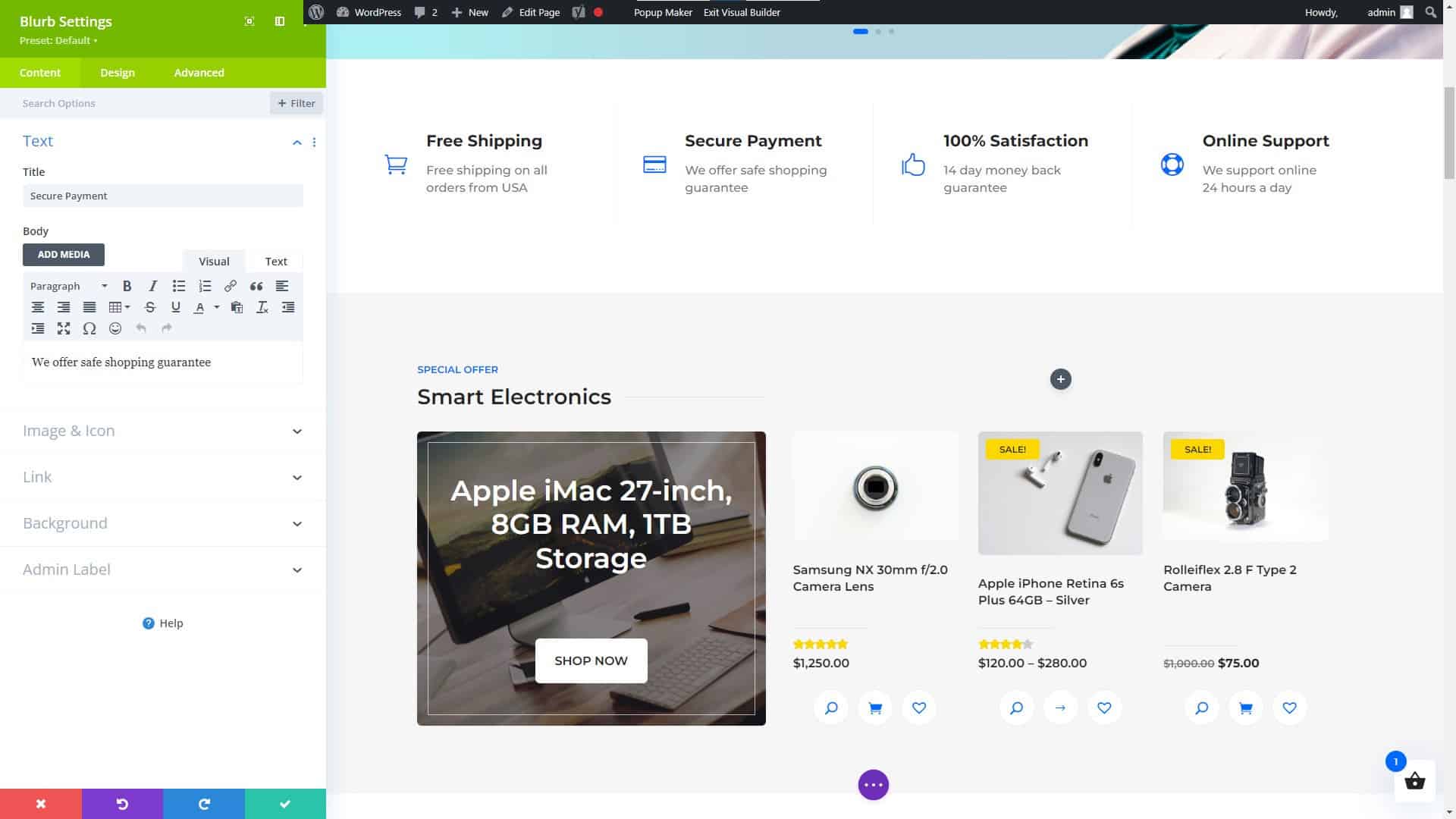
Divi Website Builder for WordPress Accordion Module

Divi Website Builder Blurb Settings
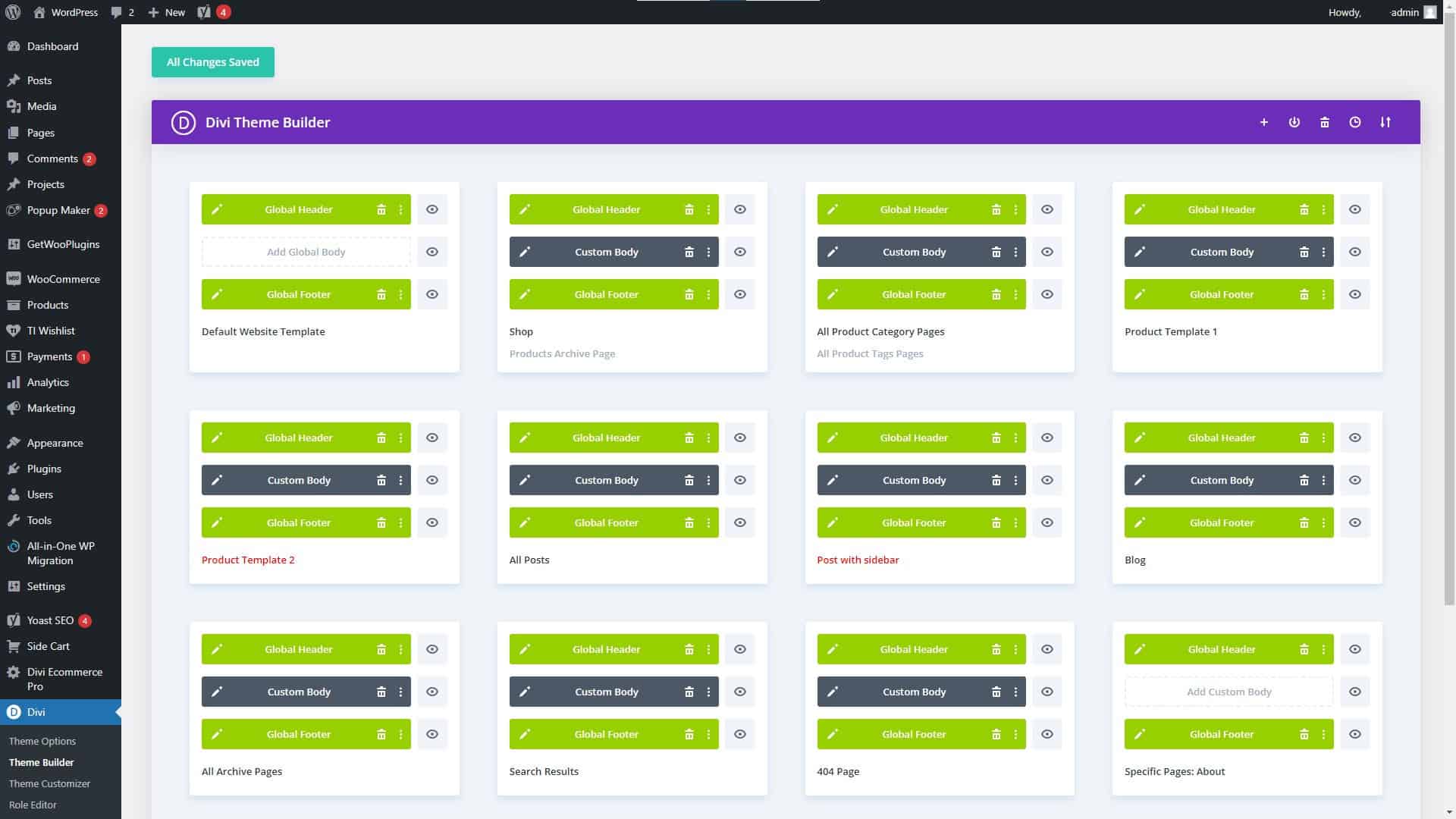
Divi Website Builder Blurb Settings

Divi Theme Builder Settings

Divi Theme Builder Settings

Divi Theme Features and Advantages

Divi’s many useful features and options are one of its primary selling points. Additionally, it comes equipped with a theme builder that lets you create unique layouts without having to learn how to code. Among Divi’s many great qualities are:

  • A HUGE number of third-party themes, modules, plugins, and fellow users offering everything you could possibly need to create an amazing website.
  • A drag-and-drop interface for easy customization
  • A wide range of pre-designed templates to choose from
  • A large library of widgets and elements to add to your website
  • Integration with popular WordPress plugins and services
  • A live design feature that allows you to see your changes in real-time
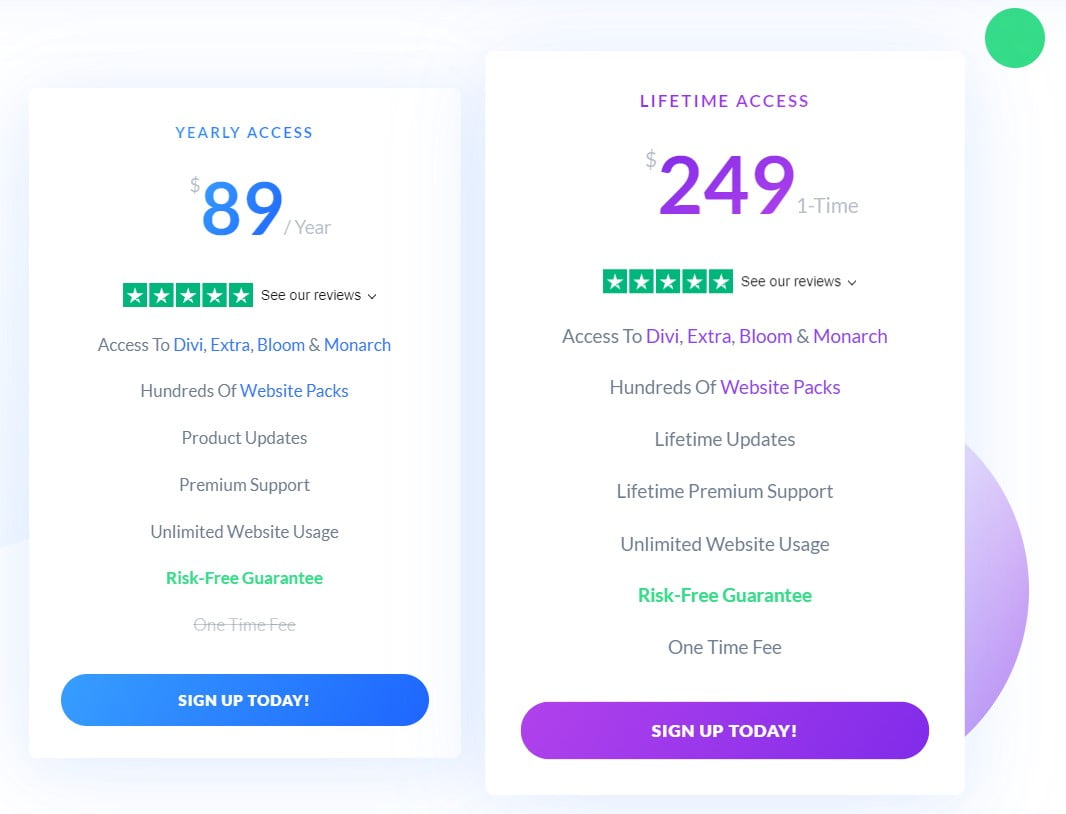
Elegant Themes Membership Pricing Plans

Elegant Themes Membership Pricing Plans

Divi Pricing, Pros, and Cons

Divi’s loading time used to be a problem on some sites, especially those with many widgets and elements. However, a major update of Divi was released on August 18, 2021, with the goal of “Speeding Up Divi From Every Angle,” according to my tests and the many sites I have created using Divi, it was a huge success.

Additionally, it is one of the most expensive website builders on the market, with pricing starting at $89 per year (2/10/2023).
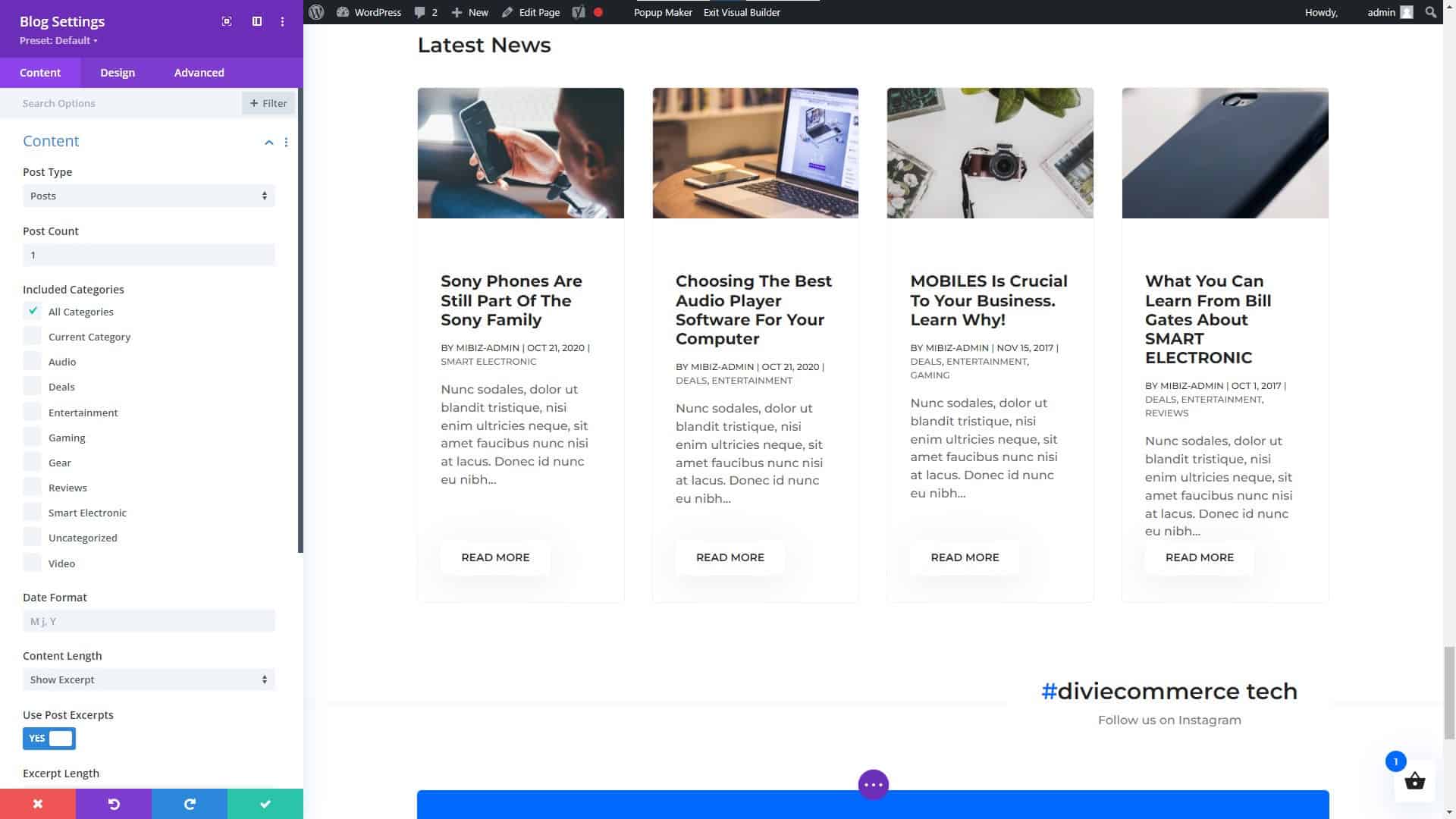
Divi Builder Blog Module Settings

Divi Builder Blog Module Settings

Divi Modules (NOT a Complete List)

Hhere are some of the main categories of modules that you can expect to find with Divi:

  1. Basic Modules: These modules include Text, Image, Gallery, Video, Audio, Button, Number Counter, and more.
  2. Design Elements: These modules include Call to Action, Blurb, Testimonial, Pricing Table, and more.
  3. Layout Elements: These modules include Fullwidth Header, Fullwidth Menu, Fullwidth Slider, Fullwidth Map, and more.
  4. Blog Modules: These modules include Post Title, Post Meta, Post Navigation, Author Box, and more.
  5. Portfolio Modules: These modules include Portfolio, Portfolio Slider, Portfolio Grid, and more.
  6. WooCommerce Modules: These modules include Products, Product Slider, Product Category, and more.
  7. Lead Generation Modules: These modules include Optin, Bloom, and more.
  8. Social Media Modules: These modules include Follow, Share, and more.

These are but a few of the many possible module types available in the Divi framework. Keep in mind that the specific modules and their names may change over time, so it is always a good idea to visit the Divi website for the most up-to-date information.
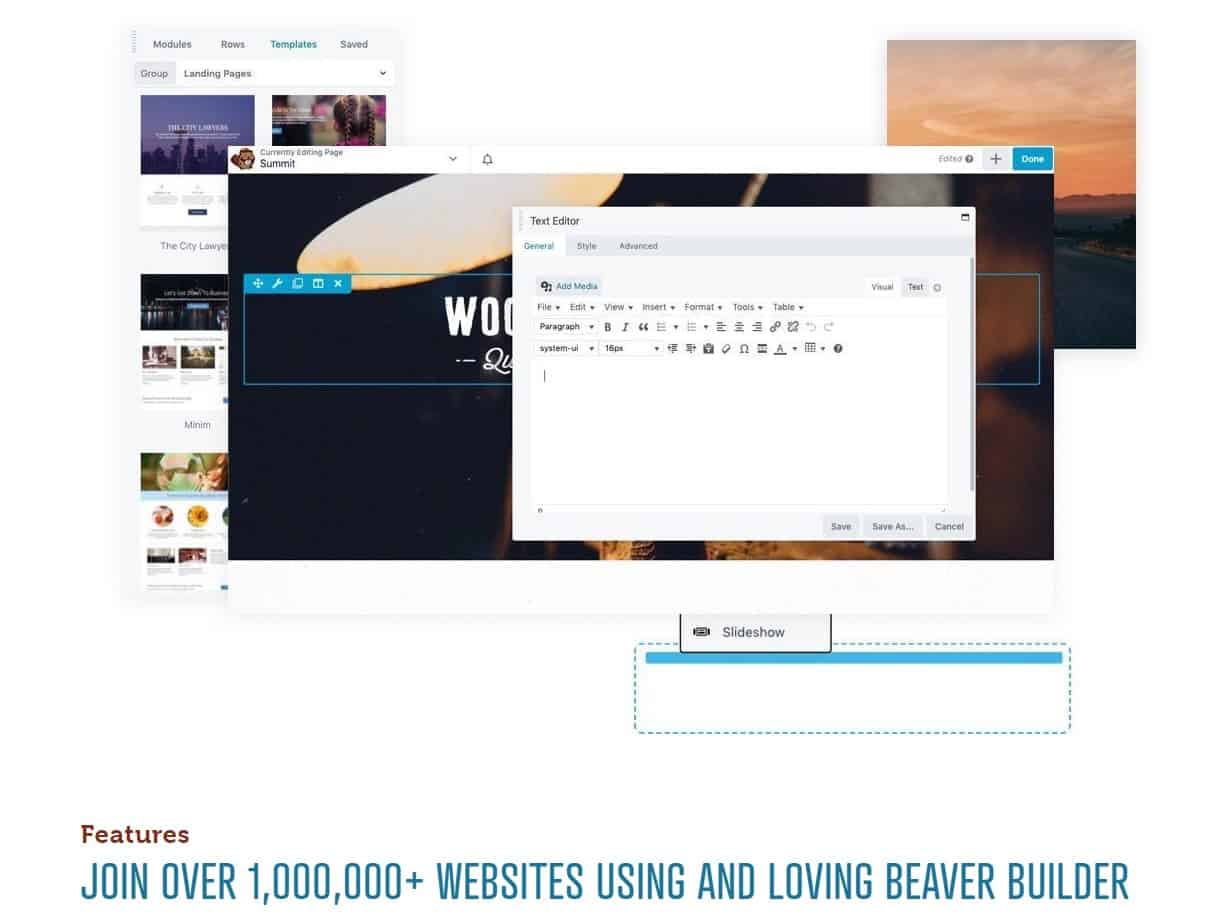
Beaver Builder Page Builder

Beaver Builder Page Builder

Beaver Builder

Among the many WordPress site-construction plugins available, Beaver Builder stands out for its user-friendliness and flexibility. It has a user-friendly interface where you can simply drag and drop elements, as well as a number of customizable pre-made layouts. You may discover many guides and tutorials to help you get started thanks to its enormous user and developer base.

Beaver Builder’s flexibility in providing a wide variety of features and capabilities is one of its primary strengths. It also includes a theme creator that lets you make unique layouts without learning to code. Here are a few of Beaver Builder’s most notable capabilities:

  • A drag-and-drop interface for easy customization
  • A wide range of pre-designed templates to choose from
  • A large library of widgets and elements to add to your website
  • Integration with popular WordPress plugins and services
  • A live design feature that allows you to see your changes in real-time
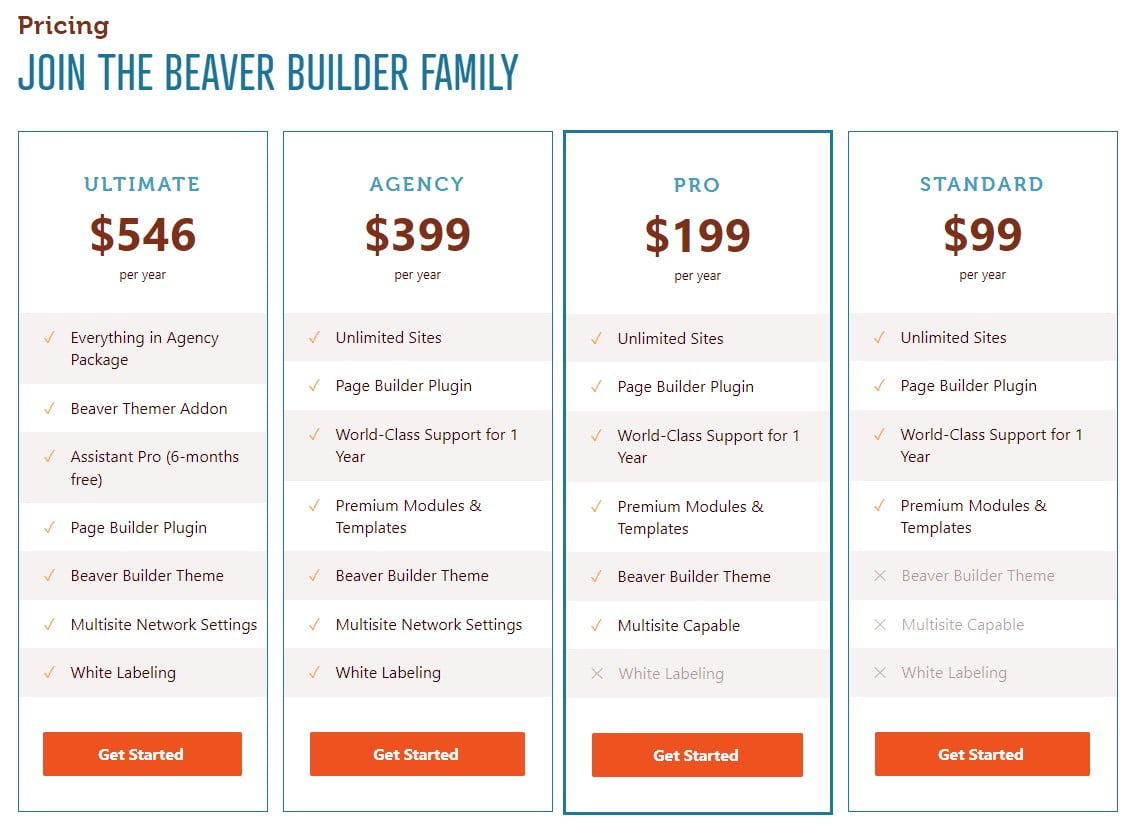
Beaver Builder Pricing Plans

Beaver Builder Pricing Plans

One of the downsides of Beaver Builder is that it can be a bit more expensive than some of the other website builders on the market, with pricing starting at $99 for the standard version (2/10/2023) and $199 for the pro version (2/10/2023). Additionally, some users have reported that the interface can be a bit confusing, particularly for beginners.
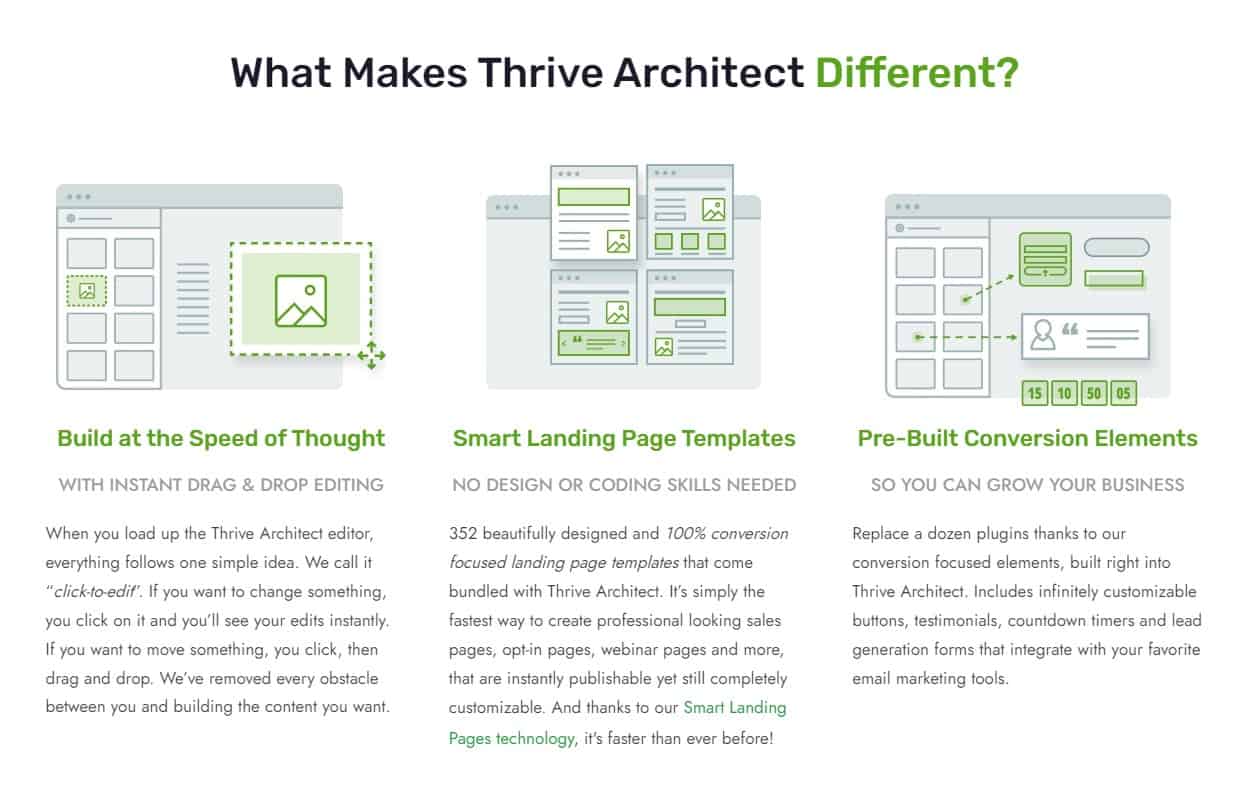
Thrive Architect Page Builder

Thrive Architect Page Builder

Thrive Architect

In the world of WordPress website builders, Thrive Architect stands out for its user-friendliness and flexibility. It has a user-friendly interface where you can simply drag and drop elements, as well as a number of customizable pre-made layouts. You may discover many guides and tutorials to help you get started thanks to its enormous user and developer base.

Thrive Architect’s versatility lies on its many useful features and capabilities. It also includes a theme creator that lets you make unique layouts without learning to code. Among Thrive Architect’s many useful features are:

  • A drag-and-drop interface for easy customization
  • A wide range of pre-designed templates to choose from
  • A large library of widgets and elements to add to your website
  • Integration with popular WordPress plugins and services
  • A live design feature that allows you to see your changes in real-time
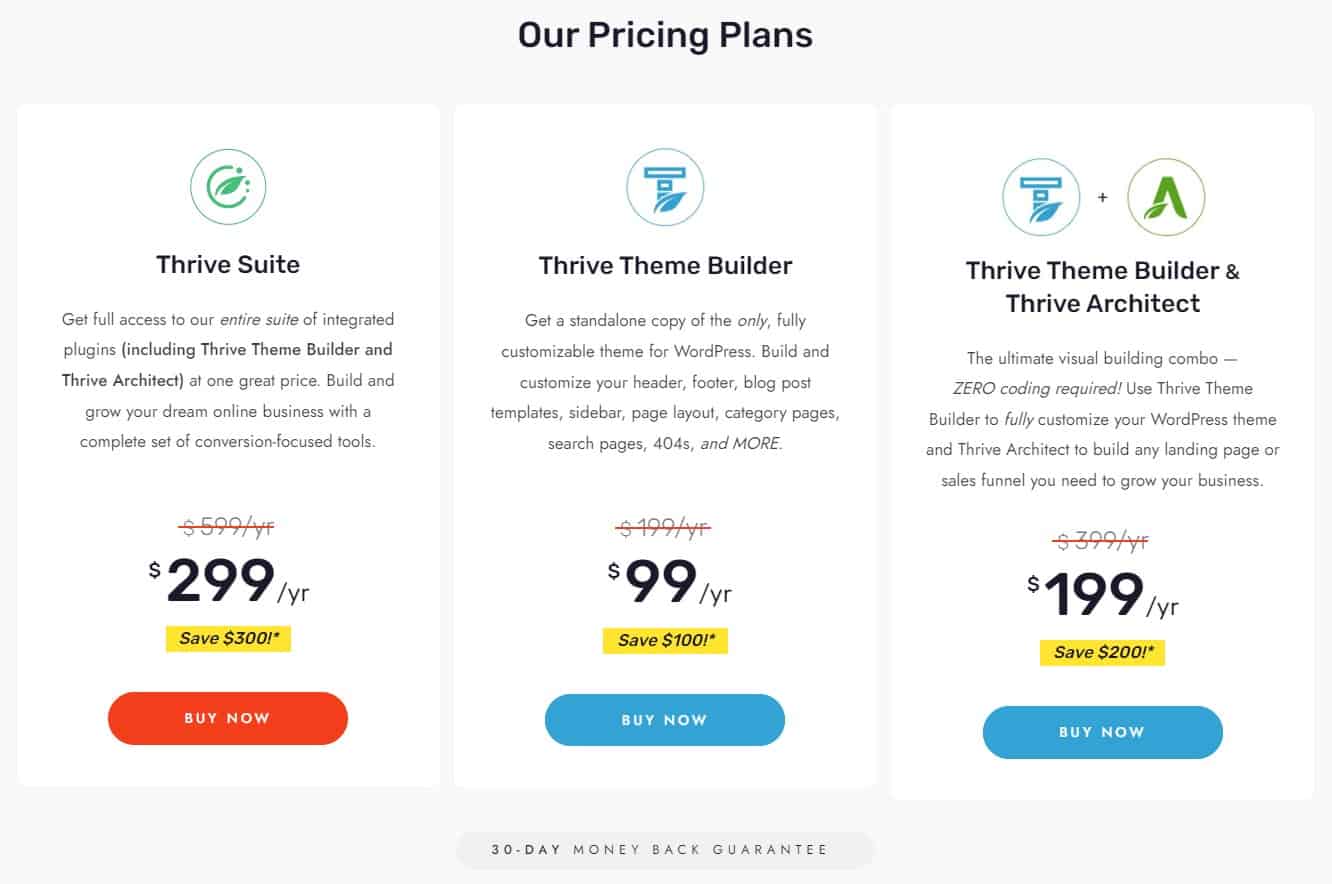
Thrive Architect Page Builder Pricing Plans

Thrive Architect Page Builder Pricing Plans

One of the downsides of Thrive Architect is that it can be a bit more expensive than some of the other website builders on the market, with pricing starting at $67 for the standard version (2/10/2023). Additionally, some users have reported that the interface can be a bit confusing, particularly for beginners.

WordPress Page Builders Do Not Require Knowledge of Coding

WordPress Page Builders Do Not Require Knowledge of Coding

Choosing the Right WordPress Website Builder

Choosing a WordPress page builder is not as simple as it may seem. Price, features, compatibility, sales or users, usability, functioning, updates, and developer reliability should all be considered. Each aspect is critical in picking the best page builder for your requirements. Some themes, like Divi, include a builder, so you can get more information on How to Choose the Best WordPress Theme to make an informed decision.

Choosing a WordPress page builder can be daunting, so we’ve compiled this handy checklist to help you narrow down your options.

Price: What is the cost of the page builder, and does it fit within your budget?

Features: Does the page builder have all the features you need to build your website, such as responsive design, custom fonts, and e-commerce integration?

Compatibility: Does the page builder work seamlessly with your WordPress theme and other plugins?

Number of sales or users: How many people have used or purchased the page builder, and what are their experiences with it?

Ease of use: Is the page builder user-friendly, and does it have a straightforward interface that’s easy to navigate?

Functionality: Does the page builder have all the functionalities you need to build your website, such as drag-and-drop functionality, and the ability to add custom CSS?

Update schedule: How often does the developer release updates for the page builder, and are they reliable and bug-free?

Reliability of the developer:

Ask yourself if the page builder’s creator can be relied upon to deliver high-quality software and responsive customer service.

With this information in hand, you may confidently select the most suitable WordPress page builder. For your convenience, we have expanded upon three of the most important factors to keep in mind while deciding on the best WordPress website builder for your business or personal site below.

Features and Functionality

Features and functionality are two of the most crucial factors to think about when selecting a WordPress website builder. It’s important to note that different builders cater to different skill levels. Some are tailored to certain niches, like portfolios or e-commerce sites. Also, prices vary widely from one option to the next.

Before settling on a website builder, it’s wise to evaluate your needs. Do you want or require a lot of room for personalization? Do you wish there was a theme creator preinstalled? Are you trying to find a simple to operate program? When deciding on a website builder, these are crucial factors to consider.

Ease of Use

When deciding on a WordPress website builder, simplicity of use is an additional point to think about. It’s crucial to select a builder that’s simple to use, even if you’re just starting out with website creation, and some are more user-friendly than others.

Find a website creator that has a user-friendly drag-and-drop interface, several design possibilities, and premade templates. You should also consider the size of the tool’s user and developer community as an indicator of its accessibility.

Pricing

Finally, when deciding on a WordPress website builder, cost should not be ignored. It’s crucial to do some research and pick a builder that works within your budget.

A website builder’s recurring fees should also be taken into account. There are both subscription-based and one-time payment options among the available builders. Also, some constructors provide a free version, but the more sophisticated capabilities are only available in a paid upgrade.

Before settling on one, it’s important to weigh the upfront expenditures against the total over the life of the website. Add the price of any further tools or subscriptions you may need.
The Final Word on WordPress Website and Page Builders

The Final Word on WordPress Website and Page Builders

Conclusion

For those without prior experience, settling on a WordPress website builder can feel like an overwhelming undertaking. You can choose a product that works for your demands and your budget if you take into account things like features and functionality, convenience of use, and pricing.

Elementor, Divi, Beaver Builder, and Thrive Architect are just a few of the greatest WordPress website builders, and we’ve reviewed them all here. Each of these resources has advantages and disadvantages; pick the one that works best for you.

To reiterate, it is crucial to locate a tool that is not only affordable, but also meets your needs in terms of usability, features, and functionality. And don’t be shy about reaching out to others for advice and assistance.

The WordPress Support Forum

For more information on WordPress, and support, visit the WordPress Support Forum.

NOTICE: All pricing listed within this article was accurate on the date this article was published (02/10/2023). However, pricing changes, so please refer to the developers’ websites listed in this article for their latest prices. You may even get lucky and find the cost is less due to a Black Friday sale, anniversary sale, Cyber Monday sale, or another special offering.

Disclosure: You may find affiliate links to beneficial resources within this article. You won’t pay more for using our link, but we’ll get a commission. This supports our content creation, and we only suggest products we genuinely believe in. Thank you for being so understanding!

Affiliate Links

James Turner

James Turner

Author/Copywriter

Are you looking for a tech blogger and sales copywriter who can turn your message into a powerful tool for persuasion? Look no further than James Turner, a seasoned professional with over 25 years of experience in the tech industry. With a deep understanding of how to craft words that connect with readers and drive results, James is a master of the art of persuasive writing.

Why Choosing the Best Web Hosting Company Matters in 2025

Find out why choosing the best web hosting company matters in 2025 to boost your site’s performance and skyrocket sales.

Hiring a Website Designer

Hiring a website designer? Discover actionable tips, red flags to avoid, and how to find the right designer to create a website that grows your business.

How to Create a Landing Page Using WordPress

Follow our guide on how to create a landing page using WordPress and the built-in Block Editor, page builder plugins, or specialized themes.

How to Install WordPress in Minutes

How to Install WordPress in Minutes

Considering starting your own website? WordPress, the most popular CMS, is recommended and you can launch your website quickly by following a few simple steps. From choosing a domain name and getting web hosting to installing WordPress, this guide covers everything. With this complete tutorial, you can confidently design a successful website.

Planning a WordPress Install is an Important First Step

Planning a WordPress Install is an Important First Step

Installing WordPress is like baking a cake, just follow the recipe and you’ll end up with a delicious website!

Requirements

Before you begin, there are a few things you’ll need to make sure you have:

  • A domain name (e.g., yourwebsite.com) – Your website’s domain name is its internet address. GoDaddy or Namecheap are good domain registrars that allow you to choose an easy-to-remember and spell name and a domain extension that matches your website’s purpose (such as .com for commercial sites or .org for non-profits). This will assist your target audience in accessing your website.
  • Web hosting (a place for your website to live on the internet) – This service saves and makes available the files on your website is this one. Numerous web hosting solutions are available, including A2 Hosting.  When selecting a web hosting service, compare the various possibilities and pick one with the required features and resources. The amount of space and bandwidth offered, the responsiveness of customer care, and the intuitiveness of the hosting control panel are all important considerations.
  • FTP software (to upload WordPress to your hosting account) – To move the WordPress files from your PC to your web hosting account, utilize this software. Cyberduck and FileZilla are two popular choices. Before beginning the installation procedure, ensure the software is downloaded and prepared to use.
Register a Domain Name That People Can Remember

Register a Domain Name That People Can Remember

Domain and Hosting

Buying a domain name and web hosting is the first step in building your website. The address people will use to find your website is a domain name (e.g. www.yourwebsite.com). The service that actually stores and makes the files on your website accessible to the public is called web hosting. If you are not sure how to find a web host, you can read our article on How to Choose the Best WordPress Web Hosting Company for detailed information on this topic.

Registering the Right Domain Name for Your Brand

Choosing your brand’s domain name doesn’t have to be difficult! With ingenuity, research, and foresight, you can get a domain name that appeals to your target demographic and boosts your online presence. In the digital age, a distinctive and relevant domain name is the foundation of your brand identification, helping customers find and engage with you.

Start domain name brainstorming using your brand’s soul. Your mission, values, and USPs? Keep it simple and memorable. Try alternative business-related keywords and phrases. Check domain name availability and trademark infringement after compiling a list. Secure common domain extensions like.com,.net, and.org, as well as country-specific extensions. Multiple extensions safeguard your brand from cybersquatters and provide clients extra options to find you online.

  • Choosing the right domain name
  • Selecting a top-level domain (TLD) and second-level domain (SLD)
  • Ensuring the domain name is easy to remember and spell
  • Making sure the domain name accurately represents your brand or business

Signing Up for Web Hosting

Embarking on your website creation journey begins with obtaining web hosting services. Web hosting is, in a nutshell, the provision of necessary tools and storage for your website’s files, ensuring your site is accessible online.

Consider dependability, efficiency, pricing, and customer service when choosing a web host. The goal is to find a provider that delivers an optimal combination of features and resources while adhering to your budgetary constraints.

  • The importance of web hosting for a website
  • Factors to consider when choosing a web hosting provider
  • Reliability, performance, cost, and customer support
  • Selecting a web hosting provider that offers the right balance of features and resources
Download WordPress from the Official Website

Download WordPress from the Official Website

Download and Upload

It’s time to download the WordPress software after your domain and hosting are set up. The most recent version is available for download at WordPress.org. Utilize your FTP program to upload the files to your hosting account after saving them to your PC.

The files for your website will reside in this directory, so be sure to upload the files there. This directory is typically the “public html” or “www” folder. To keep everything organized, you should make a brand-new folder just for your WordPress installation. Future file management will be more straightforward as a result of this. To guarantee a successful installation, upload every file and folder, not just the main WordPress folder.

How to Use Filezilla FTP Software

Filezilla FTP software is a powerful tool for transferring files between your computer and web server. However, FTP software can be scary to individuals who have never used it before. The good news is that operating Filezilla is simple and intuitive.

You can quickly and easily get Filezilla functioning with just a few easy clicks. Filezilla streamlines every step of handling the files for your website.

  • What makes Filezilla a user-friendly tool
  • Step-by-step guide on how to connect to your web server with Filezilla
  • How to upload and download files with Filezilla
  • How Filezilla makes managing your website files more accessible than ever before
A Step by Step WordPress Configuration Guide

A Step by Step WordPress Configuration Guide

Configuration

Upon successfully uploading WordPress to your web hosting account, the next action is to initiate the configuration process. This entails the creation of a database and the input of particular details about your site, such as its title and administrative login credentials. To generate a new database, access your web hosting control panel.

The database name, username, password, and hostname must be saved for configuration. The database name, admin username, and password, along with other site-specific details, will be requested as you establish the database.

The newly created database, site title, admin username, and password will be requested. For the admin account, it is advisable to opt for a unique and secure combination of username and password.

Initial WordPress Configuration: Step-by-Step Instructions

With the appropriate assistance, you can customize your WordPress website. The initial setup procedure involves several critical steps, such as selecting a hosting provider, installing WordPress, and customizing your site’s appearance and functionality.

Here is a detailed step-by-step guide on how to configure your WordPress site:

  1. Pick a hosting provider: The first step in creating a WordPress website is choosing one. You have various options, including shared hosting, VPS, dedicated hosting, and managed WordPress hosting. When choosing, consider factors like storage capacity, bandwidth, security, customer support, and cost.
  2. Register a domain name: After choosing a web server, register a domain name. Website visitors type your domain name into their browsers. Opt for a domain name that’s easy to recall, encapsulates your brand’s essence, and isn’t excessively lengthy.
  3. Install WordPress: Following domain name registration, it’s time to install WordPress. This process is quick and straightforward since many hosting providers offer a one-click installation option. WordPress’s installation wizard lets you manually install it if your hosting provider doesn’t.
  4. Choose a theme: WordPress offers various themes with unique styles and designs. You can select a theme that aligns with your brand or business and provides the necessary features. You don’t need to worry too much about finding the perfect piece Carriers; you can change it anytime. We recommend the Divi Theme for WordPress.
  5. Customize your site: Personalizing your website involves adding plugins and widgets and adjusting settings such as your site’s title and tagline. You can easily modify your website’s appearance by incorporating your logo, a background image, and distinctive fonts.
  6. Create pages and posts: Begin generating pages and posts to populate your site with content. Pages, like your About Us page, are utilized for static content, while seats are employed for dynamic content, such as blog entries.
  7. Launch your site: Lastly, make your website live by publishing it on the internet. With your site up and running, you can start promoting it, adding content, and engaging with visitors.
How to Complete the WordPress Installation Process

How to Complete the WordPress Installation Process

Completing Installation

It’s time to finish the installation now that the database and configuration have been set up. You will be guided through the procedure and prompted to enter any additional information by the installation script. You will be taken to the login page for your new website once the installation is complete.

To log in, enter the admin username and password you specified during configuration. The WordPress dashboard will then be displayed to you, where you can begin adding content and modifying your website. For security and performance reasons, keep your WordPress installation and any installed plugins updated.

WordPress is Installed Time for a Cupcake

WordPress is Installed Time for a Cupcake

Conclusion

Although the initial setup of WordPress might seem difficult, with some forethought and preparation, the procedure can be finished in a matter of minutes. Following these suggestions will help you build a website. You can master the platform and create a genuinely unique and expert online presence by keeping your website and software up to date, taking advantage of the wealth of tools and tutorials available to you, and keeping your software and website updated.

Check Out Our YouTube Channel

On our YouTube channel, Website Design & Tech, we are adding content for business owners and people interested in tech topics and how-to videos like “How long does it take to build a WordPress website? A 7-minute, step-by-step beginner guide.

Resources to Help You Get Started With WordPress

For further reading, we recommend checking out the WordPress Codex or consulting the WordPress Support Forum.

Disclosure: You may find affiliate links to beneficial resources within this article. You won’t pay more for using our link, but we’ll get a commission. This supports our content creation, and we only suggest products we genuinely believe in. Thank you for being so understanding!

Affiliate Links

James Turner

James Turner

Author/Copywriter

Are you looking for a tech blogger and sales copywriter who can turn your message into a powerful tool for persuasion? Look no further than James Turner, a seasoned professional with over 25 years of experience in the tech industry. With a deep understanding of how to craft words that connect with readers and drive results, James is a master of the art of persuasive writing.

Why Choosing the Best Web Hosting Company Matters in 2025

Find out why choosing the best web hosting company matters in 2025 to boost your site’s performance and skyrocket sales.

Hiring a Website Designer

Hiring a website designer? Discover actionable tips, red flags to avoid, and how to find the right designer to create a website that grows your business.

How to Create a Landing Page Using WordPress

Follow our guide on how to create a landing page using WordPress and the built-in Block Editor, page builder plugins, or specialized themes.

10 Proven Ways to Boost Your Sales Using WooCommerce

10 Proven Ways to Boost Your Sales Using WooCommerce

This article will discuss ten proven ways to boost your sales using WooCommerce. Stepping up your business by initiating an online WooCommerce store can offer many opportunities, unlocking a broader market of potential customers and elevating your profit margins. Navigating the turbulent waters of e-commerce competition might be challenging, but armed with the right techniques, your business can distinguish itself. It’s time to delve into proven methods for increasing sales using the WooCommerce feature on your WordPress e-commerce site. Remember, the growth potential is unlimited, so, let’s embark on this journey of expansion now.

10 Proven Ways to Boost Your Sales Using Woocommerce

10 Proven Ways to Boost Your Sales Using Woocommerce


“Sales are contingent upon the attitude of the salesman, not the attitude of the prospect.” – W. Clement Stone

Checklist for Boosting Sales on WooCommerce

  • Ensure your website is properly optimized for SEO, including keyword research, meta tags, and alt tags.
  • Write compelling and unique product descriptions that effectively communicate the value of your products.
  • Utilize social media platforms to promote your products and engage with customers.
  • Implement email marketing strategies, such as abandoned cart emails and newsletters.
  • Conduct A/B testing to determine the most effective sales strategies for your products.
  • Encourage customers to leave reviews and prominently display them on your website.
  • Implement upselling and cross-selling techniques, such as related products and “frequently bought together” sections.
  • Focus on customer retention by building relationships with repeat customers and offering loyalty programs.
  • Ensure that your website is mobile-optimized for a seamless shopping experience on all devices.
  • Track and analyze data on sales, traffic, and customer behavior to inform future strategies.
Optimizing WooCommerce for SEO

Optimizing WooCommerce for SEO


Optimizing for SEO

Keyword Research

One of the proven ways to boost your sales using WooCommerce is optimizing your WooCommerce store for SEO is conducting extensive keyword research. This entails determining the terms and phrases that potential clients use while searching for products similar to yours. Once you clearly understand the keywords and phrases relevant to your products, you can incorporate them into your website’s content, meta tags, and alt tags.

Meta Tags

In addition to putting keywords into the text of your website, optimizing your meta tags for SEO is critical. Meta tags are a type of HTML tag that supplies search engines with important information about your website. By using relevant keywords in your meta tags, you can increase the chances of your website appearing in search engine results when potential clients look for things related to what you provide.

Alt Tags

Using alt tags for photos is another crucial component of optimizing your WooCommerce store for SEO. Search engines and people who are visually impaired use alt tags, also referred to as alternative text, to describe images in text. By inserting relevant keywords in the alt tags of your website’s photos, you can boost the chances of those images appearing in image search results.

Writing Compelling Product Descriptions for an Online Store

Writing Compelling Product Descriptions for an Online Store

Writing Compelling Product Descriptions

Make them Unique

Crafting a compelling product description is crucial for a successful WooCommerce store. This is your chance to highlight your product’s features and advantages, enticing prospective buyers to make a purchase. Make sure your descriptions are original, as duplicating content can hurt your SEO. Search engines may penalize sites for copied content, and distinctive product descriptions can help you outshine competitors and boost your search ranking.

Include Keywords

Besides ensuring your product descriptions are original, it’s vital to include pertinent keywords. This assists search engines in comprehending your product pages’ content and enhances the likelihood of your site appearing in search results when potential customers look for similar products. However, it’s crucial to use keywords organically and avoid overstuffing, as this can harm your SEO.

Provide Detailed Information

Like other marketing efforts, product descriptions are most effective when they supply ample information to potential customers. Details such as dimensions, materials, and additional features should be included. Providing sufficient information also makes it more likely that search engines will display your product pages when users search for related products, which will boost your sales using WooCommerce.

Using Social Media to Improve Online Sales

Using Social Media to Improve Online Sales


Boosting WooCommerce Sales through Effective Social Media Strategies

To increase brand awareness and ultimately, sales, in today’s digital world, businesses can’t do without social media. The exposure, brand awareness, and consumer interaction of WooCommerce stores can be greatly improved by taking advantage of the power of social media networks. Let’s talk about how you may use social media to boost your sales using WooCommerce.

Choosing the Right Social Media Platforms

Selecting the right social media channels for your specific demographic and marketing objectives is crucial for successful social media marketing. The following are some examples of widely used social media:

  1. Facebook: With billions of active users, Facebook offers an enormous market for your WooCommerce store. You can effectively target your desired customer demographics by creating a dedicated business page and utilizing Facebook Ads.
  2. Instagram: A visually-driven platform, Instagram is ideal for showcasing your products and building a strong brand identity. Utilize Instagram Stories and shoppable posts to drive sales and engage with your audience.
  3. Twitter: Twitter serves as an influential medium for real-time interaction and customer support. Announce product updates, offers, and engage with your followers to cultivate a devoted customer base.
  4. Pinterest: As a visually-focused platform, Pinterest can generate considerable traffic to your WooCommerce store by enabling users to save and share your product images with their network.

Creating Engaging Content

Developing content that connects with your audience is a vital aspect of social media marketing. We recommend learning How to Create a WordPress Content Strategy for Your Business. Here are some additional suggestions for producing engaging content:

  1. Share high-quality visuals: Invest in professional photography or design eye-catching graphics to display your products and capture users’ interest.
  2. Tell a story: Humanize your brand by sharing behind-the-scenes tales, customer reviews, and the motivation behind your products.
  3. Promote exclusive offers: Leverage social media to announce time-limited promotions, discounts, and special offers, which drives urgency and boosts sales.
  4. Utilize user-generated content: Encourage clients to share their experiences with your products by showcasing their photos and testimonials on your social media channels.

Building a Social Media Community

When we consider the ten proven ways to boost your sales using WooCommerce, building a social media community can be one of the best. A robust social media community can foster brand loyalty and generate a pool of potential buyers. Strategies to create and maintain your community include:

  1. Engage with your audience: Promptly respond to comments, messages, and inquiries. Show gratitude towards your customers’ support by liking and sharing their contributions.
  2. Collaborate with influencers: Team up with niche influencers to tap into a wider audience and establish credibility.
  3. Host giveaways and contests: Conduct giveaways and contests: Foster user engagement and elevate visibility by holding giveaways or contests, asking participants to like, share, or tag friends in your posts.
  4. Use hashtags strategically: Research pertinent and trending hashtags to amplify your content’s visibility and reach prospective customers.

Leveraging social media to its full capacity is a dependable approach to attract traffic and, ultimately, boost sales for your WooCommerce venture. By choosing the right channels, creating captivating content, and nurturing an engaged online community, you can raise awareness and enhance sales. Committing to social media marketing with diligence and a strategic plan can significantly contribute to your WooCommerce store’s expansion.

Checklist for Implementing WooCommerce Email Marketing Plan

Checklist for Implementing WooCommerce Email Marketing Plan


Implementing Email Marketing Strategies

Connecting with customers and driving more sales for your WooCommerce store may be accomplished through email marketing. A well-thought-out email marketing approach may help you build brand loyalty, encourage repeat purchases, and keep your audience interested. Here we’ll go over several email marketing tactics that will help your WooCommerce shop bring in more customers and more sales.

Choosing the Right Email Marketing Tools: Picking the appropriate email marketing tools can greatly influence the success of your campaigns. Some well-known email marketing tools that are compatible with WooCommerce are:

  1. Mailchimp: A comprehensive marketing platform providing email marketing services, automation, and analytics capabilities.
  2. Sendinblue: A powerful email marketing tool with advanced segmentation, automation, and transactional email capabilities.
  3. Omnisend: A platform designed specifically for eCommerce, offering advanced automation, segmentation, and omnichannel marketing features.

Building and Segmenting Your Email List: A top-notch email list is essential for triumphant email marketing campaigns:

  1. Offer incentives: Encourage users to subscribe to your email list by offering a discount, free shipping, or an exclusive resource.
  2. Use exit-intent pop-ups: Capture visitors’ email addresses before they leave your site with exit-intent pop-ups.
  3. Segment your list: Categorize your subscribers based on their preferences, purchase history, and engagement levels to send targeted and personalized campaigns.

Crafting Effective Email Campaigns: To maximize the impact of your email marketing efforts, follow these best practices:

  1. Write compelling subject lines: Create curiosity and urgency with attention-grabbing subject lines to increase open rates.
  2. Personalize your emails: Address your subscribers by their names and tailor your content based on their preferences and behavior.
  3. Optimize for mobile devices: Ensure your emails are mobile-friendly, as a significant portion of your audience will likely open your emails on their smartphones.
  4. Test and analyze: Regularly A/B test your campaigns and analyze their performance to optimize and improve your email marketing strategies.

Types of Email Campaigns to Boost Sales: Several types of email campaigns can help drive sales for your WooCommerce store:

  1. Welcome emails: Greet new subscribers with a welcome email, offering a special promotion or showcasing your top-selling products.
  2. Abandoned cart emails: Remind customers who have left items in their cart to complete their purchase, potentially offering an incentive to encourage conversion.
  3. Promotional emails: Share limited-time offers, seasonal sales, or new product launches to encourage purchases.
  4. Re-engagement emails: Target inactive subscribers with special offers, personalized product recommendations, or updates on what they have missed.

Implementing effective email marketing strategies can significantly boost sales for your WooCommerce store. By choosing the right tools, building a high-quality email list, crafting engaging campaigns, and sending targeted emails, you can foster customer loyalty and drive revenue. With persistence and continuous optimization, email marketing can be a game-changer for your WooCommerce store’s success.

Conducting A/B Split Testing for a Website

Conducting A/B Split Testing for a Website


Conducting A/B Testing

If you want to boost your sales using WooCommerce, testing is crucial. Your WooCommerce store’s layout, product descriptions, prices, and marketing methods can all benefit from A/B testing, also known as split testing. Data-driven decisions can be made to improve conversion rates by comparing the success of two versions of a website or marketing campaign. This section of the post will discuss the significance of A/B testing and offer advice for running effective tests to enhance the functionality of your WooCommerce store.

Understanding the Basics of A/B Testing: A/B testing entails comparing two variations of a single component to determine the one that yields superior results. The process consists of:

  1. Identifying the element to test: Choose a specific aspect of your store, such as a call-to-action button, product image, or email subject line.
  2. Creating two variations: Develop two versions of the chosen element, each with a different design, text, or layout.
  3. Randomly assigning users: Split your traffic or audience randomly between the two variations, ensuring that each user only sees one version.
  4. Analyzing the results: Compare the performance of the two variations based on the chosen metric, such as conversion rate, click-through rate, or average order value.

Choosing the Right Elements to Test: To maximize the impact of your A/B testing efforts, focus on elements that directly influence user behavior and conversions. Some examples include:

  1. Headlines and product titles: Test different headlines or product titles to determine which ones are more appealing and drive better engagement.
  2. Call-to-action buttons: Experiment with various colors, sizes, shapes, and text to pinpoint the most effective call-to-action design.
  3. Pricing and discounts: Test various pricing strategies, discount offers, and sales incentives to find the optimal approach for your WooCommerce store.
  4. Landing page designs: Experiment with different layouts, images, and content structures to optimize user experience and conversions.

Best Practices for Effective A/B Testing: Adhere to these best practices for successful A/B tests:

  1. Set clear objectives: Set explicit goals and metrics for each test, such as boosting conversion rates, minimizing cart abandonment, or enhancing click-through rates.
  2. Test one element at a time: Limit your tests to a single element per experiment to isolate the impact of the change and accurately measure its effect.
  3. Use a large sample size: Ensure that your test comprises an adequate number of users to produce statistically meaningful results and reduce the influence of random fluctuations.
  4. Run tests for an adequate duration: Allow your tests to run for a sufficient time to account for variations in user behavior and avoid basing decisions on incomplete data.

Leveraging A/B Testing Tools: Several tools can help streamline your A/B testing process and provide valuable insights. Some well-known choices include:

  1. Google Optimize: A complimentary tool from Google that enables you to conduct A/B tests on your website and integrates smoothly with Google Analytics.
  2. Optimizely: A comprehensive A/B testing platform that offers advanced features for testing, targeting, and personalization.
  3. VWO (Visual Website Optimizer): An all-in-one platform for A/B testing, conversion rate optimization, and website analytics.

WooCommerce store owners who want to optimize their sites’ performance and increase their revenue may consider conducting A/B tests. You may improve your store and make shopping there more enjoyable for customers by conducting scientific experiments and basing your decisions on the results. A/B testing can be a significant asset for the growth and success of your business if you approach it strategically and use the appropriate tools to boost your sales using WooCommerce.

Upselling and Cross Selling Techniques to Boost WooCommerce Sales

Upselling and Cross-Selling Techniques to Boost WooCommerce Sales


Implementing Upselling and Cross-Selling Techniques

Using tried-and-true sales techniques like upselling and cross-selling can do wonders for your WooCommerce store’s bottom line. You can increase your average order value and your clients’ pleasure by suggesting related or supplementary products and upselling them. Here, we’ll break down the distinctions between upselling and cross-selling, and offer advice for putting both strategies to work in your own WooCommerce shop.

Understanding Upselling and Cross-Selling: Upselling and cross-selling are distinct sales strategies that can be applied together to maximize revenue:

  1. Upselling: This technique involves encouraging customers to purchase a higher-priced item, upgrade, or an enhanced version of the product they are already considering. The goal is to increase the average order value by offering additional features, benefits, or improved quality.
  2. Cross-selling: Cross-selling involves suggesting complementary or related products that enhance the primary item the customer is purchasing. This strategy aims to increase the number of items in the customer’s cart and improve the overall shopping experience by offering relevant product recommendations.

Strategies for Effective Upselling: To implement successful upselling techniques in your WooCommerce store, follow these tips:

  1. Focus on value: Emphasize the added value or benefits the customer will receive by choosing the higher-priced item or upgrade.
  2. Offer a limited number of options: Avoid overwhelming customers with too many choices; instead, present a few well-selected upsell options.
  3. Show price comparisons: Clearly display the price difference between the original product and the upsell, highlighting the potential savings or added value.
  4. Personalize recommendations: Use customer browsing and purchase history to tailor your upsell suggestions, making them more relevant and appealing.

Strategies for Effective Cross-Selling: Implement the following cross-selling strategies to enhance your WooCommerce store’s sales:

  1. Bundle products: Create product bundles or offer discounts when customers purchase a set of complementary products together.
  2. Display related products: Show relevant product recommendations on product pages, shopping cart pages, or during the checkout process.
  3. Use social proof: Highlight popular or frequently purchased together items to leverage social proof and encourage customers to add these products to their cart.
  4. Offer time-sensitive deals: Create a sense of urgency by offering limited-time deals or exclusive offers on complementary products.

Leveraging WooCommerce Plugins: Several plugins can help simplify the process of implementing upselling and cross-selling techniques in your WooCommerce store:

  1. WooCommerce Product Add-Ons: This plugin allows you to offer additional product options, customizations, or upgrades to customers during the purchase process.
  2. WooCommerce Product Bundles: Use this plugin to create custom product bundles, offering customers a discount for purchasing a set of complementary products together.
  3. YITH WooCommerce Frequently Bought Together: This plugin enables you to display frequently bought together items, encouraging customers to add related products to their cart.

Implementing upselling and cross-selling techniques can significantly boost your WooCommerce store’s revenue and improve customer satisfaction. By offering relevant, value-added product recommendations and promotions, you can increase average order value and enhance the overall shopping experience. With a strategic approach and the right tools, upselling and cross-selling can become powerful drivers of growth for your WooCommerce store.

Customer Retention-Focused Programs to Drive Revenue

Customer Retention-Focused Programs to Drive Revenue


Focusing on Customer Retention

Keeping your current customers around is essential if you want your WooCommerce store to thrive. It’s important to put effort into maintaining connections with current consumers and inspiring them to buy from you again rather than trying to attract brand-new ones. You may boost profits, save money, and foster client loyalty by focusing on retention rather than acquisition. In this section, we’ll discuss specific measures you can implement to boost the proportion of returning customers to your WooCommerce store.

Provide Excellent Customer Service: Providing exceptional customer service is crucial for fostering enduring relationships with your clients. Some strategies to boost your sales using WooCommerce and ensure top-notch customer service include:

  1. Offer multiple communication channels: Facilitate customers’ ability to contact you by supplying an array of contact options, including email, phone, live chat, or social media.
  2. Respond promptly: Aim to address customer inquiries, complaints, and feedback as quickly as possible to show your commitment to their satisfaction.
  3. Train your support team: Equip your customer service team with the necessary knowledge and skills to handle customer concerns effectively and professionally.

Implement a Customer Loyalty Program: A well-designed customer loyalty program can encourage repeat purchases and foster customer loyalty. Consider the following tips when creating your loyalty program:

  1. Offer tiered rewards: Create a tiered system with increasing benefits, motivating customers to continue shopping with you to unlock more valuable rewards.
  2. Provide personalized offers: Use customer data to tailor rewards and promotions based on individual preferences and purchase history.
  3. Simplify the redemption process: Make it easy for customers to earn and redeem points or rewards to keep them engaged and motivated.

Send Personalized and Targeted Email Campaigns: Email marketing can be an effective tool for retaining customers and driving repeat purchases. Use these strategies to create personalized and targeted email campaigns:

  1. Segment your email list: Categorize subscribers based on factors such as purchase history, browsing behavior, or engagement levels to send targeted and relevant content.
  2. Utilize triggered emails: Send automated emails based on customer actions, such as abandoned cart reminders, post-purchase follow-ups, or re-engagement campaigns.
  3. Offer exclusive deals: Reward loyal customers with exclusive discounts, early access to sales, or special promotions to show appreciation and encourage repeat business.

Enhance User Experience: A positive user experience can significantly impact customer retention. Ensure a seamless and enjoyable shopping experience by:

  1. Optimizing site speed: Improve your website’s loading time to reduce bounce rates and provide a better browsing experience.
  2. Streamlining the checkout process: Simplify the checkout process by minimizing the number of steps, offering guest checkout, and providing multiple payment options.
  3. Offering a user-friendly design: Ensure your website is easy to navigate, mobile-responsive, and visually appealing to keep customers engaged and satisfied.

Collect and Act on Customer Feedback: Gathering and addressing customer feedback can help you identify areas for improvement and demonstrate your commitment to customer satisfaction. Consider these tips:

  1. Provide easy feedback channels: Offer simple ways for customers to share their feedback, such as online surveys, feedback forms, or social media.
  2. Monitor reviews and ratings: Regularly check product reviews and ratings to identify common issues or areas for improvement.
  3. Act on feedback: Use customer feedback to make necessary changes and improvements, and communicate these actions to your customers to show that their opinions matter.

If you want your WooCommerce store to thrive in the long run, customer retention must be a top priority. You may boost client lifetime value by offering first-rate customer service, launching reward programs, sending targeted email marketing, bettering the user interface, and listening to and acting on customer feedback. Customer retention has the potential to become a major growth driver for your WooCommerce store with some careful work.

Customization of the WooComerce Store Design and Cart Flow

Customization of the WooComerce Store Design and Cart Flow


Optimizing for Mobile

Mobile optimization for your WooCommerce store is crucial as mobile usage rises. A Mobile-Friendly Website Design will make purchasing on smartphones and tablets easy, increasing conversion rates and sales. This section discusses mobile optimization and offers practical recommendations for improving your WooCommerce store’s mobile experience.

Understanding the Importance of Mobile Optimization: Mobile optimization is essential for several reasons and it cannot be ignored if you want to boost your sales using WooCommerce:

  1. Growing mobile usage: More people are using mobile devices to browse and shop online, making it crucial to cater to this audience.
  2. Higher conversion rates: A mobile-friendly website can result in greater conversion rates since customers are more inclined to finalize their purchases on an easy-to-use, responsive site.
  3. Improved search engine rankings: Google prioritizes mobile-friendly websites in search results, meaning that optimizing for mobile can improve your store’s visibility and attract more organic traffic.

Choose a Mobile-Responsive Theme: Mobile-friendly WooCommerce stores start with mobile-responsive themes. A responsive theme adapts layout, images, and navigation to different screen sizes and devices. Several WooCommerce themes—free and premium—are responsive by default. Test your theme on numerous devices for a smooth user experience.

Optimize Images and Media: Optimizing pictures and media, assets improves page performance—large photos and media files slow page loading, especially on mobile devices. To optimize images and media for mobile, consider the following tips:

  1. Compress images: Use image compression tools, such as TinyPNG or ShortPixel, to reduce file sizes without sacrificing image quality.
  2. Use responsive images: Implement responsive images using the srcset attribute in HTML or by using a plugin like WP Retina 2x to ensure that the appropriate image size is served for different screen resolutions.
  3. Optimize video content: Compress video files and use a responsive video player to ensure smooth playback on mobile devices.

Simplify Navigation and Layout: A clutter-free and straightforward layout is essential for mobile users, as smaller screens require easy-to-use navigation and legible content. Think about the following to improve the structure and usability of your mobile site:

  1. Use a mobile-friendly menu: You should implement a menu that is compatible with mobile devices. Use a hamburger, accordion, or other mobile-friendly menu to make navigation easier on smaller displays.
  2. Optimize typography: Choose legible fonts and use appropriate font sizes, line spacing, and text contrast to ensure readability on mobile devices.
  3. Limit pop-ups and overlays: Minimize the use of pop-ups and overlays, as they can be intrusive and difficult to close on small screens.

Improve Mobile Page Load Speed: Mobile users often have slower internet connections, making it essential to optimize your website’s loading time. To enhance your mobile site’s performance, follow these tips:

  1. Enable caching: Use caching plugins, such as WP Rocket or W3 Total Cache, to store and serve static versions of your website, reducing server load and improving page load speed.
  2. Use a content delivery network (CDN): Utilize a CDN, like Cloudflare or Amazon CloudFront, to disseminate your website’s content over multiple servers and decrease latency for visitors.
  3. Minify and combine CSS and JavaScript files: Use plugins like Autoptimize to minify and combine your CSS and JavaScript files, reducing the number of HTTP requests and improving page load speed.

Test and Monitor Your Mobile Experience: Maintaining a smooth user experience requires testing your WooCommerce store on multiple mobile devices and screen sizes. Fix mobile-specific issues with Google’s Mobile-Friendly Test and Google Search Console’s Mobile Usability report.

In today’s mobile-first world, your WooCommerce store must be mobile-optimized. Choose a responsive theme, optimize pictures and media, simplify navigation and layout, improve page load speed, and test your mobile experience to develop a mobile-friendly, responsive site. A well-optimized mobile experience can boost conversion rates, search engine rankings, and customer happiness, boosting WooCommerce store growth.

Implement Tracking and Google Analytics to Boost Sales

Implement Tracking and Google Analytics to Boost Sales


Tracking and Analyzing Data

Examining data is crucial for the expansion of WooCommerce stores. Keep an eye on KPIs and consumer behavior to make well-informed choices, adjust marketing initiatives, and enhance the shopping experience. In this section, we will delve into data monitoring and examination, providing recommendations for data-driven decision-making in WooCommerce stores.

Significance of Monitoring and Evaluating Data: Several advantages arise from tracking and analyzing data:

  1. Spot trends and patterns: Monitoring customer actions and sales information enables you to recognize trends and patterns that can shape your marketing tactics and product offerings.
  2. Evaluate marketing efficacy: Keeping track of marketing campaign performance allows you to gauge their success and allocate resources more effectively.
  3. Refine user experience: Assessing customer interactions with your site can help you pinpoint areas for enhancement and elevate the overall shopping experience.
  4. Adopt data-driven decisions: Accurate and timely data empowers you to make knowledgeable decisions that foster growth and profitability.

Crucial Metrics to Monitor: To efficiently track and analyze your WooCommerce store’s performance, pay attention to these vital metrics:

  1. Sales revenue: Monitor your store’s total sales revenue over time to evaluate growth and detect trends.
  2. Average order value (AOV): Keep track of the average amount customers spend per transaction to identify upselling, cross-selling, or pricing adjustment opportunities.
  3. Conversion rate: Calculate the percentage of website visitors who finalize a purchase to determine the effectiveness of your marketing approaches and website design.
  4. Cart abandonment rate: Observe the percentage of customers who add items to their cart but don’t complete a purchase, which can help identify improvements needed in the checkout process.
  5. Customer acquisition cost (CAC): Determine the average expense of obtaining a new customer to gauge the efficiency of your marketing strategies.
  6. Customer lifetime value (CLV): Estimate the total revenue generated by a customer throughout their entire relationship with your store to evaluate customer loyalty and retention efforts.

Tools for Monitoring and Evaluating Data: Various tools can assist you in tracking and analyzing your WooCommerce store’s data:

  1. Google Analytics: Integrate Google Analytics with your WooCommerce store to observe website traffic, user activity, and e-commerce performance. Use the Enhanced Ecommerce plugin for additional insights and reporting capabilities.
  2. WooCommerce Reports: Leverage built-in WooCommerce reports to monitor sales, customer, and stock data directly within your WordPress dashboard.
  3. Data analysis plugins: Employ plugins like Metorik, Glew, or Putler for advanced reporting features, data visualizations, and customer segmentation tools.

Employing Data-Driven Decision-Making: Follow these guidelines to incorporate data-driven decision-making in your WooCommerce store:

  1. Establish clear goals and objectives: Set specific, measurable, achievable, relevant, and time-bound (SMART) goals for your store to direct your data tracking and analysis efforts.
  2. Gather and evaluate data: Utilize the tools and metrics mentioned above to collect, monitor, and analyze data related to your store’s performance and customer behavior.
  3. Pinpoint areas for enhancement: Examine the data to detect trends, patterns, and areas for improvement in your marketing strategies, product offerings, and user experience.
  4. Experiment and optimize: Execute modifications based on your data analysis and continuously test and optimize your store’s performance to attain your goals and objectives.

Monitoring and analyzing data is a must for WooCommerce stores.

How to Get More Customer Reviews

How to Get More Customer Reviews

Encouraging Customer Reviews

Importance of Reviews

Customer testimonials are invaluable for the prosperity of an online store and one of the proven ways to boost your sales using WooCommerce. They offer potential buyers an understanding of your product’s quality and can also boost your SEO. Customer testimonials can raise your website’s visibility and search rankings. Social proof from delighted consumers can boost brand reputation and attract new customers.

Review Gathering Strategies

It’s essential to have a strategy for encouraging customers to submit product reviews. One effective approach is to email purchasers after they’ve completed a transaction and kindly ask for their feedback. Including a link to your product pages in your email signature can also motivate customers to share their opinions. Furthermore, you can stimulate customers to write reviews by offering them exclusive deals or discounts.

Responding to Reviews

Regularly monitoring and replying to customer testimonials is equally important. This demonstrates that you appreciate customer input and can also enhance your SEO. Engaging with good testimonials can boost your website’s search rankings, while resolving negative ones can enhance your business’s reputation.

Optimizing Your WooCommerce Store Will Make Customers Happy

Optimizing Your WooCommerce Store Will Make Customers Happy

Final Thoughts on Using WooCommerce to Boost Online Sales

There are many proven ways to boost your sales on a WooCommerce store. From optimizing your website for SEO to writing compelling product descriptions to encourage customer reviews, the key is to have a strategy in place and consistently implement it. By implementing the guidance provided in this piece, you can improve your website’s prominence in search outcomes and ultimately increase revenue for your online shop.

Resources to Help You Get Started With WordPress

Our Recommended Hosting Provider

Our Recommended WoodCommerce Theme

The WooCommerce Plugin and Other Helpful Plugins

Woocommerce Shopping Cart Resources for WordPress

Woocommerce Shopping Cart Resources for WordPress

If you’re looking for further reading or research on the topic of boosting sales on a WooCommerce store, consider the following resources:

WooCommerce Stats on Increasing Sales for Online Stores

The widely used e-commerce solution, WooCommerce, supports online retailers in enhancing their sales and broadening their customer reach. With its intuitive interface and advanced functionality, WooCommerce simplifies the process of managing and selling products online for store owners.

Numerous metrics indicate the positive impact WooCommerce can have on online stores’ sales. For example, those who transition to WooCommerce from another e-commerce platform experience an average sales increase of 18%. The platform’s inherent SEO capabilities, such as customizable product pages and automatic sitemaps, aid online retailers in achieving higher search engine placement and boosting website traffic.

Consider the following aspects when evaluating WooCommerce’s statistics and its potential to elevate sales for online stores:

  • Average sales growth of 18%: Online stores migrating to WooCommerce from another e-commerce platform witness an average sales growth of 18%.
  • Intuitive interface: WooCommerce offers an intuitive interface, streamlining the management and sales processes for online stores.
  • Sophisticated features: The platform’s sophisticated features, including customizable product pages and automatic sitemaps, equip online stores with the necessary tools to augment sales and attract a wider audience.
  • Integrated SEO capabilities: WooCommerce’s integrated SEO capabilities assist online stores in attaining higher positions in search engine results and driving more traffic to their websites.

By employing the various methods and tactics discussed in this article, you can effectively enhance your sales on your WooCommerce store and propel your business to new levels. The key is to continually analyze and optimize your approach while striving for progress.

Disclosure: You may find affiliate links to beneficial resources within this article. You won’t pay more for using our link, but we’ll get a commission. This supports our content creation, and we only suggest products we genuinely believe in. Thank you for being so understanding!

Affiliate Links

James Turner

James Turner

Author/Copywriter

Are you looking for a tech blogger and sales copywriter who can turn your message into a powerful tool for persuasion? Look no further than James Turner, a seasoned professional with over 25 years of experience in the tech industry. With a deep understanding of how to craft words that connect with readers and drive results, James is a master of the art of persuasive writing.

Why Choosing the Best Web Hosting Company Matters in 2025

Find out why choosing the best web hosting company matters in 2025 to boost your site’s performance and skyrocket sales.

Hiring a Website Designer

Hiring a website designer? Discover actionable tips, red flags to avoid, and how to find the right designer to create a website that grows your business.

How to Create a Landing Page Using WordPress

Follow our guide on how to create a landing page using WordPress and the built-in Block Editor, page builder plugins, or specialized themes.

How to Get Started With WordPress the Right Way

How to Get Started With WordPress the Right Way

This article was designed to help you get started with WordPress the right way because it can be difficult to recover after starting your online business the wrong way. Embarking on a website creation journey can be daunting, particularly when finding the perfect platform. WordPress has earned its reputation as a top choice for building websites due to its numerous benefits. It’s easy to navigate, flexible, and comes with an array of tools to craft an elegant webpage quickly.

This comprehensive guide will equip you with the basics of WordPress, enabling you to get started with ease. We’ll discuss various aspects, from choosing a hosting service and installing WordPress to personalizing your website to match your requirements.

“Building a WordPress website is like writing a book, it all starts with a blank screen and ends with a masterpiece.”

Laptop for Creating Your First WordPress Website

Laptop for Creating Your First WordPress Website

Choosing the Right Hosting Provider

Selecting a hosting company is the first step in building a WordPress website, and one of the most important steps to ensure you get started with WordPress the right way. Your website’s files will be kept here; and this is also where it will be reachable via the Internet.

There are numerous hosting companies to pick from, including A2 Hosting, WP Engine, Bluehost, and SiteGround. It’s crucial to conduct thorough research and pick a provider that offers consistent uptime, first-rate customer service, and the features your website needs.

Installing WordPress

The next step is to install WordPress after selecting a hosting company. The process is quick and simple thanks to the one-click installation option provided by many hosting companies.

Don’t fret if your web host doesn’t offer this feature. Manual WordPress installations are still possible. Follow the detailed steps provided in the WordPress Codex to accomplish this.

Beginner’s Guide to WordPress Installation: Step-by-Step

Step 1: Choose a Hosting Provider

  • Select a reliable hosting provider offering WordPress compatibility, security, and adequate storage and bandwidth for your requirements.
  • Create an account with your chosen provider to utilize their hosting services.

Step 2: Set up WordPress

  • Access your hosting account and opt for the WordPress installation feature.
  • Install the most recent version of WordPress on your hosting account.
  • Follow the installation guide provided by your hosting provider to complete the process.

Step 3: Access the WordPress Dashboard

  • Navigate to the WordPress login page using your browser.
  • Input the login details you obtained from your hosting provider.
  • Log in to your WordPress dashboard to manage your website’s backend.

Step 4: Pick and Customize a Theme

  • There are numerous WordPress themes available. Choose one that aligns with your website’s purpose and style.
  • Modify the theme to reflect your brand’s colors, fonts, and visuals.

Step 5: Install and Enable Plugins

  • WordPress plugins enhance your website’s features and capabilities.
  • Find and install the necessary plugins from the WordPress plugin repository.
  • Activate the plugins to make use of their features.

Step 6: Create Pages and Posts

  • Develop the content of your website by crafting pages and posts in the WordPress dashboard.
  • Utilize the page editor to format and design your content.
  • Preview your pages and posts to confirm their appearance and functionality.

Step 7: Modify Site Settings

  • Visit the settings section of the WordPress dashboard to adjust your site’s settings.
  • Tailor permalinks, reading options, discussion settings, and other preferences to your requirements.
  • Save your modifications to implement the updated settings.

Step 8: Review and Launch the Website

  • Examine your site’s layout and performance.
  • Implement any required changes and refinements.
  • Release your site to the public by publishing it.

Step 9: Market Your Website

  • Begin advertising your website to draw visitors and establish your online presence.
  • Promote your website on social media, search engines, and other relevant channels.
  • Maintain a steady flow of fresh and engaging content to retain visitors’ interest.

Choosing a Theme

WordPress has now been set up, so it’s time to select a theme. A theme is essentially your website’s design template. WordPress offers a huge selection of both free and premium themes.

It’s crucial to pick a theme that is user-friendly, visually appealing, and responsive (meaning it looks good on all devices). The type of website you’re building will also influence the theme you select.

Popular themes like Astra and Divi are a great place to start if you’re not sure where to start.

Customizing Your WordPress Theme

The next step is to modify the theme once you’ve made your decision. Changes to the color scheme, the addition of a logo, and the layout can all be examples of this.

Accessed through the WordPress customizer, the majority of themes have their own set of customization options. Real-time change preview is possible with this built-in tool.

There are a ton of online tutorials that can help you if you’re not confident making changes to your theme.

Adding Pages and Posts

The time has come to add some content to your website now that your theme is configured. WordPress organizes content using a system of pages and posts.

Pages, like your About page and Contact page, are used for static content. Blog entries and other dynamic content are contained in posts.

Go to the Pages or Posts section of the WordPress dashboard and click Add New to add a new page or post. Using the built-in editor, you can add content from here.

Installing Plugins

Adding functionality to your WordPress website is easy with plugins. There are countless plugins that can be used to add features like contact forms, social media integration, and e-commerce functionality, both free and paid, but if you want to get started with WordPress the right way, you need to check out the articles below, which will help you choose the best plugins for your website.

Go to the Plugins section of the WordPress dashboard and select Add New to begin installing a plugin. From here, you can browse by category or conduct a search for a particular plugin. Click the Install button to begin the installation process after selecting the plugin you want to use.

The fact that not all plugins are created equally must be noted. Some of them might be poorly coded and cause your website to load slowly or even introduce security flaws. Stick with well-liked and reviewed plugins, and keep the number of them you have installed to a minimum.

Creating a Contact Form

A contact form is one of a website’s most crucial components. This enables users to contact you without ever leaving your website. Check out this article if you are wondering How Do I Add a Contact Form to My WordPress Website?

There are numerous WordPress contact form plugins available. Gravity Forms and Contact Form 7 are popular choices. The creation of forms with various fields, including name, email, and message, is made simple by these plugins.

Once a contact form plugin has been set up, you can use a shortcode to add a form to any page or post on your website. You can simply copy and paste the special code provided by the plugin into your content.

Creating an E-Commerce Platform to Accept Credit Card Payments Online

Creating an E-Commerce Platform to Accept Credit Card Payments Online

Establishing an e-Commerce Platform

If you aim to sell products or services online, WordPress serves as an excellent foundation for constructing your store. You can create your online store by utilizing one of the numerous e-commerce plugins, such as WooCommerce or Easy Digital Downloads. We have created A Step-by-Step Guide to Setting Up a WooCommerce Store to help you get your store online fast.

These plugins simplify the processes of adding products, setting up payment methods, and managing orders. They also offer features like customer and inventory management.

Before establishing an e-commerce platform, ensure that your hosting provider, theme, and plugin are compatible. Additionally, acquire an SSL certificate to guarantee secure transactions.

The Importance of Incorporating Authentic Images of Your Business on Your Website

When designing a website for your business, it’s essential to use actual photographs of your company rather than stock images. Although it might appear trivial, this can significantly impact your website’s credibility and trustworthiness.

Here are several reasons why it’s vital to use authentic images of your business:

  • Genuine photos lend credibility and personality to your website. They allow customers to engage with and form personal connections with the real people and locations behind your business.
  • Stock images often come across as impersonal and generic. They can hinder visitors’ ability to connect with your business and render your website bland and unremarkable.
  • Authentic images can help showcase your unique selling propositions. For example, use real photos to emphasize aspects like a distinct storefront or an impressive view from your office.
  • Real photos enable you to narrate your company’s story. By including authentic images of your employees, products, or processes, you can offer website visitors a deeper understanding of what sets your company apart.

It’s important to use high-quality, well-composed real photos on your website. This means capturing images with a top-notch camera, employing proper lighting, and editing them to enhance their appearance.
Furthermore, ensure you have the legal right to use any photos you upload to your website. Obtain consent from individuals visible in the images and avoid violating copyright laws.

Genuine photos of your business can create a more appealing, sincere, and reliable online presence. They can help you resonate with your target audience and emphasize your unique selling points.

Optimizing Images and Videos for Search Engines

Every website should include images and videos. They can help readers understand your message better by breaking up long passages of text and enhancing engagement. However, they may slow down your site’s loading time and prevent search engines from properly indexing your material.

There are several things you can do to make images and videos search engine-friendly:

  • When naming your videos and image files, use descriptive keywords.
  • File size can be decreased by compressing images and videos.
  • For those who are blind, include descriptions in the alt tags for images and videos.
  • In order for the search engine to understand the context of the images and videos, use captions.

Your website can be made to load quickly, be easily accessible, and be understandable by search engines by optimizing your images and videos for them.

Planning a Search Engine Optimization Strategy for a Website

Planning a Search Engine Optimization Strategy for a Website

SEO Best Practices for WordPress Websites

SEO improves your website’s search engine rankings. This crucial step ensures that when people use search engines like Google to find information related to your business or blog, your website appears prominently.

One of WordPress’s many outstanding features is its inherent focus on SEO. Take your search engine optimization to the next level by learning How to Leverage the WordPress Community for Better SEO. Among the variety of SEO plugins available, Yoast SEO is a popular option for optimizing your website for search engines. These plugins facilitate adding meta tags, generating an XML sitemap for your website, and more.

Besides using an SEO plugin, there are other measures you can implement to improve your WordPress website’s search engine optimization.

Such measures include:

  • Developing high-quality content infused with relevant keywords
  • Creating backlinks directing to your website
  • Optimizing images and videos with search engines in mind
  • Incorporating header tags

Following these guidelines will help search engines rank your website higher.

Protecting a WordPress Website from Hackers and Malware

Protecting a WordPress Website from Hackers and Malware

Security and Backups for WordPress Websites

To get started with WordPress the right way, it is vital to consider the security of your website, which should be your foremost concern. Regrettably, WordPress websites are often targeted by malware and hackers. You can take several steps to enhance your website’s safety:

  • Regularly update your WordPress installation, themes, and plugins
  • Employ a robust, distinct password for your admin account
  • Utilize a security plugin, such as iThemes Security or Wordfence, to defend your website against common threats
  • Periodically back up your website, enabling you to restore it if something goes awry

By following these recommended practices, you can bolster your website’s security and ensure its recoverability in case of any issues.

Troubleshooting Common WordPress Issues

Despite taking all necessary precautions, your WordPress website may still encounter issues. Here are some common problems and their respective solutions:

  • A white screen of death often occurs due to a bug in your website’s code. To resolve this issue, try deactivating all plugins, switching to the default theme, or increasing the memory allocated to your website.
  • Internal server errors are another frequent issue that can arise for various reasons. To address this, try disabling plugins, increasing your website’s memory allocation, or examining the .htaccess file.
  • When WordPress cannot establish a connection with your website’s database, an error will appear. To rectify this, check your database connection settings, repair your database, or increase your website’s memory limit.

If you’re unable to resolve the issue independently, don’t hesitate to seek assistance from your hosting provider or the WordPress community.

Customizing the Navigation and Layout of a WordPress Website

WordPress’s high degree of customizability is one of its best features. Your website’s layout and navigation can be altered to meet your needs.

You can use the built-in menu system to modify the navigation on your website. Create a new menu and add items to it in the WordPress dashboard by going to Appearance > Menus. A plugin like Max Mega Menu can be used to build a unique navigation menu.

Use a plugin like Beaver Builder or Elementor to alter the design of your website. With the aid of a drag-and-drop interface, these plugins let you design unique layouts.

The layout of your website can also be further customized using unique CSS and PHP code. It’s crucial to keep in mind that this necessitates a basic understanding of code and can be dangerous because a small error could result in the complete and total failure of your website.

Creating and Managing User Accounts on a WordPress Website

Managing user accounts is an essential feature of WordPress. This functionality is particularly useful for websites with multiple authors or those that allow user registration for visitors.

In WordPress, go to Users to create and manage user accounts. You can add, edit, and assign user roles here.

User roles define the actions a user is permitted or restricted from performing on your website. The default roles in WordPress include:

  • Super Admin: possesses complete access to the site and can manage network settings
  • Administrator: has full access to all site features
  • Editor: has the ability to publish and manage posts
  • Author: can publish and manage their own posts
  • Contributor: can write and manage their own posts, but is unable to publish them
  • Subscriber: has access only to managing their own profile

WordPress’s ability to create and manage user accounts is crucial. This is particularly useful for websites with multiple authors or those that allow user registration for visitors.

To manage user accounts, go to the Users section in the WordPress dashboard. Users can be created, edited, and assigned permissions in this section.

User roles define the capabilities and limitations a user has on your website.

Integrating Social Media Accounts Into Your Web Design

Integrating Social Media Accounts Into Your Web Design

Integrating Social Media with a WordPress Website

An essential component of any online presence is social media. You can get started with WordPress the right way by broadening your audience and increasing traffic to your WordPress website by integrating your social media accounts.

WordPress’s plugin system makes incorporating social media features into your site easy. You can Supercharge Your Social Media Strategy with WordPress Plugins.

Some popular options include:

  • Social Media Share Buttons: add social media share buttons to your pages and posts
  • Social Media Follow Buttons: add social media follow buttons to your website
  • Social Media Auto-Publish: automatically publish your posts on your social media accounts
  • Social Media Feed: display your social media feed on your website

It’s crucial to have a plan before integrating your social media accounts. This includes knowing which social media platforms your audience is active on and what kind of content will perform well on each platform.

Integrating Your WordPress Website with Your Existing Business

Crafting a website serves as a fantastic method to broaden your business’s horizons and establish connections with online clientele. However, your website should complement your business, not replace it.

Here are several ways you can blend your new WordPress website with your current business operations:

  • Utilize your website for the purpose of endorsing your business’s products and services. This can be achieved by constructing pages or posts that highlight your offerings and by setting up a dedicated e-commerce platform.
  • Merge your website with your social media accounts. This enables you to share updates and promotions on your website with your social media audience.
  • Employ your website as a means to gather customer information. This might encompass email addresses, contact details, and customer feedback. The collected data can then be used for devising targeted marketing strategies and refining your customer service.
  • Turn your website into a customer service and support hub. By creating a FAQ page, a contact form, or a ticket system, you can offer assistance to customers with their inquiries.
  • Fuse your website with your existing business systems. This could involve integrating your website with your accounting software, CRM, or inventory management system.

By dedicating time to integrate your new WordPress website with your current enterprise, you can provide your clients with a seamless experience and optimize your online presence, and ensure you get started with WordPress the right way. It’s also vital to remember that owning a website does not signify the completion of your online presence. Utilize online directories, email marketing, social media, and additional channels to forge a robust online presence. Greater traffic to your website will enable you to connect with a wider audience.

Think of your website as a dynamic entity that requires regular maintenance; this is crucial. Regularly updating the text, graphics, and other elements will ensure that they stay current and relevant.

It’s also advisable to allocate funds for online advertising and marketing campaigns to enhance site visitors and brand recognition. Ad networks, such as Google AdWords, Facebook Ads, and Instagram Ads, grant you the ability to focus on specific demographics when promoting your enterprise.

Incorporate a Call to Action

Incorporating a prominent call to action, like “Contact Us” or “Shop Now,” at the conclusion of your website can persuade customers to stay engaged. By converting more of your website’s visitors into paying customers, you can boost your business’s revenue.

By adhering to these guidelines, you can effectively weave your new WordPress site into your existing business and begin to witness tangible results, like increased visitors, leads, and sales.

It’s Okay to Start with a Basic WordPress Website

Beginning your WordPress journey might appear daunting, particularly for beginners or small businesses. It’s crucial to remember that taking the first step is more vital than launching with a fully-featured WordPress website.

Starting small doesn’t mean sacrificing website quality. In essence, it indicates that you do not need all the additional features and functionality immediately. Your website can grow and evolve alongside your business. You can always introduce new features, visual elements, and pages as needed.

A business must have a website in the current era of technology. Getting started is essential. You may inform more people about your business and its offerings and facilitate communication with your clients by creating a website.

Get Started Right Away

Beginning is the most important step in getting started with WordPress the right way because it helps you establish an online presence, build credibility and trust with your target audience. The longer you delay, the more distance you’ll have to cover to catch up to your competitors. Getting started quickly also allows you to try different advertising approaches and see which ones generate the best results.

This method lets you fine-tune your strategy and steadily boost your website’s effectiveness.

In conclusion, a simple WordPress site is OK as a first step, but the most critical factor is moving quickly. You can build credibility and trust with your intended audience and attract more customers if you start right away with your internet presence.

Developing Online Marketing Strategies for Your Business Website

Developing Online Marketing Strategies for Your Business Website

Marketing Strategies for Your WordPress Website

Merely building a WordPress website won’t do the trick to bolster your digital footprint; you need to ensure you get started with WordPress the right way and maximize your opportunities. You must go beyond and leverage various marketing techniques to attract visitors and captivate your desired audience. Below are some potential strategies that can yield positive results, and we also provide suggestions on how to integrate them into your WordPress website seamlessly.

  • SEO (Search Engine Optimization) – Improving your website’s search engine ranking requires refining it with high-quality content, relevant keywords, and backlinks. You can utilize a plugin such as Yoast SEO to assist with on-page optimization, keyword research, and implementing SEO on your WordPress website. This boosts search engine ranks and internet presence.
  • Content Marketing – Producing and promoting outstanding content to attract and retain your target audience. Create blog entries, videos, infographics, and other useful information for visitors. For content marketing on your WordPress website, a plugin like Yoast SEO can aid in keyword research and content strategy development.
  • Email Marketing – Building an email list and consistently sending newsletters and promotions to subscribers. This can increase sales and keep your audience engaged. Implement email marketing on your WordPress website using a plugin like MailChimp to send emails and Gravity Forms to create sign-up forms.
  • Social Media – Facebook, Twitter, and Instagram presence. This increases content discovery and website traffic. Use plugins like Social Media Share Buttons and Social Media Follow Buttons to add sharing and follow buttons to your WordPress site.
  • Paid Advertising – Online marketing and advertising to increase brand exposure and website traffic. Use Facebook, Instagram, and Google Ads. Google Analytics may track website traffic, bounce rates, and other analytics for sponsored advertising on WordPress.
  • Marketing Automation – Streamlining time-consuming, repetitive marketing tasks to increase efficiency. This can include scheduling social media posts with applications like Hootsuite or Buffer, or sending automated emails using email marketing software like MailChimp. To implement marketing automation on your WordPress website, use a plugin like Gravity Forms to create sign-up forms and a plugin like MailChimp for sending automated emails.

These marketing methods and WordPress integration can enhance website traffic, conversions, and revenue. Keep in mind that these strategies are ongoing processes that require constant monitoring and adjustments, rather than one-time efforts.

Selecting the Optimal Marketing Strategy for Your Business

It’s essential to recognize that not all these strategies may be suitable for your business. Therefore, consider which ones will work best for your industry and target market. Monitoring the efficacy of your marketing efforts and making necessary adjustments is crucial for achieving the best possible results.

Another vital aspect is integrating these approaches to function seamlessly together. For instance, you may use your blog entries to increase website traffic and SEO, implement an email sign-up form to convert site visitors into subscribers, and then use email marketing to keep customers engaged and push your items.

Finally, be patient and consistent—it takes time to build an online presence. You’ll be well on your way to building a popular and lucrative WordPress site if you follow these strategies.

Wordpress Questions and Answers for Beginners

WordPress Questions and Answers for Beginners

Don’t Get Frustrated! Check Out These Answers to WordPress Questions for Beginners

Need help making a website? WordPress may be the perfect answer. The most popular website design tool needs no training. It’s flexible and user-friendly, so you may create a custom website. We’ll discuss WordPress basics and answer questions here.

Question List:

Is WordPress easy to use for a beginner?

The simplicity of WordPress was a fundamental consideration in its development, enabling individuals without previous experience in website creation to create an exceptional website.

Can a beginner build a website on WordPress?

WordPress empowers individuals, regardless of technical expertise, to construct a website. Thanks to the wealth of online tutorials, resources, and support available, building a website on WordPress is a feasible and achievable task for beginners.

Is it difficult to learn WordPress?

The ease of learning WordPress varies depending on an individual’s background and learning style. Some may grasp it quickly and naturally, while it may take a bit longer for others. Nevertheless, with the vast array of accessible resources and tutorials, anyone can learn WordPress at their own pace and convenience.

Is it free to make a website with WordPress?

Building a website with WordPress may incur expenses such as hosting, a domain name, and premium themes or plugins, despite the platform itself being free and open-source. Nevertheless, there are various reasonably priced choices to select from.

Is coding required for WordPress?

While coding is not necessary for using WordPress, having some familiarity with it can enhance your experience. With premade themes and plugins, you can easily create and personalize your website on WordPress. Additionally, the platform’s visual editor allows you to add and modify content without any coding expertise. However, for more intricate customization, knowing HTML, CSS, and PHP can be beneficial.

What should I learn before WordPress?

WordPress does not have any prerequisites, but it is advantageous to have some fundamental computer skills, such as using a text editor and web navigation. Fundamental knowledge of HTML, CSS, and PHP is not required but can be helpful. If you want, you can pick up these skills while learning WordPress.

How long will it take to learn WordPress?

Each person has a different learning curve when it comes to WordPress. Some people might learn the fundamentals in a matter of days. Others might need more time to become proficient with the platform. However, learning WordPress can be accomplished in a reasonable amount of time with perseverance and practice. Discovering online communities, forums, and support groups can be a valuable resource for seeking answers, exchanging experiences, and gaining insights from fellow users on your journey. These digital tools can provide a supportive environment to keep you inspired, hone your abilities, and tackle any obstacles that may arise, enhancing your growth and progress.

Is WordPress harder than coding?

Your prior knowledge and abilities will play a role. WordPress may not be as difficult for experts as for those with a background in web development, coding, or other technical fields. But learning WordPress from scratch can be challenging for a person who has never programmed. WordPress is user-friendly, so even non-technical people can develop a website rapidly.

Can you build anything with WordPress?

Yes, WordPress can be used to build almost anything. Various websites, including blogs, portfolios, e-commerce sites, and more, can be made using this flexible platform. WordPress provides an extensive array of tools and resources to meet the diverse needs of small business owners looking to establish their online presence, freelance writers seeking to promote their work, or hobbyists exploring website development for leisurely pursuits.

Visit the Official WordPress Website to Learn More

Visit the Official WordPress Website to Learn More

My Final Thoughts on the Divi Theme for WordPress:

Despite appearances, setting up a WordPress site is a really simple process. By adhering to these simple steps, you can effortlessly construct a professional and visually pleasing website. For additional insights on WordPress, we suggest checking out the WordPress Codex and support forum. Furthermore, you can gain comprehensive knowledge of the platform by watching the abundant tutorials on WordPress available on YouTube. Embrace your creativity and enjoy building your website!

Resources to Help You Get Started With WordPress

Hosting Providers

Themes

Plugins

Social Media Integration

Other Resources

If you want to dive deep into WordPress then the WordPress Codex is the place to go. Otherwise, try the support forum or watch videos on YouTube.

Kindly note that this compilation is not exhaustive, and there exist many other digital and physical resources that could be accessible in your area. We highly recommend connecting with individuals in your vicinity and seeking out a local WordPress gathering to accelerate the growth of your enterprise in both the virtual and real-world spheres.

Disclosure: You may find affiliate links to beneficial resources within this article. You won’t pay more for using our link, but we’ll get a commission. This supports our content creation, and we only suggest products we genuinely believe in. Thank you for being so understanding!

Affiliate Links

James Turner

James Turner

Author/Copywriter

Are you looking for a tech blogger and sales copywriter who can turn your message into a powerful tool for persuasion? Look no further than James Turner, a seasoned professional with over 25 years of experience in the tech industry. With a deep understanding of how to craft words that connect with readers and drive results, James is a master of the art of persuasive writing.

Why Choosing the Best Web Hosting Company Matters in 2025

Find out why choosing the best web hosting company matters in 2025 to boost your site’s performance and skyrocket sales.

Hiring a Website Designer

Hiring a website designer? Discover actionable tips, red flags to avoid, and how to find the right designer to create a website that grows your business.

How to Create a Landing Page Using WordPress

Follow our guide on how to create a landing page using WordPress and the built-in Block Editor, page builder plugins, or specialized themes.

10 Reasons Why You Need to Hire a WordPress Website Designer

10 Reasons Why You Need to Hire a WordPress Website Designer

Because many people are unfamiliar with the technical facets of website design and development, building a website for your company or personal brand can seem like an overwhelming task, so you may find the article 10 reasons why you need to hire a WordPress website designer interesting. With the appropriate tools and resources at their disposal, many individuals can successfully create a website for their enterprise. Nevertheless, this article highlights ten instances in which obtaining expert guidance may be advantageous.

WordPress, a widely used website design platform, is well-suited for those lacking extensive coding or design skills, as it provides numerous customizable templates, plugins, and widgets. Despite its user-friendly nature, crafting a website that aligns with your vision and functions optimally may be more challenging than anticipated.

This article delves into ten compelling reasons to collaborate with a skilled WordPress website designer to construct the ideal website. Upon conclusion, you will be equipped to discern the value of enlisting a professional’s help and decide if such a partnership aligns with your website development goals. You may also be surprised to learn Why Hiring a Website Designer is Cheaper Than Doing it Yourself, and possibly avoid making a crucial mistake.

Business Meeting About Hiring a Website Design Company

Business Meeting About Hiring a Website Design Company

A Question About Why to Hire a Website Designer

Tom Hamilton: “Can you provide a more concise explanation of the advantages of using a website designer over building a site on my own?”

Dear Tom: Hiring a WordPress website designer will help you achieve your goals and vision with a professional website. These professionals possess the expertise and experience to design and personalize your website’s structure, functionality, and features while optimizing it for search engines and ensuring mobile compatibility. Engaging a professional will save you time and guarantees a top-quality website.


“A professional website designer can turn your online presence into a powerful tool for attracting and retaining customers, saving you time and money in the long run.”

Website Designer Programming Pages

Website Designer Programming Pages

Reason 1: A Professional Designer Has the Skills and Experience to Create a Stunning Website

Hiring a WordPress website designer offers numerous benefits, including the creation of a visually appealing and functional website. A proficient designer understands design principles such as color theory, typography, and layout, enabling them to develop a user-friendly and attractive website.

A professional designer is also adept at using WordPress to create a site that aligns with your vision and functions flawlessly. They have the expertise to customize premade themes and plugins to meet your website’s specific needs and recommend suitable options. Additionally, they can design unique plugins and themes to distinguish your business.

Reason 2: A WordPress Expert Can Optimize Your Site for Search Engines

Collaborating with a designer or agency can improve your site’s search engine visibility due to their SEO expertise. Optimizing your site for search engines like Google, Bing, and Yahoo! increases traffic and exposure. Proficient designers are familiar with SEO best practices and can identify keywords that attract beneficial traffic for your business.

This process may involve optimizing content, meta tags, images, and developing high-quality backlinks. A professional designer can improve your site’s rankings and traffic by making it more accessible to search engines.

Reason 3: A Professional Designer Can Create Custom Templates and Plugins

As mentioned earlier, hiring a WordPress website designer allows you to create custom templates and plugins that meet your exact specifications. This may involve developing custom post types, fields, taxonomies, widgets, and shortcodes, resulting in a unique website using customizable themes and extensions.

Additionally, you can enhance your website with features like contact forms, online stores, or login systems through custom templates or plugins. This saves time and resources by avoiding the need to search for and set up unofficial add-ons or build functionality from scratch.

Reason 4: A WordPress Website Designer Can Create a Site That is Easy to Navigate

An expert can also help you create a user-friendly website. Navigation is crucial for a successful user experience when developing a website. A skilled designer can design a consistent and user-friendly menu structure throughout your site.

They also know how to organize content for easy access, enabling readers to quickly find what they need. Effective content formatting techniques include using clear headings and subheadings, bullet lists, images, and more.

Reason 5: A Professional Can Help You Create a Mobile-Friendly Site

Optimizing your website for mobile devices is essential. WordPress website designers excel at creating sites that function well on both mobile devices and desktop computers. This might entail customizing the layout and presentation specifically for mobile devices, such as using a responsive design that adapts to the display settings of the viewing device.

Additionally, a professional ensures that your Mobile-Friendly Website Design displays and functions correctly across various devices and browsers, attracting more visitors and providing a satisfying experience.

Website Design Code CSS and HTML

Website Design Code CSS and HTML

Reason 6: A WordPress Website Designer Can Help You Create a Site That is Accessible to Everyone

By employing a WordPress website designer, you can create a site that accommodates users with diverse abilities. Integrating accessibility features in your site’s design broadens your audience and aligns with legal requirements. A skilled designer will be familiar with regulations like the ADA and standards like the Web Content Accessibility Guidelines (WCAG).

Approaches to achieving accessibility include using appropriate HTML tags, applying high-contrast color schemes, and offering alternative text for images. A good web designer aims to create an accessible website by making it user-friendly regardless of device, ability, or location. To achieve this, the designer must consider screen reader compatibility, color contrast, and responsive design. Ultimately, your website should be inclusive and accessible.

Reason 7: A Skilled Expert Can Help You Create a Site That is Secure

A secure and dependable website is essential in today’s interconnected environment. A professional WordPress developer can protect your site from hacking and other malicious activities. Effective security practices involve using Secure Sockets Layer (SSL) certificates, performing regular backups, and updating your site’s plugins.

A professional designer can help you comply with strict data protection rules like the GDPR and CCPA. A professional designer helps protect your business and customers’ data by building a secure site.

Reason 8: A WordPress Designer Can Help You Create a Scalable Site

A skilled WordPress website designer can help you construct a scalable website that evolves with your user base. Designing your site with scalability in mind allows it to expand and accommodate new features. An expert can develop a site that is robust enough to manage increased traffic and flexible enough to include future enhancements.

Specialists understand how to create a website with a strong foundation, preventing potential technical problems. They can assist you in crafting a site that grows with your business by making it modular and simple to modify.

Reason 9: A Professional Can Help You Create a Site That is Easy to Maintain

A WordPress specialist can guide you in developing a website that is easy to manage and update. Regular maintenance is crucial to keep your site current and functioning optimally. A professional website designer possesses the necessary skills to assist you and your team in maintaining and updating your website.

Typically, professional designers offer training and support, empowering you to maintain your site independently. Engaging a professional designer to create an easily updateable website saves time and resources.

Reason 10: A WordPress Website Designer Can Help You Create a Site That is Easy to Update

With the support of a professional WordPress website designer, you can maintain an easily updatable website. Consistently updating your site helps eliminate bugs, boost performance, increase functionality, and bolster security. An experienced designer can change your site without affecting the live version.

Furthermore, a professional designer can guide you in preparing for future updates and alterations, ensuring your site has a solid base for continued growth and development. A professional designer helps keep your website current and competitive by streamlining the process of making adjustments.

Seo Website Design Infographic

Seo Website Design Infographic

Web Design Infographic

Web Design Infographic

Conclusion

Engaging a WordPress web design expert can significantly benefit your enterprise. Such a professional can help you develop a site tailored to your specific requirements and goals, from crafting an attractive and practical website to ensuring its search engine optimization. A capable designer can also help you create a user-friendly website on mobile devices, accessible, secure, adaptable, straightforward to manage, and current.

If you aim to develop a website for your business or personal brand, think about employing a WordPress web design specialist to help you bring your ideal site to life. A skilled designer can utilize their expertise, background, and know-how to help you construct a website that is visually appealing and optimally functional for success.

Resources

  • WordPress.org – the official website of WordPress, where you can learn more about the platform and access a wide range of tutorials and resources.
  • Web Content Accessibility Guidelines (WCAG) – guidelines developed by the World Wide Web Consortium (W3C) to help make web content more accessible to people with disabilities.
  • Search Engine Optimization (SEO) – the practice of optimizing a website to rank higher in search engine results pages (SERPs).

Still Not Convinced You Should Hire a Website Design Company?

  1. Professional expertise:  The staff at website design firms comprises knowledgeable and skilled individuals who are up to date on the newest technologies, trends and best practices in website design.
  2. Customization:  A website design firm can produce a distinctive, personalized design that supports your brand and commercial objectives.
  3. Functionality: Professional website design firms can incorporate E-commerce platforms, lead generation forms, and other features essential to your business.
  4. Search engine optimization: Website design companies can optimize your website for search engines, increasing your visibility and driving more traffic.
  5. Mobile responsiveness: Web design agencies can guarantee your website is optimized for mobile devices, offering an enhanced user experience for those visiting your site via smartphones or tablets.
  6. Time-saving: Building a website of high quality from scratch requires time and effort. As a result, delegating the construction of your website to a skilled company may allow you to conserve time and effort.
  7. Scalability: Web design agencies can create a website that grows with your business, ensuring that it can handle increased traffic and incorporate new features as necessary.
  8. Testing and quality assurance:  Web design agencies can evaluate and inspect your website for glitches, mistakes, and compatibility concerns before it is launched, guaranteeing a high-quality end product.
  9. Maintenance and updates: To maintain your website up-to-date and protected, web design agencies can provide regular maintenance and updates.
  10. Better return on investment: By employing a professional web design company, you can be confident that your funds will be wisely used on a site that is both visually attractive and practical for your enterprise.

Disclosure: You may find affiliate links to beneficial resources within this article. You won’t pay more for using our link, but we’ll get a commission. This supports our content creation, and we only suggest products we genuinely believe in. Thank you for being so understanding!

Affiliate Links

James Turner

James Turner

Author/Copywriter

Are you looking for a tech blogger and sales copywriter who can turn your message into a powerful tool for persuasion? Look no further than James Turner, a seasoned professional with over 25 years of experience in the tech industry. With a deep understanding of how to craft words that connect with readers and drive results, James is a master of the art of persuasive writing.

Why Choosing the Best Web Hosting Company Matters in 2025

Find out why choosing the best web hosting company matters in 2025 to boost your site’s performance and skyrocket sales.

Hiring a Website Designer

Hiring a website designer? Discover actionable tips, red flags to avoid, and how to find the right designer to create a website that grows your business.

How to Create a Landing Page Using WordPress

Follow our guide on how to create a landing page using WordPress and the built-in Block Editor, page builder plugins, or specialized themes.

My Island Designs

Pin It on Pinterest