How to Create a Website for a Nail Salon

How to Create a Website for a Nail Salon

Home » Business » Page 4

Investing time and effort to learn how to create a website for a nail salon can pay huge dividends. An attractive and straightforward site will help you win over new clients and keep existing ones. This article will delve into the essential aspects of building a nail salon website, including design tips, SEO best practices, and helpful resources.

Hi there! I’m James Turner, a website designer and business owner for over 25 years. Today, I’ll guide you through creating a stunning website for your nail salon. So let’s get started!

In addition to this article, you may want to consider the following blog posts we have created to help businesses create a website.

Question from Georgina K.: “What are the key elements of a nail salon website?”

Answer: A nail salon website should include essential information about your business, showcase your services, and provide a way for clients to book appointments. Your website should be attractive and easy to use. The key elements include a homepage, an about page, a services page, a gallery, a booking system, contact information, and a blog.

A Virtual Storefront for Your Nail Salon

A Virtual Storefront for Your Nail Salon

“Your website is your salon’s virtual storefront. Make it as inviting and informative as your physical space.” Don Marsh, Content Management

Design a Captivating Home Page for Your Nail Salon

Design a Captivating Home Page for Your Nail Salon

1. Designing a Homepage That Captivates

Your homepage is the first impression visitors get of your nail salon. To make a lasting impact, focus on creating a clean and professional design. To communicate your brand’s message, use high-quality graphics and simple language.

  • Choose a color scheme: Pick a color palette that represents your salon’s atmosphere and complements your logo.
  • Utilize a responsive design: Ensure your website is mobile-friendly and looks great on various screen sizes.
  • Include a call-to-action: Encourage visitors to book an appointment, browse your services, or contact you.

2. The About Page: Telling Your Story

The about page is an opportunity to share your salon’s story and introduce your team. Include a brief history of your salon, the expertise of your staff, and any awards or recognition you’ve received. Be sure to add professional photos of your team members and salon interior.

3. Showcasing Your Services

Your services page is where you’ll highlight the treatments and packages your salon offers. Sort your offerings like manicures, pedicures, and nail art into convenient categories. Include clear descriptions, pricing, and the estimated duration of each service.

  • Use high-quality images: Display eye-catching photos of your work to entice potential clients.
  • Offer package deals: Create special packages or promotions to encourage clients to try multiple services.

A picture is worth a thousand words, especially for industries where beauty is a priority, like in the nail salon business. A visually stunning gallery showcases your team’s talent and helps potential clients decide which services to book.

  • Update regularly: Keep your gallery fresh by adding new images of your latest creations.
  • Use high-resolution photos: Invest in a high-quality digital camera or hire a professional photographer to capture the excellent work you and your staff do for clients.
  • Organize by style or service: Make it easy for clients to browse your gallery by categorizing your images.

Check out our WordPress Image Optimization Guide for Creating Stunning Visuals, it will help you optimize your pictures so they look great and load fast too.

Implement a User Friendly Booking System

Implement a User Friendly Booking System

5. Implementing a Seamless Booking System

Integrating a user-friendly booking system into your website can streamline appointment scheduling for both clients and staff. Choose a booking platform that allows clients to view available time slots, select services, and receive appointment confirmations.

  • Offer multiple booking options: Give clients the flexibility to book appointments online, over the phone, or in person.
  • Send reminders: Use an automated system to send appointment reminders via email or text message.

6. Providing Easy Access to Contact Information

Make it easy for customers to reach you by promoting it prominently on your website. Don’t forget to provide people a way to reach you besides just guessing. Embedding a Google Maps widget can help clients find your salon easily.

7. Engaging Visitors with a Blog

You can engage with customers, demonstrate your knowledge, and boost your site’s search engine rankings all with the help of a blog. Publish articles on topics related to nail care, beauty trends, and salon news. Encourage interaction by allowing comments and sharing your blog posts on social media.

8. SEO Best Practices for Nail Salon Websites

To increase your website’s visibility on search engines, follow these SEO best practices:

  • Research keywords: Identify relevant long-tail keywords for your nail salon and incorporate them into your content.
  • Optimize your content: Use keywords in your headings, titles, meta descriptions, and image alt tags.
  • Build backlinks: Reach out to industry influencers, bloggers, and local businesses to earn high-quality backlinks.
Creating a Website for Your Nail Salon

Creating a Website for Your Nail Salon

9. Useful Resources for Building a Nail Salon Website

Discover valuable resources for building a stunning website for your nail salon:

  • W3Schools: A comprehensive guide to HTML, CSS, and JavaScript for web development.
  • Canva: A user-friendly graphic design platform for creating visually appealing website elements and social media graphics.
  • Unsplash: A source of high-quality, royalty-free images to enhance your website’s appearance.
  • Ahrefs Blog: An informative blog featuring SEO tips and strategies for improving your website’s search engine rankings.
  • Contact My Island Designs if you need someone to create a fantastic Custom Nail Salon Website for your nail salon.
User Friendly Website Design and SEO Strategy

User Friendly Website Design and SEO Strategy

10. Final Thoughts on Creating a Nail Salon Website

Creating a nail salon website requires a combination of engaging content, user-friendly design, and effective SEO strategies. This tutorial will help you build a website that showcases your salon’s specialties, attracts new customers, and boosts business. Remember, your website is an extension of your salon’s brand, so invest time and effort in making it as polished and professional as your services.

Disclosure: You may find affiliate links to beneficial resources within this article. You won’t pay more for using our link, but we’ll get a commission. This supports our content creation, and we only suggest products we genuinely believe in. Thank you for being so understanding!

Affiliate Links

James Turner

James Turner

Author/Copywriter
Why Choosing the Best Web Hosting Company Matters in 2025

Find out why choosing the best web hosting company matters in 2025 to boost your site’s performance and skyrocket sales.

Hiring a Website Designer

Hiring a website designer? Discover actionable tips, red flags to avoid, and how to find the right designer to create a website that grows your business.

How to Create a Landing Page Using WordPress

Follow our guide on how to create a landing page using WordPress and the built-in Block Editor, page builder plugins, or specialized themes.

How to Create a WordPress Website for Your Restaurant

How to Create a WordPress Website for Your Restaurant

Home » Business » Page 4

If you want to benefit from online ordering and an online menu, you must understand how to create a WordPress website for your restaurant. Perhaps you’re just getting started and want to develop a beautiful website to exhibit your culinary talents; our helpful guide can help you with that as well. Whatever your motivation, creating a WordPress website for your restaurant is an excellent way to reach out to new consumers and develop your business. We’ll walk you through the steps of developing a visually stunning and effective website in this article. From choosing a theme to customizing your menu, we’ve got you covered!

Question: Hey, I’m Blaire T., can you really create a professional-looking website for my restaurant with WordPress?

Answer: Certainly, Blaire! WordPress has a number of themes and plugins that are specifically built for restaurants, making it simple to create a beautiful, functioning website with little work.

Running a Restaurant With the Help of WordPress

Running a Restaurant With the Help of WordPress

“I can’t imagine running my restaurant without my WordPress website. It has become an essential part of my business and has helped me attract new customers and keep them coming back for more.” – Ely B., restaurant owner

Choosing the Right WordPress Restaurant

Choosing the Right WordPress Restaurant

1. Choose the Right Restaurant Theme

When building your restaurant website, the first step is to choose a WordPress theme specifically designed for restaurants or one capable of using template files and plugins to create the desired site. Several restaurant themes are available, with features like reservation systems, menu display options, and event management. Some popular themes offered at themeforest.net include:

2. Customize Your WordPress Website

After you’ve chosen your theme, you will need to customize your WordPress website to accurately reflects your restaurant’s brand identity. Consider the following when customizing your site:

  • Logo: Upload your restaurant’s logo to make your site instantly recognizable.
  • Color scheme: Choose a color scheme that complements your restaurant’s branding and ambiance.
  • Typography: Select fonts that are easy to read and fit your restaurant’s style.
  • Images: Use high-quality images of your dishes, restaurant interior, and team to make your website visually appealing.
  • Layout: Arrange your content in a way that is easy to navigate and highlights the most important information.

3. Create and Display Your Online Menu

Your menu is the heart of your restaurant website, so could you make sure it’s easy to find and well-designed? You can use a plugin like Food and Drink Menu or Restaurant Menu Manager to create your Food and Drink Menu or Restaurant Menu Manager. Popular WordPress plugins like Menus by WP Baker make it simple to create, organize, and display a menu that readers will like using. Be sure to include enticing descriptions and high-quality images for each dish.


Integrating a Menu and Online Ordering

Integrating a Menu and Online Ordering

4. Social Integrations and Plugin Features

To make your website even more functional and user-friendly, consider adding some of the following integrations and features:

  • Reservation system: A plugin like OpenTable allows customers to make reservations directly from your website.
  • Online ordering: Allow customers to place orders for pickup or delivery using a plugin like RestroPress.
  • Event management: Promote and manage special events using a plugin like The Events Calendar.
  • Social media integration: Encourage customers to follow and engage with your restaurant on social media by displaying your profiles and feeds on your website using plugins like Smash Balloon.
  • Reviews and testimonials: Display customer reviews and testimonials on your website to build trust and credibility using a plugin like Strong Testimonials.

5. Internet Marketing Strategies

Some of the following advertising approaches are worth considering if you want to boost visitors to your website and interaction with your brand:

  • Email marketing: Use a service like Mailchimp to compile an email list and broadcast periodic newsletters advertising sales, events, and other news and information.
  • Search engine optimization (SEO): SEO-optimize your website’s content and structure. This includes keyword research, on-page optimization, and link building.
  • Content marketing: Blog posts, recipes, and behind-the-scenes stories will attract and maintain clients.
  • Social media marketing: To maintain your online presence, provide updates and interact with fans on Facebook, Instagram, and Twitter.
  • Local marketing: Collaborate with other local businesses, attend community events, and participate in local online directories to increase your visibility within your community. You may also want to consider hiring a professional for your Local SEO Services.
A Restaurant Owner Shares His WordPress Story

A Restaurant Owner Shares His WordPress Story

A Restaurant Owners Inspirational Story

Allow me to share my story as Cassady R., a restaurant owner who successfully built a WordPress website for my restaurant. Having a strong web presence would be important for my restaurant when it first opened. However, starting from scratch to create a website was daunting.

After doing some research, I discovered WordPress and its vast selection of restaurant-specific themes and plugins. I chose a theme that perfectly captured the essence of my restaurant and began customizing it to make it my own. I picked up some knowledge about search engine optimization and its value along the way.

Having a reservation system that could be embedded into my website was a great addition. This made booking a table easy for my customers and helped me manage my reservations efficiently. Additionally, integrating social media and customer reviews helped me build trust and credibility with my audience.

Several life lessons have emerged from this experience:

  • Don’t be shy about looking for guidance or requesting further materials.

  • To increase site visits, you should work on search engine optimization and content promotion.

  • Regularly update your website with fresh content and promotions to keep customers engaged.

  • Monitor your website’s performance and make adjustments as needed.

I look back at the website I created for my restaurant with great satisfaction today. I’ve been able to expand my clientele, get devoted fans, and attract new business because of my active internet profile. WordPress’s user-friendliness, adaptability, and abundance of helpful materials would make me pick it up again in a heartbeat.

Restaurant Website Order Statistics

Restaurant Website Order Statistics

Online Restaurant Ordering Statistics

Here are some interesting statistics related to restaurant websites and online marketing:

  • Approximately 90% of customers research a restaurant online before deciding to dine there (ReviewTrackers).
  • Restaurants that use online reservation systems can increase their table bookings by up to 20% (OpenTable).
  • According to a study by Toast, 56% of guests prefer to order directly from a restaurant’s website rather than third-party platforms.
  • Mobile-friendly websites are crucial, as over 52% of global website traffic comes from mobile devices (Statista).

Useful WordPress Resources

Here are some helpful resources for building and managing your restaurant’s website:

  • U.S. Small Business Administration: Offers guidance and resources for small businesses, including marketing and online presence.
  • Yoast SEO: A comprehensive SEO plugin for WordPress to help you optimize your website’s content and structure.
  • Google My Business: A free tool that allows you to manage your restaurant’s online presence across Google, including Search and Maps.
Facts About WordPress Restaurant Websites

Optimizing Conversions With A-B Testing

Restaurant Patron Testimonial

“I had the pleasure of dining at a new local restaurant last month, and I must say, the website played a significant role in my decision to visit. The easy-to-navigate menu, high-quality images, and the option to book a reservation directly on the site made for a seamless experience. The website’s design and features truly reflect the quality and atmosphere of the restaurant itself.” – Laura R.

Expert Comments

“SEO is essential for driving traffic to your restaurant’s website and improving its visibility in search engine results. Be sure to invest time and effort into keyword research, on-page optimization, and link building to ensure your website ranks highly and attracts potential customers.” – Lenetta P., SEO Consultant

“Integrating features like online reservations, ordering, and event management can greatly enhance your website’s user experience and lead to increased customer satisfaction. Make sure your website is also mobile-friendly, as more and more consumers are using their smartphones to search for and interact with businesses online.” – Chad L., Digital Marketing Strategist

Facts

Some interesting facts about restaurant websites:

  • WordPress powers over 40% of all websites on the internet, making it the most popular content management system available (W3Techs).
  • Having a professional and user-friendly website can greatly increase customer trust and brand perception, leading to increased revenue and customer retention.
  • Integrating social media and customer reviews into your website can help build credibility and trust with potential customers.
  • For local companies like restaurants, the bulk of their online traffic will come from mobile devices, thus making sure their website is mobile-friendly is crucial.
WordPress Restaurant Website Theme Comparison

WordPress Restaurant Website Theme Comparison

WordPress Theme Comparison

Here’s a comparison of some popular WordPress themes for restaurant websites:

  • Divi: Divi is a versatile and customizable theme that offers a wide range of pre-built layouts and modules. It’s suitable for any type of restaurant and can be easily tailored to your specific needs.
  • Astra: Astra is a lightweight and fast-loading theme with numerous pre-built templates specifically designed for restaurants. It also integrates seamlessly with popular page builders like Elementor and Beaver Builder.
  • Rosa 2: Rosa 2 is a stylish and modern theme focused on creating an immersive experience for your website visitors. It features full-screen images, parallax effects, and a unique layout that showcases your menu and other content.

Restaurant Website Design Glossary

Here is a glossary of key terminology connected to building a WordPress website for your restaurant that you should be aware of:

  • WordPress: An open-source, free website creation and administration platform.
  • Theme: A pre-built design template that can be applied to your WordPress website. Themes can be customized to fit your restaurant’s branding and requirements.
  • Plugin: A software component that adds specific features or functionality to your WordPress website, such as reservation systems, online ordering, or SEO tools.
  • SEO: Search engine optimization optimizes a website’s content, structure, and other variables to increase its search engine rankings.
  • Mobile-friendly: A website optimized for smartphones and tablets.

Restaurant Website Creation with WordPress Do’s and Don’ts

A helpful list of things to keep in mind while you design your restaurant’s WordPress website:

  • Do: Pick a popular and well-designed WordPress theme that fits your restaurant’s aesthetic.
  • Do: Regularly update your website with fresh content, promotions, and events.
  • Do: Optimize your website for search engines using SEO best practices.
  • Don’t: Neglect mobile-friendliness, as a significant portion of your visitors will be using mobile devices to access your site.
  • Do: Integrate social media and customer reviews into your website to build credibility and trust with potential customers.
  • Don’t: Make your menu, location, and contact information hard to find.
  • Do: Use high-quality images and visuals to showcase your dishes and entice potential customers.
  • Don’t: Overlook the importance of user experience and site speed when designing your website.

WordPress Restaurant Website Templates

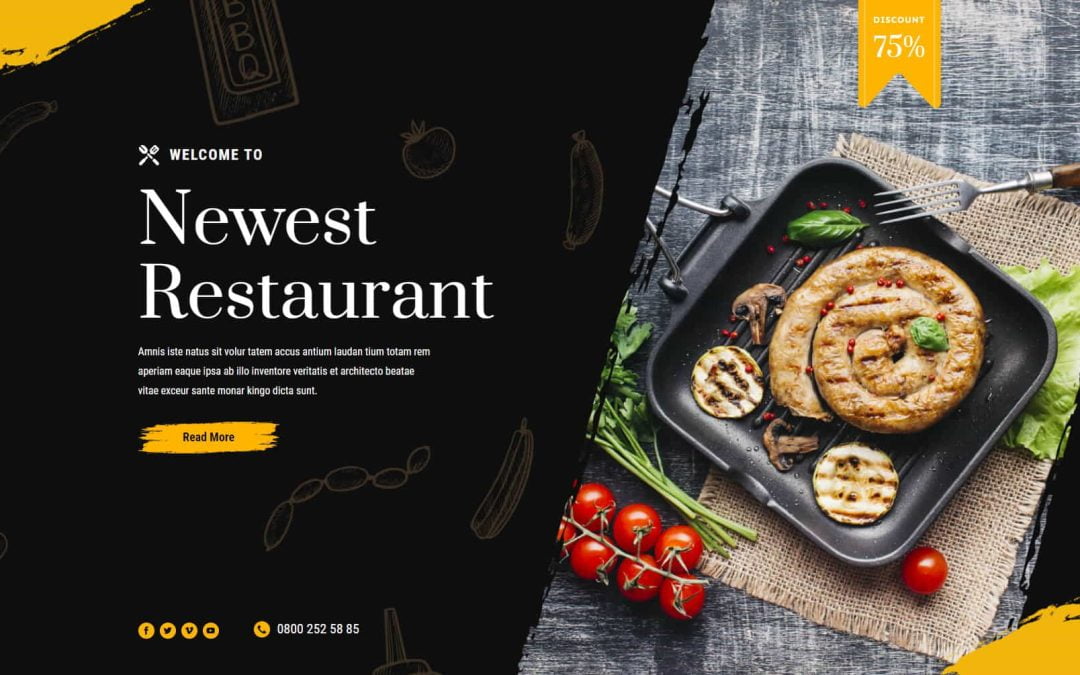
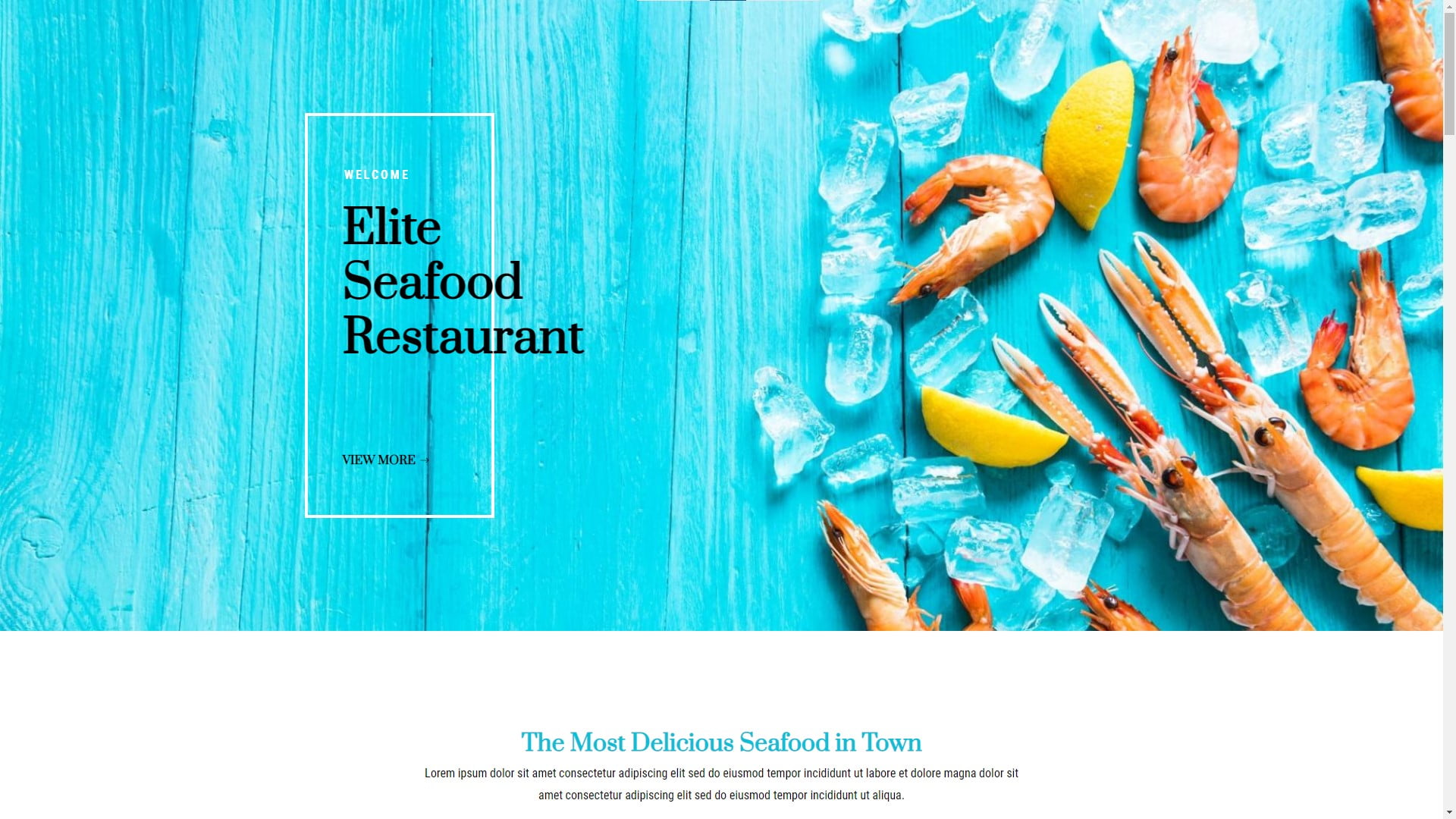
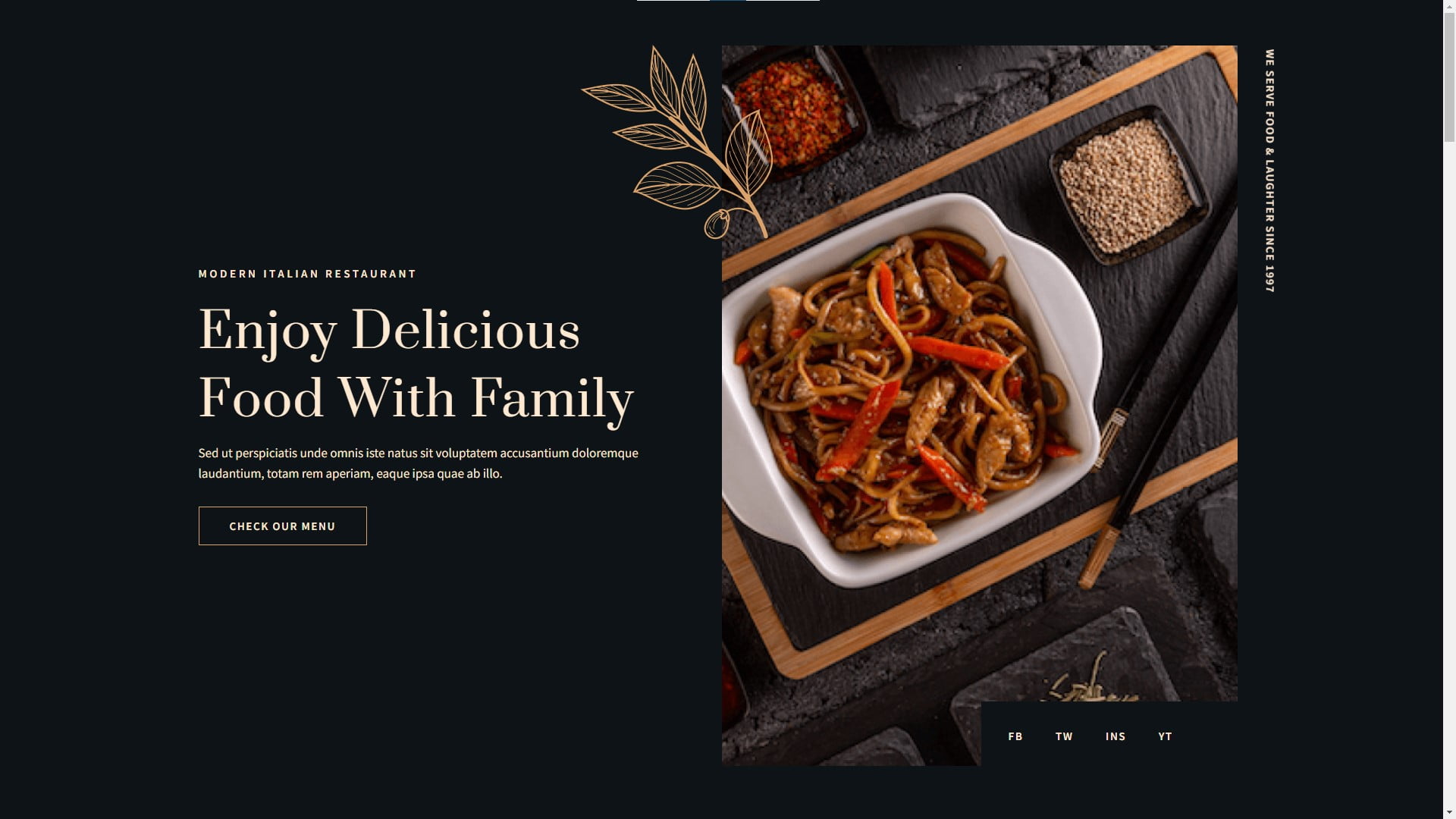
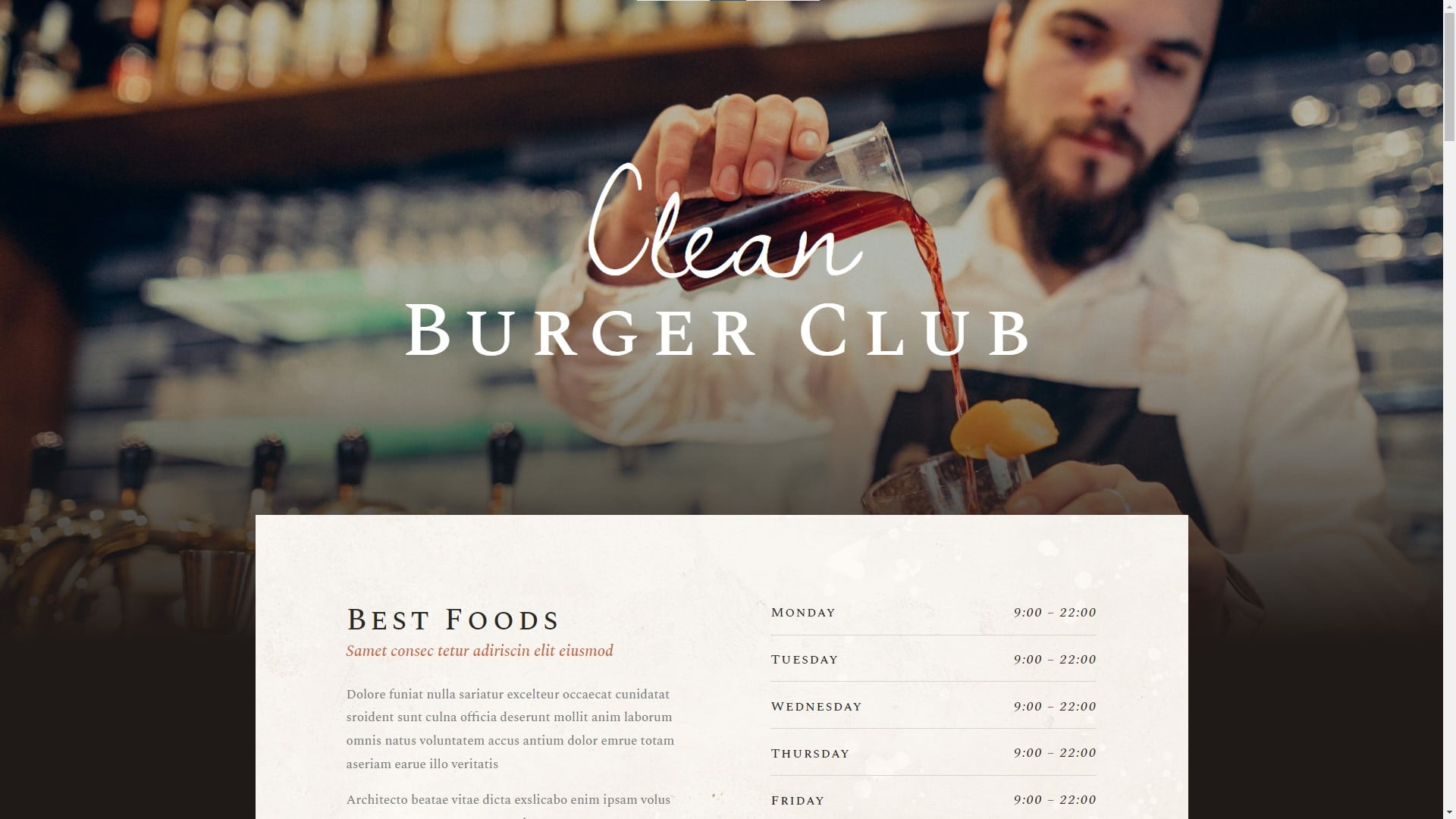
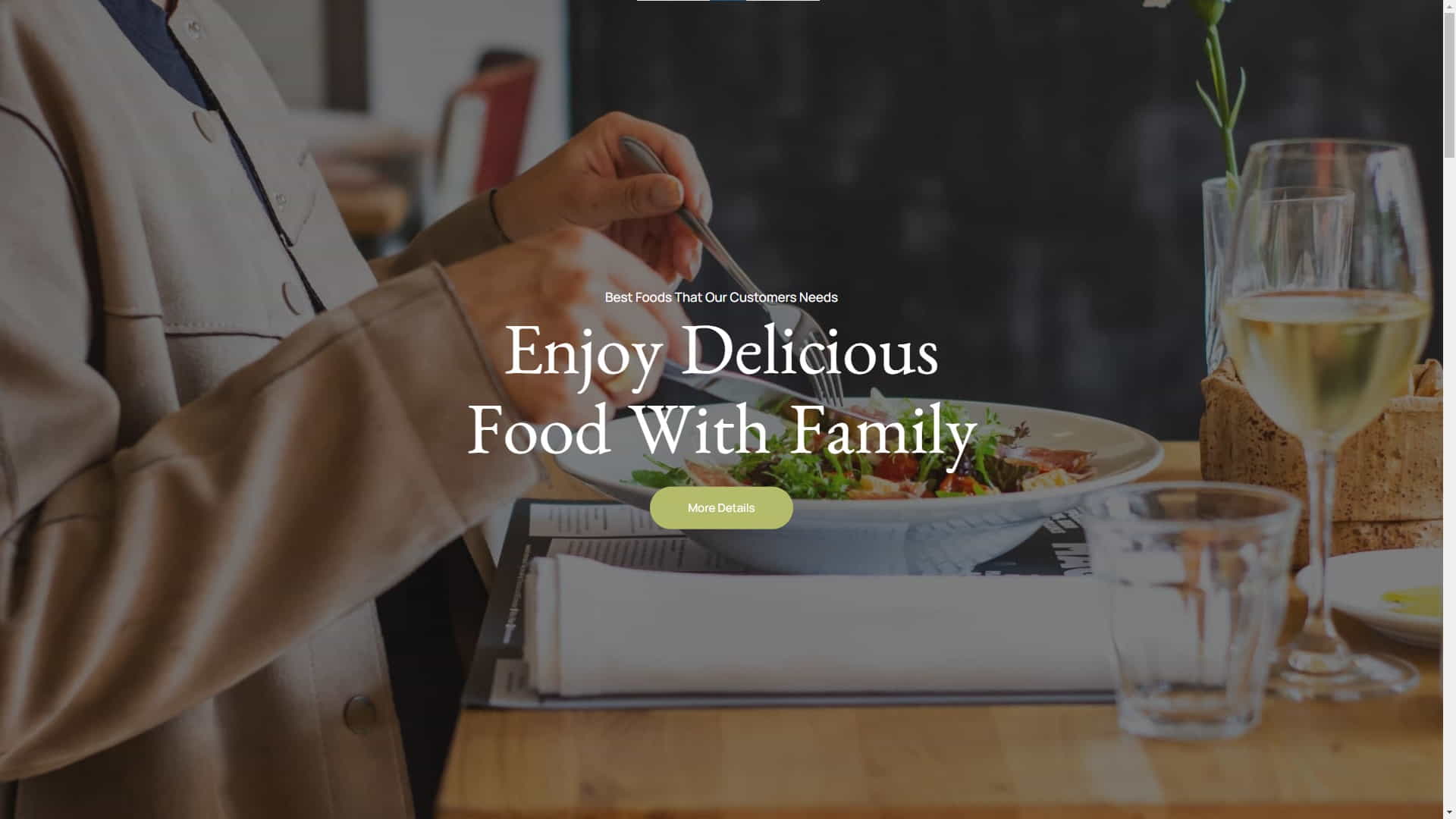
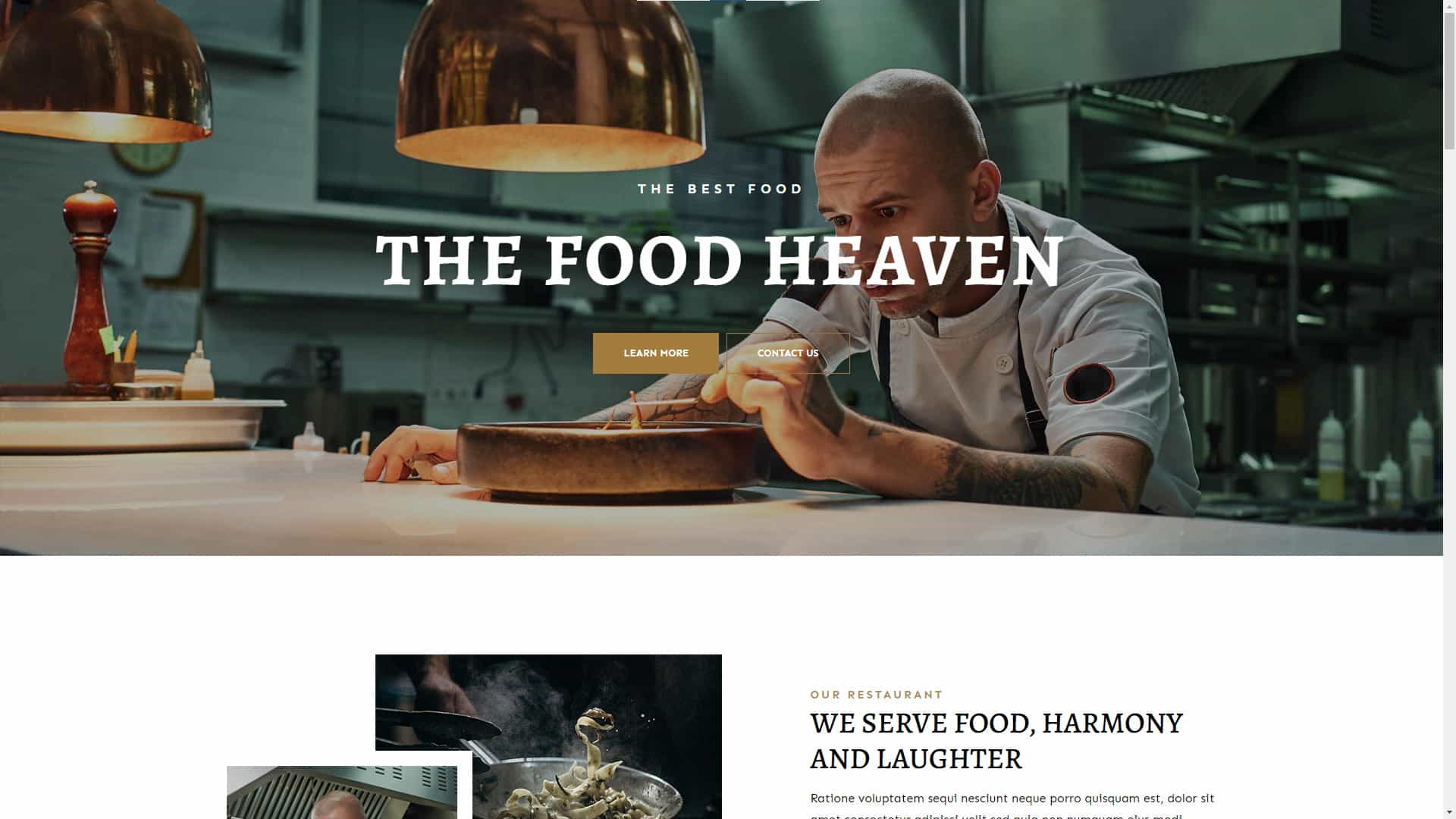
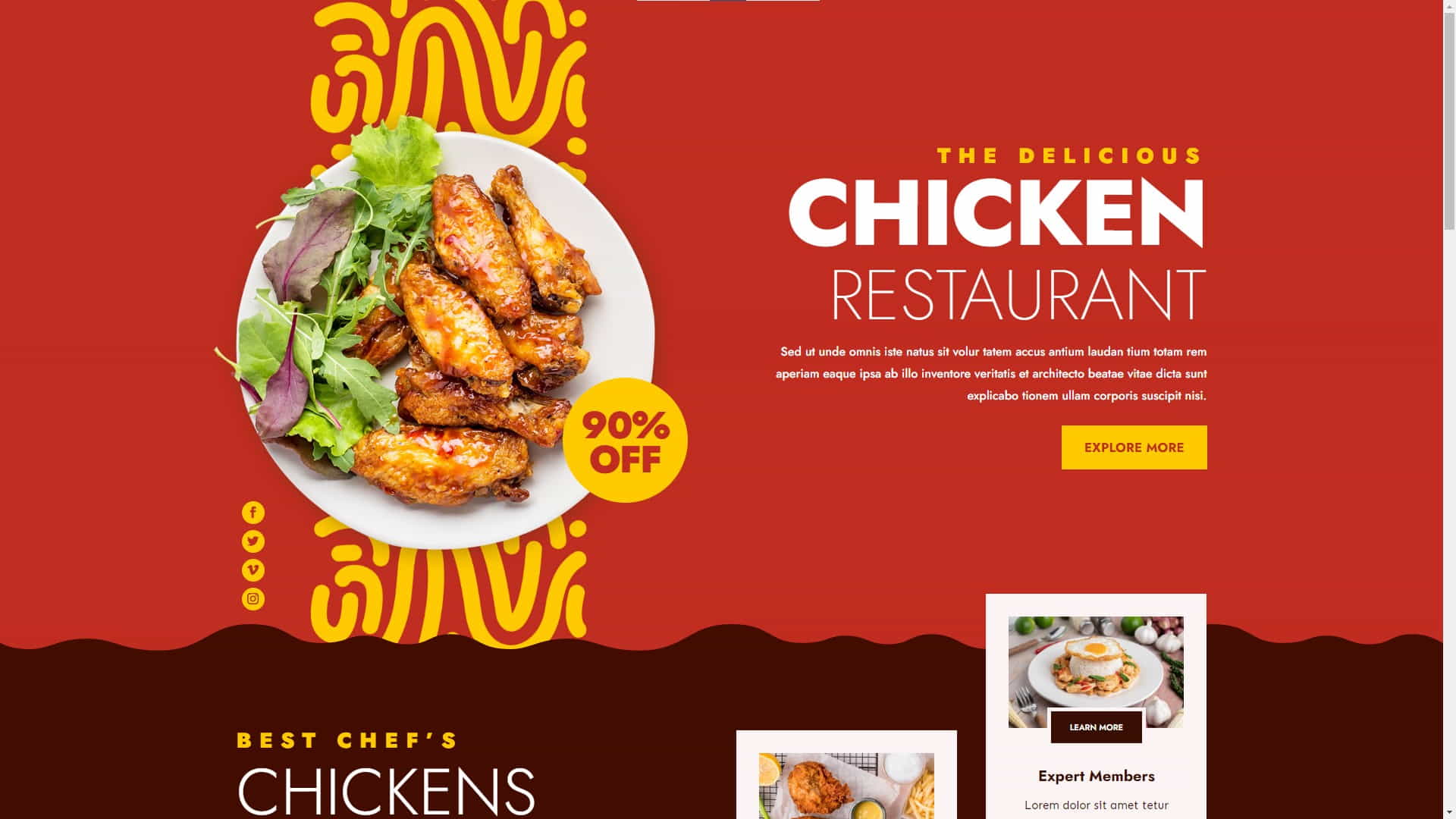
Countless WordPress restaurant website templates can be used with specialty themes or to customize almost any general-use WordPress theme. However, some templates are designed using a specific theme like Divi or Elementor, so be sure the template you choose is compatible with the theme you plan to use.

Every template displayed on this page was designed with the Divi theme. The image carousel above contains four more templates designed for restaurant websites. You can learn how to create a WordPress website for your restaurant by searching for tutorials on YouTube, like this one title “How to design a restaurant website – Divi Theme“.

Final Thoughts On WordPress Restaurant Websites

Final Thoughts On WordPress Restaurant Websites

Final Thoughts

Creating a WordPress website for your restaurant is a step toward establishing an online presence, which can help you attract more consumers. You will successfully create a digital platform that is a true reflection of your establishment’s high-quality offerings and contributes to the expansion of your business by carefully selecting an appropriate theme that embodies the essence of your restaurant, fine-tuning your website to be easily discoverable by search engines, and ensuring a seamless, user-friendly experience.

Remember that keeping your site current is essential to its continued success as a part of your overall internet strategy. This includes not only sharing the latest news, promotions, and menu updates but also implementing innovative features that improve the overall experience for your patrons. By prioritizing a human touch in your digital communications, you can make a lasting impression on your clientele and foster a loyal following that will contribute to the ongoing success of your business.

Disclosure: You may find affiliate links to beneficial resources within this article. You won’t pay more for using our link, but we’ll get a commission. This supports our content creation, and we only suggest products we genuinely believe in. Thank you for being so understanding!

Affiliate Links

James Turner

James Turner

Author/Copywriter
Why Choosing the Best Web Hosting Company Matters in 2025

Find out why choosing the best web hosting company matters in 2025 to boost your site’s performance and skyrocket sales.

Hiring a Website Designer

Hiring a website designer? Discover actionable tips, red flags to avoid, and how to find the right designer to create a website that grows your business.

How to Create a Landing Page Using WordPress

Follow our guide on how to create a landing page using WordPress and the built-in Block Editor, page builder plugins, or specialized themes.

10 Reasons Why WordPress is the Best Platform for Blogging

10 Reasons Why WordPress is the Best Platform for Blogging

Home » Business » Page 4

Considering the initiation of a new blog or revamping your current one? If so, consider which platform best caters to your requirements. In this article, we shall delve into ten reasons why WordPress is the best platform for blogging, equipping you with comprehensive knowledge for a well-informed choice. We will explore aspects ranging from its user-friendly nature to its extensive plugin ecosystem, showcasing the distinctive qualities that set WordPress apart from its rivals.

Q & A

Question: “Hey, my name is Jennifer S. and I was wondering if WordPress is really the best platform for blogging?”

Our Answer: Hi Jennifer S., absolutely! WordPress is an exceptional choice for bloggers due to its user-friendly nature, flexibility, and extensive features.

“Due to its user-friendly layout, customizable capabilities, and supporting community, WordPress is the blogging standard. It’s the ideal platform for creating a professional and engaging blog that can captivate and grow an audience.”

WordPress Offers Ease of Use for Bloggers

WordPress Offers Ease of Use for Bloggers

1. Ease of Use

People like WordPress because it is simple to use. Even if you are not technically competent you can easily understand How Blogging Can Help Your Business, because WordPress is simple to install and configure. With the intuitive dashboard and built-in content editor, creating and managing content is a breeze.

2. Flexibility

One of the reasons WordPress is the best platform for blogging is you can use it to create a wide range of websites, from simple blogs to complex e-commerce enterprises. Its large theme and plugin collection allow for website customization to meet your specific needs and wants.

Customizable Themes

WordPress has a large variety of both free and premium themes designed to fulfill the demands of a wide range of industries and niches. These themes are easily customizable to match your brand’s own character and design.

Extendable with Plugins

The WordPress Plugin Repository offers a whopping number of over 58,000 plugins that enable you to enhance WordPress’s primary features in infinite ways.

3. SEO-friendly

WordPress is structured to help your website rank higher in search engine results (SEO). permalinks, metadata, and clean, efficient coding make it SEO-friendly. Yoast SEO and other SEO plugins can help optimize your content and boost your website’s search engine rankings.

4. Vast Plugin Ecosystem

WordPress’s plugin ecosystem is one of the main reasons bloggers love it. You can find a plugin for almost every aspect of your blog, from boosting your website’s security to enhancing its performance. This enables you to effortlessly expand your site’s functionality without the need for technical expertise or hiring a developer.

5. Large Community of Users and Developers

WordPress boasts a vibrant, bustling community of users and developers who constantly strive to enhance the platform and offer a helping hand. You can find many online forums, blogs, and how-to guides ready to assist you with any bumps. With WordPress, you’re never flying solo – help is just a stone’s throw away, which is why many business owners know How to Leverage the WordPress Community for Better SEO.

A Wide Variety of Built in Blogging Features

A Wide Variety of Built in Blogging Features

6. Built-in Blogging Features

WordPress was initially designed as a blogging platform, so it comes with various built-in features tailored explicitly for bloggers. This includes support for multiple authors, comments, tags, and categories and an easy-to-use content editor that supports rich media like images and videos.

7. Responsive Design

As more people access the web on their smartphones, having a mobile-friendly website is critical. The majority of WordPress themes, thankfully, are made with responsive designs, ensuring that your site not only looks amazing but also functions flawlessly on all devices.

8. Security

WordPress takes security seriously and constantly releases updates to protect users against vulnerabilities. Several security plugins, like Wordfence, can further strengthen your site’s defenses. WordPress offers a firm foundation for keeping your website secure, despite the fact that no platform is immune to security threats.

9. Regular Updates

Thanks to a dedicated developer community, WordPress is a constantly expanding open-source platform. With frequent updates, you can be sure that your site stays current, boasting the newest features, top-notch security, and performance boosts.

10. Cost-effective

WordPress is a cost-effective solution for bloggers, as the platform is free. While some expenses are associated with running a website, such as hosting and premium themes/plugins, these costs are generally affordable. They can be easily managed even on a tight budget.

Blogging Can Change Your Life

Blogging Can Change Your Life

How WordPress Changed My Blogging Life

Hey! I’m Victor F., and I’ve been a blogger for ages. I started out using a different platform, and honestly, it was driving me nuts. Customizing was a struggle, features were scarce, and learning the ropes felt like scaling Everest. That’s when I bumped into WordPress and thought, “Hey, let’s see what this is all about!”

Switching to WordPress felt like I’d struck gold. It was super user-friendly, and with a treasure trove of plugins and handy blogging tools, I could zero in on crafting wicked content instead of wrangling with tech snafus. In no time, my blog traffic and engagement skyrocketed, and it just fueled my blogging fire!

If I had a time machine, I’d tell my past self to kick off my blogging escapades with WordPress from the very start. The platform’s flexibility and control turned my blog into a thriving online gig. I’m stoked with the results, and I owe a huge thanks to the awesome WordPress community for supporting me every step of the way.

If you’re thinking about hopping on the WordPress bandwagon, here’s some tried-and-true advice:

  • Explore the vast plugin universe to make your site your own and add rad features.
  • Pick a responsive theme, so your site looks slick on any gadget.
  • Keep your ear to the ground for updates and security best practices to ensure your site’s as safe as a vault.
  • Get your hands on SEO plugins and tools to scale the search engine ladder.
  • And remember, the friendly WordPress community is always there if you need a helping hand.

Thanks to WordPress, I’ve built a blog that makes my heart swell, and I have no doubt it’s the top-notch choice for bloggers far and wide.


Some Statistics on WordPress and Blogging

  • WordPress powers over 40% of all websites on the internet (source).
  • There are over 58,000 plugins available in the WordPress Plugin Repository (source).
  • Approximately 70 million new blog posts are published on WordPress each month (source).
  • WordPress sites receive over 400 million unique visitors each month (source).
WordPress User Tools and Resources

WordPress User Tools and Resources

Useful Resources

User Testimonial

“I’ve tried many blogging platforms, and WordPress is the best. Its user-friendliness, endless customization choices, and slick built-in blogging tools let me build a site that’s not just a perfect fit for my brand but also keeps my audience hooked. I’m so thankful for the tight-knit WordPress community and the boatload of resources they offer—it’s been a game-changer for growing my blog.” – Felicia G.


Expert Opinions

WordPress is my go-to SEO recommendation. The platform’s built-in SEO capabilities and plugins like Yoast SEO make it easier for website owners to optimize their content and boost their search engine rankings.” SEO Consultant Michael R.

List of Facts

  • WordPress is an open-source platform, making it free to use and customize.
  • It offers a user-friendly interface, even for those with limited technical knowledge.
  • WordPress has a vast ecosystem of plugins that can add functionality to your site.
  • Most WordPress themes are responsive, ensuring that your site looks great on all devices.
  • The platform has a large, active community of users and developers who provide support and resources.
Comparing the Best Blog Platforms for Copywriting

Comparing the Best Blog Platforms for Copywriting

Comparison of Popular Blogging Platforms

WordPress might be a popular pick for loads of bloggers, but even after reading the 10 reasons why WordPress is the best platform for blogging, you may not be convinced it’s not the only game in town. Other choices are available, and each has its own pros and cons, so let’s see how they measure up:

  • Platform
    • WordPress
    • Blogger
    • Medium
    • Wix
  • Pros
    • Extensive plugin ecosystem, customizable, large community (WordPress)
    • Easy to use, free, owned by Google (Blogger)
    • Focus on content creation, simple interface, built-in audience (Medium)
    • Drag-and-drop website builder, customizable templates (Wix)
  • Cons
    • May require some technical knowledge for advanced customization (WordPress)
    • Limited customization, fewer features (Blogger)
    • Less control over design and monetization (Medium)
    • Less flexible than WordPress, fewer plugins (Wix)

Glossary of Terms

  • Plugin: A piece of software that adds specific features or functionality to a WordPress site.
  • Responsive Design: A design approach that ensures a website looks and functions well on various devices and screen sizes.
  • SEO: Search Engine Optimization – the process of improving a website’s visibility in search engine results.
  • Theme: A pre-designed template that determines the appearance and layout of a WordPress site.
WordPress is the Best Blogging Platform for Business

WordPress is the Best Blogging Platform for Business

Do’s and Don’ts for WordPress Blogging

  • Do’s
    • Keep your WordPress site updated and secure.
    • Choose a responsive theme for a better user experience.
    • Utilize plugins to add functionality and features to your site.
    • Optimize your content for search engines using SEO plugins and tools.
    • Engage with the WordPress community for support and resources.
  • Don’ts
    • Ignore security best practices and updates.
    • Use a non-responsive theme that may not display well on all devices.
    • Overload your site with unnecessary plugins that may slow it down or cause compatibility issues.
    • Neglect SEO best practices, making it harder for your site to rank in search engine results.
    • Attempt to navigate the platform without seeking help when needed.

Final Thoughts on Why WordPress is the Best Choice for Blogging

After thorough analysis, it is evident that WordPress is the optimal platform for blogging. This conclusion is based on several factors: its intuitive user interface, versatile customization capabilities, robust plugin ecosystem, and welcoming community. The platform’s built-in search engine optimization features and mobile-responsive design further contribute to its suitability for bloggers who aim to establish a compelling and professional web presence that is easy to find and navigate.

WordPress offers a wealth of resources and support for those starting or seeking to expand their blogs. It is the best platform for blogging, and wide usage has created a vast knowledge base, making it simple to troubleshoot any issues that may arise. With all these fantastic benefits, it’s no surprise that WordPress remains the leading choice for bloggers.

Disclosure: Some of the links in this post could be considered “affiliate links.” If you click on one of those links and buy the item, I’ll get a commission, but it won’t raise your price.

Affiliate Links

James Turner

James Turner

Author/Copywriter
Why Choosing the Best Web Hosting Company Matters in 2025

Find out why choosing the best web hosting company matters in 2025 to boost your site’s performance and skyrocket sales.

Hiring a Website Designer

Hiring a website designer? Discover actionable tips, red flags to avoid, and how to find the right designer to create a website that grows your business.

How to Create a Landing Page Using WordPress

Follow our guide on how to create a landing page using WordPress and the built-in Block Editor, page builder plugins, or specialized themes.

Latest Trends in WordPress Website Design

Latest Trends in WordPress Website Design

Home » Business » Page 4

Businesses must follow the latest trends in WordPress website design to succeed because staying ahead in any endeavor requires ongoing modification. This thorough guide explores cutting-edge ways to help you develop or update your internet presence. WordPress website design develops with the internet. Businesses prosper and stay ahead by following cutting-edge trends. Let’s discuss WordPress website design trends, their benefits, and how they can help you make informed decisions while developing or maintaining your online presence.

What Is WordPress and Why You Should Use It

A Mobile First Approach to Website Design

“Design is not just what it looks like and feels like. Design is how it works.” – Steve Jobs

Mobile-First Approach

As mobile devices dominate web browsing, adopting a mobile-first approach in WordPress website design is essential. This strategy prioritizes the optimization of websites for mobile devices, ensuring a seamless user experience across various screen sizes and platforms.

Responsive Design

Responsive design allows websites to adapt to different screen sizes and orientations, providing an optimal viewing experience for users on any device. This approach helps maintain a consistent look and feel across devices, increasing user satisfaction and engagement.

Mobile-First SEO

Search engines like Google prioritize mobile-friendly websites in their ranking algorithms. To improve your site’s search engine visibility, implement mobile-first SEO practices, such as optimizing meta tags, utilizing schema markup, and implementing AMP (Accelerated Mobile Pages).

Touch-Friendly Navigation

Designing websites with touch-friendly navigation ensures that users can easily interact with your site on touch-screen devices. Consider implementing larger buttons, intuitive gestures, and accessible menus to enhance the mobile user experience.

Enhancing User Interface and User Experience

A well-designed user interface (UI) and an engaging user experience (UX) are critical components of a successful WordPress website. These elements determine how users interact with your site and directly impact satisfaction and engagement.

Intuitive Navigation

Organize your site’s content in a logical and straightforward manner, making it easy for users to find the information they need. Implementing clear navigation menus, breadcrumbs, and search functionality can significantly enhance the user experience.

Visual Hierarchy

Establishing a strong visual hierarchy guides users through your site’s content, emphasizing important information and improving readability. Utilize headings, subheadings, font sizes, and whitespace to create a balanced and organized layout.

Call-to-Action Buttons

Well-designed call-to-action (CTA) buttons encourage users to take specific actions, such as subscribing to a newsletter or making a purchase. Optimize your CTA buttons by choosing contrasting colors, strategic placement, and persuasive copy to increase conversion rates.

Micro-interactions

Micro-interactions are subtle, interactive design elements that enhance user engagement and provide a more enjoyable browsing experience. Examples of micro-interactions include animated buttons, hover effects, and scroll-triggered animations. These elements can make a website feel more dynamic and responsive to user input.

Optimizing for Voice Search

With the rise of voice assistants like Siri, Google Assistant, and Alexa, optimizing websites for voice search has become increasingly important. To remain competitive, web designers must consider voice search when creating content and structuring websites.

Dark Mode Adoption

Dark mode has become increasingly popular as it provides a visually appealing alternative to traditional light mode interfaces. This feature can enhance user experience by reducing eye strain and improving battery life on mobile devices.

Follow WordPress Web Security Trends to Keep Your Site Secure

Follow WordPress Web Security Trends to Keep Your Site Secure

WordPress E-commerce Trends

As online shopping continues to grow, staying informed about the latest e-commerce trends is vital for businesses selling products or services online. Utilize innovative solutions and strategies to optimize your WordPress e-commerce website.

Personalized Shopping Experiences

Personalizing your e-commerce website based on user behavior and preferences can significantly enhance the shopping experience. Implement personalized product recommendations, targeted promotions, and customized content to increase conversion rates and customer satisfaction.

Mobile Shopping Optimization

Optimize your e-commerce website for mobile devices to cater to the increasing number of users shopping on smartphones and tablets. Implement responsive design, easy-to-use navigation, and mobile-friendly checkout processes to improve the mobile shopping experience.

Secure Payment Solutions

Offering secure and diverse payment options is essential for building trust with your customers. Integrate reliable payment gateways, such as PayPal, Stripe, and Square, to provide a seamless and secure checkout process for your customers.

Prioritizing Web Security

We all know how crucial it is to protect our personal data online, which is why you need to follow the latest trends in WordPress website design security. Companies must safeguard user data because WordPress website security is crucial. Fortunately, security can be improved by employing strong passwords, restricting login attempts, activating two-factor authentication, adding security plugins, and backing up your website regularly.

These precautions can prevent hacking and malware attacks. Website visitors can trust their data when you prioritize security. This boosts your company’s credibility. Every firm should prioritize website security and demonstrate their concern for client privacy and security by protecting WordPress website and user data.

SSL Certificates

Secure Sockets Layer (SSL) certificates encrypt data transferred between your website and users, ensuring secure communication. Install an SSL certificate to protect sensitive information and improve search engine rankings, as search engines prioritize secure websites.

Regular Updates

Updating your WordPress core, themes, and plugins ensures security. Doing so ensures that your website has the latest security fixes and additions, protecting it from vulnerabilities and threats. You can rest certain that your website is secure with regular upgrades.

Two-Factor Authentication (2FA)

Implement two-factor authentication (2FA) to add an extra layer of security to your website’s login process. By requiring users to verify their identity through a secondary method, such as a text message or an authentication app, you can significantly reduce the risk of unauthorized access.

Integrating New Content And Making it More Accessible

Integrating New Content And Making it More Accessible

Multimedia Integration

Incorporating multimedia elements, such as images, videos, and interactive content, can greatly enhance user engagement on your WordPress website. Use multimedia strategically to support your content and create a dynamic, visually appealing website.

Video Content

Embed relevant videos within your website’s content to provide users with engaging, informative material. Video content can help explain complex concepts, showcase products or services, and entertain users, ultimately increasing engagement and dwell time on your site.

Infographics and Visualizations

Utilize infographics and data visualizations to present complex information in a visually appealing and easily digestible format. Well-designed visuals can help convey your message more effectively and enhance user understanding.

Interactive Elements

Incorporate interactive elements, such as quizzes, polls, or calculators, to encourage user engagement and participation. Interactive content can provide valuable insights into user preferences and behavior while keeping users on your site for longer periods.

Website Accessibility

Creating an accessible WordPress website ensures that users with disabilities can easily navigate and interact with your content. Implement accessibility best practices to provide an inclusive user experience for all visitors.

Alt Text for Images

Add descriptive alt text to your website’s images to provide context for users with visual impairments using screen readers. Alt text also benefits your site’s SEO by helping search engines understand the content and context of your images.

Accessible Forms

Design accessible forms with clear labels, logical field order, and easy-to-use input fields. This will help users with disabilities, as well as other users, interact with your site more easily and efficiently.

Keyboard Navigation

Ensure that your website can be navigated using only a keyboard, as some users may be unable to use a mouse or touch screen. Implement tab index attributes, focus states, and keyboard shortcuts to improve keyboard accessibility.

Personalized Digital Marketing Strategies are the Most Effective

Personalized Digital Marketing Strategies are the Most Effective

Personalization and Customization

Personalizing and customizing your WordPress website based on user preferences and behavior can significantly enhance user satisfaction and engagement. Implement tailored content, design elements, and features to create a unique experience for each user.

Dynamic Content

Deliver dynamic content to users based on their preferences, browsing history, and behavior. This may include personalized recommendations, targeted promotions, or tailored content, which can help increase engagement and conversion rates.

User Profiles and Preferences

Allow users to create profiles and set preferences on your website, enabling you to deliver a customized experience. Providing personalized options for layout, theme, or content can help users feel more connected to your website and encourage repeat visits.

Geolocation Targeting

Utilize geolocation data to deliver relevant content, promotions, or language options to users based on their location. Geolocation targeting can help improve user engagement and conversion rates by providing a more tailored experience for each visitor.

Content Marketing Strategies

Effective content marketing strategies are essential for attracting and retaining users on your WordPress website. Create valuable, engaging, and shareable content that resonates with your target audience to drive traffic and increase brand visibility.

Consistent Content Creation

Regularly publish high-quality, informative content that aligns with your brand and audience’s interests. Consistent content creation can help establish your website as a trusted resource and improve search engine rankings.

Storytelling and Authenticity

Brand success requires audience engagement. Sharing actual brand-aligned stories and experiences works well because storytelling can personalize your brand and build trust and loyalty. Share personal stories to connect with your audience. Social networking, blogs, and videos can do this. Genuine storytelling shows your audience the people and ideas behind your brand, revealing what makes it exceptional.

Doing so might make your brand more approachable and relatable. As your audience gets to know your brand, trust and loyalty grow. Sharing your values and mission through storytelling may set you apart from competition and leave a lasting impression. Real storytelling can build trust, loyalty, and brand humanity. Sharing personal tales and experiences that represent your brand’s beliefs and mission can build a lasting engagement with users.

Content Promotion

Quality material is only half the battle, promoting your content on relevant platforms maximizes its impact. Social media management, email marketing, influencer outreach, and more can help you accomplish this goal. Content promotion can boost brand awareness and website traffic and social media promotes content well. Sharing your content across channels increases brand engagement and audience reach. Email marketing also lets you send targeted communications to your target audience. Influencer outreach promotes content, allowing you to reach new customers by working with industry influencers. This boosts brand awareness and credibility.

Promoting your content across several media maximizes its reach and effect. This can grow your audience and brand engagement. Effective content promotion can also position your company as an industry thought leader, boosting credibility and authority. So, againg, it is important to repeat how advertising your content across several media maximizes its reach and impact. Social networking, email marketing, influencer outreach, and other methods can boost website traffic and brand awareness.

Latest Trends in Social Media Design

Latest Trends in Social Media Design

WordPress User Testimonial

“After revamping our WordPress website by incorporating the latest design trends and strategies outlined in this article, we’ve experienced a significant boost in user engagement, traffic, and conversions. The comprehensive, step-by-step approach made it easy for us to implement changes, and the results have been nothing short of spectacular!”

– Janice Davis, A Happy WordPress Website Owner

Final Thoughts on WordPress Trends

In the ever-changing world of WordPress website design, staying informed about the latest trends and best practices is essential for success. By adopting a mobile-first approach, enhancing UI and UX, optimizing performance and SEO, embracing e-commerce trends, prioritizing web security, integrating multimedia, ensuring accessibility, personalizing content, and implementing effective content marketing strategies, you can create a dynamic, engaging, and high-performing website that attracts and retains users.

Stay ahead of the curve by continuously updating your website design knowledge and skills, and don’t hesitate to consult with experts or seek professional assistance when needed. By doing so, you’ll be well-equipped to build a WordPress website that stands out in today’s competitive online landscape.

Disclosure: You may find affiliate links to beneficial resources within this article. You won’t pay more for using our link, but we’ll get a commission. This supports our content creation, and we only suggest products we genuinely believe in. Thank you for being so understanding!

Affiliate Links

James Turner

James Turner

Author/Copywriter
Why Choosing the Best Web Hosting Company Matters in 2025

Find out why choosing the best web hosting company matters in 2025 to boost your site’s performance and skyrocket sales.

Hiring a Website Designer

Hiring a website designer? Discover actionable tips, red flags to avoid, and how to find the right designer to create a website that grows your business.

How to Create a Landing Page Using WordPress

Follow our guide on how to create a landing page using WordPress and the built-in Block Editor, page builder plugins, or specialized themes.

Benefits of WordPress Website Design for Business Owners

Benefits of WordPress Website Design for Business Owners

Home » Business » Page 4

Every business owner wants a strong online presence, and a great website is key. Entrepreneurs worldwide embrace WordPress, a robust CMS. It’s popular—why? This article discusses the numerous benefits of WordPress website design for business owners and individuals. WordPress powers 40% of websites. It’s ideal for companies of all sizes due to its versatility, ease of use, and extensive feature set.

Its user-friendliness makes WordPress popular because it makes website creation and management easy for non-techies. Its simple interface lets you add pages, blog posts, and multimedia without scripting.

Building Ecommerce Shopping Websites With WordPress is Easy

Building Ecommerce Shopping Websites With WordPress is Easy

“WordPress is not just a platform, it is an ecosystem that enables endless possibilities.” – Anonymous

Ease of Use

WordPress excels in providing a user-friendly experience to its users. Even individuals with minimal technical expertise can efficiently manage their websites. The intuitive interface, simple navigation, and drag-and-drop features make it a breeze to create and update content.

Effortless Content Creation

One of the primary reasons behind WordPress’s immense popularity is its ease of content creation. You can effortlessly draft, edit, and publish content on your website. Moreover, the platform supports a variety of multimedia elements such as images, audio files, and videos.

Streamlined Website Management

WordPress allows for streamlined website management with its centralized dashboard. This feature enables you to monitor and control every aspect of your website, including content updates, theme customization, plugin management, and more.

Flexibility

WordPress offers unparalleled flexibility, catering to a vast array of industries and niches. Whether you run a small blog or a large e-commerce store, the platform has the tools and features to help your business thrive.

Customization Options

With a myriad of customization options, you can tailor your website to fit your unique brand identity. From choosing the perfect theme to customizing fonts, colors, and layouts, WordPress allows for endless possibilities.

Adaptable Functionality

As your business grows and evolves, so do your website’s needs. WordPress accommodates these changes with its adaptable functionality. The platform’s extensive plugin library and integration capabilities ensure that your website remains up-to-date and competitive.

WordPress Website Designs are Scalable for Any Size Business

WordPress Website Designs are Scalable for Any Size Business

Scalability

Scalability is a critical consideration for businesses of all sizes and one of the best benefits of WordPress website design for business owners. WordPress delivers on this front, ensuring your website grows seamlessly as your business expands.

Efficient Resource Management

WordPress’s efficient resource management capabilities enable your website to handle increased traffic and content without slowing down or experiencing downtime. This allows your website to grow in tandem with your business.

Flexible Hosting Options

WordPress provides a wide range of hosting options, catering to different budgets and requirements. As your website grows, you can easily migrate to a more powerful hosting plan, ensuring that your site remains fast, secure, and reliable.

SEO Friendliness

Search engine optimization (SEO) is vital for driving organic traffic to your website. WordPress is inherently SEO-friendly, making it easier for you to optimize your site for search engines and attract a larger audience. WordPress websites are optimized for search engine rankings. Its clean and semantic coding lets search engines crawl and index your website’s content.

Clean Code

WordPress follows best coding practices, ensuring clean and efficient code. This helps search engines to easily crawl and index your website, improving your site’s search engine ranking.

SEO Plugins

WordPress offers numerous SEO plugins that can further optimize your website for search engines. These plugins assist with keyword research, meta tags, XML sitemaps, and more, giving you the tools you need to enhance your website’s visibility online.

Yoast SEO and All in One SEO Pack are WordPress plugins that improve your website for search engines. These plugins make metadata, XML sitemaps, and SEO best practices easy.

WordPress Website Designs are Affordable for Both Short and Long Term

WordPress Website Designs are Affordable for Both Short and Long Term

Affordability

WordPress is an affordable solution for businesses of all sizes, and just one more of the excellent benefits of WordPress website design. Its open-source nature and cost-effective themes and plugins make it a budget-friendly option for website design and development.

WordPress offers a wide range of free and premium themes that can be adjusted to match your brand’s style. With time and patience, you won’t need to spend thousands on a web designer to produce a beautiful website.

WordPress websites need plugins to provide functionality. You’ll discover the right plugin from 58,000 available options. Several plugins are free or have a nominal one-time fee, making them cheap for business owners on a budget.

Low Startup Costs

Getting started with WordPress is relatively inexpensive. The platform is free to use, and many themes and plugins are available at no cost. This allows you to build a professional-looking website without breaking the bank.

Cost-Effective Maintenance

WordPress’s ease of use and extensive resources make maintaining your website affordable. You can handle most updates and modifications in-house, reducing the need for costly professional assistance.

Support

WordPress boasts a vast and active community that provides invaluable support to users. Whether you encounter technical issues or need advice on website design, you can rely on the WordPress community for assistance.

WordPress has a wealth of official resources for help, including as documentation, forums, and tutorials, which can be found on their website. Users of all skill levels can benefit greatly from the information and guidance offered by these sources.

Forums and Documentation

WordPress offers comprehensive documentation and forums where users can seek guidance and share their experiences. These resources provide answers to common questions and solutions to technical challenges. You may rely on the WordPress community in addition to the official assistance. WordPress has millions of users and developers all over the world, so if you run into trouble you may easily find solutions.

Professional Assistance

If you require professional help, there is no shortage of WordPress experts available for hire. From developers to designers, you can find a specialist to tackle any issue or improvement you have in mind.

Plugins

Plugins are one of the most powerful aspects of WordPress, allowing you to extend your website’s functionality and features with ease. With thousands of plugins available, you can customize your site to meet your specific needs.

Feature Enhancement

Plugins enable you to add features like contact forms, social media integration, and e-commerce capabilities to your website. This allows you to create a more engaging and functional online presence for your business.

Improved Performance

Performance-enhancing plugins can help optimize your website for speed and user experience. From caching to image optimization, these plugins ensure that your site runs smoothly and efficiently.

Updates and Maintenance Keep WordPress Websites Secure

Updates and Maintenance Keep WordPress Websites Secure

Themes

WordPress offers a vast selection of themes, allowing you to create a visually stunning and unique website. These pre-designed templates can be easily customized to match your brand identity and industry requirements.

Professional Appearance

A well-designed theme can give your website a professional appearance that leaves a lasting impression on your visitors. With countless themes to choose from, you can find the perfect design to showcase your brand.

Responsive Design

Responsive design is crucial in today’s mobile-driven world. Many WordPress themes are mobile-friendly, ensuring that your website looks great and functions seamlessly on all devices and screen sizes.

Today’s digital landscape requires responsive site design, where more than half of internet consumers utilize mobile devices. WordPress themes are responsive, guaranteeing your website looks fantastic and works well on smartphones, tablets, and desktop computers.

WordPress websites support multiple browsers and devices. No matter what device or browser your visitors use, your website will appear appropriately, delivering a good user experience.

Security

Security is a top priority for any business website, and WordPress takes it seriously. The platform regularly releases updates and patches to protect your site from potential threats and vulnerabilities.

Security Plugins

WordPress offers a variety of security plugins that can further bolster your website’s defenses. These plugins assist with malware scanning, firewalls, and more, providing additional protection.

Best Practices

By following WordPress best practices, you can further enhance your website’s security. Regular updates, strong passwords, and reliable hosting providers can help keep your site safe and secure.

Community

One of the most significant advantages of using WordPress is its vibrant and supportive community. From developers to business owners, the WordPress community fosters collaboration, innovation, and growth.

Shared Knowledge

The WordPress community is a treasure trove of knowledge and expertise. Users openly share their experiences, tips, and solutions, helping others learn and grow.

Collaborative Innovation

WordPress’s open-source nature encourages collaborative innovation. Developers from around the world contribute to the platform’s improvement, ensuring that it remains cutting-edge and relevant in the ever-evolving digital landscape.

WordPress Websites Make Digital Marketing Easier for Businesses

WordPress Websites Make Digital Marketing Easier for Businesses

Frequently Asked Questions

  1. Is WordPress suitable for large-scale business websites?
    Yes, WordPress is a scalable solution that can accommodate websites of any size, from small businesses to large enterprises.
  2. Can I migrate my existing website to WordPress?
    Yes, there are various tools and plugins available to help you migrate your current website to WordPress, ensuring a smooth transition.
  3. Do I need to know how to code to use WordPress?
    No, WordPress is designed to be user-friendly, and you can create and manage a website without any coding knowledge.
  4. How often should I update my WordPress website?
    It’s essential to keep your WordPress website up-to-date by regularly installing core updates, theme updates, and plugin updates. This ensures your website remains secure, functional, and compatible with the latest web standards.
  5. Is it possible to create an e-commerce website using WordPress?
    Yes, WordPress offers a variety of e-commerce plugins, such as WooCommerce, that allow you to create an online store and manage products, inventory, shipping, and payments directly from your website.

Final Thoughts

The benefits of a WordPress website design for your business are too numerous to mention in this article, but, from ease of use and flexibility to scalability and support, the advantages are clear. By harnessing the power of this versatile platform, you can create a stunning, high-performing website that drives growth and success for your business.

WordPress Business User Testimonial

“My WordPress website has been a game-changer for my business. It’s easy to use, looks great, and has helped attract more customers than ever before. I couldn’t be happier!” – Paul Taylor, Taylor Consctruction

Disclosure: You may find affiliate links to beneficial resources within this article. You won’t pay more for using our link, but we’ll get a commission. This supports our content creation, and we only suggest products we genuinely believe in. Thank you for being so understanding!

Affiliate Links

James Turner

James Turner

Author/Copywriter
Why Choosing the Best Web Hosting Company Matters in 2025

Find out why choosing the best web hosting company matters in 2025 to boost your site’s performance and skyrocket sales.

Hiring a Website Designer

Hiring a website designer? Discover actionable tips, red flags to avoid, and how to find the right designer to create a website that grows your business.

How to Create a Landing Page Using WordPress

Follow our guide on how to create a landing page using WordPress and the built-in Block Editor, page builder plugins, or specialized themes.

My Island Designs

Pin It on Pinterest